Writing a custom script for Truespace
-
lrdsatyr8
- Petty Officer First Class
- Posts: 68
- Joined: 24 Mar 2013, 20:19
- Type the number ten into the box: 10
Writing a custom script for Truespace
I've been wondering about something. I've got a standard object that I have separated onto groups. Each element of this object is named. I was wondering if it would be possible to pass dimensions etc to a script and have the script rearrange all the elements in the object? Like instead of 20x20x20 I want to make it 30x50x10... but instead of using the scaling option (because I have some pipes in this object cluster that become warped from scaling) just by typing in the dimension in the script it would automatically resize and position everything to adjust to the new size perimeters? And if so, what would be my best choice of langauges to use for writing such a script? Thanks
-
BNG

- Chief Warrant Officer
- Posts: 684
- Joined: 16 Oct 2009, 03:26
- Type the number ten into the box: 0
- Location: Texas
Re: Writing a custom script for Truespace
Are the pipes all atached to the same model? Rescaling shouldn't distort the pipes at all. How are you rescaling the model? Could you post an image? Thanks Leroy.
Casual Truespace 3D modeling hobbyist. My Truespace blog and simple 3d Modeling Tutorials for Casual Model Makers.
-
lrdsatyr8
- Petty Officer First Class
- Posts: 68
- Joined: 24 Mar 2013, 20:19
- Type the number ten into the box: 10
Re: Writing a custom script for Truespace
Well I've found that if you have a pipe or round object and you scale it on one dimension, the pipe will become distorted. For example... if you take a cylinder and attach it to the end a pair of cubes as a child or sibling, then change the X scale of the combined object to 2x the original size the cylinder will then become an oval. I want to avoid that with a script so that when I resize the cubes, the cylinder will remain in the center of the end where it was attached without distorting its shape. Would tht be possible with a script and I've been researching it and seeing that it will take learning Python to do so. But does anyone have all the various properties/functions that can be used on the objects that are gathered from the script?
-
Fenerit

- Senior Chief Petty Officer
- Posts: 173
- Joined: 21 Nov 2011, 19:19
- Type the number ten into the box: 9
Re: Writing a custom script for Truespace
In the example above and so on, it is more easy to accomplish the operation through the SceneEditor. Without gluing anything (or unglue first), do select the two cubes only (ctrl+LMC) and scale it along X.
-
Finis

- Captain
- Posts: 5410
- Joined: 21 May 2009, 18:26
- Type the number ten into the box: 0
- Location: America!
Re: Writing a custom script for Truespace
Welcome to the forum lrdsatyr8.
You want the pipes to remain the same diameter but otherwise change to fit on the other objects or each other in the same way, right? Like if you had a cylinder with a pipe coming out of the center top and coiling around it. You want to scale this so the pipe still comes out of the center top and still coils around the cylinder but doesn't change its diameter?
You want the pipes to remain the same diameter but otherwise change to fit on the other objects or each other in the same way, right? Like if you had a cylinder with a pipe coming out of the center top and coiling around it. You want to scale this so the pipe still comes out of the center top and still coils around the cylinder but doesn't change its diameter?
I prefer dangerous freedom over peaceful servitude. -- Thomas Jefferson/Jean Jacques Rousseau
-
lrdsatyr8
- Petty Officer First Class
- Posts: 68
- Joined: 24 Mar 2013, 20:19
- Type the number ten into the box: 10
Re: Writing a custom script for Truespace
The diameter can change, just not be ovaled. Ok... lets try another example. Create 2 cubes, 10x10x5... place them apart about 2 clicks. Then in between them, place a cylinder 2x2x20. Now, glue them all together (as siblngs or children, don't matter) and now you have a single object. Now lets scale it up to 60x40x30. Notice how the cylinder become ovaled... I don't want that to happen, but I still want the cylinder to remain round, but scale up with relation to the blocks. Now of course I could do all this manually by holding down both mouse buttons and scaling up and then adjusting the size of the cubes individually to match the size/shape I'm going for, but that always means repositioning them and it throws off the original design a bit everytime. What I'd like is to be able to lock the roundness of the cylinder while changing the scale/size of a combined object and still allow the cylinder to scale in relation to the other objects its grouped with no matter what axis I chose to change. Now I'm pretty sure this all can be done with a script or something, I'm just wondering if it is possible to do so and if so how?Finis wrote:Welcome to the forum lrdsatyr8.
You want the pipes to remain the same diameter but otherwise change to fit on the other objects or each other in the same way, right? Like if you had a cylinder with a pipe coming out of the center top and coiling around it. You want to scale this so the pipe still comes out of the center top and still coils around the cylinder but doesn't change its diameter?
-
Finis
- Captain
- Posts: 5410
- Joined: 21 May 2009, 18:26
- Type the number ten into the box: 0
- Location: America!
Re: Writing a custom script for Truespace
Ah, you need something like "lock aspect ratio" in a 2D program's (paint shop, photo shop) resize feature plus the ability to select the attributes and objects to be locked. That would be a good feature for a 3D program. I don't know of anything like that in TS.
You could try rescaling the the group with distortions from its new "aspect ratio" or proportions and then use the object panel (model side TS 7.6x or earlier TS) to change the pipes dimensions so they are round again. I don't think that will work well especially if they bend all around.
It seems there is not a tool or method to do this with less effort than "the hard way". Sometimes you just have to get in there and edit.
You could try rescaling the the group with distortions from its new "aspect ratio" or proportions and then use the object panel (model side TS 7.6x or earlier TS) to change the pipes dimensions so they are round again. I don't think that will work well especially if they bend all around.
It seems there is not a tool or method to do this with less effort than "the hard way". Sometimes you just have to get in there and edit.
I prefer dangerous freedom over peaceful servitude. -- Thomas Jefferson/Jean Jacques Rousseau
-
lrdsatyr8
- Petty Officer First Class
- Posts: 68
- Joined: 24 Mar 2013, 20:19
- Type the number ten into the box: 10
Re: Writing a custom script for Truespace
That's why I was thinking of perhaps writing a script that would allow you to lock the aspect ratio of a object within a group. Then as you resize the group, the object within it would maintain it's aspect ratio in relation to the main grouped object without distorting. You think it could be done with a script or would it be better suited to a plugin?
-
Fenerit
- Senior Chief Petty Officer
- Posts: 173
- Joined: 21 Nov 2011, 19:19
- Type the number ten into the box: 9
Re: Writing a custom script for Truespace
Do try the SizeEx plugin. I scales like you wish. For what I've understood, a constrain is that glued objects must remains in place and not "rised up" by the mouse scaling, along with their scaled proportions unchanged as well.
-
lrdsatyr8
- Petty Officer First Class
- Posts: 68
- Joined: 24 Mar 2013, 20:19
- Type the number ten into the box: 10
Re: Writing a custom script for Truespace
I tried SizeEx and it does the exat same thing that just changing size does. cylinder distortion. Any other ideas?Fenerit wrote:Do try the SizeEx plugin. I scales like you wish. For what I've understood, a constrain is that glued objects must remains in place and not "rised up" by the mouse scaling, along with their scaled proportions unchanged as well.
-
Fenerit
- Senior Chief Petty Officer
- Posts: 173
- Joined: 21 Nov 2011, 19:19
- Type the number ten into the box: 9
Re: Writing a custom script for Truespace
Is "Equality" option checked?
-
trueBlue

- Captain
- Posts: 5548
- Joined: 06 Jul 2009, 22:50
- Type the number ten into the box: 10
Re: Writing a custom script for Truespace
Here is an idea:
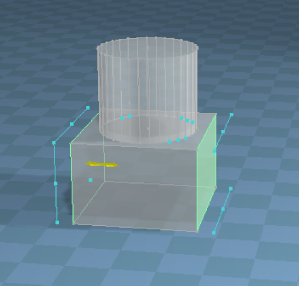
How about Point Editing the faces of the cubes that you want to resize, instead of using the scale widget?
In Workspace you can use the Tangent Coordinate system to move both sides at the same time.
Hummm...? Tangent Coordinate. tsx plugin
How about Point Editing the faces of the cubes that you want to resize, instead of using the scale widget?
In Workspace you can use the Tangent Coordinate system to move both sides at the same time.
Hummm...? Tangent Coordinate. tsx plugin
- Capture.PNG (60.22 KiB) Viewed 2588 times
-
lrdsatyr8
- Petty Officer First Class
- Posts: 68
- Joined: 24 Mar 2013, 20:19
- Type the number ten into the box: 10
Re: Writing a custom script for Truespace
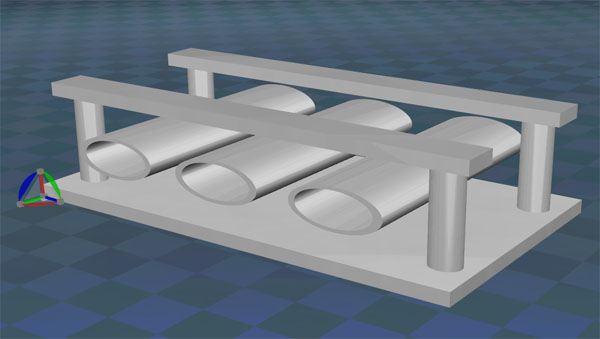
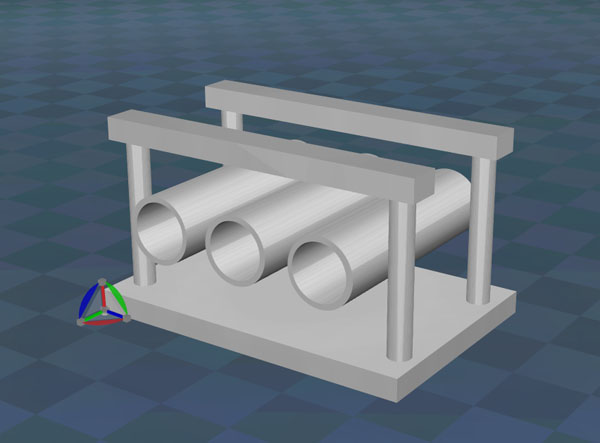
Ok... lemme see if I can clear this up a bit... say you have a predefined widget like in pic #1. Where all the parts are where they should be, but this widget can be any size (the X and Y can be defined independantly of each other the Z I'll worry about later).
However, the cylindical components of the widget would scale up along with the rest of the components without distortion as that happens in pic #2. Now what I'd like to be able to do is be able to lock the X and Y scale aspects of the cylinders so they will always remain round or just lock the axis to a specific diameter that won't be changed at all, but will scale up with the rest of the widget without becoming ovaled. Now I don't know how difficult it would be to do this, but I'm sure a plugin or a script would be able to accomplish something like this and would become very handy and save alot of time in manually having to go into each component and changing the values manually!
- Attachments
-