WIP: tS7.61 New View with View tools
-
trueBlue
- Captain
- Posts: 5548
- Joined: 06 Jul 2009, 22:50
- Type the number ten into the box: 10
WIP: tS7.61 New View with View tools
Started a new script that creates a new view with a view aspect toolbar.
Need feedback with regards to what tools should be included.
Simply load the New View Bar.RsObj to check it out. NOTE: Changes made from any of the Unofficial Updates have not been applied as of yet.
Sofar this is what is included: * Icons were resized to 16x16, the background was cut, and saved in the png32 format.
* Added the WindowsManager.Activate(); command to all of the button's Command attribute to make them work properly within the Aspect Toolbar.
Need feedback with regards to what tools should be included.
Simply load the New View Bar.RsObj to check it out. NOTE: Changes made from any of the Unofficial Updates have not been applied as of yet.
Sofar this is what is included: * Icons were resized to 16x16, the background was cut, and saved in the png32 format.
* Added the WindowsManager.Activate(); command to all of the button's Command attribute to make them work properly within the Aspect Toolbar.
- Attachments
-
- New View Bar.zip
- (69.26 KiB) Downloaded 175 times
-
Draise
- Captain
- Posts: 3200
- Joined: 21 Sep 2009, 19:33
- Type the number ten into the box: 0
- Location: Bogota, Colombia
Re: WIP: tS7.61 New View with View tools
Reset view, zoom to object (one of your scripts?), rectangle zoom
-
trueBlue
- Captain
- Posts: 5548
- Joined: 06 Jul 2009, 22:50
- Type the number ten into the box: 10
Re: WIP: tS7.61 New View with View tools
Reset View, Look at Selection, Rectangle Zoom is already included which are nested inside the FP navigation row (not shown).Draise wrote:Reset view, zoom to object (one of your scripts?), rectangle zoom
-
trueBlue
- Captain
- Posts: 5548
- Joined: 06 Jul 2009, 22:50
- Type the number ten into the box: 10
Re: WIP: tS7.61 New View with View tools
Updated icon's background and added more tools.
-
Draise
- Captain
- Posts: 3200
- Joined: 21 Sep 2009, 19:33
- Type the number ten into the box: 0
- Location: Bogota, Colombia
Re: WIP: tS7.61 New View with View tools
Oh that's handy. I think your bar that you proposed would be perfect then!
But maybe the object manipulation tools may come in handy.
-
trueBlue
- Captain
- Posts: 5548
- Joined: 06 Jul 2009, 22:50
- Type the number ten into the box: 10
Re: WIP: tS7.61 New View with View tools
Okay, I added these as well.Draise wrote:Oh that's handy. I think your bar that you proposed would be perfect then!
But maybe the object manipulation tools may come in handy.
-
Steinie
- Captain
- Posts: 2958
- Joined: 21 May 2009, 17:38
- Type the number ten into the box: 10
Re: WIP: tS7.61 New View with View tools
Get rid of the dumb camera icon and replace with the cool trueBlue 7 Camera widget.
Your window view tool is looking good!
-
Steinie
- Captain
- Posts: 2958
- Joined: 21 May 2009, 17:38
- Type the number ten into the box: 10
Re: WIP: tS7.61 New View with View tools
How about an Icon to create the new window view?
-
trueBlue
- Captain
- Posts: 5548
- Joined: 06 Jul 2009, 22:50
- Type the number ten into the box: 10
Re: WIP: tS7.61 New View with View tools
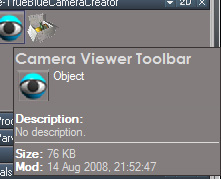
Uh...the camera icon is what calls the Camera Widget, if it is installed. Part of the Unofficial update.Steinie wrote:Get rid of the dumb camera icon and replace with the cool trueBlue 7 Camera widget.
Your window view tool is looking good!
From the original 3D Window icon in the bottom toolbar? Or a new icon?Steinie wrote:How about an Icon to create the new window view?
-
Steinie
- Captain
- Posts: 2958
- Joined: 21 May 2009, 17:38
- Type the number ten into the box: 10
Re: WIP: tS7.61 New View with View tools
1) Maybe a modified Icon to launch a new window.
2) I was referring to this trueBlue widget to replace the create camera widget.
- Attachments
-

- trueBlueCameraWidgetIcon.jpg (35.47 KiB) Viewed 4016 times
-
trueBlue
- Captain
- Posts: 5548
- Joined: 06 Jul 2009, 22:50
- Type the number ten into the box: 10
Re: WIP: tS7.61 New View with View tools
Curious? Isn't it just as easy to load this script from the Library verses from an icon?Steinie wrote:1) Maybe a modified Icon to launch a new window.
2) I was referring to this trueBlue widget to replace the create camera widget.
-
trueBlue
- Captain
- Posts: 5548
- Joined: 06 Jul 2009, 22:50
- Type the number ten into the box: 10
Re: WIP: tS7.61 New View with View tools
Here is a different version that can be used to install the View Bar on any 3D Window.
Load this View Bar.RsObj, select the 3D Window's titlebar, and then select Open. You may have to select in the 3D View to refresh it. For me the window turns white. I tried every command I could think of to alleviate this issue to no avail. Save your Layout to keep the changes. Open: Installs the View Bar into the selected 3D Window's titlebar.
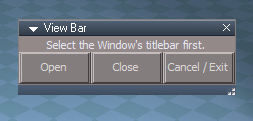
Close: Removes the View Bar from the selected 3D Window's titlebar.
Cancel / Exit: Closes this panel and the script in the Link Editor.
Credit: Thanks to Stan the Man for the example how to do this!
Edit: File removed. Newest versions are here: viewforum.php?f=31"
Load this View Bar.RsObj, select the 3D Window's titlebar, and then select Open. You may have to select in the 3D View to refresh it. For me the window turns white. I tried every command I could think of to alleviate this issue to no avail. Save your Layout to keep the changes. Open: Installs the View Bar into the selected 3D Window's titlebar.
Close: Removes the View Bar from the selected 3D Window's titlebar.
Cancel / Exit: Closes this panel and the script in the Link Editor.
Credit: Thanks to Stan the Man for the example how to do this!
Edit: File removed. Newest versions are here: viewforum.php?f=31"
-
Steinie
- Captain
- Posts: 2958
- Joined: 21 May 2009, 17:38
- Type the number ten into the box: 10
Re: WIP: tS7.61 New View with View tools
Thanks trueBlue!trueBlue wrote:Curious? Isn't it just as easy to load this script from the Library verses from an icon?Steinie wrote:1) Maybe a modified Icon to launch a new window.
2) I was referring to this trueBlue widget to replace the create camera widget.
For your information I almost always leave the library closed when making adjustments. This will allow me to open and close windows more quickly while positioning the scene or during modeling.
-
Steinie
- Captain
- Posts: 2958
- Joined: 21 May 2009, 17:38
- Type the number ten into the box: 10
Re: WIP: tS7.61 New View with View tools
Well this isn't working like I hoped. If I drag the plugin into the 3D scene it changes the LE from 2d to a 3d window. The buttons do appear.
The version before this, if I drag the plugin into the 3D scene a new smaller window is created within the 3D window. (as expected)
-
trueBlue
- Captain
- Posts: 5548
- Joined: 06 Jul 2009, 22:50
- Type the number ten into the box: 10
Re: WIP: tS7.61 New View with View tools
You need to select the 3D Window's titlebar (titlebar is highlighted) first before you select the Open button. Sounds like you had the Link Editor's titlebar selected. Then save your layout. Same goes for the Close button.Steinie wrote:Well this isn't working like I hoped. If I drag the plugin into the 3D scene it changes the LE from 2d to a 3d window. The buttons do appear.
The version before this, if I drag the plugin into the 3D scene a new smaller window is created within the 3D window. (as expected)
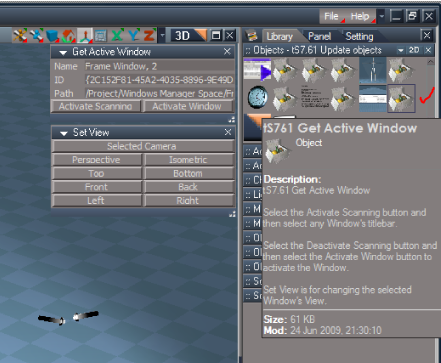
This is my Default layout with the View Bar.
-
Steinie
- Captain
- Posts: 2958
- Joined: 21 May 2009, 17:38
- Type the number ten into the box: 10
Re: WIP: tS7.61 New View with View tools
Ok I did as you described and a new window was created but it was as large as the old 3d window. At first I didn't realize it untill I saw the new
small icons at the top.
-
trueBlue
- Captain
- Posts: 5548
- Joined: 06 Jul 2009, 22:50
- Type the number ten into the box: 10
Re: WIP: tS7.61 New View with View tools
This version is for installing the View Bar into a 3D Window as shown in my capture of my Default Layout. It does not create another 3D Window. This is what the other version is for. I have a Unofficial Updated version in the works.
-
Steinie
- Captain
- Posts: 2958
- Joined: 21 May 2009, 17:38
- Type the number ten into the box: 10
Re: WIP: tS7.61 New View with View tools
Oppps
-
stan
- Master Chief Petty Officer
- Posts: 584
- Joined: 21 May 2009, 17:20
Re: WIP: tS7.61 New View with View tools
Trueblue if you use the WinID = WindowsManager.GetWorkWindow() as the path to the commands on the views icons(written at install time) it will only change the view in that window the last part of this sample code will activate that window. It would make the aspect bar work only for the window its located on . Makes more sense ...
~WinID = 'Project/Windows Manager Space/Frame Window, 5'~
D3DView.SwitchEyeCameraType('Project/Windows Manager Space/Frame Window, 5', '0');WindowsManager.ActivateFrame('/Project/Windows Manager Space/Frame Window, 5')
you should be able to do similar to the fpn, object display too.( for the LoadRAPreset the view name variable is the WinID)
~WinID = 'Project/Windows Manager Space/Frame Window, 5'~
D3DView.SwitchEyeCameraType('Project/Windows Manager Space/Frame Window, 5', '0');WindowsManager.ActivateFrame('/Project/Windows Manager Space/Frame Window, 5')
you should be able to do similar to the fpn, object display too.( for the LoadRAPreset the view name variable is the WinID)
-
trueBlue
- Captain
- Posts: 5548
- Joined: 06 Jul 2009, 22:50
- Type the number ten into the box: 10
Re: WIP: tS7.61 New View with View tools
Thanks stan. Thought about that but I wanted it to be global so that they will work with more than one window. I already created somethig simular that is included in the tS761 Unofficial Update. At least it is closer to the main window.
Did you notice that I had to put an extra command in every icon in order to get the aspect toolbar to function properly? D3DView.SwitchEyeCameraType('', '0');WindowsManager.Activate()
Lots of work!
Lots of work!
-
stan
- Master Chief Petty Officer
- Posts: 584
- Joined: 21 May 2009, 17:20
Re: WIP: tS7.61 New View with View tools
Guess it doesn't work the same as it does in xp because that WindowsManager.Activate() wasn't needed for any of mine. They are no different than the ts6 files one except not having a prototype.
-
splinters
- Chief Warrant Officer
- Posts: 733
- Joined: 21 May 2009, 18:55
- Type the number ten into the box: 0
Re: WIP: tS7.61 New View with View tools
New icon? Resizing icons? Sacrilege!!

-
trueBlue
- Captain
- Posts: 5548
- Joined: 06 Jul 2009, 22:50
- Type the number ten into the box: 10
Re: WIP: tS7.61 New View with View tools
Hey Buddy!. Hope all is well with you and the Fam! Glad to see you survived the Olympics.
Have any ideas on new icons for these:
New View = Creates a new view with the ViewBar installed in the titlebar.
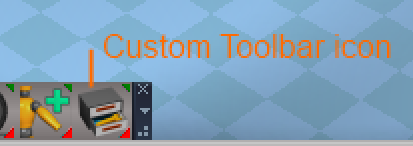
"I copied your icon and pasted it inside your icon" Custom Toolbar icon = Opens a Custom Toolbar. Cut, Copy, and Paste icons.
"I am using the ones from the Script Editor. (they are smaller)
Have any ideas on new icons for these:
New View = Creates a new view with the ViewBar installed in the titlebar.
"I copied your icon and pasted it inside your icon" Custom Toolbar icon = Opens a Custom Toolbar. Cut, Copy, and Paste icons.
"I am using the ones from the Script Editor. (they are smaller)