PE errors
-
Saul
- Senior Chief Petty Officer
- Posts: 308
- Joined: 22 May 2009, 16:50
PE errors
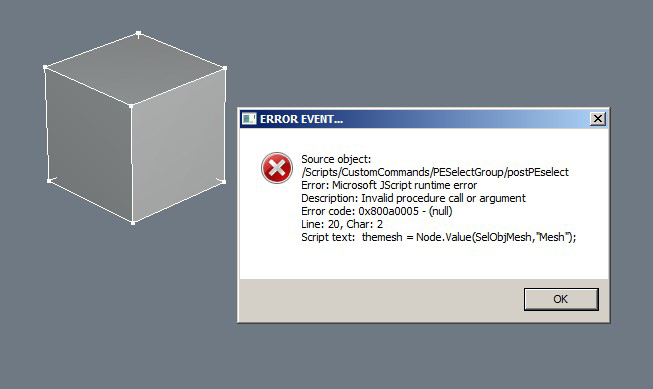
I am getting following error in PE in workSpace, it occurs sometimes when R-click object other times when calling the select mode, any ideas?
- Attachments
-
-
stan
- Master Chief Petty Officer
- Posts: 584
- Joined: 21 May 2009, 17:20
Re: PE errors
that looks like a script giving the error. one of Clinton's I think.
-
Saul
- Senior Chief Petty Officer
- Posts: 308
- Joined: 22 May 2009, 16:50
Re: PE errors
Hehe, yeah, i did an uninstall of Clinton's layers plug-in and now it all works fine((
I hope he gets it working properly 'cos it will be a great help.
I hope he gets it working properly 'cos it will be a great help.
-
clintonman

- Captain
- Posts: 5659
- Joined: 21 May 2009, 21:08
- Type the number ten into the box: 0
- Location: California
Re: PE errors
Was it just the workspace layers or was it also the Unselectable script? I'll check it out, but I don't think the layers would cause a problem with other scripts but I know the lock selection/unselectable script will. If you had both installed was the "enable locking" checkbox active? Just to be sure are you using the layers(2) or the original layers(1 implied) version that works via modelspace layers?Saul wrote:Hehe, yeah, i did an uninstall of Clinton's layers plug-in and now it all works fine((
I hope he gets it working properly 'cos it will be a great help.
Edit: Found it! I was about to give up. I was able to recreate the problem by starting in PE mode then starting the rectangle or lasso select for objects, not faces,edges or points and that's the source of the problem. The custom rectangle and lasso scripts don't take PE mode into consideration. I wasn't able to find any link between the layers and this problem. Working on it...

Last edited by clintonman on 19 Jun 2011, 15:40, edited 1 time in total.
-
Saul
- Senior Chief Petty Officer
- Posts: 308
- Joined: 22 May 2009, 16:50
Re: PE errors
It was the layers2, workspace only version and things went back to normal after i disabled it I dont have the unselectable script installed.
HTH
HTH
-
clintonman
- Captain
- Posts: 5659
- Joined: 21 May 2009, 21:08
- Type the number ten into the box: 0
- Location: California
Re: PE errors
Oops, missed your post. I found a problem with using custom lasso/rectangle select when in PE mode. Do you have those scripts installed? I can make it happen by starting either one and then right clicking, which exits the tool part way instead of ending it.Saul wrote:It was the layers2, workspace only version and things went back to normal after i disabled it I dont have the unselectable script installed.
HTH
-
Saul
- Senior Chief Petty Officer
- Posts: 308
- Joined: 22 May 2009, 16:50
Re: PE errors
I have both rectangle and lasso custom installed but they both seem to be working fine, do you mean a R-click with layers2 functioning?
-
clintonman
- Captain
- Posts: 5659
- Joined: 21 May 2009, 21:08
- Type the number ten into the box: 0
- Location: California
Re: PE errors
Nope, I mean totally independent of workspace layers. In fact the problem with the rectangle and lasso selection is worse than I thought. If you do the "wrong" thing you can crash trueSpace. I made an update to these selection tools, but it's only a partial fix.Saul wrote:I have both rectangle and lasso custom installed but they both seem to be working fine, do you mean a R-click with layers2 functioning?