hi can i draw a poly line a set lengthfor example a square with sides 2x2x2 inch square , i want to draw the shape not via input selection via right click object select , say i want to polyline draw one line 2 inches long how would i do that
thanks for help
draw polyline a set length
-
automike
- Petty Officer Second Class
- Posts: 22
- Joined: 11 Nov 2009, 19:06
draw polyline a set length
-
Breech Block

- Master Chief Petty Officer
- Posts: 482
- Joined: 13 Jun 2009, 20:31
Re: draw polyline a set length
You'd probably get a more detailed and quicker response if you posted these type of questions in the TechForum. Or better still, start a new thread in the Work In Progress Forum (WIP). That would not only show the community what you are working on and thus perhaps generate more beneficial responses, but keep all these queries together in the same thread. That would also aide other community users who will no doubt follow in your footsteps one day and seek out the same type of answers.
HTH.
HTH.

-
automike
- Petty Officer Second Class
- Posts: 22
- Joined: 11 Nov 2009, 19:06
Re: draw polyline a set length
so you cant help me
cheers mate
cheers mate
-
spacekdet

- Captain
- Posts: 1810
- Joined: 27 May 2009, 15:00
- Type the number ten into the box: 10
- Location: On the day shift at the Utility Muffin Research Kitchen
Re: draw polyline a set length
Well, we can try.
See if this helps:
(click to enlarge)
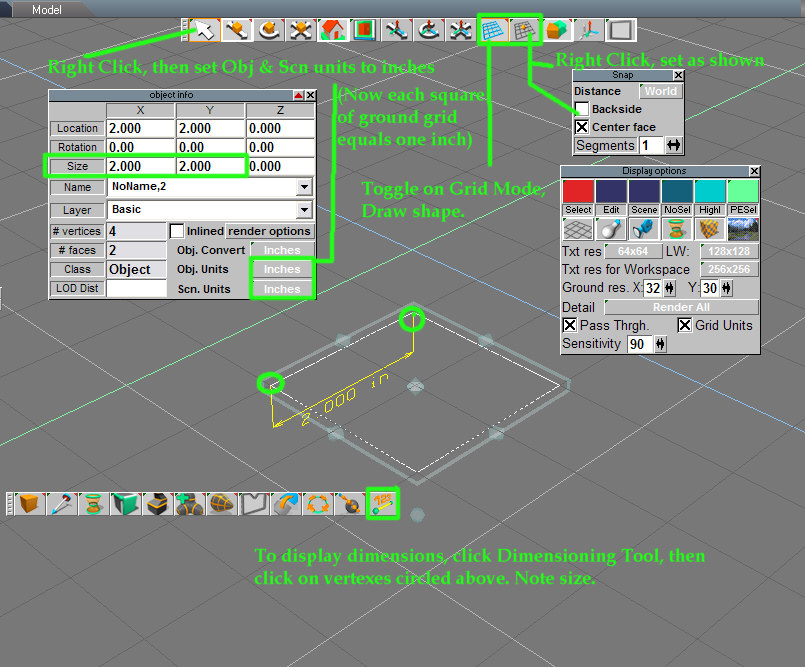
Basically, you just set the Scene and Object units in the Object Info panel to inches.
Open the panel by right clicking the Object Tool
Click and hold 'Obj Units' and 'Scn units', then select inches in each flyout.
Now, each square in the ground grid will equal one inch.
Note that the 'Size' boxes in the Object info panel will display the size of not only the selected object as a whole,
but also the size of any selected element during Point Editing.
You can select a single edge and see it's size - or change it by inputting a new value.
(type in new number and hit Enter)
Toggle Grid Mode on, and draw your polyline.
Another tool you can use to display actual dimensions is the Dimensioning Tool.
(indicated bottom center in the image).
To use it, activate it by clicking it's icon, then click the two vertexes that define the ends of the dimension you want displayed. The yellow marker and numerical dimension display will pop up.
Use the Dimensioning Tool Panel to delete single, delete all, or cycle thru marked dimensions.
See if this helps:
(click to enlarge)
Open the panel by right clicking the Object Tool
Click and hold 'Obj Units' and 'Scn units', then select inches in each flyout.
Now, each square in the ground grid will equal one inch.
Note that the 'Size' boxes in the Object info panel will display the size of not only the selected object as a whole,
but also the size of any selected element during Point Editing.
You can select a single edge and see it's size - or change it by inputting a new value.
(type in new number and hit Enter)
Toggle Grid Mode on, and draw your polyline.
Another tool you can use to display actual dimensions is the Dimensioning Tool.
(indicated bottom center in the image).
To use it, activate it by clicking it's icon, then click the two vertexes that define the ends of the dimension you want displayed. The yellow marker and numerical dimension display will pop up.
Use the Dimensioning Tool Panel to delete single, delete all, or cycle thru marked dimensions.
-
automike
- Petty Officer Second Class
- Posts: 22
- Joined: 11 Nov 2009, 19:06
Re: draw polyline a set length
thank you so much , sorry for sounding like a xxxx it gets frustrating learning this stuff
-
Tommy

- Master Chief Petty Officer
- Posts: 403
- Joined: 28 Jun 2009, 14:05
- Type the number ten into the box: 0
- Location: Sweden, Göteborg
Re: draw polyline a set length
Thank you automike for your question in this forum.
I see that you are rather new to this community as I am. I have used TS since 2004 and have a lot to learn. Through your question I have learned a new thing about TS.
Dont give up. Ask questions and you will get answers an help in some way.
I see that you are rather new to this community as I am. I have used TS since 2004 and have a lot to learn. Through your question I have learned a new thing about TS.
Dont give up. Ask questions and you will get answers an help in some way.
"Carpe diem"
-
automike
- Petty Officer Second Class
- Posts: 22
- Joined: 11 Nov 2009, 19:06
Re: draw polyline a set length
thanksa tommy for your encouragement , i think im trying to use ts for reasons other than it was designed for ,
im trying to draw square oil storage tanks with moving hinge lids and other attachment ,so i need exact measurments and lots of straight lines , if you are interested ive made a website for my business that my father and my brother and me run , we've been going about 40 years now
http://www.wilesfabrication.co.uk" you will have to type in address bar as i havent sussed out how to get it in google searh yet
thanks to all
mike wiles
im trying to draw square oil storage tanks with moving hinge lids and other attachment ,so i need exact measurments and lots of straight lines , if you are interested ive made a website for my business that my father and my brother and me run , we've been going about 40 years now
http://www.wilesfabrication.co.uk" you will have to type in address bar as i havent sussed out how to get it in google searh yet
thanks to all
mike wiles
-
Steinie

- Captain
- Posts: 2958
- Joined: 21 May 2009, 17:38
- Type the number ten into the box: 10
Re: draw polyline a set length
Hey Mike you look just like you Dad! (Ok maybe younger...) 
Are you trying to use trueSpace as a CAD program or so that you
can render a mock representation for Clients?
Are you trying to use trueSpace as a CAD program or so that you
can render a mock representation for Clients?
-
Tommy
- Master Chief Petty Officer
- Posts: 403
- Joined: 28 Jun 2009, 14:05
- Type the number ten into the box: 0
- Location: Sweden, Göteborg
Re: draw polyline a set length
The important thing is what you are using TS for. Is it for 3D illustrations or for blue prints.
I does not apprehend TS as a CAD software. I have tried the spacekadet suggestion of using dimensioning and I think it's only for constuction and get the right dimensions then building i TS. I haven't succeded in printing out the object with the dimension printed. How do I do what?
It's easy to put the exact meusurments in the "object info". I uses it a lot when building in TS and straight lines are no problems i CG.
I have used another software before TS (dont remember the name of it) and in the start I found TS difficult to learn. Dont give up.
What you can do is to get nice renderings to show your costumers. I belive you have a standard assortment of pieces to build your tanks. Build these pieces in TS and when you can pick them from your CG storage and in a simple way ad to your costumers specially built tank. The tank seems to been built of planes of steel plates and these are simple to do in TS. You can also animate the functions of it to show how it works.
I does not apprehend TS as a CAD software. I have tried the spacekadet suggestion of using dimensioning and I think it's only for constuction and get the right dimensions then building i TS. I haven't succeded in printing out the object with the dimension printed. How do I do what?
It's easy to put the exact meusurments in the "object info". I uses it a lot when building in TS and straight lines are no problems i CG.
I have used another software before TS (dont remember the name of it) and in the start I found TS difficult to learn. Dont give up.
What you can do is to get nice renderings to show your costumers. I belive you have a standard assortment of pieces to build your tanks. Build these pieces in TS and when you can pick them from your CG storage and in a simple way ad to your costumers specially built tank. The tank seems to been built of planes of steel plates and these are simple to do in TS. You can also animate the functions of it to show how it works.
"Carpe diem"
-
automike
- Petty Officer Second Class
- Posts: 22
- Joined: 11 Nov 2009, 19:06
Re: draw polyline a set length
thanks for help , yes my dad and me have the same hairdresser and my younger brother on the right also ,
im really just playing with 3d modelling as a photo of a tank will always be the best option to show customer
our line of products , i make the larger fuel stations myself outside with alot of help from the forklift as we only have a small workshop ,then my brother does tanks under 5000 litres inside.
im really just playing with 3d modelling as a photo of a tank will always be the best option to show customer
our line of products , i make the larger fuel stations myself outside with alot of help from the forklift as we only have a small workshop ,then my brother does tanks under 5000 litres inside.
-
v3rd3
- Lieutenant Commander
- Posts: 1191
- Joined: 21 May 2009, 20:04
Re: draw polyline a set length
I guess one thing to point out is that the measurement system on the workspace side is relative... as such if you are using the workspace you can decide what a unit of "1" means, inches, metres or yards.
The modelside works with specific units of measure which you set when you work with the objects properties.
As an aside, if you ever create a model that you want to export to autocad some of us have old TS plugins that will export to .dxf.
The file you create would have to be able to be loaded into one of the TS versions with the modelside still working.
The modelside works with specific units of measure which you set when you work with the objects properties.
As an aside, if you ever create a model that you want to export to autocad some of us have old TS plugins that will export to .dxf.
The file you create would have to be able to be loaded into one of the TS versions with the modelside still working.