I'm using Clintonman's FBX import to get a rigged/weighted model into TS (7.6.1 beta 8 with patch, stand alone). The model originated from a CAL3D source which I converted with Misfit Model to Milkshape. From Milkshape I exported an FBX which I then imported into TS. I am fascinated with the IK tools, and find them really intuitive (comparable to Autodesk Human IK), but I have twist bones in my characters arms that originate at the same shoulder joint as the arm bones.
I need to maintain the weighting to these twist bones that is in my model. Is there a way to link these twist bones to the arm bones so they rotate as a single unit with the arm bones when I use IK?
Creating Moviestorm Animations
-
rampa
- Petty Officer Third Class
- Posts: 14
- Joined: 26 Jun 2013, 22:05
- Type the number ten into the box: 10
Creating Moviestorm Animations
-
Draise

- Captain
- Posts: 3200
- Joined: 21 Sep 2009, 19:33
- Type the number ten into the box: 0
- Location: Bogota, Colombia
Re: Creating Moviestorm Animations
Yes, I like the rigging concepts of TS, Modo has some of it's IK concepts, and Autodesk has something, albiet hard to setup. Softimage's ICE kinematics I've found to be amazing, but requires lots of learning....... but TS still was and is in concept very much ahead of it's time.
Concerning linking your twist bones to the arm bones, where are the twist bones? Where do they branch off?
I have tried linking joint attributes to other attributes before, but it screws with the envelope/skin weights a bit too much, very buggy.
But depending where your twist joints are, you can edit their rotation limits, stiffness and the like in the LE. This will help when manipulating. You can also turn on a rotation limit, so when you rotate the parent, the child joint will be locked on or off. Using IK controls, you can work on the type of control you need or want.
Do you have an example of your rig to show?
Concerning linking your twist bones to the arm bones, where are the twist bones? Where do they branch off?
I have tried linking joint attributes to other attributes before, but it screws with the envelope/skin weights a bit too much, very buggy.
But depending where your twist joints are, you can edit their rotation limits, stiffness and the like in the LE. This will help when manipulating. You can also turn on a rotation limit, so when you rotate the parent, the child joint will be locked on or off. Using IK controls, you can work on the type of control you need or want.
Do you have an example of your rig to show?
-
rampa
- Petty Officer Third Class
- Posts: 14
- Joined: 26 Jun 2013, 22:05
- Type the number ten into the box: 10
Re: Creating Moviestorm Animations
I'll get a picture up tomorrow when I'm back at my computer. On a phone now.
At the shoulder joint is where the twist bone originates. It extends along the upper arm bone (a third of the upper arm bone's length). There is a second twist bone that is an immediate child of the first.
It is possible to make the twist bones into their own IK chain, so I can just pose them separately. Perhaps a "snap to" would help.
I am not an Autodesk user, but only know of "HumanIK" through iClone (another machinima program). It can be used for animation creation, whereas Moviestorm requires pre-made animations.
At the shoulder joint is where the twist bone originates. It extends along the upper arm bone (a third of the upper arm bone's length). There is a second twist bone that is an immediate child of the first.
It is possible to make the twist bones into their own IK chain, so I can just pose them separately. Perhaps a "snap to" would help.
I am not an Autodesk user, but only know of "HumanIK" through iClone (another machinima program). It can be used for animation creation, whereas Moviestorm requires pre-made animations.
-
rampa
- Petty Officer Third Class
- Posts: 14
- Joined: 26 Jun 2013, 22:05
- Type the number ten into the box: 10
Re: Creating Moviestorm Animations
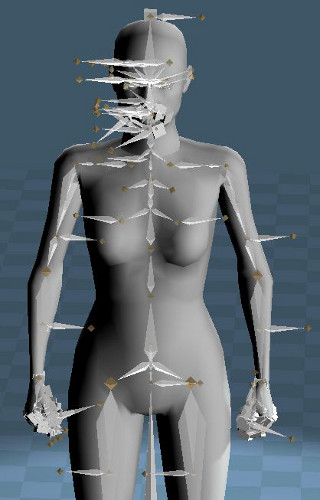
I'm getting really odd bone rotations with Clintonman's FBX importer. The last bone in any chain is being rotated 90 degrees. Is this a known issue? Workaround? I tried it with an FBX out of DAZ studio, and had the same result.
-
Draise
- Captain
- Posts: 3200
- Joined: 21 Sep 2009, 19:33
- Type the number ten into the box: 0
- Location: Bogota, Colombia
Re: Creating Moviestorm Animations
Hmm.. this looks very messy.
It might be easier or faster to create the skeleton from zero in TS and weight in there. Looks like there may be a lot of troubleshooting to figure out, or a lot of joints to fix.
It might be easier or faster to create the skeleton from zero in TS and weight in there. Looks like there may be a lot of troubleshooting to figure out, or a lot of joints to fix.
-
rampa
- Petty Officer Third Class
- Posts: 14
- Joined: 26 Jun 2013, 22:05
- Type the number ten into the box: 10
Re: Creating Moviestorm Animations
Yes. It would make more sense to rebuild it for my own project, but this a a skeleton that is used for many different meshes within a machinima program. So I would have to copy it exactly.
-
Draise
- Captain
- Posts: 3200
- Joined: 21 Sep 2009, 19:33
- Type the number ten into the box: 0
- Location: Bogota, Colombia
Re: Creating Moviestorm Animations
Oh nice! Machinima. What program are you using? And what is the project for? I would love to help you out with your rigging needs the way I can, just not sure how combatible the FBX importer is, cross software export/import with rigs is always a bit iffy..
-
rampa
- Petty Officer Third Class
- Posts: 14
- Joined: 26 Jun 2013, 22:05
- Type the number ten into the box: 10
Re: Creating Moviestorm Animations
Certainly is!
I extracted this model and skeleton from Moviestorm, a purpose built machinima program from a small UK company. I am not terribly active in that community anymore, but have some good friends there that need a good animation creation platform. Getting the model into Blender has proved elusive, and I don't think Blender has "full body IK" like Truespace.
I am concerned that the FBX plugin has given the same odd results from different program's FBX files.
I've attached the female skeleton with a basic mesh as an FBX. Note that the head is not attached to the body.
I extracted this model and skeleton from Moviestorm, a purpose built machinima program from a small UK company. I am not terribly active in that community anymore, but have some good friends there that need a good animation creation platform. Getting the model into Blender has proved elusive, and I don't think Blender has "full body IK" like Truespace.
I am concerned that the FBX plugin has given the same odd results from different program's FBX files.
I've attached the female skeleton with a basic mesh as an FBX. Note that the head is not attached to the body.
-
Draise
- Captain
- Posts: 3200
- Joined: 21 Sep 2009, 19:33
- Type the number ten into the box: 0
- Location: Bogota, Colombia
Re: Creating Moviestorm Animations
I loaded your FBX into Softimage, an Autodesk application, out of curiosity.
The rig isn't too complicated, mainly built off nulls. I had a look at the structure and it looks alright and easy enough to replicate (no foot rolls, simple facial rig, etc). The rotation joints can be replaced by joints with a Z axis rotation in TS.
I can take screen captures of the weight system, so it would be easier to re-setup in TS. I found the weights were not too well preserved though, as the facial weights were very much..... un-useable.
To create a good character in TS, I would use Bob's rig with your female skin. It has a much better rig to play with, including foot roll, etc. Then you can do the weights as you desire.
Concerning the head, maybe you can make some morph targets.
If you want, I can send you the bone structure and hierarchy for you, including weight maps so you get an idea of what to replicate.
Concerning blender, you can program a full body IK system, it's.. just hard and fiddly.
The rig isn't too complicated, mainly built off nulls. I had a look at the structure and it looks alright and easy enough to replicate (no foot rolls, simple facial rig, etc). The rotation joints can be replaced by joints with a Z axis rotation in TS.
I can take screen captures of the weight system, so it would be easier to re-setup in TS. I found the weights were not too well preserved though, as the facial weights were very much..... un-useable.
To create a good character in TS, I would use Bob's rig with your female skin. It has a much better rig to play with, including foot roll, etc. Then you can do the weights as you desire.
Concerning the head, maybe you can make some morph targets.
If you want, I can send you the bone structure and hierarchy for you, including weight maps so you get an idea of what to replicate.
Concerning blender, you can program a full body IK system, it's.. just hard and fiddly.
-
rampa
- Petty Officer Third Class
- Posts: 14
- Joined: 26 Jun 2013, 22:05
- Type the number ten into the box: 10
Re: Creating Moviestorm Animations
Thanks for the info.
I'm not to worried about the weighting, as this will really only be used for creating animations to transfer over to Moviestorm. I'm not even sure if I can get the Truespace animation back into (ugh!) Milkshape, where I can save it as CAL3D. It's all pretty experimental, and I'm expecting all kinds of problems.
It seems Truespace adds a new bone called "Mybone" that I would need to delete later as well.
I'm already running into trouble exporting the model as FBX from Truespace. That would be a show stopper, as it's the skeletal animation that is important.
I'm not to worried about the weighting, as this will really only be used for creating animations to transfer over to Moviestorm. I'm not even sure if I can get the Truespace animation back into (ugh!) Milkshape, where I can save it as CAL3D. It's all pretty experimental, and I'm expecting all kinds of problems.
It seems Truespace adds a new bone called "Mybone" that I would need to delete later as well.
I'm already running into trouble exporting the model as FBX from Truespace. That would be a show stopper, as it's the skeletal animation that is important.
-
rampa
- Petty Officer Third Class
- Posts: 14
- Joined: 26 Jun 2013, 22:05
- Type the number ten into the box: 10
Re: Creating Moviestorm Animations
Hooray! I'm back in business!
I gave up on the FBX, as it just wouldn't work right for me. I managed to get a BVH version of my CAL3D skeleton, and that imported perfectly into Truevision. Now I can just bring in the mesh and rig/skin it. I can then export the BVH from Truespace to another program where I can export it as a CAL3D animation.
I guess it's time to really start learning Truespace now.

I gave up on the FBX, as it just wouldn't work right for me. I managed to get a BVH version of my CAL3D skeleton, and that imported perfectly into Truevision. Now I can just bring in the mesh and rig/skin it. I can then export the BVH from Truespace to another program where I can export it as a CAL3D animation.
I guess it's time to really start learning Truespace now.
-
rampa
- Petty Officer Third Class
- Posts: 14
- Joined: 26 Jun 2013, 22:05
- Type the number ten into the box: 10
Re: Creating Moviestorm Animations
Are other people having good luck with the FBX importer? I'm new to TS, so it could be user error.
-
clintonman

- Captain
- Posts: 5659
- Joined: 21 May 2009, 21:08
- Type the number ten into the box: 0
- Location: California
Re: Creating Moviestorm Animations
There is a reason for it. The fbx file uses joints not bones and joints like truespace, so the only way to get the final joint to effect it's geometry is to add another joint at the end of the chain. That way the last true joint has a bone for skin deformations. It's ugly but it works(I think I had some trouble trying to make the last joint pretty, so I left it ugly). A much bigger problem is the actual joint orientations coming from other programs. If you build a skeleton in truespace the Z axis of a joint always points down the bone, in the female.fbx file it points down the X axis. This can cause problems with truespaces IK rigs.rampa wrote:I'm getting really odd bone rotations with Clintonman's FBX importer. The last bone in any chain is being rotated 90 degrees. Is this a known issue? Workaround? I tried it with an FBX out of DAZ studio, and had the same result.
-
clintonman
- Captain
- Posts: 5659
- Joined: 21 May 2009, 21:08
- Type the number ten into the box: 0
- Location: California
Re: Creating Moviestorm Animations
The fbx importer adds the MyBone bone and MyJoint joint, because I could not figure out how to control the root joint orientation. truespace skeletons have an invisible joint called Skeleton root. It's generally located in the center of the first 2 joints you draw when creating a skeleton. The strangeness makes it difficult to program for it so the importer and exporter are setup to ignore the MyBone and MyJoint chain when exporting. If you want to export an actor that uses a skeleton you built, but not using the new skeleton button on the plugin, you can try exporting with the "skip skeleton root" unchecked. This may or may not make a difference, but it's worth a shot.rampa wrote:Thanks for the info.
I'm not to worried about the weighting, as this will really only be used for creating animations to transfer over to Moviestorm. I'm not even sure if I can get the Truespace animation back into (ugh!) Milkshape, where I can save it as CAL3D. It's all pretty experimental, and I'm expecting all kinds of problems.
It seems Truespace adds a new bone called "Mybone" that I would need to delete later as well.
I'm already running into trouble exporting the model as FBX from Truespace. That would be a show stopper, as it's the skeletal animation that is important.
-
rampa
- Petty Officer Third Class
- Posts: 14
- Joined: 26 Jun 2013, 22:05
- Type the number ten into the box: 10
Re: Creating Moviestorm Animations
Thank you Clintonman for the information!
It helps me understand this a lot better. This is not a skeleton I made, but originated from a CAL3D model that I discovered could be imported into Misfit Model 3D, exported to Milkshape 3D, and finally, exported to FBX.
The odd joint rotations are probably causing a lot of my troubles.
It helps me understand this a lot better. This is not a skeleton I made, but originated from a CAL3D model that I discovered could be imported into Misfit Model 3D, exported to Milkshape 3D, and finally, exported to FBX.
The odd joint rotations are probably causing a lot of my troubles.