Disappearing transparency

Technical questions, etc..
User avatar
CdeB
Chief Petty Officer
Posts: 109
Joined: 21 May 2009, 19:13
Type the number ten into the box: 0
Location: Scandinavia!

Disappearing transparency

Post by CdeB »

-or now you see it: now you don't .

Using tS7.6 at work not updated beta

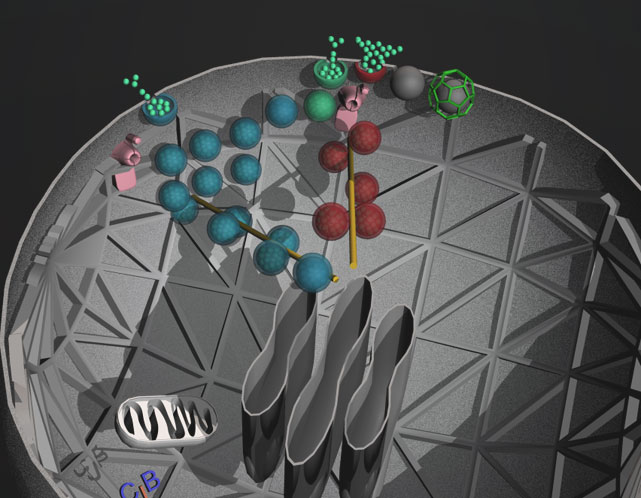
I have one of my cell scenes and I have a number of hollow balls which I wish to make transparent so that the contents are partially visible.

I paint them transparent, (in model view) looks good. Render looks better.
Save (by inserting into scene library) and the transparency disappears.
In the saved file the transparency has also gone.

With my scene this is very reproducible and the only workround is to complete the whole operation and then render to file, hoping no nasty crashes on the way ;) .

Can others reproduce this (and was it fixed in 7.61beta8?)

I don't have the the most recent beta version at work, only at home.


Any help, confirmation of problem etc. would be greatly appreciated.

Chris
User avatar
marcel
Captain
Posts: 2247
Joined: 21 May 2009, 19:52
Type the number ten into the box: 0
Location: paris - France

Re: Disappearing transparency

Post by marcel »

difficult to reproduce your problem without your scene. send your scene here and we can see if the problem appear.
Design - illustration - Animation
http://www.crea-vision.fr
User avatar
MikomDude
Captain
Posts: 1930
Joined: 04 Oct 2010, 11:12
Type the number ten into the box: 0
Location: The Hague, Netherlands

Re: Disappearing transparency

Post by MikomDude »

Strange, I've had the same problem, but not that often. Since I always save my work in Workspace, I think the transparency always gets saved. However it does not always work in the model side after switching sides for a bit.
Do as Marcel says and upload your scene, then we can take a look at it and see if we can fix it. ;)
User avatar
CdeB
Chief Petty Officer
Posts: 109
Joined: 21 May 2009, 19:13
Type the number ten into the box: 0
Location: Scandinavia!

Re: Disappearing transparency

Post by CdeB »

Thanks Guys : decided to have one last attempt before posting the scene...

Thought I had posted this already, but its not here on the thread (so perhaps some unlucky person has it on their thread instead :oops: )

Anyway, I found 2 solutions to the problem

1. Save scene using the TS file tab on the top of the screen

2. Switch off the material editor and then save by inserting into scene library.

I do vaguely remember issues with having material editor open and saving, in the dim and distant past!
The result is below:
S-model.jpg
User avatar
MikomDude
Captain
Posts: 1930
Joined: 04 Oct 2010, 11:12
Type the number ten into the box: 0
Location: The Hague, Netherlands

Re: Disappearing transparency

Post by MikomDude »

Oh, I think Marcel meant post the scene itself, the .scn or .RsScn file.

On a personal note, what exactly is it? it looks very complicated :)
User avatar
CdeB
Chief Petty Officer
Posts: 109
Joined: 21 May 2009, 19:13
Type the number ten into the box: 0
Location: Scandinavia!

Re: Disappearing transparency

Post by CdeB »

Hi from the bus on way home..

1. I know he wanted the scene file...but since I'd sorted out to my satisfaction
i.e. got it to work I thought I'd just post the result ;)

2. The scene is showing the different routes insulin (small green balls) can be released from the pancreatic beta cell that makes it. More details on request:)
Now to the train.(they don't call them smart phones for nothing ;)
User avatar
MikomDude
Captain
Posts: 1930
Joined: 04 Oct 2010, 11:12
Type the number ten into the box: 0
Location: The Hague, Netherlands

Re: Disappearing transparency

Post by MikomDude »

Ah so you posted the image at work? it would have been awesome though if you could run TrueSpace on your smart phone :)

Return to “TechForum”