D3D Scripts
-
clintonman
- Captain
- Posts: 5659
- Joined: 21 May 2009, 21:08
- Type the number ten into the box: 0
- Location: California
D3D Scripts
I was looking for a way to make an Unreal Engine 4 material for trueSpace workspace and found the fx files in the scripts folder. I did a test and altered the bloom effect. I modified it so it only blurs horizontally.
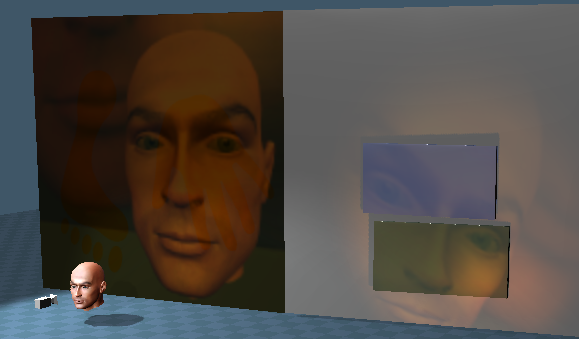
Image below shows the result, the default blur and bloom unchecked. It may be possible to add post process effects like blur, glow, distortions, fog I also found what I was looking for in the cook-torrance fx file. I made a copy gave it new description, name and guid. Can load it via script command
D3DView.ImportBrick("C:\\trueSpace761Std\\Scripts\\MaterialEditor\\Bricks\\Compound\\CookTorrance3.Brick.xml",Space.CurrentScene());
For this one I would liek to add an environment reflection and maybe alter it to use the newer GGX instead of Beckmann distribution
Image below shows the result, the default blur and bloom unchecked. It may be possible to add post process effects like blur, glow, distortions, fog I also found what I was looking for in the cook-torrance fx file. I made a copy gave it new description, name and guid. Can load it via script command
D3DView.ImportBrick("C:\\trueSpace761Std\\Scripts\\MaterialEditor\\Bricks\\Compound\\CookTorrance3.Brick.xml",Space.CurrentScene());
For this one I would liek to add an environment reflection and maybe alter it to use the newer GGX instead of Beckmann distribution
-
Draise
- Captain
- Posts: 3200
- Joined: 21 Sep 2009, 19:33
- Type the number ten into the box: 0
- Location: Bogota, Colombia
Re: D3D Scripts
Oh Beautiful!
Yeah, I was thinking and started documenting what I would need to create a PBR shader - or how I would make a script to make cubemap or spherical reflection probles to the environment map using the camera projection trueSpace comes with.
I also was experimenting on Micro Normal maps to alter the "roughness" of reflections and things. I can see potential in trueSpace, because a micronormal map is really small and you can tile it to the thousands, ultimately creating the diffused roughness you would see on most PBR materials. I haven't sat down and developed anything at all - but I'm SO happy that you too have similar ideas and that you actually ARE making something happen with it!
Love the new bloom/blur effects you are doing.
Yeah, I was thinking and started documenting what I would need to create a PBR shader - or how I would make a script to make cubemap or spherical reflection probles to the environment map using the camera projection trueSpace comes with.
I also was experimenting on Micro Normal maps to alter the "roughness" of reflections and things. I can see potential in trueSpace, because a micronormal map is really small and you can tile it to the thousands, ultimately creating the diffused roughness you would see on most PBR materials. I haven't sat down and developed anything at all - but I'm SO happy that you too have similar ideas and that you actually ARE making something happen with it!
Love the new bloom/blur effects you are doing.
-
clintonman
- Captain
- Posts: 5659
- Joined: 21 May 2009, 21:08
- Type the number ten into the box: 0
- Location: California
Re: D3D Scripts
Thanks, I looked at the bloom and it looks like only the final image is available by bloom time and there's no way to add more controls. So I think the final bloom will have options for alpha, blur and glow by using the existing controls with filtered values so a value of 100.1 will become a value of 0.1 and the 100 will mean "do alpha pass".
Here's the alpha I came up with. It doesn't work with the background color so there is a sphere with alpha value surrounding the scene. Funny that the wireframe grid shows and you can see the semi-transparent navigation widget. I think for non-metals the PBR will be "easy". There is a youtube video for showing how it's done with Blender.
https://www.youtube.com/watch?v=8HMS1MG ... WL&index=3"
PBR is useful for matching Unreal, but also good for matching rendermans pixar shaders.
Here's the alpha I came up with. It doesn't work with the background color so there is a sphere with alpha value surrounding the scene. Funny that the wireframe grid shows and you can see the semi-transparent navigation widget. I think for non-metals the PBR will be "easy". There is a youtube video for showing how it's done with Blender.
https://www.youtube.com/watch?v=8HMS1MG ... WL&index=3"
PBR is useful for matching Unreal, but also good for matching rendermans pixar shaders.
-
clintonman
- Captain
- Posts: 5659
- Joined: 21 May 2009, 21:08
- Type the number ten into the box: 0
- Location: California
Re: D3D Scripts
Here it is, the final result.
Post Process settings:
set Scene Intensity to 100 to get only the bloom, which is really a blur
Bloom Intensity, Smoothness and Downsample are still active
set Scene Intensity to 200 to get alpha values as gray color
any Scene Intensity value below 100 will behave the same as before
Installation:
copy or rename
C:\trueSpace761Std\Scripts\D3D\RsD3DBloomFilter.fx so you have the option of going back to the original behavior
unzip and copy the new RsD3DBloomFilter.fx in it's place
restart truespace
Post Process settings:
set Scene Intensity to 100 to get only the bloom, which is really a blur
Bloom Intensity, Smoothness and Downsample are still active
set Scene Intensity to 200 to get alpha values as gray color
any Scene Intensity value below 100 will behave the same as before
Installation:
copy or rename
C:\trueSpace761Std\Scripts\D3D\RsD3DBloomFilter.fx so you have the option of going back to the original behavior
unzip and copy the new RsD3DBloomFilter.fx in it's place
restart truespace
- Attachments
-
- RsD3DBloomFilter.zip
- (1.29 KiB) Downloaded 380 times
-
Draise
- Captain
- Posts: 3200
- Joined: 21 Sep 2009, 19:33
- Type the number ten into the box: 0
- Location: Bogota, Colombia
Re: D3D Scripts
Wow, nice.. So..... do you think the same blurry Postprocess can be plugged into a Camera Texture Projector?
-
clintonman
- Captain
- Posts: 5659
- Joined: 21 May 2009, 21:08
- Type the number ten into the box: 0
- Location: California
Re: D3D Scripts
I think that would work using HLSL shader bricks.Draise wrote:Wow, nice.. So..... do you think the same blurry Postprocess can be plugged into a Camera Texture Projector?
Here's a picture using the blur from my compositing nodes. It runs too slow and is a bit finicky. The tS post process also uses a simplified faster blur. HLSL using the faster blur should work well.
-
Draise
- Captain
- Posts: 3200
- Joined: 21 Sep 2009, 19:33
- Type the number ten into the box: 0
- Location: Bogota, Colombia
Re: D3D Scripts
I have used your blur HLSL brick before, it can be a bit slow yes. I guess the post-process brick could be replaced with your new one that you just made for the faster blur.
-
clintonman
- Captain
- Posts: 5659
- Joined: 21 May 2009, 21:08
- Type the number ten into the box: 0
- Location: California
Re: D3D Scripts
Almost...Draise wrote:I have used your blur HLSL brick before, it can be a bit slow yes. I guess the post-process brick could be replaced with your new one that you just made for the faster blur.
The post process lives outside truespace in .fx file, so it only works with the bloom. The good news is that the commands in the fx file are close to what's needed to make a HLSL brick. My blur node doesn't use HLSL code, it's C++. I think an HLSL will be faster because it runs on the gpu. We'll see, I plan to throw together a blur script now.
-
clintonman
- Captain
- Posts: 5659
- Joined: 21 May 2009, 21:08
- Type the number ten into the box: 0
- Location: California
Re: D3D Scripts
Not as easy as I thought. The fx file can process the image in passes, meaning it can feed the resulting image into the next step. The HLSL brick only does one pass. If the full image can be stored in HLSL then simulating multiple passes is possible otherwise it isn't. Next I'll see if I can adapt my blur node code from C++ to HLSL.
Image shows blur in horizontal. A second pass in vertical is needed to complete the effect. A blurplane mesh is attached here. Add to a scene and hook up the image. No UI, not user friendly and no clue what good values can be used yet.
- Attachments
-
- BlurPlane.zip
- (26.58 KiB) Downloaded 355 times
-
clintonman
- Captain
- Posts: 5659
- Joined: 21 May 2009, 21:08
- Type the number ten into the box: 0
- Location: California
Re: D3D Scripts
First results of "pbr" material. Left sphere has a little bit of roughness and the right has more. The material uses 16 samples of the image at each pixel and runs slowly. I tried 64 samples and tS couldn't handle it. For comparison the source code I found had 128 samples and another had 1024 samples. The code isn't designed for speed. The roughness randomizer also uses very slow code, but it may not be possible to increase it's speed in HLSL so some other solution or hack will be needed. Precomputing some values and storing them in a image is one method of speedup outside of the roughness calculations.
-
Draise
- Captain
- Posts: 3200
- Joined: 21 Sep 2009, 19:33
- Type the number ten into the box: 0
- Location: Bogota, Colombia
Re: D3D Scripts
Well.. that's a nice start.
Here is what and how - I think I mentioned earlier - using micronormal maps would work, which is by FAR much faster that processing it in code or nodes into the Environment and specular aspects of the shader. It has NO hit on performance, or none that I know of.

So, using my shader that Stan and I developed for the passes, and with the default secondary normal map I have placed, you can tile it to quite high values. So using the Diffuse value, I inversely influenced the reflectance, and made the normal map stronger and more tiled inversely. So more reflectence, the more tiled (smaller) the micronormalmap would be, also less/more height values accordingly to not distort the environment map too much. Obviously I'd need to finetune the settings and make a single controller that would drive all those values dynamically - but you can achieve that system without much processing... well other than the dynamic aspect of the shader driving those values.
Ultimately I consider roughness to be.. molecular roughness, microscopic.. so why not use the beauty of normal maps on microscopic detail to achive the "blur" roughiness?? No or little visual performance hit. Though, the little normal map can only get so large tiled that you begin to see it's rough detail as not so "microscopic" but noisy..
Ultimately, PBR usually doesn't have a Specular driver, so that would have to be dynamically configured too, to dynamically change it's value with the reflectance/diffuse and Micronormal map values. When.. I have a bit of time and want to do something large or interesting in trueSpace again - I'll develop that. I miss having realtime AO. I will need to work on my false AO lighting rig a bit more.....
Here is what and how - I think I mentioned earlier - using micronormal maps would work, which is by FAR much faster that processing it in code or nodes into the Environment and specular aspects of the shader. It has NO hit on performance, or none that I know of.

So, using my shader that Stan and I developed for the passes, and with the default secondary normal map I have placed, you can tile it to quite high values. So using the Diffuse value, I inversely influenced the reflectance, and made the normal map stronger and more tiled inversely. So more reflectence, the more tiled (smaller) the micronormalmap would be, also less/more height values accordingly to not distort the environment map too much. Obviously I'd need to finetune the settings and make a single controller that would drive all those values dynamically - but you can achieve that system without much processing... well other than the dynamic aspect of the shader driving those values.
Ultimately I consider roughness to be.. molecular roughness, microscopic.. so why not use the beauty of normal maps on microscopic detail to achive the "blur" roughiness?? No or little visual performance hit. Though, the little normal map can only get so large tiled that you begin to see it's rough detail as not so "microscopic" but noisy..
Ultimately, PBR usually doesn't have a Specular driver, so that would have to be dynamically configured too, to dynamically change it's value with the reflectance/diffuse and Micronormal map values. When.. I have a bit of time and want to do something large or interesting in trueSpace again - I'll develop that. I miss having realtime AO. I will need to work on my false AO lighting rig a bit more.....
-
clintonman
- Captain
- Posts: 5659
- Joined: 21 May 2009, 21:08
- Type the number ten into the box: 0
- Location: California
Re: D3D Scripts
Very nice. I think I'll have to borrow that idea. Normalmaps for roughness - that's brilliant!
One limitation of trueSpace is that it uses DX9 and many of the techniques that have come out over the years are based on DX10 and newer. For me it's ok if it runs slowly, the end goal is to have a material that has the same inputs as the Unreal UE4 shaders with a somewhat similar look which is also close to the disney pbr which should make using renderman easier since it also has similar inputs for it's pbr shader.
-
clintonman
- Captain
- Posts: 5659
- Joined: 21 May 2009, 21:08
- Type the number ten into the box: 0
- Location: California
Re: D3D Scripts
Still coming along. I can get some results that look like the unreal material editor preview by combining the roughness with a blur. Only drawback is that the blur was slow. The blur has been rewritten and is now 5 times faster than before which is fast enough for what I want to do. The roughness calculation is still slow. Also found out I needed an hdr image and some adjustments to bring the values into range for display. I was using vue 5 to make hdr images and found that the format was hdr but the values were low dynamic range and gave a bad result.
Image shows no roughness reflection. Next roughness of 0.2 with 16 samples. Last image is blur reflection before the roughness is applied.
-
Draise
- Captain
- Posts: 3200
- Joined: 21 Sep 2009, 19:33
- Type the number ten into the box: 0
- Location: Bogota, Colombia
Re: D3D Scripts
This middle one made the sun speckle a bit, is.. that supposed to happen?
I'm glad it's 5 times faster! Good work on the optimizing.
-
clintonman
- Captain
- Posts: 5659
- Joined: 21 May 2009, 21:08
- Type the number ten into the box: 0
- Location: California
Re: D3D Scripts
That's what you get with only 16 samples. The blur is used to hide the low sample count. The 3rd one is the 2nd with a blur.Draise wrote:This middle one made the sun speckle a bit, is.. that supposed to happen?
I'm glad it's 5 times faster! Good work on the optimizing.
I have everything worked out for metallic materials and got the truespace and unreal editor viewports giving similar results. Earlier test was comparing tS to the material editor in unreal. One last adjustment was to the tS lights. Setting intensity to 1500 and quadratic to 50 makes the lighting match up.
I'll take a short break now to fix up the other compositing nodes with the 5 times faster technique.
-
clintonman
- Captain
- Posts: 5659
- Joined: 21 May 2009, 21:08
- Type the number ten into the box: 0
- Location: California
Re: D3D Scripts
Closer still. Left is metal and right is non-metal both with the same roughness value and base color. Maybe one more session to work out the details, match the unreal look then combine plastic and metal as one material.
-
Draise
- Captain
- Posts: 3200
- Joined: 21 Sep 2009, 19:33
- Type the number ten into the box: 0
- Location: Bogota, Colombia
-
clintonman
- Captain
- Posts: 5659
- Joined: 21 May 2009, 21:08
- Type the number ten into the box: 0
- Location: California
Re: D3D Scripts
Thanks, I'll look into it. Could be because I'm faking it with small sample count + blur.
-
clintonman
- Captain
- Posts: 5659
- Joined: 21 May 2009, 21:08
- Type the number ten into the box: 0
- Location: California
Re: D3D Scripts
Resurrecting the old project.
I've been working on this for over a week trying to understand the math and how to do it within trueSpace limitations.
The image shows a GLTF model imported to trueSpace with the new PBR based material. The results are pretty good. The trick to get started was to bypass all of the material setup in tS except for the normalmap which is kind of separate anyway. Everything is inside the constant part of the material. It also bypasses the model shader so one more thing I need to add is the light attenuation. That will be really easy compared to everything else. As shown there are no lights in the scene. It has an environment lighting and reflection setup using an hdr image.
I'm also working on a GLTF import/export plugin. It's actually the reason I needed a PBR material. So the GLTF textures for metallic, roughness, ambient occlusion and color had a meaningful place to go.
-
clintonman
- Captain
- Posts: 5659
- Joined: 21 May 2009, 21:08
- Type the number ten into the box: 0
- Location: California
Re: D3D Scripts
final work for now.
Fixed the reflection, it was upside down.
Fixed faint detail was missing. It's still too faint but it can be seen now, more obvious is the bottle cap detail.
I attached the object file since it can't be shown very well in still images. The material is still a little rough and hasn't been balanced with the lights, so it looks best if all the lights in the scene are set to black. This requires the Clintons3dPlugin is installed or one of the Unofficial Updates which includes it.
The environment light/reflection is from the Unreal game engine. The original bottle model is from the Khronos Group github page
https://github.com/KhronosGroup/glTF-Sa ... master/2.0
An internal precalculated data image was created using the BRDFGenerator, https://github.com/HectorMF/BRDFGenerator
I'll come back to this project after more work on the gltf importer is complete.
Fixed the reflection, it was upside down.
Fixed faint detail was missing. It's still too faint but it can be seen now, more obvious is the bottle cap detail.
I attached the object file since it can't be shown very well in still images. The material is still a little rough and hasn't been balanced with the lights, so it looks best if all the lights in the scene are set to black. This requires the Clintons3dPlugin is installed or one of the Unofficial Updates which includes it.
The environment light/reflection is from the Unreal game engine. The original bottle model is from the Khronos Group github page
https://github.com/KhronosGroup/glTF-Sa ... master/2.0
An internal precalculated data image was created using the BRDFGenerator, https://github.com/HectorMF/BRDFGenerator
I'll come back to this project after more work on the gltf importer is complete.
- Attachments
-
- WaterBottlePBR.RsObj
- (9.95 MiB) Downloaded 173 times
-
clintonman
- Captain
- Posts: 5659
- Joined: 21 May 2009, 21:08
- Type the number ten into the box: 0
- Location: California
Re: D3D Scripts
PostProcess Pixelate test.
I found a tutorial on youtube and it looked easy enough to try. First I tried it with a normal material and pretty much all the nodes matched up to the tutorial ... with a little encouragement. Then it was surprsingly straightforward to translate into the post process fx file.
Here's the tut
-
clintonman
- Captain
- Posts: 5659
- Joined: 21 May 2009, 21:08
- Type the number ten into the box: 0
- Location: California
Re: D3D Scripts
Attached is a plane mesh with a pixelate material I created from the tutorial
- Attachments
-
- Plane.RsObj
- (156.3 KiB) Downloaded 42 times
-
clintonman
- Captain
- Posts: 5659
- Joined: 21 May 2009, 21:08
- Type the number ten into the box: 0
- Location: California
Re: D3D Scripts
I added a few more post process effects options.
Pixelate, Tint/Colorize and 3 different vignette styles.
They all need some work, but so far so good and I set it up so it's easier to use them along with the color glow, alpha and blur post process options.
-
clintonman
- Captain
- Posts: 5659
- Joined: 21 May 2009, 21:08
- Type the number ten into the box: 0
- Location: California
Re: D3D Scripts
Update June 19 2024
new installer updates the fx file, the post process node and the postprocess nodes in the layouts
new options pixelate, tint and 3 vignette styles
new easier to use UI
http://clintons3d.com/plugins/truespace ... ocess.html
new installer updates the fx file, the post process node and the postprocess nodes in the layouts
new options pixelate, tint and 3 vignette styles
new easier to use UI
http://clintons3d.com/plugins/truespace ... ocess.html
-
clintonman
- Captain
- Posts: 5659
- Joined: 21 May 2009, 21:08
- Type the number ten into the box: 0
- Location: California
Re: D3D Scripts
One last script for this object.
The idea for the Scene FX Control is based on the UU Scene Animator FX scripts.
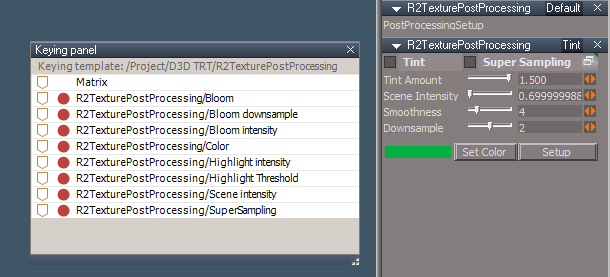
The image shows the Default panel. The post process controls make up the other panels.
This works by making a direct connection to the nodes that control the selected windows 3D appearance. The panels include buttons on the left to set keyframes. It is designed to work with the new post process fx file. It also works with the default tS Postprocess node and fx files.
There is one gotcha in that if you do a new scene or load another scene while still connected, the post process nodes controls will stop working. The fix is to open a fresh layout or reload the Scene FX Control and press the Repair button.
http://clintons3d.com/plugins/truespace ... efxcontrol
-
trueBlue
- Captain
- Posts: 5548
- Joined: 06 Jul 2009, 22:50
- Type the number ten into the box: 10
Re: D3D Scripts
Very cool!
Never cease to amaze me!
I discovered that you can 3D Group the R2TexturePostProcessing to make it available for animating Postprocess .
Never cease to amaze me!
I discovered that you can 3D Group the R2TexturePostProcessing to make it available for animating Postprocess .