Workspace Layers v4

User avatar
clintonman
Captain
Posts: 5659
Joined: 21 May 2009, 21:08
Type the number ten into the box: 0
Location: California

Workspace Layers v4

Post by clintonman »

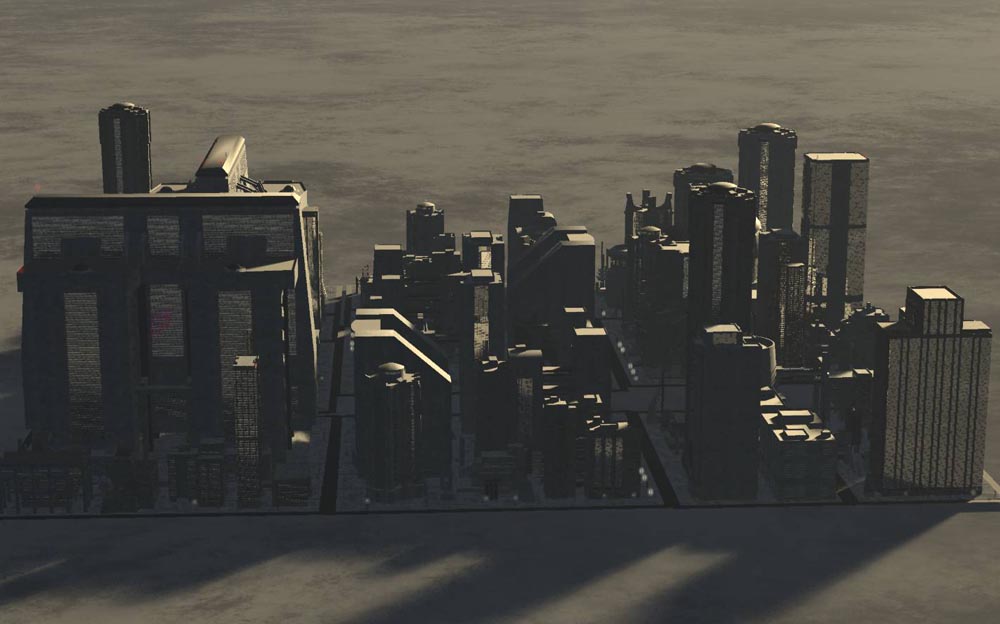
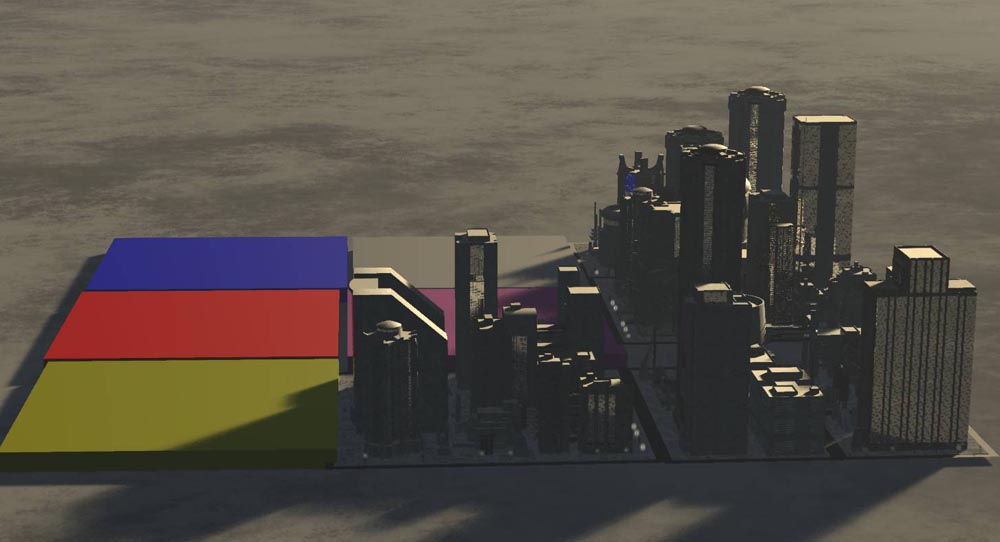
WorkspaceLayers4_beginning.jpg
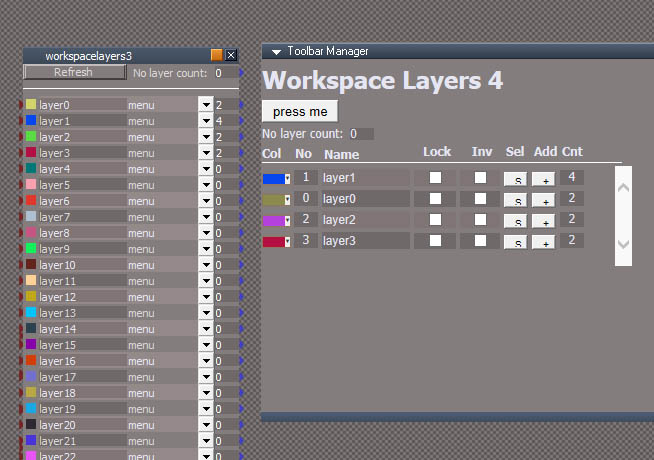
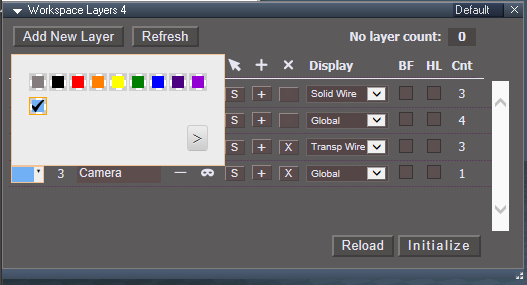
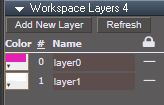
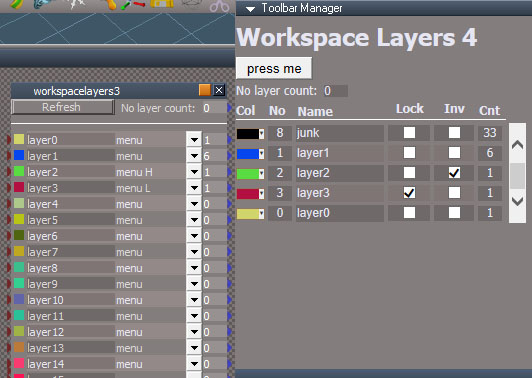
left workspace layers v3, right experimental v4

I've started trying new ways to do workspace layers. The old method is pretty crazy. It works but if you undo a few times it can end up in a bad state. The quick fix for that is to clear all undos, but then you lose the ability to undo whenever the layers tool is used. One big improvement would be to replace the dropdown menu with individual buttons. I did some tests there and it would solve the problem. The dropdown is the center of the problems with the version 3 layers.
This new method uses the webserver plugin and a web browser view window inside tS. My tests show it will work and it won't be limited to 24 layers. So it's just a matter of putting in the time.
One note is that this new technique only works with windows 10 and maybe windows 7 and 8. The view uses the internet explorer base so it's limited tech. The newest internet explorer is old tech and older versions are just too old to even work at all. Because of the age everything has to be made from scratch. If the browser was more modern there would be all sorts of tech that would make it much easier to make a web based UI.
Clinton Reese

http://clintons3d.com
User avatar
trueBlue
Captain
Posts: 5548
Joined: 06 Jul 2009, 22:50
Type the number ten into the box: 10

Re: Workspace Layers v4

Post by trueBlue »

web browser view window inside tS
:bananathumb:
HTML View Control?
User avatar
clintonman
Captain
Posts: 5659
Joined: 21 May 2009, 21:08
Type the number ten into the box: 0
Location: California

Re: Workspace Layers v4

Post by clintonman »

trueBlue wrote: 04 Apr 2021, 22:40
web browser view window inside tS
:bananathumb:
HTML View Control?
Yep.
Clinton Reese

http://clintons3d.com
User avatar
clintonman
Captain
Posts: 5659
Joined: 21 May 2009, 21:08
Type the number ten into the box: 0
Location: California

Re: Workspace Layers v4

Post by clintonman »

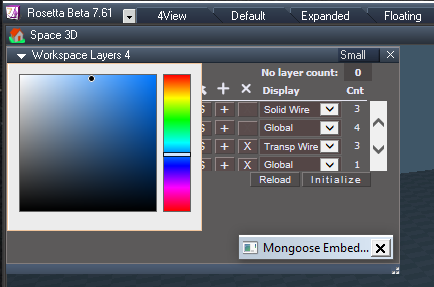
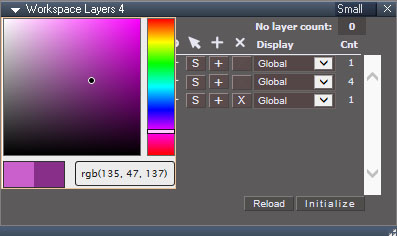
Things are going pretty smoothly. The difficult part was the layer color control. The spectrum color control, http://bgrins.github.io/spectrum/ , was used because the internet explorer base does not have a basic color input like a modern browser.
Now the scripts can set the layer color, name and visibility.
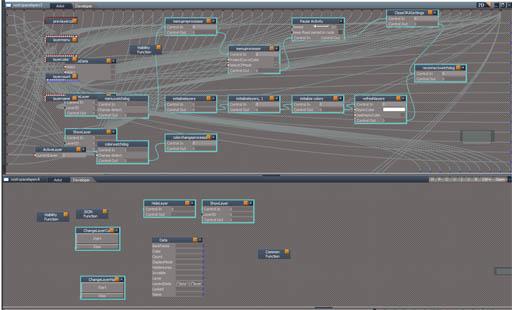
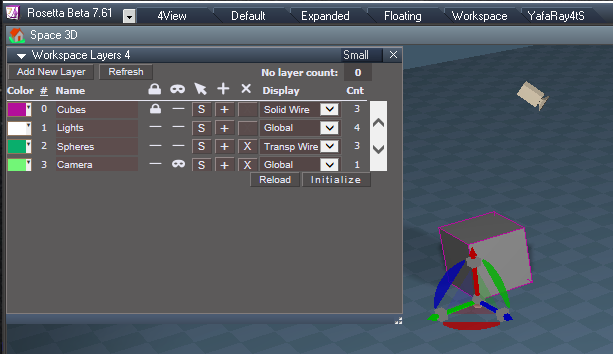
layers3_vs_layer4.jpg
So far the new layers on the bottom is far less complex than the old layers on top.
Clinton Reese

http://clintons3d.com
User avatar
clintonman
Captain
Posts: 5659
Joined: 21 May 2009, 21:08
Type the number ten into the box: 0
Location: California

Re: Workspace Layers v4

Post by clintonman »

workspacelayers4.jpg

Added the "select layer" and "add to layer" buttons
The add to layer only changes wireframe color and layer number for the selected items. It does not update the visibility or locking for the objects.
Next up is "add new layer" to create empty layers and "remove layer" which will move it's members to the no layer section and delete the layer from the list
Clinton Reese

http://clintons3d.com
User avatar
clintonman
Captain
Posts: 5659
Joined: 21 May 2009, 21:08
Type the number ten into the box: 0
Location: California

Re: Workspace Layers v4

Post by clintonman »

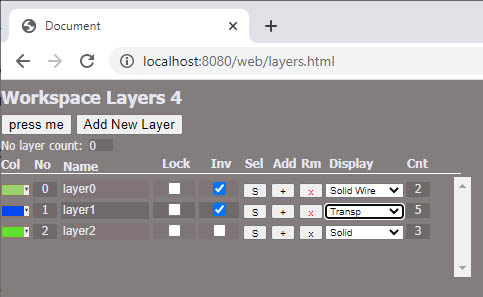
workspacelayers4_2.jpg
All parts are working except for the display mode.
Added the ability to remove a layer
Added the ability to add new layers

Layer 0 and 1 are permanent and cannot be removed because layer 1 is the default layer for lights in workspace and layer zero is kind of the default layer of modelspace objects.

Needs to get the display mode working and then some setup functions in truespace to initialize and refresh the layers data.
Clinton Reese

http://clintons3d.com
User avatar
clintonman
Captain
Posts: 5659
Joined: 21 May 2009, 21:08
Type the number ten into the box: 0
Location: California

Re: Workspace Layers v4

Post by clintonman »

workspacelayers4_3.jpg

Alright, it's working!
Added teh display mode controls and checkboxes for hidden lines and back face display. Initialize button to get started and a refresh button for when objects are added or removed from the scene.

Next step is to make it fancy and pretty.
Clinton Reese

http://clintons3d.com
User avatar
clintonman
Captain
Posts: 5659
Joined: 21 May 2009, 21:08
Type the number ten into the box: 0
Location: California

Re: Workspace Layers v4

Post by clintonman »

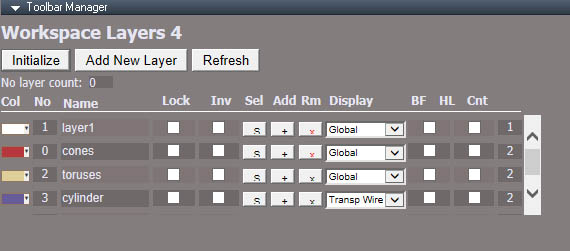
workspacelayers4_4.jpg

Fancier and prettier version though it can still use a bit of work.
The plan is to move the initialize button to the bottom, style the buttons and the last 2 checkboxes to look like they exist in trueSpace and line up the "no layer count" with the count column. Maybe replace the add and remove column headers with vector images then balance their weight. The lock is a little heavy compared to the other icons.

Then finally get back to coding and fix the bugs.
Clinton Reese

http://clintons3d.com
User avatar
the_ant
Chief Petty Officer
Posts: 155
Joined: 02 Jun 2009, 09:26
Type the number ten into the box: 0
Location: Perugia - Italy

Re: Workspace Layers v4

Post by the_ant »

:worship: :worship: :worship:
User avatar
trueBlue
Captain
Posts: 5548
Joined: 06 Jul 2009, 22:50
Type the number ten into the box: 10

Re: Workspace Layers v4

Post by trueBlue »

:worship:
My two sense...
I would would welcome a more compact UI as much as possible
Eliminating the "Workspace Layers 4" header which could be the title of the floating frame and any unneeded padding or unused space
Not sure why one would need Hidden lines and Back face options for a layer system, but eliminating those would shorten up the UI
If possible, add helpful tooltips to the column icons and or buttons

I notice that your Clintons3dPlugin.rsx plugin has:
utilityFunctions.CreateServer()
utilityFunctions.DestroyServer()
utilityFunctions.PoleServer()
utilityFunctions.SocketComm()

Is this the same as your Clintons3dRsView.rsx plugin and or could your Clintons3dPlugin.rsx plugin be used for this project?
User avatar
RAYMAN
Captain
Posts: 2547
Joined: 21 May 2009, 18:56

Re: Workspace Layers v4

Post by RAYMAN »

Backface culling.....
Here is an example.... see the room with a ceiling and lights from the inside but switch off visabillity of the ceiling for posing the objects I would think..thats what layer visability is used for..

https://youtu.be/kT0sSF6o-rA
User avatar
clintonman
Captain
Posts: 5659
Joined: 21 May 2009, 21:08
Type the number ten into the box: 0
Location: California

Re: Workspace Layers v4

Post by clintonman »

trueBlue wrote: 13 Apr 2021, 17:04 ...

I notice that your Clintons3dPlugin.rsx plugin has:
utilityFunctions.CreateServer()
utilityFunctions.DestroyServer()
utilityFunctions.PoleServer()
utilityFunctions.SocketComm()

Is this the same as your Clintons3dRsView.rsx plugin and or could your Clintons3dPlugin.rsx plugin be used for this project?
Except for SocketComm I completely forgot those even existed. No, none of those can be used here.
Clinton Reese

http://clintons3d.com
User avatar
clintonman
Captain
Posts: 5659
Joined: 21 May 2009, 21:08
Type the number ten into the box: 0
Location: California

Re: Workspace Layers v4

Post by clintonman »

workspacelayers4_5.jpg
I fixed all the bugs I could find and started cleaning up the UI.
Changed the invisible icon into a mask, replaced the + and x text with svg images and balanced the icon weights.
Removed the header, refined the no layer count display and moved the intialize button to the bottom.

Next is to make the checkboxes look like tS checkboxes, make the big buttons look like tS buttons, add tips and adjust the size and spacing of the whole thing and maybe make a super compact version. Also the color control looks a little weird.
Clinton Reese

http://clintons3d.com
User avatar
clintonman
Captain
Posts: 5659
Joined: 21 May 2009, 21:08
Type the number ten into the box: 0
Location: California

Re: Workspace Layers v4

Post by clintonman »

workspacelayers4_6.jpg

Almost done!
Added a Reload button that works the same as the refresh button on a web browser - maybe not needed. will keep it because the only other alternative is closing the window, restarting the web server and reopening the window
Added some tooltips
Clicking on the number or name column will sort the list. Image above is in order by layer name. If you add or remove layers the list will need to be resorted.

Todo: add state so will sort when adding or removing layers. Test, make installer and publish it.
Clinton Reese

http://clintons3d.com
User avatar
RAYMAN
Captain
Posts: 2547
Joined: 21 May 2009, 18:56

Re: Workspace Layers v4

Post by RAYMAN »

Clintonman how does the layer system work ?
Does it just blend out the meshes from display and manipulation.. or does it take the meshes out of TS workload thus freeing resources ?Can one delete the content from the layer ? Can one make an object replace layer by layer with content with much less poly count alongside the proxy system override for collections that Blender uses ? :?:
https://youtu.be/DNP7diC63IA
User avatar
clintonman
Captain
Posts: 5659
Joined: 21 May 2009, 21:08
Type the number ten into the box: 0
Location: California

Re: Workspace Layers v4

Post by clintonman »

RAYMAN wrote: 18 Apr 2021, 12:43 Clintonman how does the layer system work ?
Does it just blend out the meshes from display and manipulation.. or does it take the meshes out of TS workload thus freeing resources ?Can one delete the content from the layer ? Can one make an object replace layer by layer with content with much less poly count alongside the proxy system override for collections that Blender uses ? :?:
https://youtu.be/DNP7diC63IA
Layers are used to organize objects without gluing them. Then the layers are used to control the appearance, visibility and whether or not the objects can be selected in the 3D view. Without layers you would have to change the objects one by one. The Blender collections are more like a superset of a layers system. I don't think any other software has anything like it.
Clinton Reese

http://clintons3d.com
User avatar
RAYMAN
Captain
Posts: 2547
Joined: 21 May 2009, 18:56

Re: Workspace Layers v4

Post by RAYMAN »

Yeah Clintonman I thought that was done that way but can we disable meshes with the layer system as if they werent even loaded into the memory !
My thoughts are that by disabling content we could free resources and render or use bigger scenes!
Of course I can distribute the scenes to the layers...save the whole scene..delete what I dont need right away and reload.. the saved scene..throw away the other part... etc etc....! I do that often on big scenes even in other programs.. but its always a lot of stress...open save.. reopen resave etc..!
Bypassed or skipped in the code...but not just muted from selection or from viewing....
Thats a real big problem of TS we could solve that way !
TS crashing because of lack of resources...
The idea is to throw in a block that the object isnt loaded.. and disable that blocking when we want that object or objectgroup included..again...like with a refresh button..
User avatar
RAYMAN
Captain
Posts: 2547
Joined: 21 May 2009, 18:56

Re: Workspace Layers v4

Post by RAYMAN »

Here I have an example.. if we could aquire and drop or replace by dummy or proxy parts.. we could break through the 1 Mio poly barrier that we have with TS!
Remember that although I am 100 certain TS 7 is built for
Win 64 in mind it still is exe packaged as 086...!
Specify a folder....select automatically everthing in the layer..save incrementaly with underscore layer to the folder.. delete layer content...reload from underscore file when the layer is needed again.. or replace with dummy object of same size as placeholder
Render parts of the scene with the layer content and compose in an editor outside..
a1.jpg
.. etc
b1.jpg
c1.jpg
User avatar
clintonman
Captain
Posts: 5659
Joined: 21 May 2009, 21:08
Type the number ten into the box: 0
Location: California

Re: Workspace Layers v4

Post by clintonman »

workspaceLayers4_small.jpg
workspaceLayers4_small.jpg (38.82 KiB) Viewed 5504 times
Final version has a small window option, but the size of the color picker makes it awkward to use.

I discovered during the last tests that the system can be a little unpredictable if more than one instance of trueSpace is running the web server. I was super confused until I figured out that it was reading layers information from the other running tS. I have a vague idea how to fix it in the future. For now it will be just a note, "Don't open more than one tS web server". It's not possible to open more than 1 instance of the web server in a single tS instance.
Clinton Reese

http://clintons3d.com
User avatar
trueBlue
Captain
Posts: 5548
Joined: 06 Jul 2009, 22:50
Type the number ten into the box: 10

Re: Workspace Layers v4

Post by trueBlue »

First Test in tS761Standalone
Observations...
Workspace4.png
Camera 'Hide Layer' is not working for the Camera
Cubes 'Lock Layer' works but I would suggest adding Space.Unselect() in cases where an object in the layer is selected when you Lock the Layer
With the Small aspect, making the panel longer vertically, the Color control works/fits better. I made it 392x208
Not sure what to say about the Mongoose Embedded Web Server window
Maybe making it smaller initially?
Docking it seems less bothersome
User avatar
clintonman
Captain
Posts: 5659
Joined: 21 May 2009, 21:08
Type the number ten into the box: 0
Location: California

Re: Workspace Layers v4

Post by clintonman »

trueBlue wrote: 19 Apr 2021, 15:59 First Test in tS761Standalone
Observations...
Workspace4.png
Camera 'Hide Layer' is not working for the Camera
Cubes 'Lock Layer' works but I would suggest adding Space.Unselect() in cases where an object in the layer is selected when you Lock the Layer
With the Small aspect, making the panel longer vertically, the Color control works/fits better. I made it 392x208
Not sure what to say about the Mongoose Embedded Web Server window
Maybe making it smaller initially?
Docking it seems less bothersome
Hiding the camera is working here, but I may be a UU version or 2 behind you.
I will add an option to remove locked items from the selection when locking. Deselecting everything is too heavy handed.
Will make the small aspect taller.
I might be able to make the web server open to a smaller window.

Just tested and it works on windowsXP using an external web browser, firefox. The truespace http control window in winXP does not work with the WebUI system because the version of internet explorer is too old.
Clinton Reese

http://clintons3d.com
User avatar
trueBlue
Captain
Posts: 5548
Joined: 06 Jul 2009, 22:50
Type the number ten into the box: 10

Re: Workspace Layers v4

Post by trueBlue »

Not sure why the Camera is not hiding with Workspace Layers 4, but the Hide/Show Camera and Lights does work
Personally, I like the Option showButtons: false,
no buttons.png
User avatar
clintonman
Captain
Posts: 5659
Joined: 21 May 2009, 21:08
Type the number ten into the box: 0
Location: California

Re: Workspace Layers v4

Post by clintonman »

trueBlue wrote: 19 Apr 2021, 20:02 ...
Personally, I like the Option showButtons: false,
no buttons.png
What is "Option showButtons: false" ?
Clinton Reese

http://clintons3d.com
User avatar
trueBlue
Captain
Posts: 5548
Joined: 06 Jul 2009, 22:50
Type the number ten into the box: 10

Re: Workspace Layers v4

Post by trueBlue »

It is in the spectrum.js file under Options
Change
showButtons: true
to
showButtons: false

You will have to reload Workspace Layers 4
User avatar
clintonman
Captain
Posts: 5659
Joined: 21 May 2009, 21:08
Type the number ten into the box: 0
Location: California

Re: Workspace Layers v4

Post by clintonman »

trueBlue wrote: 20 Apr 2021, 00:24 It is in the spectrum.js file under Options
Change
showButtons: true
to
showButtons: false

You will have to reload Workspace Layers 4
Good find, I also see on their webpage "Show Input and Initial" option, I like that too.
Clinton Reese

http://clintons3d.com
User avatar
trueBlue
Captain
Posts: 5548
Joined: 06 Jul 2009, 22:50
Type the number ten into the box: 10

Re: Workspace Layers v4

Post by trueBlue »

clintonman wrote: 20 Apr 2021, 00:33
trueBlue wrote: 20 Apr 2021, 00:24 It is in the spectrum.js file under Options
Change
showButtons: true
to
showButtons: false

You will have to reload Workspace Layers 4
Good find, I also see on their webpage "Show Input and Initial" option, I like that too.
The show Input did not work for me, it shows but does not work
I been testing using the palette but there is inconsistencies in the Default & Small aspects
Default.png
Small.png
Do you have any experience with appendTo ?
You can choose which element the colorpicker container is appended to (default is "body"). This can be any valid object taken into the jQuery appendTo function.

Changing this can help resolve issues with opening the colorpicker in a modal dialog or fixed position container, for instance.
User avatar
clintonman
Captain
Posts: 5659
Joined: 21 May 2009, 21:08
Type the number ten into the box: 0
Location: California

Re: Workspace Layers v4

Post by clintonman »

workspacelayers4_colorpicker2.jpg
workspacelayers4_colorpicker2.jpg (46.59 KiB) Viewed 6392 times
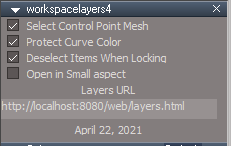
Got the color picker working the way I wanted. It was tricky because of the clashing styles of the layers page and the color picker. Removed the buttons and added the "before and after" color swatches and the text input. The text input will update the final color, but doesn't update the preview color in the html view inside trueSpace. It only seems to update with external web browsers like chrome.

Also made the small aspect taller
Fixed the problem of hiding lights and cameras that are part of the layer and selected by deselecting them. The real problem is with the active camera or light, all the other selected cameras and lights behaved and hide properly.
added a "deselect on locking" option which will deselect the selected layer items during the lock process

The last thing will be to try making the webserver window smaller and stop it from starting if another instance of trueSpace is already running the web server.
Clinton Reese

http://clintons3d.com
User avatar
trueBlue
Captain
Posts: 5548
Joined: 06 Jul 2009, 22:50
Type the number ten into the box: 10

Re: Workspace Layers v4

Post by trueBlue »

I am testing your newest Workspace Layers 4 in the tS761Standalone UU7
I loaded the Night Church scene and then Layers
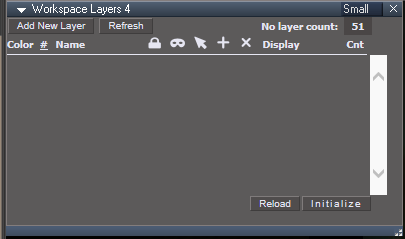
No Layer Count shows 51 objects
1) There is no layers initially
No layers.png
No layers.png (9.33 KiB) Viewed 6381 times
Add New Layer
Select the Lights in the scene
Add selected to the layer
2) They are not being added to this layer
I am able to add other objects
3) Layer 0 and Layer1 does not have a Remove button

4) I think there needs to be an option to clear all of the Layers in CustomCommands/wsLayersGroup4/workspacelayers4
Because, if you delete the workspacelayers4.RsObj in the scene and reload Layers it still has the preexisting data

BTW... I am using Edge and it just updated yesterday
User avatar
clintonman
Captain
Posts: 5659
Joined: 21 May 2009, 21:08
Type the number ten into the box: 0
Location: California

Re: Workspace Layers v4

Post by clintonman »

trueBlue wrote: 23 Apr 2021, 17:10 I am testing your newest Workspace Layers 4 in the tS761Standalone UU7
I loaded the Night Church scene and then Layers
No Layer Count shows 51 objects
1) There is no layers initially
No layers.png
Add New Layer
Select the Lights in the scene
Add selected to the layer
2) They are not being added to this layer
I am able to add other objects
3) Layer 0 and Layer1 does not have a Remove button

4) I think there needs to be an option to clear all of the Layers in CustomCommands/wsLayersGroup4/workspacelayers4
Because, if you delete the workspacelayers4.RsObj in the scene and reload Layers it still has the preexisting data

BTW... I am using Edge and it just updated yesterday
2) Looks like old lights don't have an object render attribute node which stores the layer number. In plain trueSpace you can add it with the "Show Object Attribs" button. Pressing this button in the unofficial updates doesn't work for those old lights. That's the reason I have "Show Object Attribs" original button and "Show Object Attribs with cleanup" UU version in my UU4Clinton scripts. It was just in case something came up where the replacement button didn't work.

3) Modelspace objects defaults to layer 0, layer 0 cannot be removed in modelspace. In workspace lights and other stuff defaults to layer 1. So if layer 1 is deleted as soon as you add something to the scene layer 1 would just get created again.

4) I don't see that happening at all. No preexisting data should be in the CustomCommands/wsLayersGroup4/workspacelayers4
If you look at CustomCommands/wsLayersGroup4/workspacelayers4/Data the "LayersData" it should always be empty. If you look at the same thing in the scene the "LayersData" will not be empty. Also that value is setup with a default value of "" so if yours does have a value something has gone wrong.
Clinton Reese

http://clintons3d.com
User avatar
clintonman
Captain
Posts: 5659
Joined: 21 May 2009, 21:08
Type the number ten into the box: 0
Location: California

Re: Workspace Layers v4

Post by clintonman »

trueBlue wrote: 23 Apr 2021, 17:10 ...

BTW... I am using Edge and it just updated yesterday
I don't think that matters since the html control uses the internet explorer base.
Clinton Reese

http://clintons3d.com
User avatar
trueBlue
Captain
Posts: 5548
Joined: 06 Jul 2009, 22:50
Type the number ten into the box: 10

Re: Workspace Layers v4

Post by trueBlue »

Previous versions of Workspace Layers always showed Layer0 & Layer1
This is not happening in Workspace Layers 4
Is this indented in this newest version?
4) I think there needs to be an option to clear all of the Layers in CustomCommands/wsLayersGroup4/workspacelayers4
Because, if you delete the workspacelayers4.RsObj in the scene and reload Layers it still has the preexisting data
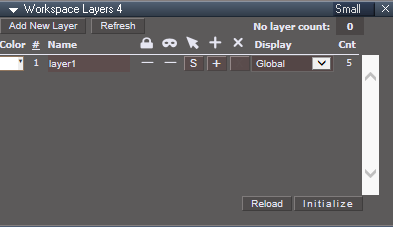
With a new scene, load Workspace Layers 4
Close Workspace Layers 4 and delete everything in the scene
Load Workspace Layers 4
No objects in the scene.png
No objects in the scene.png (9.1 KiB) Viewed 6113 times
User avatar
clintonman
Captain
Posts: 5659
Joined: 21 May 2009, 21:08
Type the number ten into the box: 0
Location: California

Re: Workspace Layers v4

Post by clintonman »

trueBlue wrote: 23 Apr 2021, 20:06 Previous versions of Workspace Layers always showed Layer0 & Layer1
This is not happening in Workspace Layers 4
Is this indented in this newest version?
4) I think there needs to be an option to clear all of the Layers in CustomCommands/wsLayersGroup4/workspacelayers4
Because, if you delete the workspacelayers4.RsObj in the scene and reload Layers it still has the preexisting data
With a new scene, load Workspace Layers 4
Close Workspace Layers 4 and delete everything in the scene
Load Workspace Layers 4
No objects in the scene.png
"indented"? I'm guessing "intended". Previous versions had layers 0 to 31 always showing.

http://clintons3d.com/plugins/truespace ... yers4.html
"Refresh button is for updating the display after deleting, creating or loading new items into the scene."

The layers does not keep track of scene changes so you have to refresh it.
Clinton Reese

http://clintons3d.com
User avatar
trueBlue
Captain
Posts: 5548
Joined: 06 Jul 2009, 22:50
Type the number ten into the box: 10

Re: Workspace Layers v4

Post by trueBlue »

Should have said "Workspace Layers 4"
"Previous versions of Workspace Layers 4 always showed Layer0 & Layer1"
User avatar
clintonman
Captain
Posts: 5659
Joined: 21 May 2009, 21:08
Type the number ten into the box: 0
Location: California

Re: Workspace Layers v4

Post by clintonman »

Does the Object hider node inside the cameras and spotlights do anything useful?

When I remove them I can barely just see the spotlight mesh behind the spotlight widget and I can't see the camera mesh behind the camera widget at all.
Clinton Reese

http://clintons3d.com
User avatar
trueBlue
Captain
Posts: 5548
Joined: 06 Jul 2009, 22:50
Type the number ten into the box: 10

Re: Workspace Layers v4

Post by trueBlue »

clintonman wrote: 25 Apr 2021, 01:04 Does the Object hider node inside the cameras and spotlights do anything useful?

When I remove them I can barely just see the spotlight mesh behind the spotlight widget and I can't see the camera mesh behind the camera widget at all.
The only thing I notice is, if the Camera or Spot light is selected while rendering, it does not show in the image
If it is removed, it shows regardless if it is selected or not
User avatar
clintonman
Captain
Posts: 5659
Joined: 21 May 2009, 21:08
Type the number ten into the box: 0
Location: California

Re: Workspace Layers v4

Post by clintonman »

workspacelayers4_7.jpg

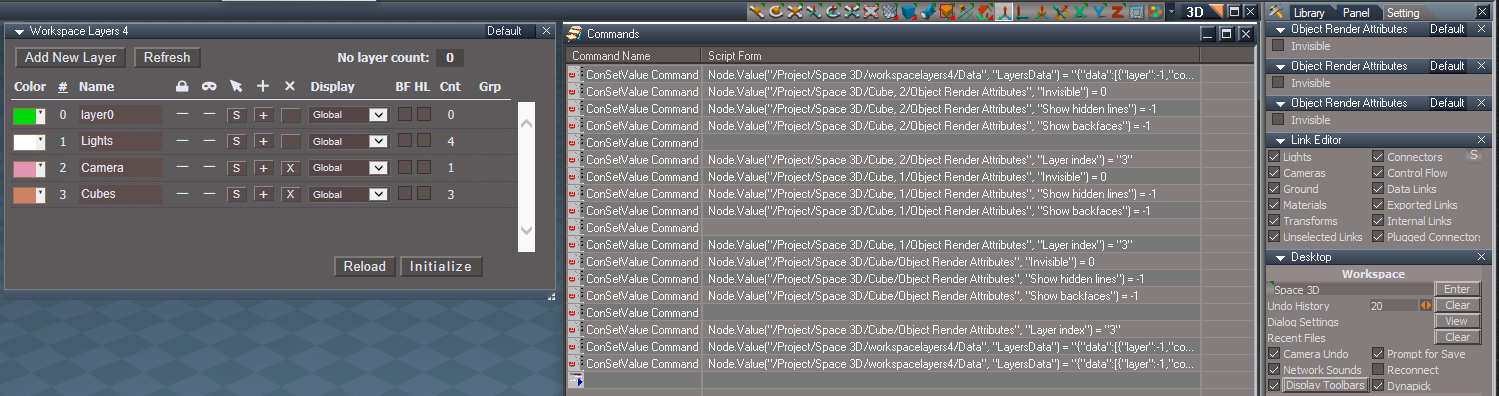
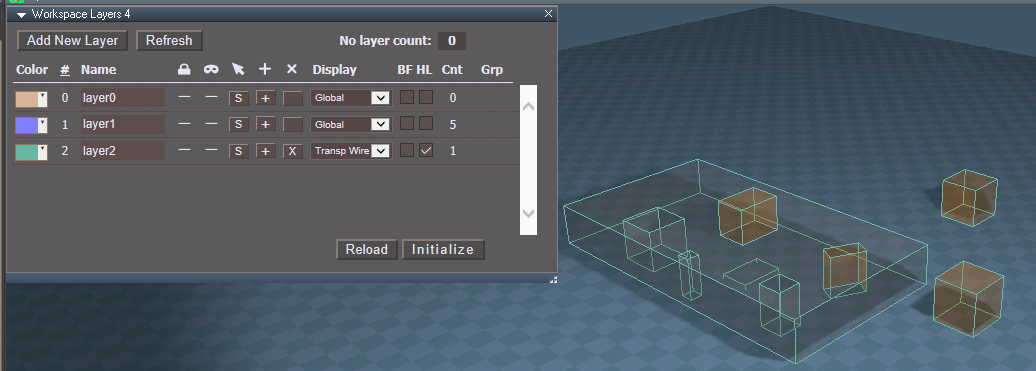
In the process of adding full group support, meaning It will work with deeply nested groups properly. The new Grp column gives some group counts.
Layer0 in the image has a Cnt of 14 and Grp of 3(12) which in English translates to 14 visible objects with 12 of the objects inside 3 groups. So if you select the layer you will have 5 objects selected, 3 group objects plus 2 loose items.

Layers 0 and 1 are now always visible in the layers list.
The camera and lights object hider is disconnected. This makes it easier to make changes to the code and easier to show and hide them. The plan is to add a button that will reconnect them if desired. If cameras or lights are placed in groups the object hider gets disconnected anyway when you change the appearance of the layer or hide it. So for cameras and lights in groups it may be necessary to treat them as if they are not inside a group so that the object hider can be reconnected. More testing is needed.

Also fixed some bugs:

works with old lights from the Night Church scene
Refresh button bug - was increasing the no layer count with each press
remove layer had a bug and I don't know why it wasn't giving errors
add to layer the backfaces and hidden lines settings weren't being transferred

TODO: slightly bigger Grp column, smaller BF and HL columns, update the locking code with full group support
Clinton Reese

http://clintons3d.com
User avatar
trueBlue
Captain
Posts: 5548
Joined: 06 Jul 2009, 22:50
Type the number ten into the box: 10

Re: Workspace Layers v4

Post by trueBlue »

Group support sounds great! :worship:

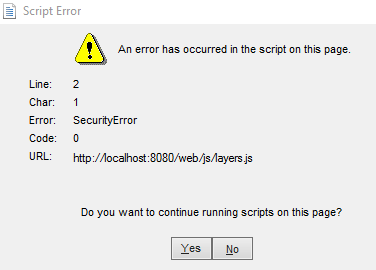
I am getting an Error when switching aspects Default/Small after selecting the Reload button
WL4 LayerJS Error after Reload switching aspects.png
WL4 LayerJS Error after Reload switching aspects.png (8.75 KiB) Viewed 6113 times
Edit: Forgot to mention that selecting Yes or No stops Workspace Layers 4 from working

I also created another option to load Workspace Layers4 in the Small aspect
Small_UI.png
Small_UI.png (6.92 KiB) Viewed 6112 times
loadIt script
Add

Code: Select all

var Small = Node.Value(owner + "/workspacelayers4", "Small_UI")
if(Small) {
WindowsManager.SetPanelWindowAspect('/Project/Windows Manager Space/LayersPanelFrame', 4)
WindowsManager.Activate()
WindowsManager.UpdateWindowsStructure()
}
User avatar
clintonman
Captain
Posts: 5659
Joined: 21 May 2009, 21:08
Type the number ten into the box: 0
Location: California

Re: Workspace Layers v4

Post by clintonman »

I think I got the last of the 2D and 3D group bugs worked out. The locking seems to be working so no changes needed there.
Added the small UI option, thanks for that :bananathumb: , looks like the trick is to change the window to small and not try to create the window as small.

TODO:
slightly bigger Grp column, smaller BF and HL columns,
add button to reestablish the object hider node for cameras/lights and
update the NURBS support which is likely broken after all the group related changes
Clinton Reese

http://clintons3d.com
User avatar
trueBlue
Captain
Posts: 5548
Joined: 06 Jul 2009, 22:50
Type the number ten into the box: 10

Re: Workspace Layers v4

Post by trueBlue »

Really amazing project Clinton! :bananathumb:
Currently testing...
One thing I notice with the ReconnectObjectHiders script
You will get multiple connections
Add
Node.Disconnect(currentNode + "/Object hider", "Invisible", currentNode + "/Object Render Attributes", "Invisible")

I see you are capturing the websocket error and it seems to work
Alert says to Close and Open the Webserver
I also have to select the Reload button
Wondering if you could could preform all three functions in the script, instead of the Alert?

The Small aspect's Color control is different in this version
Before
workspaceLayers4_small.jpg
workspaceLayers4_small.jpg (38.82 KiB) Viewed 6035 times
After
Small aspect Color control.png
Small aspect Color control.png (4.38 KiB) Viewed 6035 times
User avatar
clintonman
Captain
Posts: 5659
Joined: 21 May 2009, 21:08
Type the number ten into the box: 0
Location: California

Re: Workspace Layers v4

Post by clintonman »

trueBlue wrote: 04 May 2021, 17:02 Really amazing project Clinton! :bananathumb:
Currently testing...
One thing I notice with the ReconnectObjectHiders script
You will get multiple connections
Add
Node.Disconnect(currentNode + "/Object hider", "Invisible", currentNode + "/Object Render Attributes", "Invisible")

I see you are capturing the websocket error and it seems to work
Alert says to Close and Open the Webserver
I also have to select the Reload button
Wondering if you could could preform all three functions in the script, instead of the Alert?

The Small aspect's Color control is different in this version
Before
workspaceLayers4_small.jpg
After
Small aspect Color control.png
Thanks, I'll take care of the object hider connections issue.
Nope, can't do anything outside the alert. It lives in a completely different world than the rest of trueSpace.
That color control is a challenge, I'll see what I can do, should be able to bash it into shape.
Clinton Reese

http://clintons3d.com
User avatar
trueBlue
Captain
Posts: 5548
Joined: 06 Jul 2009, 22:50
Type the number ten into the box: 10

Re: Workspace Layers v4

Post by trueBlue »

Every time I use "Add selected to layer"
ORA panels show in the Stack/Settings
Invisible is set to 0
Show hidden lines is set to -1
Show backfaces is set to -1

In this case, three Cubes were selected
Add selected to Layer.png
When I use "Remove the Layer"
The object's Object Render Attributes node(s) are deleted

Also, Lights and Cameras, in addition to the above, the ORA Default aspect is being exported out
User avatar
clintonman
Captain
Posts: 5659
Joined: 21 May 2009, 21:08
Type the number ten into the box: 0
Location: California

Re: Workspace Layers v4

Post by clintonman »

trueBlue wrote: 06 May 2021, 12:24 Every time I use "Add selected to layer"
ORA panels show in the Stack/Settings
Invisible is set to 0
Show hidden lines is set to -1
Show backfaces is set to -1

In this case, three Cubes were selected
Add selected to Layer.png

When I use "Remove the Layer"
The object's Object Render Attributes node(s) are deleted

Also, Lights and Cameras, in addition to the above, the ORA Default aspect is being exported out
ORA panels show in Stack - must be missing your special commands from the CloseORASettings node that cleans it up, thanks.

I see the problem with Show hidden lines and backfaces. I check for a valid connector and then forgot to set it based on the layer setting.
The invisible should be set according to the layer settings.

Remove Layer ORA are deleted was the same way in workspace layers3. I based it on the fact that bare tS meshes don't have ORA nodes. Bare tS cameras and lights are in layer1 so they get moved to layer1 when the layer they occupy is removed.

I don't see the exported ORA as a problem for lights and cameras, could be some disadvantage I don't know about, but I think the RsStackView.SetPanelExportInfo command might be used to "un-export" it. I'll let you know what I find, thanks again.
Clinton Reese

http://clintons3d.com
User avatar
trueBlue
Captain
Posts: 5548
Joined: 06 Jul 2009, 22:50
Type the number ten into the box: 10

Re: Workspace Layers v4

Post by trueBlue »

Remove Layer ORA are deleted was the same way in workspace layers3. I based it on the fact that bare tS meshes don't have ORA nodes. Bare tS cameras and lights are in layer1 so they get moved to layer1 when the layer they occupy is removed.
One disadvantage of deleting the ORA node would be when a user has set any of the options in the ORA node
Like Cast shadows and or Receive shadows

:idea: Maybe you could just set the Layer index to 0 :?:
I don't see the exported ORA as a problem for lights and cameras, could be some disadvantage I don't know about, but I think the RsStackView.SetPanelExportInfo command might be used to "un-export" it. I'll let you know what I find, thanks again.
:idea:
Add
&& (!Node.IsCamera(cursel) || !Node.IsLight(cursel)
User avatar
trueBlue
Captain
Posts: 5548
Joined: 06 Jul 2009, 22:50
Type the number ten into the box: 10

Re: Workspace Layers v4

Post by trueBlue »

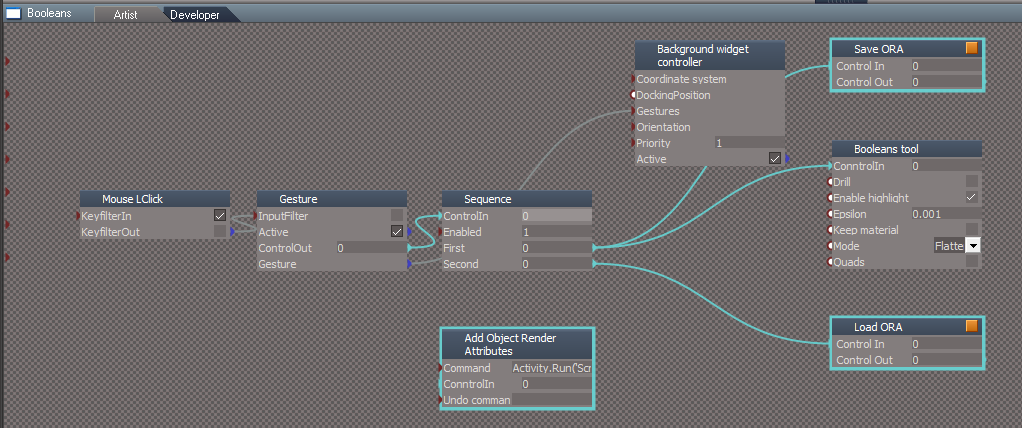
After reading your new UU Doc, I noticed where you mention that Booleans remove the ORA
I have a working Booleans widget that Saves the ORA to the RsData folder, runs the Boolean tool, then Loads the saved ORA back into the First Selected Object
Booleans mod.png
Save ORA

Code: Select all

if(Node.Exists(Node.FirstSelected() + '/Object Render Attributes')) {
var fSel = Node.FirstSelected()
Node.ConRemove(fSel, 'RenderAttributes')
RsFileIO.SaveObject(System.GetMainDir() + '\\RS Data\\Object Render Attributes.RsObj', fSel + '/Object Render Attributes')
Node.Delete(fSel + '/Object Render Attributes')
Load ORA

Code: Select all

var fSel = Node.FirstSelected()
RsFileIO.LoadObject(System.GetMainDir() + '\\RS Data\\Object Render Attributes.RsObj', fSel + '/')
Node.ExportConnector(fSel + "/Object Render Attributes", "RenderAttributes", "", 1, 1)
This is working great in Workspace Layers 4, but is limited to the First Selected Object
WL4.png
.
.
This is not going to work with Groups!

Do you think you could make it work for Groups and or whatever else is needed?

Edit: It looks like Booleans remove Group's ORA too, so this might Work!
Thoughts?
User avatar
clintonman
Captain
Posts: 5659
Joined: 21 May 2009, 21:08
Type the number ten into the box: 0
Location: California

Re: Workspace Layers v4

Post by clintonman »

Haven't had a chance to test it. Only thought is don't forget to test the other boolean option, "not flatten" or whatever it's called and test on Subdivision objects.
Clinton Reese

http://clintons3d.com

Return to “Workspace Side”