Synching modeler and workspace cameras

Legacy tS 6.6
Benji
Senior Chief Petty Officer
Posts: 280
Joined: 22 May 2009, 01:23

Synching modeler and workspace cameras

Post by Benji »

I'm trying to set up a camera so that it appears the same in modeler as it does in workspace (i.e what I render in modeler is exactly the same in workspace). All I've managed to achieve so far is frustration, and the surprising realization that the z and y axis have been reversed for rotation (31 degrees in z in workspace is -31 in modeler). It's the same for the location in x.

Why this was changed I don't really care, I guess it was another of the weird things that occurred between 6 and 7. However, it would be great if I could figure out why the same camera in modeler is angled differently in workspace.

Any help would be appreciated. :?
User avatar
trueBlue
Captain
Posts: 5548
Joined: 06 Jul 2009, 22:50
Type the number ten into the box: 10

Re: Synching modeler and workspace cameras

Post by trueBlue »

Here is my attempt at it. This is a Project file for tS761 that has been Unofficially patched in the Default layout which has Vray installed. So if the above does not match YOUR setup then use at your OWN risk.
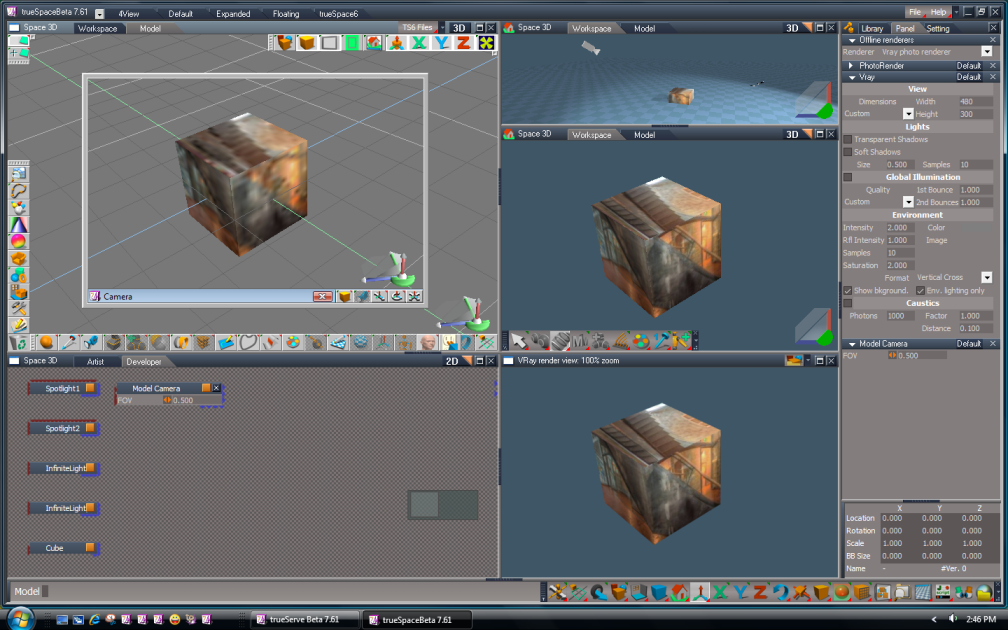
I think the key here is to have both Model and Workspace open with the Bridge set to Auto. Also I had a new window opened in both Spaces viewing from the Model Camera in with which I docked in Workspace both at the same size. Lastly do all of your navigation in the Model's New Model Window and everything should sync. Set both of your New Windows the same size and when you Render Vray set it also to View.
Project and larger image is included. HTH

Also I think the Model's new Window does not save in the Project so you will have to recreate that.
Attachments
ModelWorkspaceProject.zip
(653.08 KiB) Downloaded 277 times
Capture.png
Benji
Senior Chief Petty Officer
Posts: 280
Joined: 22 May 2009, 01:23

Re: Synching modeler and workspace cameras

Post by Benji »

Thanks a lot for this, you've been a big help. :)

I've done some tooling around and the setup as is works well. When you want to render larger scenes (I tried 640x480), I had to change the scale of the modelside camera to 1.15. Then it seemed to match up nicely in post.

I'm still testing this out, so I'm not sure if this setting is pixel perfect, but I'm getting close. :bananatyping: