RENDER TO FILE
-
DarkScythe
- Senior Chief Petty Officer
- Posts: 243
- Joined: 23 Sep 2009, 08:57
RENDER TO FILE
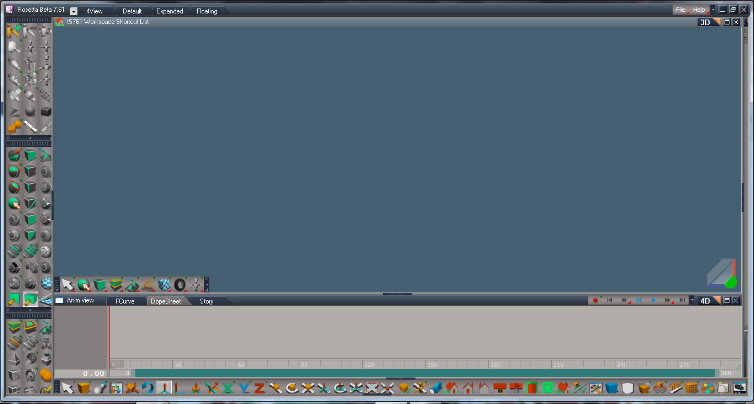
I don't where to find it and check the shortcut at the tsupdate library which is ctrl+r but it is not working anyone knows where it is.....
-
pugman 1
- Captain
- Posts: 1555
- Joined: 21 May 2009, 19:26
- Type the number ten into the box: 0
- Location: Germany
Re: RENDER TO FILE
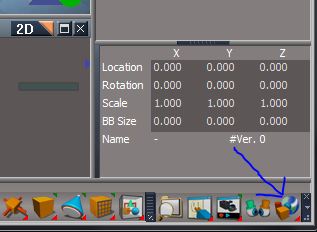
Hi ,open this and you will find it
click and hold
click and hold
- Attachments
-
- Unbenannt.JPG (21.07 KiB) Viewed 3622 times
-
MikomDude

- Captain
- Posts: 1930
- Joined: 04 Oct 2010, 11:12
- Type the number ten into the box: 0
- Location: The Hague, Netherlands
Re: RENDER TO FILE
I'm curious though, how does the Workspace renderer work? It's realtime rendered I know but when you make a render, you get exactly the same result as you see on your screen. For example, if I have lights in my scene, I don't want the light sources to be seen in the render but they are. So how do you change that? nowadays, I only use the model-side for renders, you have much more options there.
-
DarkScythe
- Senior Chief Petty Officer
- Posts: 243
- Joined: 23 Sep 2009, 08:57
Re: RENDER TO FILE
thats the original layout, what I meant is the one with the updates look at my image post (Layout of truespace updated) I cannot find it in there.....pugman 1 wrote: Hi ,open this and you will find it
click and hold
actually I able to render it but the pop up option doesn't appear. Ii want to change the settings
-
trueBlue

- Captain
- Posts: 5548
- Joined: 06 Jul 2009, 22:50
- Type the number ten into the box: 10
Re: RENDER TO FILE
What is your Display's resolution size?DarkScythe wrote: I don't where to find it and check the shortcut at the tsupdate library which is ctrl+r but it is not working anyone knows where it is.....
Looking at your screen capture, I am not seeing the right side of the bottom toolbar. There should be two more icons,one of which is the Render to File icon, and the right side of the toolbar's frame.
I looked at the command for the Ctrl + R shortcut and it is different from the command in the Render to File icon(button)
D3DView.RenderToFile('%WIN_ID%', 'auto') is the command used in the Ctrl + R shortcut.
D3DView.RenderToFile('', '') is the command used in the Render to File icon.
When I did the update, I did not change either of these commands. I can confirm that the shortcut bypasses the dialog and renders with the present settings.
Here is a modified WindowShortcuts.xml file. I changed the command to match the icon. Replace this file with the one located in C:\trueSpace761\tS\Scripts
Honestly I am not sure if this was the indended way to use the shortcut, so use this modified version at your own risk.
Last edited by trueBlue on 03 Jan 2011, 17:29, edited 1 time in total.
Reason: Removed file
Reason: Removed file
-
DarkScythe
- Senior Chief Petty Officer
- Posts: 243
- Joined: 23 Sep 2009, 08:57
Re: RENDER TO FILE
found it no need for the file I just resize the screen thanks 