Two Widgets better than One

free scripts, plugins, models, textures
User avatar
clintonman
Captain
Posts: 5659
Joined: 21 May 2009, 21:08
Type the number ten into the box: 0
Location: California

Two Widgets better than One

Post by clintonman »

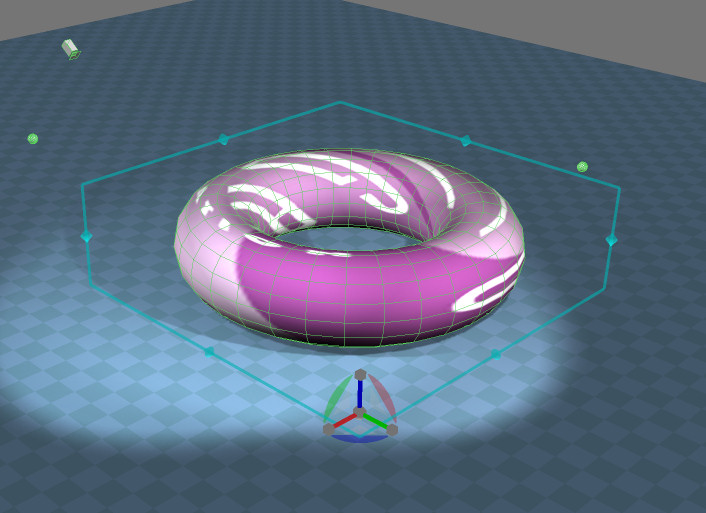
cageWidgetPlus.jpg
Script that modifies the cage widget to also include a (mostly)regular object navigation widget. Get the best of both worlds here near the bottom of the page:
http://www.clintons3d.com/plugins/trues ... index.html"

This Enhanced Cage widget requires that the truespace unofficial patch is installed.


Edit: Rewrote the script so widgets disappear with the tab shortcut and added 3 new widgets instead of modifying the cage widget.

Restart truespace after installation.
Last edited by clintonman on 02 Jan 2012, 18:46, edited 1 time in total.
Clinton Reese

http://clintons3d.com
User avatar
spacekdet
Captain
Posts: 1810
Joined: 27 May 2009, 15:00
Type the number ten into the box: 10
Location: On the day shift at the Utility Muffin Research Kitchen

Re: Two Widgets better than One

Post by spacekdet »

Viva La Cage!
User avatar
Draise
Captain
Posts: 3200
Joined: 21 Sep 2009, 19:33
Type the number ten into the box: 0
Location: Bogota, Colombia

Re: Two Widgets better than One

Post by Draise »

Woah Thanks!!! Very handy. Do you think the TAB disappear bug is possible to be fixed? I use it quite a lot. But good work!
User avatar
MikomDude
Captain
Posts: 1930
Joined: 04 Oct 2010, 11:12
Type the number ten into the box: 0
Location: The Hague, Netherlands

Re: Two Widgets better than One

Post by MikomDude »

I can't seem to get this to work. It doesn't have an installer button like most of your scripts so I figured it should just work, I Ctrl right-clicked on the widget but all it did was disappear.
I'm pretty sure I have the unofficial patch installed. Any idea what might have gone wrong?
User avatar
clintonman
Captain
Posts: 5659
Joined: 21 May 2009, 21:08
Type the number ten into the box: 0
Location: California

Re: Two Widgets better than One

Post by clintonman »

MikomDude wrote:I can't seem to get this to work. It doesn't have an installer button like most of your scripts so I figured it should just work, I Ctrl right-clicked on the widget but all it did was disappear.
I'm pretty sure I have the unofficial patch installed. Any idea what might have gone wrong?
I've only seen that a couple of times and both times the widget reappeared after selecting another object. Even without this modification ctrl-rt click should have switched to the cage widget. Is the widget completely gone and not coming back?
Clinton Reese

http://clintons3d.com
User avatar
clintonman
Captain
Posts: 5659
Joined: 21 May 2009, 21:08
Type the number ten into the box: 0
Location: California

Re: Two Widgets better than One

Post by clintonman »

I changed the script. Instead of modifying the cage widget it adds 3 new object nav widgets that have a cage included. This one installs all the widgets involved so it should be more robust since the states of all the widgets are set to predictable values. Shift + left click to switch widgets.

I also found that it is required to restart truespace after installing the widgets.
User avatar
MikomDude
Captain
Posts: 1930
Joined: 04 Oct 2010, 11:12
Type the number ten into the box: 0
Location: The Hague, Netherlands

Re: Two Widgets better than One

Post by MikomDude »

Well the Widget did come back the second time I tried it. The cage never worked though.

However, now I tried your updated version and it does work! Great job! Now I have 2 of my favorite tools in the workspace, modeling just became even easier. :worship:

Return to “Repositorium”