Quick popup toolbars for point edit, view, point edit widgets and object navigation widget controls. The system replaces the older slower Quad Toolbar.
The point edit toolbar will hide itself instead of closing which makes it's operation much faster.
The new toolbars are mostly a collection of buttons for functions that only exist as shortcuts in the Unofficial Updates and adds zoom buttons that effect all open windows.
Quad Toolbar and Quad Menu buttons are named Point Edit and Point Edit 2 toolbars in the new buttons.
The main reason for it's creation was because the old Quad toolbars were too slow and because there are too many shortcut exclusive functions in the Unofficial Updates for me to memorize and use effectively.
http://clintons3d.com/plugins/truespace ... opups.html
Popup Toolbars
-
clintonman

- Captain
- Posts: 5659
- Joined: 21 May 2009, 21:08
- Type the number ten into the box: 0
- Location: California
Popup Toolbars
-
clintonman
- Captain
- Posts: 5659
- Joined: 21 May 2009, 21:08
- Type the number ten into the box: 0
- Location: California
Re: Popup Toolbars
Update Aug 31
undo friendly code
buttons closer in content to UU popup buttons
replaces pe end edit node with original - no auto close of toolbar when exit pe mode
restrictions on when panels can open added
will start pe mode for pe widget menu
will exit pe mode for obj nav widget menu
removes quad toolbar buttons and scripts
fixed quad toolbar size definition - get rid of extra blank line
set toolbar frame owner to the active window so they will be covered by other windows and less likely to show when tS is minimized
Dev Notes:
Restrictions loosely based on UU restrictions but doesn't allow selections like script nodes.
Point Edit Toolbars 1 and 2
Point Edit Widget
Object Nav Widget
undo friendly code
buttons closer in content to UU popup buttons
replaces pe end edit node with original - no auto close of toolbar when exit pe mode
restrictions on when panels can open added
will start pe mode for pe widget menu
will exit pe mode for obj nav widget menu
removes quad toolbar buttons and scripts
fixed quad toolbar size definition - get rid of extra blank line
set toolbar frame owner to the active window so they will be covered by other windows and less likely to show when tS is minimized
Dev Notes:
Restrictions loosely based on UU restrictions but doesn't allow selections like script nodes.
Point Edit Toolbars 1 and 2
Code: Select all
if(!Node.IsRenderable(Node.FirstSelected())) return;Code: Select all
	var firstSel = Node.FirstSelected();

	if(!Node.IsRenderable(firstSel) || Node.IsCamera(firstSel) || Node.IsLight(firstSel)) return;

	if(!Node.ConExists(firstSel, "Selection")) {
		MeshModifiers.ActivatePointEditWidget('','','Default');
}Code: Select all
	var firstSel = Node.FirstSelected();

	if(!Node.IsRenderable(firstSel) || Node.IsCamera(firstSel) || Node.IsLight(firstSel)) return;

Widgets.ActivateDefaultWidget()-
clintonman
- Captain
- Posts: 5659
- Joined: 21 May 2009, 21:08
- Type the number ten into the box: 0
- Location: California
Re: Popup Toolbars
Update Sept 7 2021
additions to make it closer to the UU version and to add support for the upcoming point edit and object nav widget update which is a stripped down version of the UU widgets.
additions to make it closer to the UU version and to add support for the upcoming point edit and object nav widget update which is a stripped down version of the UU widgets.
-
clintonman
- Captain
- Posts: 5659
- Joined: 21 May 2009, 21:08
- Type the number ten into the box: 0
- Location: California
Re: Popup Toolbars
Update October 14, 2021
bug fix for incompatibility with the quadrify by normals tools
The quad by normals script alters the definition of what an array is. What I didn't know is that it does it globally for the current tS session and the change in quadrify was breaking the popup toolbars. Only way to get rid of the error was to restart truespace.
To see the error before installing the fix you can run quadrify on an object, start point edit mode and try to use the point edit popup toolbar.
script change is 1 line at line 21 of the OpenToolbars script
bug fix for incompatibility with the quadrify by normals tools
The quad by normals script alters the definition of what an array is. What I didn't know is that it does it globally for the current tS session and the change in quadrify was breaking the popup toolbars. Only way to get rid of the error was to restart truespace.
To see the error before installing the fix you can run quadrify on an object, start point edit mode and try to use the point edit popup toolbar.
script change is 1 line at line 21 of the OpenToolbars script
Code: Select all
		//if(i == "indexOf") continue;
if(!tbs[i].toolbar) continue;-
clintonman
- Captain
- Posts: 5659
- Joined: 21 May 2009, 21:08
- Type the number ten into the box: 0
- Location: California
Re: Popup Toolbars
Oct 17 Update
reduced restrictions on popups
object nav popup now works with group objects
reduced restrictions on popups
object nav popup now works with group objects
-
trueBlue

- Captain
- Posts: 5548
- Joined: 06 Jul 2009, 22:50
- Type the number ten into the box: 10
Re: Popup Toolbars
I am finding several toolbar commands that are not compatible with your NURBS!clintonman wrote: 17 Oct 2021, 18:15 Oct 17 Update
reduced restrictions on popups
object nav popup now works with group objects

Including the WorkspaceNav Toolbar
-
clintonman
- Captain
- Posts: 5659
- Joined: 21 May 2009, 21:08
- Type the number ten into the box: 0
- Location: California
Re: Popup Toolbars
June 28 2023
Added Light toolbar
add camera options - just panel to add/remove a nav widget to the camera
forgot to mentions...
March 2023 - added material node toolbars
February - added unofficial update widget functions
Added Light toolbar
add camera options - just panel to add/remove a nav widget to the camera
forgot to mentions...
March 2023 - added material node toolbars
February - added unofficial update widget functions
Last edited by clintonman on 28 Jun 2023, 21:34, edited 1 time in total.
-
clintonman
- Captain
- Posts: 5659
- Joined: 21 May 2009, 21:08
- Type the number ten into the box: 0
- Location: California
Re: Popup Toolbars
Found that the latest Unofficial Updates will stop all installations from being permanent.
The plan is to create a script to unlock UU9 and allow installations again.
The plan is to create a script to unlock UU9 and allow installations again.
-
clintonman
- Captain
- Posts: 5659
- Joined: 21 May 2009, 21:08
- Type the number ten into the box: 0
- Location: California
Re: Popup Toolbars
Installation on the Unofficial Updates v9 now requires running a UU9 Unlock script first.
Once the script is run all the installers on the website will work again.
Script is attached below for reference. It works by stopping the toolbars from being overwritten every time truespace is started.
Once the script is run all the installers on the website will work again.
Script is attached below for reference. It works by stopping the toolbars from being overwritten every time truespace is started.
- Attachments
-
- Unlock UU9.RsObj
- (4.77 KiB) Downloaded 141 times
-
trueBlue
- Captain
- Posts: 5548
- Joined: 06 Jul 2009, 22:50
- Type the number ten into the box: 10
Re: Popup Toolbars
This is totally inaccurate!clintonman wrote: 28 Jun 2023, 21:39 Installation on the Unofficial Updates v9 now requires running a UU9 Unlock script first.
Once the script is run all the installers on the website will work again.
Script is attached below for reference. It works by stopping the toolbars from being overwritten every time truespace is started.
The Restore Widgets and Toolbars script looks for a few fundamental objects in Widgets and Toolbars that are needed in the Unofficial Update version 9
Maybe you should not be DELETING these few objects because the Unofficial Update version 9 needs these objects to run correctly!
Toolbars:
WorkspaceNavBAK
PEModelingToolbar
LENavigatorBar/Encapsulate
Widgets/WidgetScripts:
PE Navigation Widget
CamLightExtras
Navigation Widget
Light Navigation Widget
Preferences
AnimPref
These are your installers that I have identified and have asked you SEVERAL times in get inSync:
http://clintons3d.com/plugins/truespace ... index.html "[Widget Scripts] not compatible with UU9"
http://clintons3d.com/plugins/truespace ... inton.html "[UU4Clinton for trueSpace7.61] not compatible with UU9"
http://clintons3d.com/plugins/truespace ... aller.html "[Batch installer for trueSpace7.61] not compatible with UU9"
http://clintons3d.com/plugins/truespace ... tokey.html "[Animation Preference panel] is not compatible with UU9"
On top of all of the above, your installers that overwrite the Toolbars do not include the ToolbarsBACKUP that is required for your Toolbar Manager
This means, once a user uses your Toolbar Manager to Restore, all of your installer's modifications are gone
-
clintonman
- Captain
- Posts: 5659
- Joined: 21 May 2009, 21:08
- Type the number ten into the box: 0
- Location: California
Re: Popup Toolbars
I'm deleting one object, the Restore Widgets and Toolbars script. If all those things you list are getting deleted so often they need to be refreshed on every run there may be bigger problems going on.trueBlue wrote: 28 Jun 2023, 22:02This is totally inaccurate!clintonman wrote: 28 Jun 2023, 21:39 Installation on the Unofficial Updates v9 now requires running a UU9 Unlock script first.
Once the script is run all the installers on the website will work again.
Script is attached below for reference. It works by stopping the toolbars from being overwritten every time truespace is started.
The Restore Widgets and Toolbars script looks for a few fundamental objects in Widgets and Toolbars that are needed in the Unofficial Update version 9
Maybe you should not be DELETING these few objects because the Unofficial Update version 9 needs these objects to run correctly!
Toolbars:
WorkspaceNavBAK
PEModelingToolbar
LENavigatorBar/Encapsulate
Widgets/WidgetScripts:
PE Navigation Widget
CamLightExtras
Navigation Widget
Light Navigation Widget
Preferences
AnimPref
These are your installers that I have identified and have asked you SEVERAL times in get inSync:
http://clintons3d.com/plugins/truespace ... index.html "[Widget Scripts] not compatible with UU9"
http://clintons3d.com/plugins/truespace ... inton.html "[UU4Clinton for trueSpace7.61] not compatible with UU9"
http://clintons3d.com/plugins/truespace ... aller.html "[Batch installer for trueSpace7.61] not compatible with UU9"
http://clintons3d.com/plugins/truespace ... tokey.html "[Animation Preference panel] is not compatible with UU9"
On top of all of the above, your installers that overwrite the Toolbars do not include the ToolbarsBACKUP that is required for your Toolbar Manager
I don't plan to go back and recreate/update every installer. Going forward maybe I'll overwrite the ToolbarsBACKUP as well. If you can tell me why the Restore Widgets and Toolbars exists, I can write a warning for the UU9 Unlock script stating the disadvantage of removing it.
-
trueBlue
- Captain
- Posts: 5548
- Joined: 06 Jul 2009, 22:50
- Type the number ten into the box: 10
Re: Popup Toolbars
If any of your installers Delete any of the items listed above, the UU9 is compromised and will not work as expectedclintonman wrote: 29 Jun 2023, 01:54I'm deleting one object, the Restore Widgets and Toolbars script. If all those things you list are getting deleted so often they need to be refreshed on every run there may be bigger problems going on.trueBlue wrote: 28 Jun 2023, 22:02This is totally inaccurate!clintonman wrote: 28 Jun 2023, 21:39 Installation on the Unofficial Updates v9 now requires running a UU9 Unlock script first.
Once the script is run all the installers on the website will work again.
Script is attached below for reference. It works by stopping the toolbars from being overwritten every time truespace is started.
The Restore Widgets and Toolbars script looks for a few fundamental objects in Widgets and Toolbars that are needed in the Unofficial Update version 9
Maybe you should not be DELETING these few objects because the Unofficial Update version 9 needs these objects to run correctly!
Toolbars:
WorkspaceNavBAK
PEModelingToolbar
LENavigatorBar/Encapsulate
Widgets/WidgetScripts:
PE Navigation Widget
CamLightExtras
Navigation Widget
Light Navigation Widget
Preferences
AnimPref
These are your installers that I have identified and have asked you SEVERAL times in get inSync:
http://clintons3d.com/plugins/truespace ... index.html "[Widget Scripts] not compatible with UU9"
http://clintons3d.com/plugins/truespace ... inton.html "[UU4Clinton for trueSpace7.61] not compatible with UU9"
http://clintons3d.com/plugins/truespace ... aller.html "[Batch installer for trueSpace7.61] not compatible with UU9"
http://clintons3d.com/plugins/truespace ... tokey.html "[Animation Preference panel] is not compatible with UU9"
On top of all of the above, your installers that overwrite the Toolbars do not include the ToolbarsBACKUP that is required for your Toolbar Manager
I don't plan to go back and recreate/update every installer. Going forward maybe I'll overwrite the ToolbarsBACKUP as well. If you can tell me why the Restore Widgets and Toolbars exists, I can write a warning for the UU9 Unlock script stating the disadvantage of removing it.
It really is simple, do not Delete those files!
I ran a few of your installers and they worked as expected
-
clintonman
- Captain
- Posts: 5659
- Joined: 21 May 2009, 21:08
- Type the number ten into the box: 0
- Location: California
Re: Popup Toolbars
"I'm deleting one object, the Restore Widgets and Toolbars script."trueBlue wrote: 29 Jun 2023, 02:13If any of your installers Delete any of the items listed above, the UU9 is compromised and will not work as expectedclintonman wrote: 29 Jun 2023, 01:54I'm deleting one object, the Restore Widgets and Toolbars script. If all those things you list are getting deleted so often they need to be refreshed on every run there may be bigger problems going on.trueBlue wrote: 28 Jun 2023, 22:02
This is totally inaccurate!
The Restore Widgets and Toolbars script looks for a few fundamental objects in Widgets and Toolbars that are needed in the Unofficial Update version 9
Maybe you should not be DELETING these few objects because the Unofficial Update version 9 needs these objects to run correctly!
Toolbars:
WorkspaceNavBAK
PEModelingToolbar
LENavigatorBar/Encapsulate
Widgets/WidgetScripts:
PE Navigation Widget
CamLightExtras
Navigation Widget
Light Navigation Widget
Preferences
AnimPref
These are your installers that I have identified and have asked you SEVERAL times in get inSync:
http://clintons3d.com/plugins/truespace ... index.html "[Widget Scripts] not compatible with UU9"
http://clintons3d.com/plugins/truespace ... inton.html "[UU4Clinton for trueSpace7.61] not compatible with UU9"
http://clintons3d.com/plugins/truespace ... aller.html "[Batch installer for trueSpace7.61] not compatible with UU9"
http://clintons3d.com/plugins/truespace ... tokey.html "[Animation Preference panel] is not compatible with UU9"
On top of all of the above, your installers that overwrite the Toolbars do not include the ToolbarsBACKUP that is required for your Toolbar Manager
I don't plan to go back and recreate/update every installer. Going forward maybe I'll overwrite the ToolbarsBACKUP as well. If you can tell me why the Restore Widgets and Toolbars exists, I can write a warning for the UU9 Unlock script stating the disadvantage of removing it.
It really is simple, do not Delete those files!
I ran a few of your installers and they worked as expected
What makes you think it's deleting all those objects you listed?
It's only deleting the Restore Widgets and Toolbars script.
How does that translate to deleting all those objects?
You list 8 objects that should not be delete. The unlock script is not deleting any of them. How can deleting the one object delete the other 8?
-
trueBlue
- Captain
- Posts: 5548
- Joined: 06 Jul 2009, 22:50
- Type the number ten into the box: 10
Re: Popup Toolbars
I am not even talking about your Delete Restore Widgets and Toolbars and overwrite the UUCommandsclintonman wrote: 29 Jun 2023, 02:25"I'm deleting one object, the Restore Widgets and Toolbars script."trueBlue wrote: 29 Jun 2023, 02:13If any of your installers Delete any of the items listed above, the UU9 is compromised and will not work as expectedclintonman wrote: 29 Jun 2023, 01:54
I'm deleting one object, the Restore Widgets and Toolbars script. If all those things you list are getting deleted so often they need to be refreshed on every run there may be bigger problems going on.
I don't plan to go back and recreate/update every installer. Going forward maybe I'll overwrite the ToolbarsBACKUP as well. If you can tell me why the Restore Widgets and Toolbars exists, I can write a warning for the UU9 Unlock script stating the disadvantage of removing it.
It really is simple, do not Delete those files!
I ran a few of your installers and they worked as expected
What makes you think it's deleting all those objects you listed?
It's only deleting the Restore Widgets and Toolbars script.
How does that translate to deleting all those objects?
You list 8 objects that should not be delete. The unlock script is not deleting any of them. How can deleting the one object delete the other 8?
You just have to make sure any of your installers do not Delete any of the above items!
It is so simple!
Maybe you would better understand if, you read the Restore Widgets and Toolbars script
-
clintonman
- Captain
- Posts: 5659
- Joined: 21 May 2009, 21:08
- Type the number ten into the box: 0
- Location: California
Re: Popup Toolbars
I did look at the Restore Widgets and Toolbars script and it doesn't look necessary, so I delete it with my script.trueBlue wrote: 29 Jun 2023, 02:37I am not even talking about your Delete Restore Widgets and Toolbars and overwrite the UUCommandsclintonman wrote: 29 Jun 2023, 02:25"I'm deleting one object, the Restore Widgets and Toolbars script."trueBlue wrote: 29 Jun 2023, 02:13
If any of your installers Delete any of the items listed above, the UU9 is compromised and will not work as expected
It really is simple, do not Delete those files!
I ran a few of your installers and they worked as expected
What makes you think it's deleting all those objects you listed?
It's only deleting the Restore Widgets and Toolbars script.
How does that translate to deleting all those objects?
You list 8 objects that should not be delete. The unlock script is not deleting any of them. How can deleting the one object delete the other 8?
You just have to make sure any of your installers do not Delete any of the above items!
It is so simple!
Maybe you would better understand if, you read the Restore Widgets and Toolbars script
"It is so simple!", good. So you can easily tell me why the Restore Widgets and Toolbars exists so I can write a warning for the UU9 Unlock script stating the disadvantage of removing it. If you tell my about it maybe I'll see the what it's all about and do a complete 180.
-
trueBlue
- Captain
- Posts: 5548
- Joined: 06 Jul 2009, 22:50
- Type the number ten into the box: 10
Re: Popup Toolbars
I did several different ways
If any of your installers Delete any of the items listed above, the UU9 is compromised and will not work as expected
It really is simple, do not Delete those files!
Or, if any installers do, do not share them
If any of your installers Delete any of the items listed above, the UU9 is compromised and will not work as expected
It really is simple, do not Delete those files!
Or, if any installers do, do not share them
-
trueBlue
- Captain
- Posts: 5548
- Joined: 06 Jul 2009, 22:50
- Type the number ten into the box: 10
Re: Popup Toolbars
I just installed your new Popup Toolbars in trueSpace that has the Unofficial Update 9 applied
Your installer deleted my Point Edit Toolbars!
This image is from your website
.
Nowhere on your website mentions deleting these toolbars that are included in the Unofficial Update
Infact, your website indicates that the Point Edit Toolbars are supposedly included
Your installer deleted my Point Edit Toolbars!
This image is from your website

Nowhere on your website mentions deleting these toolbars that are included in the Unofficial Update
Infact, your website indicates that the Point Edit Toolbars are supposedly included

-
clintonman
- Captain
- Posts: 5659
- Joined: 21 May 2009, 21:08
- Type the number ten into the box: 0
- Location: California
Re: Popup Toolbars
Thanks for testing. Think I know what the problem is, won't know for sure until I check it out later. Download has been deactivated on the page.trueBlue wrote: 30 Jun 2023, 16:58 I just installed your new Popup Toolbars in trueSpace that has the Unofficial Update 9 applied
Your installer deleted my Point Edit Toolbars!
This image is from your website
Point Edit Toolbar.png
.
Nowhere on your website mentions deleting these toolbars that are included in the Unofficial Update
Infact, your website indicates that the Point Edit Toolbars are supposedly included
Popup toolbars.png
-
trueBlue
- Captain
- Posts: 5548
- Joined: 06 Jul 2009, 22:50
- Type the number ten into the box: 10
Re: Popup Toolbars
Also, your installer replaces my Point Edit Toolbar's End edit gesture with the same command that is included in the Unofficial Update 9
Widgets.ActivateDefaultWidget()
Looks like your installer did not save the Widgets so, really do not understand why the above is necessary
This is exactly why I added the Restore Widgets and Toolbars script to the Unofficial Update 9
It restored my Toolbars but now I have to Reinstall the Unofficial Update 9 to get my Shortcuts back
Widgets.ActivateDefaultWidget()
Looks like your installer did not save the Widgets so, really do not understand why the above is necessary
This is exactly why I added the Restore Widgets and Toolbars script to the Unofficial Update 9
It restored my Toolbars but now I have to Reinstall the Unofficial Update 9 to get my Shortcuts back
-
trueBlue
- Captain
- Posts: 5548
- Joined: 06 Jul 2009, 22:50
- Type the number ten into the box: 10
Re: Popup Toolbars
Final note, I spent a lot of time Fixing the commands in the Point Edit Toolbars and Point Edit Toolbars 2 so that they did not destroy your NURBS in the Unofficial Update 9
So, unless you are fixing any of these commands that may be wrong and unknown to me, you really should not be Deleting them!
According to your website notes:
June 28, 2023
add camera options to the view toolbar
add new light toolbar
Seems like you should be able to add the needed items to the existing toolbars verses Deleting and Replacing
These have been added to the UU9(S) on 6/29/2023
Also, your Light Toolbar commands are using a Widget Function Set that does not exist in the UU9(S)
Also, removing Shortcuts should be optional
So, unless you are fixing any of these commands that may be wrong and unknown to me, you really should not be Deleting them!
According to your website notes:
June 28, 2023
add camera options to the view toolbar
add new light toolbar
Seems like you should be able to add the needed items to the existing toolbars verses Deleting and Replacing
These have been added to the UU9(S) on 6/29/2023
Also, your Light Toolbar commands are using a Widget Function Set that does not exist in the UU9(S)
Also, removing Shortcuts should be optional
-
clintonman
- Captain
- Posts: 5659
- Joined: 21 May 2009, 21:08
- Type the number ten into the box: 0
- Location: California
Re: Popup Toolbars
Yep, problem is what I thought. The installer has 2 modes of operation, Unofficial Update and No Unofficial Update. It was not updated from UU8 to UU9, so the No Unofficial Update version would be installed.
-
clintonman
- Captain
- Posts: 5659
- Joined: 21 May 2009, 21:08
- Type the number ten into the box: 0
- Location: California
Re: Popup Toolbars
Popup link has been reactivated.
The current version will not install to the Unofficial Updates, if you try it will only reset your toolbars and waste your time.
Changes:
toolbars are specific to the non-UU truespace installation, so no dummy non-functioning buttons
point edit toolbar changed the grow, shrink and smooth selection buttons to no longer auto close the toolbar
added a Prerequisites batch installer to the site because the popup toolbars need 12 extra scripts installed to fully use it
The current version will not install to the Unofficial Updates, if you try it will only reset your toolbars and waste your time.
Changes:
toolbars are specific to the non-UU truespace installation, so no dummy non-functioning buttons
point edit toolbar changed the grow, shrink and smooth selection buttons to no longer auto close the toolbar
added a Prerequisites batch installer to the site because the popup toolbars need 12 extra scripts installed to fully use it
-
clintonman
- Captain
- Posts: 5659
- Joined: 21 May 2009, 21:08
- Type the number ten into the box: 0
- Location: California
Re: Popup Toolbars
Install for unofficial updates v9 is active again.
Tried to make it work with the Restore Widgets and Toolbars script, but no luck.
Tried to make it work with the Restore Widgets and Toolbars script, but no luck.
-
trueBlue
- Captain
- Posts: 5548
- Joined: 06 Jul 2009, 22:50
- Type the number ten into the box: 10
Re: Popup Toolbars
clintonman wrote: 02 Jul 2023, 02:06 Install for unofficial updates v9 is active again.
Tried to make it work with the Restore Widgets and Toolbars script, but no luck.
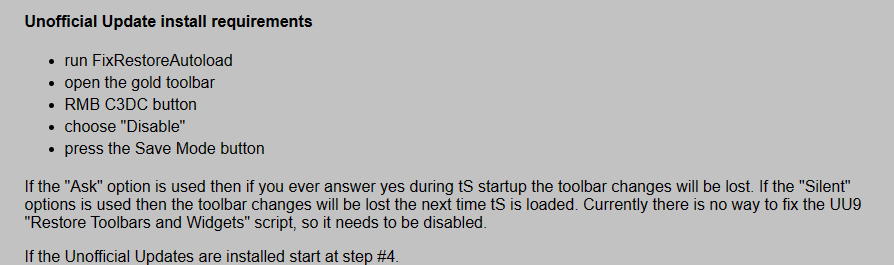
The Unofficial Update version 9 Restore Widgets and Toolbars script was PRESENT as well
After running your Popup installer, I closed and restarted trueSpace
The Unofficial Update version 9 Restore Widgets and Toolbars script DID NOT Restore the backup Toolbars or Widgets because you did not Delete the PEModelingToolbar in the Toolbar Prototypes Encapsulator
Testing all of the changes and all of the Popup toolbar(s) are WORKING including the Shortcuts
So I do not understand the above requirements/instructions
As I said previously, if a user uses your Toolbar Manager's Restore, all of the above SAVED changes will be Lost
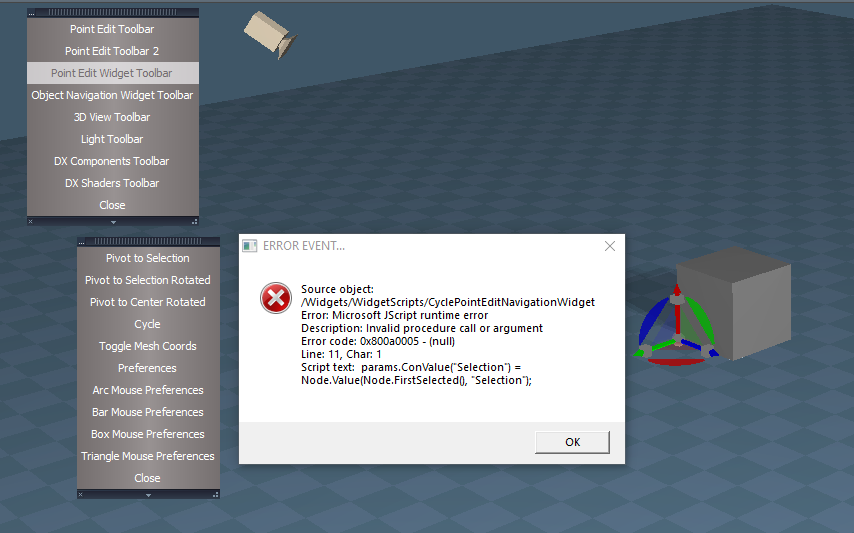
This new Popup toolbars version will throw and error when you run the Cycle button in the Point Edit Widget Toolbar
-
clintonman
- Captain
- Posts: 5659
- Joined: 21 May 2009, 21:08
- Type the number ten into the box: 0
- Location: California
Re: Popup Toolbars
Noted, thanks.trueBlue wrote: 02 Jul 2023, 15:51 ...
This new Popup toolbars version will throw and error when you run the Cycle button in the Point Edit Widget Toolbar
Cycle error.png
The problem with the Unofficial Update version 9 Restore Widgets and Toolbars script.
uu9 fresh install
install the popups without any extra uu9 steps
manually delete "Toolbar Prototypes Encapsulator/LENavigatorBar/Encapsulate"
restart truespace
the clintons toolbar button for popups is gone, the updated popup toolbars are all gone
this is true off all the installers on my website
if anyone deletes the wrong node all the installed toolbars or widgets will disappear.
-
trueBlue
- Captain
- Posts: 5548
- Joined: 06 Jul 2009, 22:50
- Type the number ten into the box: 10
Re: Popup Toolbars
In the UU9, the Toolbars, ToolbarsBACKUP.RsObj, and the toolbar backup are all the sameclintonman wrote: 02 Jul 2023, 20:34Noted, thanks.trueBlue wrote: 02 Jul 2023, 15:51 ...
This new Popup toolbars version will throw and error when you run the Cycle button in the Point Edit Widget Toolbar
Cycle error.png
The problem with the Unofficial Update version 9 Restore Widgets and Toolbars script.
uu9 fresh install
install the popups without any extra uu9 steps
manually delete "Toolbar Prototypes Encapsulator/LENavigatorBar/Encapsulate"
restart truespace
the clintons toolbar button for popups is gone, the updated popup toolbars are all gone
this is true off all the installers on my website
if anyone deletes the wrong node all the installed toolbars or widgets will disappear.
If YOU do not Delete these objects included in the Unofficial Update version 9 Restore Widgets and Toolbars script it will not restore the toolbars or widgets
Question is, why are you Deleting these objects in the Unofficial Update?
Not very respectable to say the least!
-
clintonman
- Captain
- Posts: 5659
- Joined: 21 May 2009, 21:08
- Type the number ten into the box: 0
- Location: California
Re: Popup Toolbars
What we have here is a failure to communicate.trueBlue wrote: 02 Jul 2023, 22:15In the UU9, the Toolbars, ToolbarsBACKUP.RsObj, and the toolbar backup are all the sameclintonman wrote: 02 Jul 2023, 20:34Noted, thanks.trueBlue wrote: 02 Jul 2023, 15:51 ...
This new Popup toolbars version will throw and error when you run the Cycle button in the Point Edit Widget Toolbar
Cycle error.png
The problem with the Unofficial Update version 9 Restore Widgets and Toolbars script.
uu9 fresh install
install the popups without any extra uu9 steps
manually delete "Toolbar Prototypes Encapsulator/LENavigatorBar/Encapsulate"
restart truespace
the clintons toolbar button for popups is gone, the updated popup toolbars are all gone
this is true off all the installers on my website
if anyone deletes the wrong node all the installed toolbars or widgets will disappear.
If YOU do not Delete these objects included in the Unofficial Update version 9 Restore Widgets and Toolbars script it will not restore the toolbars or widgets
Question is, why are you Deleting these objects in the Unofficial Update?
Not very respectable to say the least!
-
trueBlue
- Captain
- Posts: 5548
- Joined: 06 Jul 2009, 22:50
- Type the number ten into the box: 10
Re: Popup Toolbars
Exactly, I have tried well over two years to get you insync with your installers and the UUclintonman wrote: 02 Jul 2023, 22:26What we have here is a failure to communicate.trueBlue wrote: 02 Jul 2023, 22:15In the UU9, the Toolbars, ToolbarsBACKUP.RsObj, and the toolbar backup are all the sameclintonman wrote: 02 Jul 2023, 20:34
Noted, thanks.
The problem with the Unofficial Update version 9 Restore Widgets and Toolbars script.
uu9 fresh install
install the popups without any extra uu9 steps
manually delete "Toolbar Prototypes Encapsulator/LENavigatorBar/Encapsulate"
restart truespace
the clintons toolbar button for popups is gone, the updated popup toolbars are all gone
this is true off all the installers on my website
if anyone deletes the wrong node all the installed toolbars or widgets will disappear.
If YOU do not Delete these objects included in the Unofficial Update version 9 Restore Widgets and Toolbars script it will not restore the toolbars or widgets
Question is, why are you Deleting these objects in the Unofficial Update?
Not very respectable to say the least!
As soon as you released your new additions to your Popups, I incorporated them into the UU9
Now you are sabotaging these Popups in the UU9
For instance, your WidgetScript installer Deletes the ZoomToAll script and adds an Outdated ZoomToAll script, now it no longer restores the Selection
Your PENavObjNavWidgetAutoload script Deletes the widget(s) Help object and adds and Outdated Help object
Not cool!
- Attachments
-

-
clintonman
- Captain
- Posts: 5659
- Joined: 21 May 2009, 21:08
- Type the number ten into the box: 0
- Location: California
Re: Popup Toolbars
This does not come from the Popup Toolbars installer. To fix it in the UU edit the command node "/Widgets/WidgetScripts/CyclePointEditNavigationWidget"trueBlue wrote: 02 Jul 2023, 15:51 ...
This new Popup toolbars version will throw and error when you run the Cycle button in the Point Edit Widget Toolbar
Cycle error.png
move the params.ConValue("Selection") at line 11 below the if statement as shown
Code: Select all
// Execute
// Called to execute the command
function Execute(params)
{
	var util = System.CreateDO("Clintons3D Package/Utility functions");
	var owner = System.ThisOwner();
	var peNav = "/Widgets/Edit/Point edit widget";
	var widgetStore = owner + "/PointEditNavigationWidgets";
	var currentID = Node.Value(peNav + "/WidgetData", "ID");

	//params.ConValue("Selection") = Node.Value(Node.FirstSelected(), "Selection");

	if(!Node.ConExists(Node.FirstSelected(), "Selection")) {
		System.Alert('Point Edit Selection required')
		params.SetTerminationFlag()
		return
	}
params.ConValue("Selection") = Node.Value(Node.FirstSelected(), "Selection");-
trueBlue
- Captain
- Posts: 5548
- Joined: 06 Jul 2009, 22:50
- Type the number ten into the box: 10
Re: Popup Toolbars
In the UU9, the CyclePointEditNavigationWidget script has 106 linesclintonman wrote: 02 Jul 2023, 23:33This does not come from the Popup Toolbars installer. To fix it in the UU edit the command node "/Widgets/WidgetScripts/CyclePointEditNavigationWidget"trueBlue wrote: 02 Jul 2023, 15:51 ...
This new Popup toolbars version will throw and error when you run the Cycle button in the Point Edit Widget Toolbar
Cycle error.png
move the params.ConValue("Selection") at line 11 below the if statement as shown
Code: Select all
// Execute
// Called to execute the command
function Execute(params)
{
	var util = System.CreateDO("Clintons3D Package/Utility functions");
	var owner = System.ThisOwner();
	var peNav = "/Widgets/Edit/Point edit widget";
	var widgetStore = owner + "/PointEditNavigationWidgets";
	var currentID = Node.Value(peNav + "/WidgetData", "ID");

	//params.ConValue("Selection") = Node.Value(Node.FirstSelected(), "Selection");

	if(!Node.ConExists(Node.FirstSelected(), "Selection")) {
		System.Alert('Point Edit Selection required')
		params.SetTerminationFlag()
		return
	}
	params.ConValue("Selection") = Node.Value(Node.FirstSelected(), "Selection");
The Cycle button:
Activity.Run("/Widgets/Edit/Point edit widget/Widget Switch/CyclePEWidget");
The PEW:
Activity.Run("Widgets/WidgetScripts/CyclePointEditNavigationWidget");
Seems it would be easier to fix the Cycle button
-
trueBlue
- Captain
- Posts: 5548
- Joined: 06 Jul 2009, 22:50
- Type the number ten into the box: 10
Re: Popup Toolbars
Next update, the Restore Widgets and Toolbars script will be removedclintonman wrote: 02 Jul 2023, 20:34Noted, thanks.trueBlue wrote: 02 Jul 2023, 15:51 ...
This new Popup toolbars version will throw and error when you run the Cycle button in the Point Edit Widget Toolbar
Cycle error.png
The problem with the Unofficial Update version 9 Restore Widgets and Toolbars script.
uu9 fresh install
install the popups without any extra uu9 steps
manually delete "Toolbar Prototypes Encapsulator/LENavigatorBar/Encapsulate"
restart truespace
the clintons toolbar button for popups is gone, the updated popup toolbars are all gone
this is true off all the installers on my website
if anyone deletes the wrong node all the installed toolbars or widgets will disappear.
Really sad that you do not fix or update your installers that Delete and or destroy important objects in the Unofficial Update version 9
My true intentions of implementing this was supposed to be a Safe Guard
-
trueBlue
- Captain
- Posts: 5548
- Joined: 06 Jul 2009, 22:50
- Type the number ten into the box: 10
Re: Popup Toolbars
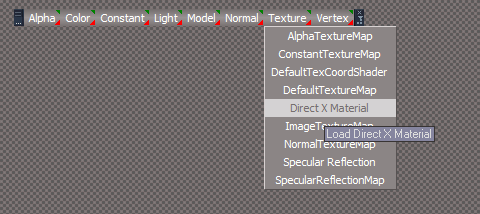
What is the Direct X Material?
I do not see it in the library
I do not see it in the library
-
clintonman
- Captain
- Posts: 5659
- Joined: 21 May 2009, 21:08
- Type the number ten into the box: 0
- Location: California
Re: Popup Toolbars
Looks like an error. There's no Specular Reflection either.trueBlue wrote: 22 Aug 2023, 15:13 What is the Direct X Material?
I do not see it in the library
Direct X Material.png
-
clintonman
- Captain
- Posts: 5659
- Joined: 21 May 2009, 21:08
- Type the number ten into the box: 0
- Location: California
Re: Popup Toolbars
Update April 18 2024
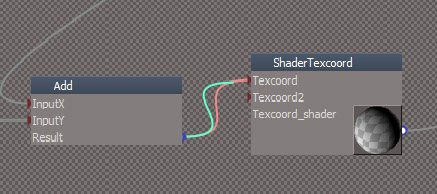
Disconnecting a link in a complex material. This is how it looks before trueSpace hangs and then finally crashes.
This has been giving me trouble for a long time now. For some things I had to just give up because there were just too many crashes while editing materials.
This update adds a new button to the DX Components popup toolbar that can be used to disconnect a material link without crashing. It's only needed when a shader has too many nodes(I think...)
After pressing the button a panel will appear near the mouse position with a list of connected input links. Choose one of the options to disconnect the corresponding input connection.
This update uses an updated rsx plugin, v1638451 and the newest floating panel script.
http://clintons3d.com/plugins/truespace ... opups.html
This has been giving me trouble for a long time now. For some things I had to just give up because there were just too many crashes while editing materials.
This update adds a new button to the DX Components popup toolbar that can be used to disconnect a material link without crashing. It's only needed when a shader has too many nodes(I think...)
After pressing the button a panel will appear near the mouse position with a list of connected input links. Choose one of the options to disconnect the corresponding input connection.
This update uses an updated rsx plugin, v1638451 and the newest floating panel script.
http://clintons3d.com/plugins/truespace ... opups.html
-
clintonman
- Captain
- Posts: 5659
- Joined: 21 May 2009, 21:08
- Type the number ten into the box: 0
- Location: California
Re: Popup Toolbars
July Update:
2 changes to the disconnect script in the dx components popup
- fixed to work with the Material node input/output bug
- added new option to disconnect all inputs
tS Bug: The Material node inside the sample materials has several "input" connectors that are flagged as "output" connectors. This bug does not stop the node from working properly. The Material.RsMat file found in the "Components - Inputs and compilers" library has the correct input flag applied to the connectors.
I also noticed that the connector names don't match between the two nodes, so there could be a some other scripts where the name mismatch may stop them from working properly when the "good" Material node is used.
2 changes to the disconnect script in the dx components popup
- fixed to work with the Material node input/output bug
- added new option to disconnect all inputs
tS Bug: The Material node inside the sample materials has several "input" connectors that are flagged as "output" connectors. This bug does not stop the node from working properly. The Material.RsMat file found in the "Components - Inputs and compilers" library has the correct input flag applied to the connectors.
I also noticed that the connector names don't match between the two nodes, so there could be a some other scripts where the name mismatch may stop them from working properly when the "good" Material node is used.