Hi all,
I'm new with truespace 7, and i'm a beginner with designing. Basically, i'm a programmer, and i love to experiment creating games.
Now i'm busy with learning the XNA Framework with 3D, and after some tutorials i thought - ok, i know enough, let's try to create a simple universe with a few planets, earth, a sun and of course the spaceship. However, i couldn't find many free earth models, and which i found, i couldn't use in XNA. I tried blender, but somehow the textures never worked in XNA well for me, and finally after much struggling i found truespace.
I read some in the manual, tried many things, and i am able to create a smooth sphere, perfectly for the earth. I have the image for it (http://www5.picturepush.com/photo/a/462 ... 647.jpg?v0" ).
The only thing is - i don't know how to put that texture on my sphere!
Create own material from image
-
nbarten
- Seaman
- Posts: 6
- Joined: 04 Jun 2012, 16:25
- Type the number ten into the box: 9
Create own material from image
-
Draise

- Captain
- Posts: 3200
- Joined: 21 Sep 2009, 19:33
- Type the number ten into the box: 0
- Location: Bogota, Colombia
Re: Create own material from image
Well with this image, all you need to do is put on a Spherical projection onto the sphere, then you need to open up the Paint tool.

The tools you need are shown. L to R, Spherical Projection, Paint Tool, Library Browser
TrueSpace provides you with some libraries of preset shaders. You can then open up that library and either drag and drop the "Texture" shader onto the sphere.

Then in the panel, you can drag and drop your texture onto the current texture then pain the object.

Hopefully that helps!
The tools you need are shown. L to R, Spherical Projection, Paint Tool, Library Browser
TrueSpace provides you with some libraries of preset shaders. You can then open up that library and either drag and drop the "Texture" shader onto the sphere.
Then in the panel, you can drag and drop your texture onto the current texture then pain the object.
Hopefully that helps!
-
nbarten
- Seaman
- Posts: 6
- Joined: 04 Jun 2012, 16:25
- Type the number ten into the box: 9
Re: Create own material from image
thank you very much for the clear explanation!
I think i only miss something... my own texture (earth picture) isn't yet in the library, correct? So, how must i 'put' the picture / texture into the materials library?
I think i only miss something... my own texture (earth picture) isn't yet in the library, correct? So, how must i 'put' the picture / texture into the materials library?
-
DarkScythe
- Senior Chief Petty Officer
- Posts: 243
- Joined: 23 Sep 2009, 08:57
Re: Create own material from image
to browse to your folder ctrl + left click from texture slot then browse.... to insert texture from library open texture library then right click then choose import then browse for the texture.... image below.
http://www.clintons3d.com/w/index.php?title=Main_Page browse below for ts pdf manual download
http://www.clintons3d.com/w/index.php?title=Main_Page browse below for ts pdf manual download
- Attachments
-
-


-
pugman 1
- Captain
- Posts: 1555
- Joined: 21 May 2009, 19:26
- Type the number ten into the box: 0
- Location: Germany
Re: Create own material from image
Hi And Welcome. If you are in workspace then drag any pic you want from your own
folder and drop it in the link editor at the bottom. then follow the obove post hope this helps.
folder and drop it in the link editor at the bottom. then follow the obove post hope this helps.
-
nbarten
- Seaman
- Posts: 6
- Joined: 04 Jun 2012, 16:25
- Type the number ten into the box: 9
Re: Create own material from image
Ctrl + left click somehow didn't work for me. I imported the jpg file into a material panel... but then i didn't know how to use it, i tried to load it, to move it on the sphere... nothing worked. Also, i see no 'Texture' in my library browser.
I wanted to give you some screens, but somehow i had closed a panel on the right side which i needed, and i didn't know how to recover it... so i closed truespace, and started it again. However, it now hangs every time on the truespace loading logo! Somehow i cannot get in the program anymore.
I'll try it again in the evening, if it's still no good i'll have to reinstall the program again.
I wanted to give you some screens, but somehow i had closed a panel on the right side which i needed, and i didn't know how to recover it... so i closed truespace, and started it again. However, it now hangs every time on the truespace loading logo! Somehow i cannot get in the program anymore.
I'll try it again in the evening, if it's still no good i'll have to reinstall the program again.
-
Steinie

- Captain
- Posts: 2958
- Joined: 21 May 2009, 17:38
- Type the number ten into the box: 10
Re: Create own material from image
Instead of a reinstall, remove the file "default.ctx" from the tS7.x dir this may be corrupted . A new one will be created when you restart truesSpace.
In the future make a backup of "default.ctx" when you have everything the way you want. This way a quick replacement will get you back to your settings.
Welcome to our Forums!
In the future make a backup of "default.ctx" when you have everything the way you want. This way a quick replacement will get you back to your settings.
Welcome to our Forums!
-
Draise
- Captain
- Posts: 3200
- Joined: 21 Sep 2009, 19:33
- Type the number ten into the box: 0
- Location: Bogota, Colombia
Re: Create own material from image
This file is located in the trueSpace installation folder.
-
nbarten
- Seaman
- Posts: 6
- Joined: 04 Jun 2012, 16:25
- Type the number ten into the box: 9
Re: Create own material from image
@Steinie: thanks, it works again.
I have my library, but i don't see 'Textures'. Also, i have imported the earth picture (see screen) but whatever i try with it, nothing works:

At the right i have pointed a red arrow to my picture of the earth.
I have my library, but i don't see 'Textures'. Also, i have imported the earth picture (see screen) but whatever i try with it, nothing works:
At the right i have pointed a red arrow to my picture of the earth.
-
MikomDude

- Captain
- Posts: 1930
- Joined: 04 Oct 2010, 11:12
- Type the number ten into the box: 0
- Location: The Hague, Netherlands
Create own material from image
Hi nbarten. I believe you have got the wrong library open, that is in fact the library browser.
Follow steps 1. and 2. in this image to open the texture library, then follow the instructions provided by DarkScythe and Draise.
If the panel with the material editor doesn't open automatically, click the paint icon as shown on the image at the bottom.
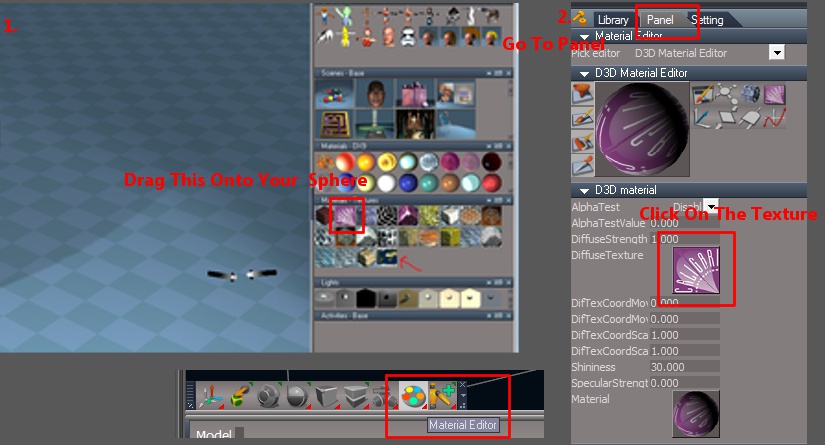
Hope this helps
Follow steps 1. and 2. in this image to open the texture library, then follow the instructions provided by DarkScythe and Draise.
If the panel with the material editor doesn't open automatically, click the paint icon as shown on the image at the bottom.
Hope this helps
- Attachments
-
-
pugman 1
- Captain
- Posts: 1555
- Joined: 21 May 2009, 19:26
- Type the number ten into the box: 0
- Location: Germany
Re: Create own material from image
Check this out ,i made a quick demo for you .
sorry no sound http://www.youtube.com/watch?v=YEjg90UtP7c"
The quality is not the best but i hope you understand , good luck
Ralph
sorry no sound http://www.youtube.com/watch?v=YEjg90UtP7c"
The quality is not the best but i hope you understand , good luck
Ralph
-
nbarten
- Seaman
- Posts: 6
- Joined: 04 Jun 2012, 16:25
- Type the number ten into the box: 9
Re: Create own material from image
Wow finally, it works! 
I used an existing Texture Material and clicked on the thumbnail next to 'Diffuse Texture'. The Bitmaps Base opened so i could drag my earth picture in it.
But i first tried this:
* In the 'Materials - Textures' panel i did right click and then insert -> a grey sphere was added.
* I double clicked on it so i got to the Material Editor
* Then i clicked on the thumbnail next to 'Diffuse Texture'... but nothing happened, no Bitmaps Base window appeared.
So i can only change the picture when i use an existing material?
Also another question (i hope i don't ask too much): I'm going to use the models (planets etc) in an XNA 'game', so i guess i don't need shadows and lights... how can i remove all the shadows? I tried to remove the light spots but there was still some shadow from the floor...
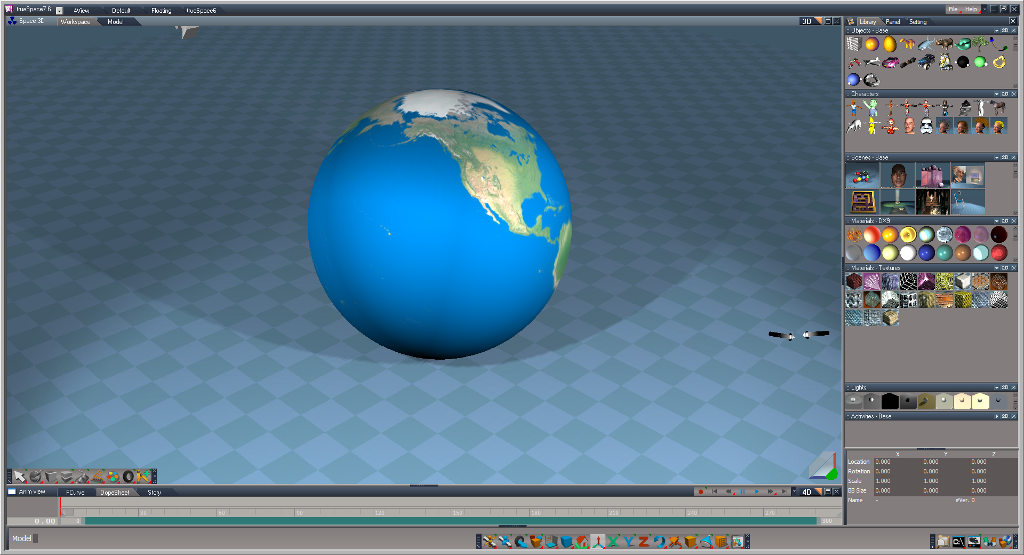

But i first tried this:
* In the 'Materials - Textures' panel i did right click and then insert -> a grey sphere was added.
* I double clicked on it so i got to the Material Editor
* Then i clicked on the thumbnail next to 'Diffuse Texture'... but nothing happened, no Bitmaps Base window appeared.
So i can only change the picture when i use an existing material?
Also another question (i hope i don't ask too much): I'm going to use the models (planets etc) in an XNA 'game', so i guess i don't need shadows and lights... how can i remove all the shadows? I tried to remove the light spots but there was still some shadow from the floor...
-
MikomDude
- Captain
- Posts: 1930
- Joined: 04 Oct 2010, 11:12
- Type the number ten into the box: 0
- Location: The Hague, Netherlands
Re: Create own material from image
You can use the lights library to your right to choose from different preset light set-ups or to remove all lights. In any case, it won't really matter since you most likely will only export the planet as an object, not the whole scene.nbarten wrote:Also another question (i hope i don't ask too much): I'm going to use the models (planets etc) in an XNA 'game', so i guess i don't need shadows and lights... how can i remove all the shadows? I tried to remove the light spots but there was still some shadow from the floor...
-
Draise
- Captain
- Posts: 3200
- Joined: 21 Sep 2009, 19:33
- Type the number ten into the box: 0
- Location: Bogota, Colombia
Re: Create own material from image
The default lighting has not just one, but a number of spotlights.
If you open up the LE (link editor) you can see all the items in the scene. Then you can find all the spotlights and delete them. If you just want an ambient light, delete the infinate lights also and then add an ambient light. The lighting will be flat then. (you can also turn off the shadows in the spotlight nodes)
If you open up the LE (link editor) you can see all the items in the scene. Then you can find all the spotlights and delete them. If you just want an ambient light, delete the infinate lights also and then add an ambient light. The lighting will be flat then. (you can also turn off the shadows in the spotlight nodes)
-
nbarten
- Seaman
- Posts: 6
- Joined: 04 Jun 2012, 16:25
- Type the number ten into the box: 9
Re: Create own material from image
Nevermind, it didn't affect my XNA result after all... the light was added in my code, i forgot about that code line.
Thanks all you guys for helping me, i'm sure i'll try to create more models with this awesome program.
Thanks all you guys for helping me, i'm sure i'll try to create more models with this awesome program.
-
DarkScythe
- Senior Chief Petty Officer
- Posts: 243
- Joined: 23 Sep 2009, 08:57
Re: Create own material from image
now I am confuse usually you have to export it in file format of one of these to use in gameI'm going to use the models (planets etc) in an XNA 'game', so i guess i don't need shadows and lights... how can i remove all the shadows? I tried to remove the light spots but there was still some shadow from the floor...
.obj
.x
.fbx
.dae
and there are setting in these file format if you want the entire scene including lights to export or just the object that you want to export.
did you download the pdf manual it's all there including uv mapping
ps.
shadow doens't export if you want only the object model and also entire scene if you don't include the lights to be export