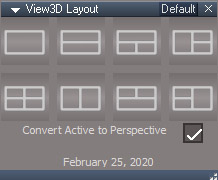
Script will convert the active 3D view into 4 3D views and back.
The result is similar the to switching to the 4View Layout except it only effects the 3D view and other configurations are included. It's also faster than a full layout change.
The single view button will revert back to a single view. The active 3D view will be the final view. 3D view layouts created outside of this script will be ignored.
The UnOfficial Updates has a special top toolbar in the 3D view, so you will probably want to have that as the active window when reverting back to one view.
http://clintons3d.com/plugins/truespace ... ayout.html
Layout for 3D View
-
clintonman
- Captain
- Posts: 5659
- Joined: 21 May 2009, 21:08
- Type the number ten into the box: 0
- Location: California
Layout for 3D View
-
clintonman
- Captain
- Posts: 5659
- Joined: 21 May 2009, 21:08
- Type the number ten into the box: 0
- Location: California
Re: Layout for 3D View
I just realized I forgot to make the 4 view option look like modelspace and workspace quad view/4view.
top left = top view
top right = perspective / original view - maybe not change the active view?
bottom left = front view
bottom right = left view
This also means that the original view will no always be in the upper left.
All the other layouts will match what I see/can find in other programs.
top left = top view
top right = perspective / original view - maybe not change the active view?
bottom left = front view
bottom right = left view
This also means that the original view will no always be in the upper left.
All the other layouts will match what I see/can find in other programs.
-
clintonman
- Captain
- Posts: 5659
- Joined: 21 May 2009, 21:08
- Type the number ten into the box: 0
- Location: California
Re: Layout for 3D View
Updated so the 4view option matches the truespace 4view layout. Also added an option to convert the active view to a perspective view before creating the layout.
-
trueBlue
- Captain
- Posts: 5548
- Joined: 06 Jul 2009, 22:50
- Type the number ten into the box: 10
Re: Layout for 3D View
Much better with your update!
That is some pretty cleaver coding Clinton!
You may want to set the OwnedBy = {2C152F81-45A2-4035-8896-9E49D60C8A7A}
attribute for the Frame Window(s).
That is some pretty cleaver coding Clinton!
You may want to set the OwnedBy = {2C152F81-45A2-4035-8896-9E49D60C8A7A}
attribute for the Frame Window(s).
-
clintonman
- Captain
- Posts: 5659
- Joined: 21 May 2009, 21:08
- Type the number ten into the box: 0
- Location: California
Re: Layout for 3D View
What would be the result of setting the OwnedBy value?trueBlue wrote: 27 Feb 2020, 18:28 Much better with your update!
That is some pretty cleaver coding Clinton!![]()
You may want to set the OwnedBy = {2C152F81-45A2-4035-8896-9E49D60C8A7A}
attribute for the Frame Window(s).![]()
-
trueBlue
- Captain
- Posts: 5548
- Joined: 06 Jul 2009, 22:50
- Type the number ten into the box: 10
Re: Layout for 3D View
If you apply your script to a floating window and click outside of that window, it disappears behind trueSpace.
Setting the OwnedBy stops it from disappearing.
-
clintonman
- Captain
- Posts: 5659
- Joined: 21 May 2009, 21:08
- Type the number ten into the box: 0
- Location: California
-
clintonman
- Captain
- Posts: 5659
- Joined: 21 May 2009, 21:08
- Type the number ten into the box: 0
- Location: California
Re: Layout for 3D View
Fixed so floating windows don't disappear behind the main tS window.
That was more difficult than expected, got a few crashes and strange window behaviors.
Also changed the order of the closing windows when reverting back to a single view. Now it closes in the reverse order that it created the windows. This fixed some strange window framing issues.
Ended up using the ownedby value of "{89F6FE6F-B09C-492A-8620-573607EAD712}", the id of the "Frame Window"
I closed all windows with an x close button and the window with that id still existed, so I figure it's safer.
That was more difficult than expected, got a few crashes and strange window behaviors.
Also changed the order of the closing windows when reverting back to a single view. Now it closes in the reverse order that it created the windows. This fixed some strange window framing issues.
Ended up using the ownedby value of "{89F6FE6F-B09C-492A-8620-573607EAD712}", the id of the "Frame Window"
I closed all windows with an x close button and the window with that id still existed, so I figure it's safer.