I have been been modeling a horse project and now am working on getting it to spin on one axis (yaw). All the parts were encapsulated in 3D, a controller hooked up to it and everything spun BUT those parts with hair moved at a different speed. I separated the hair parts from the rest but did not solve the issue. Changing the speed of just the hair object didn't solve the problem.
Has anyone overcome this problem, and if so, how was it achieved? |I have posted two screenshots that demonstrate the dilemma under 'fire breathing' previously for any who want to see it.
Animating Hair Quirk
-
dreamcatcher107
- Petty Officer First Class
- Posts: 70
- Joined: 23 Aug 2009, 16:26
- Type the number ten into the box: 0
- Location: Illinois, USA
Animating Hair Quirk
-
dreamcatcher107
- Petty Officer First Class
- Posts: 70
- Joined: 23 Aug 2009, 16:26
- Type the number ten into the box: 0
- Location: Illinois, USA
Re: Animating Hair Quirk
I did some additional close-up review of this problem and am now searching for a discrepancy in LE blocks. There are the four objects with hair (manie, forelock, left and right eyelashes) and all of the 'scalp meshes' rotate in harmony with the rest of the horse. Additionally, the left eyelash hair element rotates in harmony with its mesh. The other three hair elements, however, do not. They collectively rotate in relationship to one another but without relationship to the rest of the horse.
I am currently comparing the various LE sub-elements within each object to find the dissimilarity between the one that works andthe others that do not. Any feedback, even plausible guesses, would be appreciated.
I am currently comparing the various LE sub-elements within each object to find the dissimilarity between the one that works andthe others that do not. Any feedback, even plausible guesses, would be appreciated.
-
dreamcatcher107
- Petty Officer First Class
- Posts: 70
- Joined: 23 Aug 2009, 16:26
- Type the number ten into the box: 0
- Location: Illinois, USA
Re: Animating Hair Quirk
I have solved the problem of hair rotation and can share the solution. Within the LE, when the original objects were created, were separate hair material blocks. I deleted them and rebuilt them into the mesh active object itself. Everything rotates as it should in perfect harmony, albeit a bit jumpy. I'll flatten history and that may solve the last issue.
-
Steinie

- Captain
- Posts: 2958
- Joined: 21 May 2009, 17:38
- Type the number ten into the box: 10
Re: Animating Hair Quirk
You wouldn't mind posting a screen grab would you? I'm curious in your
solution.
solution.
-
Prodigy

- Site Admin
- Posts: 957
- Joined: 21 May 2009, 14:46
- Type the number ten into the box: 0
- Location: Uruguay
Re: Animating Hair Quirk
coincident or not, yesterday (in the bathroom  ) i thought in one solution for a problem with hairs..
and it is that the hairs cannot be painted or take the color of a texture..
scratching my head finally i found a solution, and im sure i'll find how to make fur over a character but i must to know if it's possible to copy the uv from one object to another.. if it is possible? is possible to have fur on truespace
here is a test.. the hairs still dynamic and keeping the texture over the hairs.. 
I'm sure that Paul will be happy with this little treasure
) i thought in one solution for a problem with hairs..and it is that the hairs cannot be painted or take the color of a texture..
scratching my head finally i found a solution, and im sure i'll find how to make fur over a character
but i must to know if it's possible to copy the uv from one object to another.. if it is possible? is possible to have fur on truespace 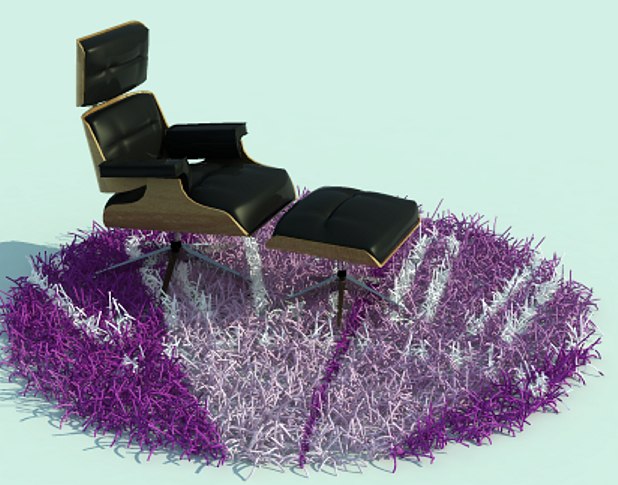
I'm sure that Paul will be happy with this little treasure
๑۩۞۩๑ prodigy ๑۩۞۩๑
-
dreamcatcher107
- Petty Officer First Class
- Posts: 70
- Joined: 23 Aug 2009, 16:26
- Type the number ten into the box: 0
- Location: Illinois, USA
Re: Animating Hair Quirk
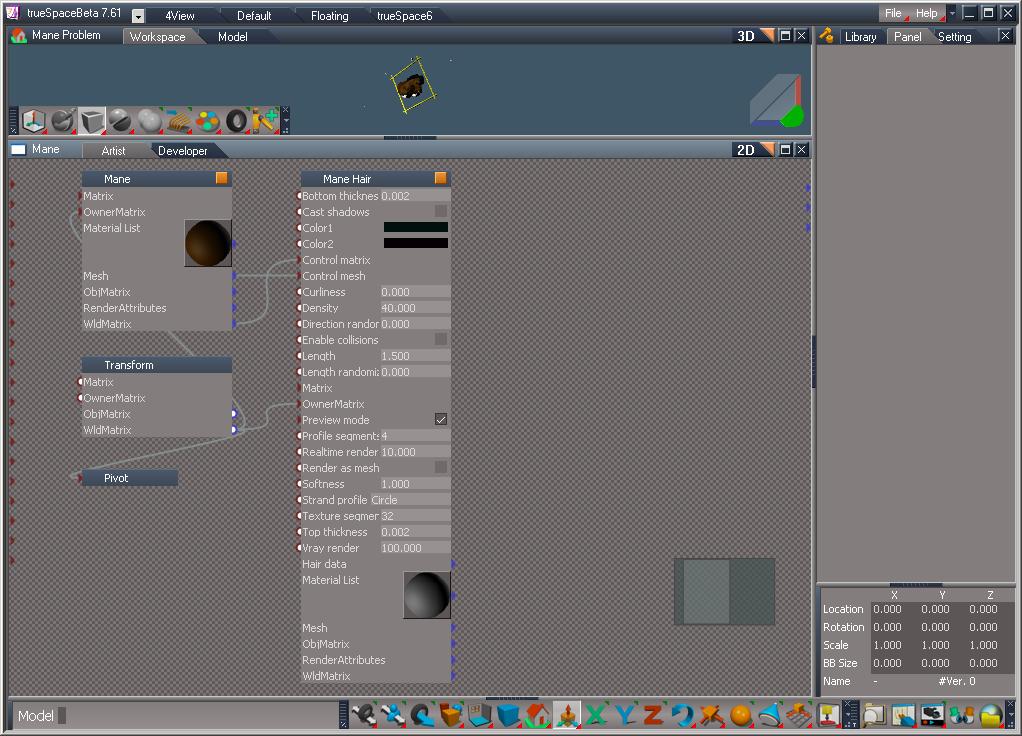
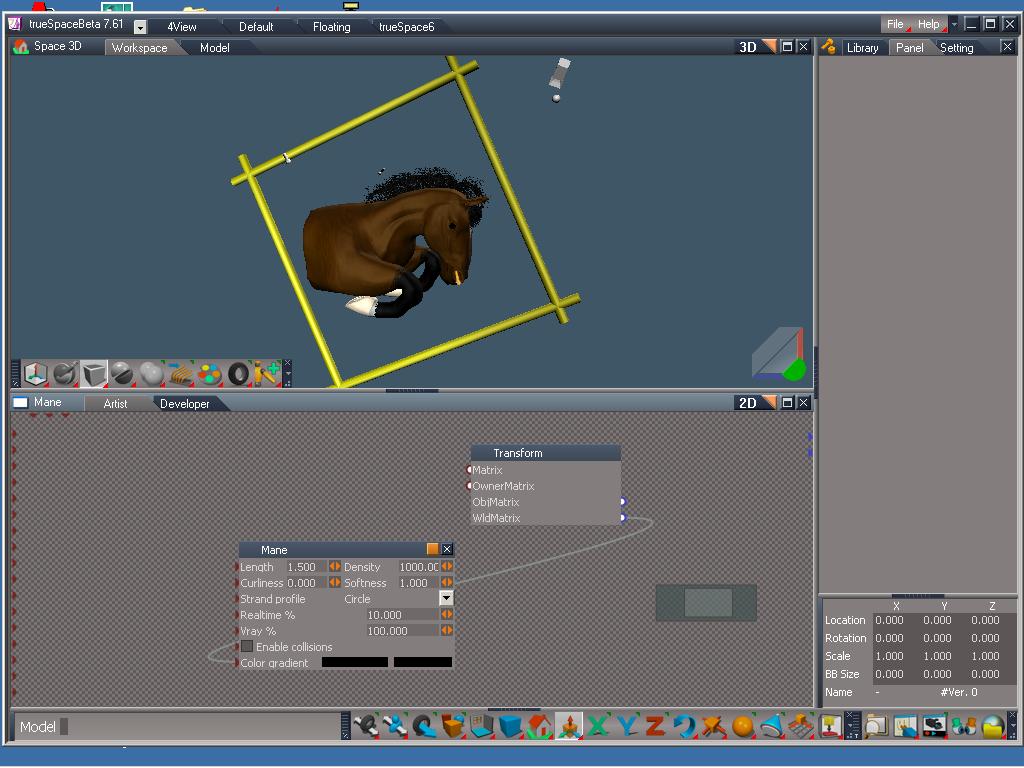
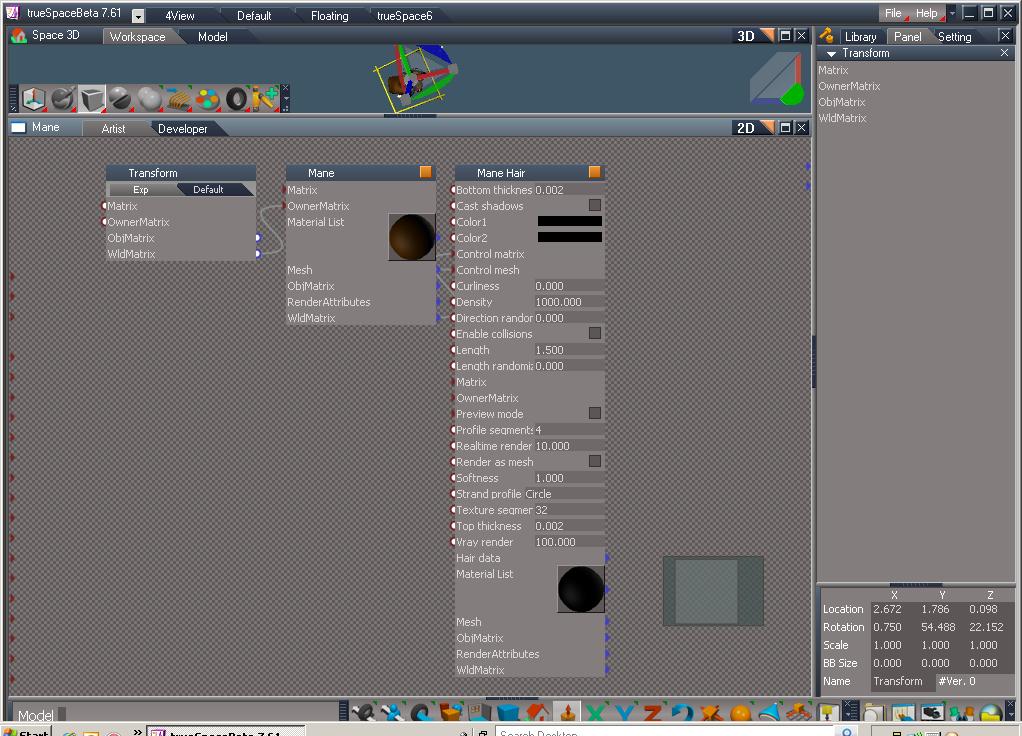
At Steinie's request, I have posted screen grabs of the solution I mentioned in my prior post. The one labeled 'Mane problem' depicts the mane object expanded one level and shows that the hair is a separate object from that of the mane scalp itself. The next, labeleled 'Mane Solution' depicts the reorganized mane object expanded one level and shows that the hair copntrols now appear directly within the mane itself. It is also interesting to note that the pivot object is no longer present. The final one labeled 'Mane hair nested' depicts the solution expanded another level to indicate that the hair object now appears within the mane object itself. I hope this is helpful to any that have a similar problem to overcome.
- Attachments
-
-
-
-
dreamcatcher107
- Petty Officer First Class
- Posts: 70
- Joined: 23 Aug 2009, 16:26
- Type the number ten into the box: 0
- Location: Illinois, USA
Re: Animating Hair Quirk
I am still working on the rotation of the horse model and the motion is not fluid since solving the hair problem. My realtime render setting is 10 and Vray is at 100, though I am on the workspace side. The timer jumps about 15 seconds at a time, with a very low frame number as a result.
Before encompassing the hair into the objects themselves, everything ran well, except for the hair movement not staying on the the horse model. Now there is a problem with the timing. Any ideas are, as always, appreciated.
Before encompassing the hair into the objects themselves, everything ran well, except for the hair movement not staying on the the horse model. Now there is a problem with the timing. Any ideas are, as always, appreciated.
-
Rhino169

- Senior Chief Petty Officer
- Posts: 201
- Joined: 29 Nov 2009, 03:15
Re: Animating Hair Quirk
Prodigy..that is some sweet looking shag carpet!  Can you post a tutorial on that or some screen grabs? Thanks!
Can you post a tutorial on that or some screen grabs? Thanks!-
Prodigy
- Site Admin
- Posts: 957
- Joined: 21 May 2009, 14:46
- Type the number ten into the box: 0
- Location: Uruguay
Re: Animating Hair Quirk
Sure my friend, i'm searching for some spear time to make a video, cos it need some basic LE explanation..
I can do a script to make it automatic.. what do you prefer?
I can do a script to make it automatic.. what do you prefer?
๑۩۞۩๑ prodigy ๑۩۞۩๑
-
Steinie
- Captain
- Posts: 2958
- Joined: 21 May 2009, 17:38
- Type the number ten into the box: 10
Re: Animating Hair Quirk
I would like BOTH! 
Is this method only for VRAy owners?
Is this method only for VRAy owners?
-
Rhino169
- Senior Chief Petty Officer
- Posts: 201
- Joined: 29 Nov 2009, 03:15
Re: Animating Hair Quirk
Yes Both..I second Steinie's motion!
To show both ways will show how versital truespace is.
To show both ways will show how versital truespace is.
-
dreamcatcher107
- Petty Officer First Class
- Posts: 70
- Joined: 23 Aug 2009, 16:26
- Type the number ten into the box: 0
- Location: Illinois, USA
Re: Animating Hair Quirk
Persistence and ingenuity paid off. To solve the problem of the hair quirk AND the speed/timing issue, I did some simple things. First I went back to a saved file of when the hair was moving at a different rate of speed than the body. Within each of the body objects where the scalp and hair objects were, I saved the separate hair objects and then deleted them. I then brought each back into the same LE level and reattached their transform wild matrices to the hair object matrices. Everything now moves seamlessly.
-
Prodigy
- Site Admin
- Posts: 957
- Joined: 21 May 2009, 14:46
- Type the number ten into the box: 0
- Location: Uruguay
Re: Animating Hair Quirk
LOL!Steinie wrote:I would like BOTH!
Is this method only for VRAy owners?
Is for anybody.. vray, realtime etc.. for realtime is a simplest and better way, but not sure how many people use the reatimerender to make artwork.. also i think for lightworks users too..
So both for unanimity.. ahahah
**btw, i will start another thread, i won't bother dreamcatcher..
๑۩۞۩๑ prodigy ๑۩۞۩๑
-
LeonRegis

- Captain
- Posts: 1946
- Joined: 18 Aug 2009, 17:36
- Type the number ten into the box: 0
- Location: Brazil/Earth/Orion Arm/Milky Way/4th Dimension/This Universe/Multiverse???/Singularity???
Re: Animating Hair Quirk
Uhull 
I don't use realtime so much, but will start with interactive scenes...
Thank you!
I don't use realtime so much, but will start with interactive scenes...
Thank you!
Be the change you want to see in the world. - Mohandas Gandhi