This is my first attempt at a tutorial so if anyone sees anyting that is incorrect or can be done in a more efficient manner please let me know. This is something that I just learned how to do and thought there may be others who were not quite sure how to do this.
I wanted a way to add some realism to my textures without having to look around for the perfect texture. Sometimes you find two that would work great together but how do you integrate them into your scene: Alpha Maps.
I use GIMP (I assume the steps would be comparable in PhotoShop)
Let's get started
1. Open up GIMP and create a new image blank image (I use 2000 x 2000)
2. Fill in the image with your background image black (this assumes that your foreground and background are set to White & Black respectively)
3. You can either use the default brush that is selected in GIMP or you can change your brush (Dialogs --> Brushes)
Note: There are a lot of great sites out there with different GIMP brushes. I found DeviantArt had some of the best free brushes for creating grunge.
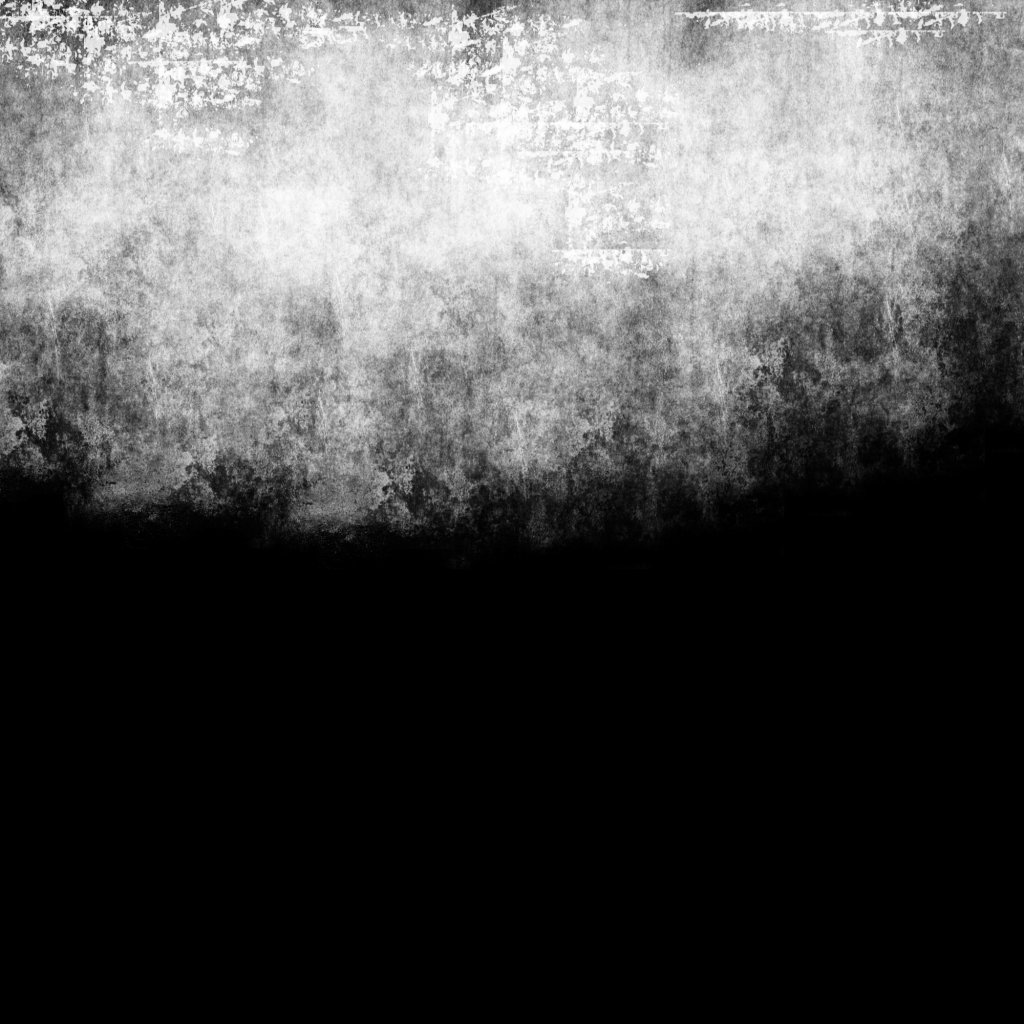
4. Once you have your brush selected ensure that your white is still your foreground color and start painting on your image with the white. The areas which you paint white are the areas that will be visible from your base layer. (Mask4.jpg)
5. Once you have created your mask save it and fire up trueSpace. Find the object that you want to try out your new mask on. I chose a cube formed in the shape of a wall.
6. Open up the material editor in trueSpace. You have a couple of choices now. If you want your underlying material to be a color then just choose a color. If you want your underlying material to be an image then load a an image. Note: I also set the Reflectance to "Matte"
7. Add another layer to your texture (right click --> add new layer)
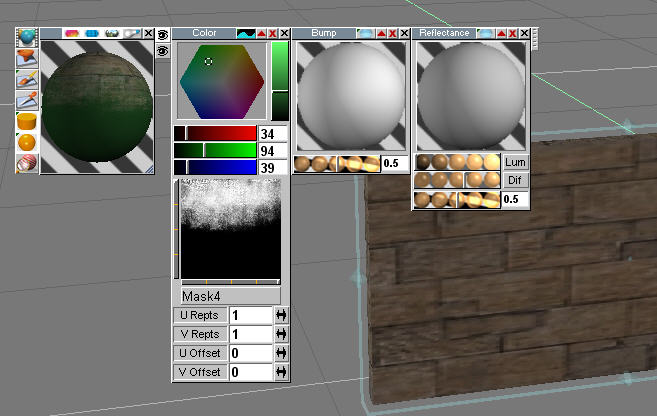
8. Select "Mask Alpha" under color blend (top of the color box next to the red traingle). Set your layer2 texture or color.
9. Again, you can make your second layer a color or an image. A second window will be open below the color shader window. This is your mask. Right click on the window and navigate to the mask that you saved. (Step 9.jpg)
10. You can paint the particular face or the entire object.
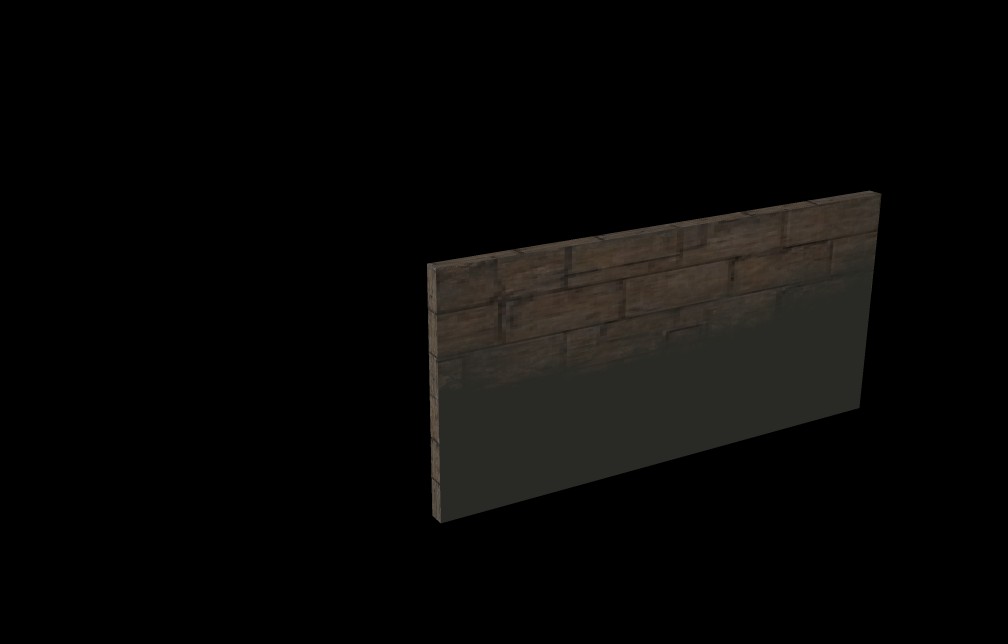
11. Save and Render. (Step 10.jpg). Notice how the brighter the white on your mask the less transparent that area is going to be so you will get more of your top layer.
12. Play around with different patterns and shades of gray and white for different effects.
Hope this was helpful.
Alpha Maps
-
tahnoak
- Master Chief Petty Officer
- Posts: 339
- Joined: 02 Sep 2009, 01:31
Alpha Maps
- Attachments
-
-
-
-
tahnoak
- Master Chief Petty Officer
- Posts: 339
- Joined: 02 Sep 2009, 01:31
Re: Alpha Maps
I just wanted to post a real example of how I used this method.
Please keep in mind that this screenie is NOT the final product but rather a moment in time of the creative process.
The walls on both the brick and plaster floors were both "dirtied" up using this method.
Note: yes, I was still rendering when I took the screenshot. I was running late for work
Please keep in mind that this screenie is NOT the final product but rather a moment in time of the creative process.
The walls on both the brick and plaster floors were both "dirtied" up using this method.
Note: yes, I was still rendering when I took the screenshot. I was running late for work
- Attachments
-

-
Tommy

- Master Chief Petty Officer
- Posts: 403
- Joined: 28 Jun 2009, 14:05
- Type the number ten into the box: 0
- Location: Sweden, Göteborg
Re: Alpha Maps
Thank you a lot!
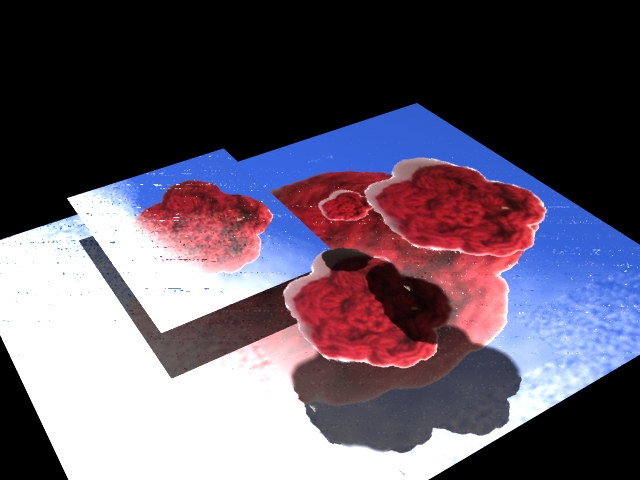
You have been a real help to explain alpha masks in a simple way. Here are my first real experiment with alpha masks. My two interest in one: crochet, knitting and CG.
You have been a real help to explain alpha masks in a simple way. Here are my first real experiment with alpha masks. My two interest in one: crochet, knitting and CG.
- Attachments
-
"Carpe diem"
-
tahnoak
- Master Chief Petty Officer
- Posts: 339
- Joined: 02 Sep 2009, 01:31
Re: Alpha Maps
You are welcome. I am glad that it was helpful to you.
-
theuns
- Lieutenant Junior Grade
- Posts: 868
- Joined: 10 Jun 2009, 11:21
- Type the number ten into the box: 0
- Location: South Africa
Re: Alpha Maps
Thanks for taking the time to do this tahnoak... that house looks totally different with dirtying alpha maps...
you'd think because it is such a basic thing that everybody would know it, and that is why there are no tutorials for this and hence a lot of people don't know how to...
now for the shock... i've been using trueSpace since 3.1 about 9 years ago and only this year, I've figured it out! [sherwood forest foliage on objects ;] ... guess I never really needed it until now, or never thought of scenes and applications that needed it before...
i know a lot of people would find this very helpful, look at that nice pis Tommy did off the bat by just knowing how it works, it might be simple Tommy but i like the image ;)
you'd think because it is such a basic thing that everybody would know it, and that is why there are no tutorials for this and hence a lot of people don't know how to...
now for the shock... i've been using trueSpace since 3.1 about 9 years ago and only this year, I've figured it out! [sherwood forest foliage on objects ;] ... guess I never really needed it until now, or never thought of scenes and applications that needed it before...
i know a lot of people would find this very helpful, look at that nice pis Tommy did off the bat by just knowing how it works, it might be simple Tommy but i like the image ;)
theuns - tSer since 2000
. http://theunsfvo.cgarena.com/" onclick="window.open(this.href);return false; |:.
. http://bluestarcreations.wordpress.com/" onclick="window.open(this.href);return false; |:.
.
http://theunsfvo.cgarena.com/" onclick="window.open(this.href);return false; |:..
http://bluestarcreations.wordpress.com/" onclick="window.open(this.href);return false; |:.-
Tommy
- Master Chief Petty Officer
- Posts: 403
- Joined: 28 Jun 2009, 14:05
- Type the number ten into the box: 0
- Location: Sweden, Göteborg
Re: Alpha Maps
Thank you a lot theuns.
After a horrible day at school with great problems with my students it's nice to get nice words about some experimenting with Alpha Maps that i did. I feel very encouraged and you made my day. Seriously!
After a horrible day at school with great problems with my students it's nice to get nice words about some experimenting with Alpha Maps that i did. I feel very encouraged and you made my day. Seriously!
"Carpe diem"
-
theuns
- Lieutenant Junior Grade
- Posts: 868
- Joined: 10 Jun 2009, 11:21
- Type the number ten into the box: 0
- Location: South Africa
Re: Alpha Maps
Glad to help, Tommy ;)
And I was also serious about how well the test image turned out...
And I was also serious about how well the test image turned out...
theuns - tSer since 2000
. http://theunsfvo.cgarena.com/" onclick="window.open(this.href);return false; |:.
. http://bluestarcreations.wordpress.com/" onclick="window.open(this.href);return false; |:.
.
http://theunsfvo.cgarena.com/" onclick="window.open(this.href);return false; |:..
http://bluestarcreations.wordpress.com/" onclick="window.open(this.href);return false; |:.-
tahnoak
- Master Chief Petty Officer
- Posts: 339
- Joined: 02 Sep 2009, 01:31
Re: Alpha Maps
Tommy....sorry, I was in a rush the other morning when I posted my reply (kids and school, etc...). I think your image turned out well. Keep tweaking and playing with the various settings within PS/GIMP. You'll be amazed at the kinds of looks you can get.
Again, nice image and if there is anything else that I can help with just let me know. I don't know a whole lot but can certainly share what I do know
Again, nice image and if there is anything else that I can help with just let me know. I don't know a whole lot but can certainly share what I do know
-
Finis

- Captain
- Posts: 5410
- Joined: 21 May 2009, 18:26
- Type the number ten into the box: 0
- Location: America!
Re: Alpha Maps
Thanks for the tutorial.
I prefer dangerous freedom over peaceful servitude. -- Thomas Jefferson/Jean Jacques Rousseau