Status Line Crashes

User avatar
clintonman
Captain
Posts: 5659
Joined: 21 May 2009, 21:08
Type the number ten into the box: 0
Location: California

Status Line Crashes

Post by clintonman »

I just found out that if you write to the status line at a high rate it will cause trueSpace to crash. :shock: It took a while to see it consistently because it takes some time to get to the unstable crash state. It happened for me while reading a text file that has more than 120,000 lines in it. I wrote the current line number to the status and it would randomly crash tS after about 30,000 lines, but I also got lucky sometimes and it crashed near the 100,000 line mark so it was a pretty wide range.

I reduced the number of updates to the status line and the mystery crashes have stopped. I need to do one more test with the file to 100% confirm it.

Edit:
confirmed, I was able to read the entire 120,000 line file without any crashes by reducing the number and frequency of status line updates.
Clinton Reese

http://clintons3d.com
User avatar
trueBlue
Captain
Posts: 5548
Joined: 06 Jul 2009, 22:50
Type the number ten into the box: 10

Re: Status Line Crashes

Post by trueBlue »

How do you write to the status line at a high rate?
How do you reduce the number and frequency of status line updates?
User avatar
clintonman
Captain
Posts: 5659
Joined: 21 May 2009, 21:08
Type the number ten into the box: 0
Location: California

Re: Status Line Crashes

Post by clintonman »

trueBlue wrote: 30 Oct 2021, 18:26 How do you write to the status line at a high rate?
How do you reduce the number and frequency of status line updates?
Reading the file line by line and outputting something like "Now on line XXX" in the status. Crash after about 30000 lines.
Reduced by only setting the status for some of the lines of the file instead of all of the lines.

You might be able to see it by just writing to the status via a loop. Something like

Code: Select all

for(i=0;i<100000;i++) {
Node.Value("Status line", "Model") = "Now on line " + i;
}
Not exact code, don't have tS in front of me to check.
Clinton Reese

http://clintons3d.com
User avatar
clintonman
Captain
Posts: 5659
Joined: 21 May 2009, 21:08
Type the number ten into the box: 0
Location: California

Re: Status Line Crashes

Post by clintonman »

Here's a sample.
Jump inside to run and set the "dontCrash" checkbox

dontCrash off and it crashes for me during the first or second run, it's random
dontCrash on it counts all 100000 but only updates the status oncce every 1000 times and hasn't crashed yet. Maybe it will crash if run a bunch of times.
Attachments
Crash Demo.RsObj
(28.45 KiB) Downloaded 182 times
Clinton Reese

http://clintons3d.com
User avatar
trueBlue
Captain
Posts: 5548
Joined: 06 Jul 2009, 22:50
Type the number ten into the box: 10

Re: Status Line Crashes

Post by trueBlue »

No crashes here
Defiantly put a strain on the UI
IE: Panel refresh
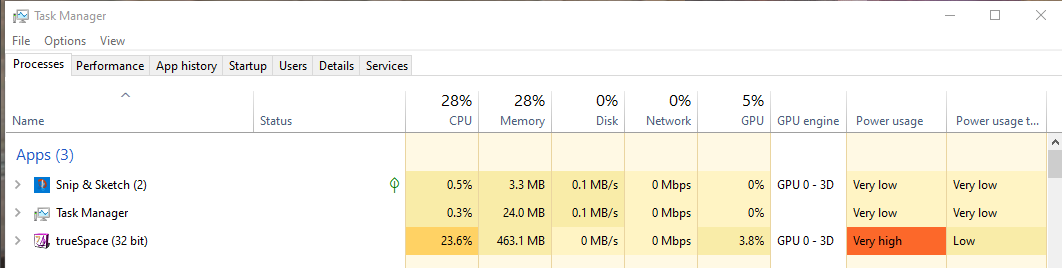
I even upped the Iteration count to 100000000, used physics, panel Editing, and tried using your plugin status line

// Node.Value("Status Line", "Model") = "Now on line " + current;
util.SetStatusMessage("Now on line " + current, 0)
Screenshot (20).png
User avatar
clintonman
Captain
Posts: 5659
Joined: 21 May 2009, 21:08
Type the number ten into the box: 0
Location: California

Re: Status Line Crashes

Post by clintonman »

trueBlue wrote: 30 Oct 2021, 21:41 No crashes here
Defiantly put a strain on the UI
IE: Panel refresh
I even upped the Iteration count to 100000000, used physics, panel Editing, and tried using your plugin status line

// Node.Value("Status Line", "Model") = "Now on line " + current;
util.SetStatusMessage("Now on line " + current, 0)
Screenshot (20).png
If you can get 100000000 with dontCrash unchecked your machine must be much more stable than mine.
Clinton Reese

http://clintons3d.com
User avatar
trueBlue
Captain
Posts: 5548
Joined: 06 Jul 2009, 22:50
Type the number ten into the box: 10

Re: Status Line Crashes

Post by trueBlue »

I ran it about five times to 100000000 in one tS761.8 session
Screenshot 2021-10-30 154312.png
User avatar
clintonman
Captain
Posts: 5659
Joined: 21 May 2009, 21:08
Type the number ten into the box: 0
Location: California

Re: Status Line Crashes

Post by clintonman »

trueBlue wrote: 30 Oct 2021, 22:05 I ran it about five times to 100000000 in one tS761.8 session
Screenshot 2021-10-30 154312.png
If you have any tips for a more stable trueSpace, I'm all ears. I think you mentioned that you run in compatibility mode? Could that be the reason?
Clinton Reese

http://clintons3d.com
User avatar
trueBlue
Captain
Posts: 5548
Joined: 06 Jul 2009, 22:50
Type the number ten into the box: 10

Re: Status Line Crashes

Post by trueBlue »

No tips
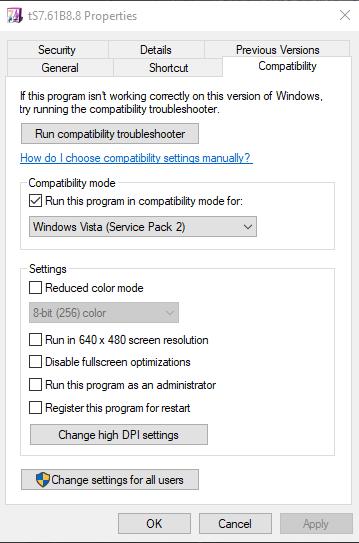
I do run it in compatibility mode
Suggest running the "Run compatibility troubleshooter" on your shortcut that opens trueSpace
Screenshot 2021-10-31 183137.png
User avatar
clintonman
Captain
Posts: 5659
Joined: 21 May 2009, 21:08
Type the number ten into the box: 0
Location: California

Re: Status Line Crashes

Post by clintonman »

I tried running in compatibility mode and the crashes stopped. The actual mode doesn't seem to matter, win8, win7 and vista all have the same effect of making it more stable. On my desktop computer it does show the status line writes happening at about 1/10th the speed, but I don't see any noticeable slowdown anywhere else.

I think I'll be running in compatibility mode from now on.
Clinton Reese

http://clintons3d.com
User avatar
trueBlue
Captain
Posts: 5548
Joined: 06 Jul 2009, 22:50
Type the number ten into the box: 10

Re: Status Line Crashes

Post by trueBlue »

Good to hear!
For me on Win 10 and running the Run compatibility troubleshooter it picks Windows Vista (Service Pack 2)
This fixed my Desktop from showing around the edges of trueSpace 7.6, 7.61, and Rosetta, Maximized
I am pretty sure that trueSpace 7.61 and Rosetta were developed using Windows Vista
User avatar
clintonman
Captain
Posts: 5659
Joined: 21 May 2009, 21:08
Type the number ten into the box: 0
Location: California

Re: Status Line Crashes

Post by clintonman »

I'll try vista and see if it fits better. Thanks.
Clinton Reese

http://clintons3d.com

Return to “Workspace Side”