About Clinton's Collada importer for TS?
-
BNG

- Chief Warrant Officer
- Posts: 684
- Joined: 16 Oct 2009, 03:26
- Type the number ten into the box: 0
- Location: Texas
About Clinton's Collada importer for TS?
What version of TS does the Collada importer work for? I have TS 7.6, 7.61 & 7.61 beta 8, but when I load a DAE file exported from Sketchup only a cube is imported. Are there issues with the importer itself? Thx, Leroy.
Casual Truespace 3D modeling hobbyist. My Truespace blog and simple 3d Modeling Tutorials for Casual Model Makers.
-
clintonman

- Captain
- Posts: 5659
- Joined: 21 May 2009, 21:08
- Type the number ten into the box: 0
- Location: California
Re: About Clinton's Collada importer for TS?
Works with version 7.61 and 7.61 beta 8
I can check your file if you like.
I can check your file if you like.
-
BNG
- Chief Warrant Officer
- Posts: 684
- Joined: 16 Oct 2009, 03:26
- Type the number ten into the box: 0
- Location: Texas
Re: About Clinton's Collada importer for TS?
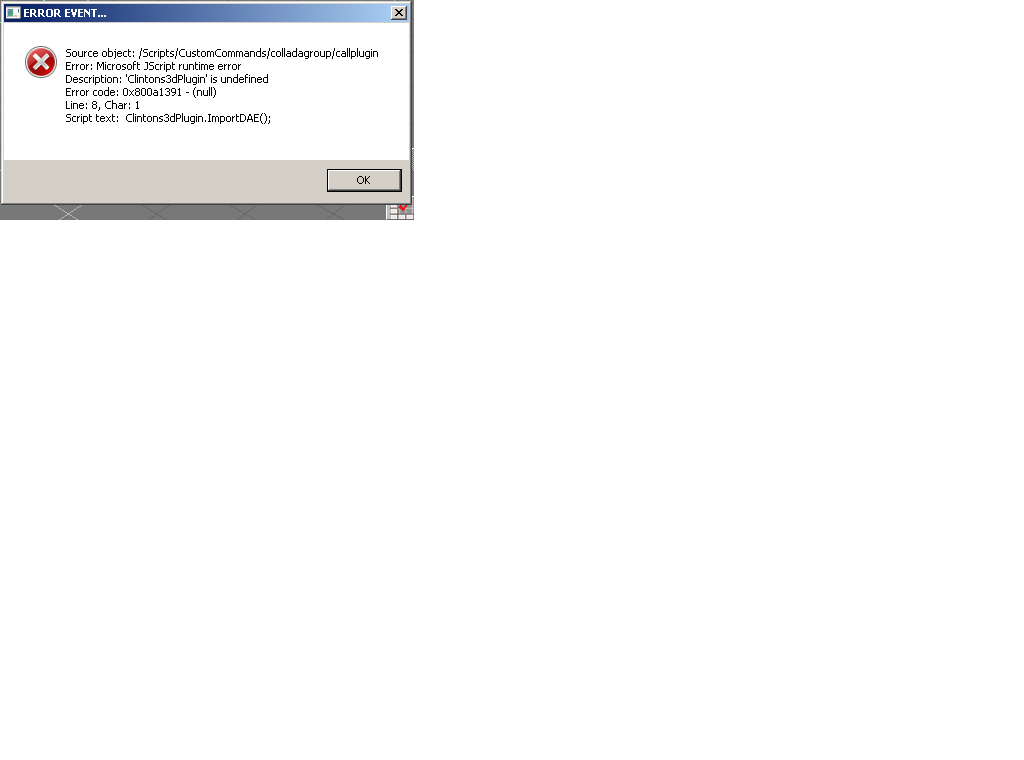
Thx, Clinton. This is a low poly downloaded via Sketchup and exported as a DAE model.
- Attachments
-
-
- a10.zip
- (193.58 KiB) Downloaded 273 times
Casual Truespace 3D modeling hobbyist. My Truespace blog and simple 3d Modeling Tutorials for Casual Model Makers.
-
clintonman
- Captain
- Posts: 5659
- Joined: 21 May 2009, 21:08
- Type the number ten into the box: 0
- Location: California
Re: About Clinton's Collada importer for TS?
Looks like 2 problems.
The page for collada import on my website fails to mention that Microsoft Visual C++ 2008 SP1 Redistributable Package is needed for the plugin and your error says that the rsx plugin isn't installed. So try installing the rsx plugin and if it doesn't work install the MS package
rsx plugin direct link: http://clintons3d.com/plugins/downloads ... Plugin.rsx"
ms link: https://www.microsoft.com/en-us/downloa ... px?id=5582"
The second problem is that the importer is limit to collada files that store items in the scene directly. Manual edit your file and it loads. Not sure if the file is complete. I only see some missiles and get same result with original file imported to blender. Also had to manual edit to load textures.
Hmm, ,my truespace is acting weird I'll have to get back to you on this.
Edit: OK I'm back. This a10 file won't work with truespace. It has too many instanced elements - scene nodes and meshes. An edited version of the file does show the whole model in Blender, but still no good for truespace.
One way to get it into truespace:
1. edit the file to fix the textures - change image path, a10 to a periods at bottom of the file
2. use autodesk fbx converter to make an fbx file, link - http://usa.autodesk.com/adsk/servlet/pc ... d=22694909"
3. load using fbx importer for truespace
The page for collada import on my website fails to mention that Microsoft Visual C++ 2008 SP1 Redistributable Package is needed for the plugin and your error says that the rsx plugin isn't installed. So try installing the rsx plugin and if it doesn't work install the MS package
rsx plugin direct link: http://clintons3d.com/plugins/downloads ... Plugin.rsx"
ms link: https://www.microsoft.com/en-us/downloa ... px?id=5582"
The second problem is that the importer is limit to collada files that store items in the scene directly. Manual edit your file and it loads. Not sure if the file is complete. I only see some missiles and get same result with original file imported to blender. Also had to manual edit to load textures.
Hmm, ,my truespace is acting weird I'll have to get back to you on this.
Edit: OK I'm back. This a10 file won't work with truespace. It has too many instanced elements - scene nodes and meshes. An edited version of the file does show the whole model in Blender, but still no good for truespace.
One way to get it into truespace:
1. edit the file to fix the textures - change image path, a10 to a periods at bottom of the file
Code: Select all
        <image id="ID12">
            <init_from>./Metal_Steel_Textured_White.jpg</init_from>
        </image>
        <image id="ID249">
            <init_from>./Metal_Seamed.jpg</init_from>
        </image>
        <image id="ID258">
            <init_from>./Metal_Rough.jpg</init_from>
        </image>
        <image id="ID423">
            <init_from>./Translucent_Resin_Crush_Gray.jpg</init_from>
        </image>
3. load using fbx importer for truespace

-
BNG
- Chief Warrant Officer
- Posts: 684
- Joined: 16 Oct 2009, 03:26
- Type the number ten into the box: 0
- Location: Texas
Re: About Clinton's Collada importer for TS?
One work around I found was a free X/OBJ exporter for Sketchup 2017. The X exporter wont load in Truespace but the OBJ option exports out of Sketchup well enough to import into the model side of TS beta 8. Thanks for your assist Clinton. Leroy. 
Casual Truespace 3D modeling hobbyist. My Truespace blog and simple 3d Modeling Tutorials for Casual Model Makers.