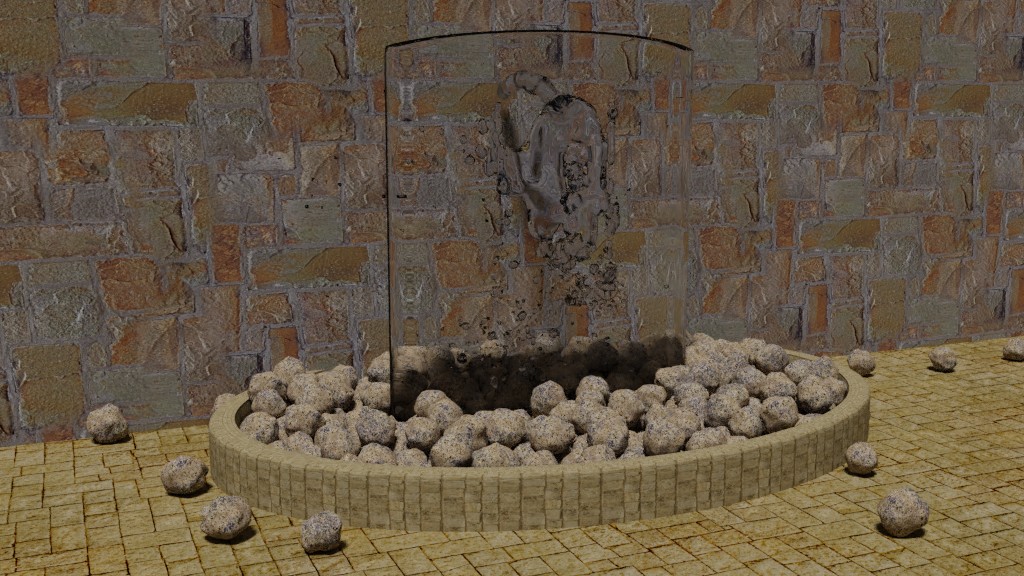
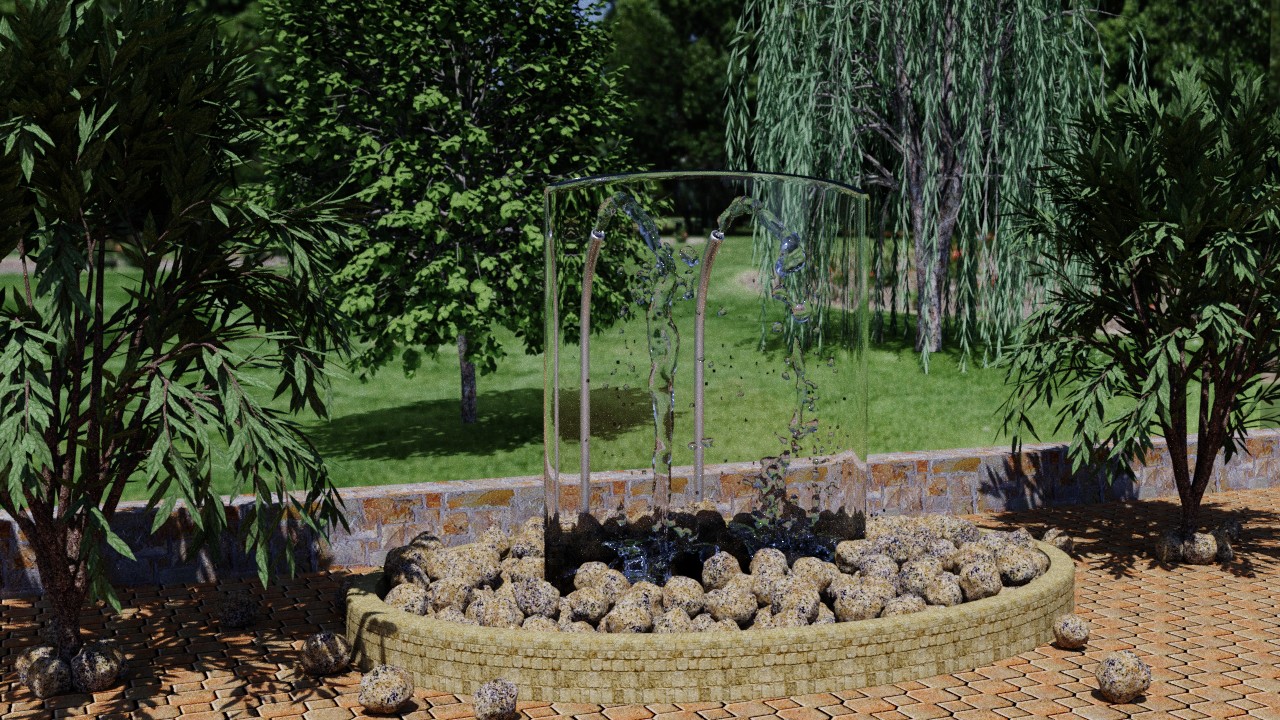
A fountain for the Potpourri challenge. Water sprays onto a curved glass wall and fills a pool with stones in it.
A picture like this will probably be my entry. I'll try to make an animation but the fluid simulation and render time might be too long.
All blender 2.79. I made six rocks like this. Then I used the rocks to make particles but stopped them before they fell to the pool, made them real (not instances or duplicates), and applied rigid body physics. Physics settled them into the pool. That procedure was needed because the particles don't interact with each other so they won't stack and push each other. The water is from the fluid simulation.
The wall uses Spacekdet's Haven Hill texture.
Rendered with cycles using filmic, denoising, 400x400 tiles, sampling: branched path tracing with square samples, light path: limited global illumination preset. 21 seconds to render at 1280x720.
Still need to make a fixture for the water to spray from.
Potpourri March 2018 challenge WIP
-
Finis

- Captain
- Posts: 5410
- Joined: 21 May 2009, 18:26
- Type the number ten into the box: 0
- Location: America!
Potpourri March 2018 challenge WIP
- Attachments
-
Last edited by Finis on 16 Mar 2018, 19:21, edited 2 times in total.
I prefer dangerous freedom over peaceful servitude. -- Thomas Jefferson/Jean Jacques Rousseau
-
Finis
- Captain
- Posts: 5410
- Joined: 21 May 2009, 18:26
- Type the number ten into the box: 0
- Location: America!
Re: Potpourri March 2018 challenge WIP
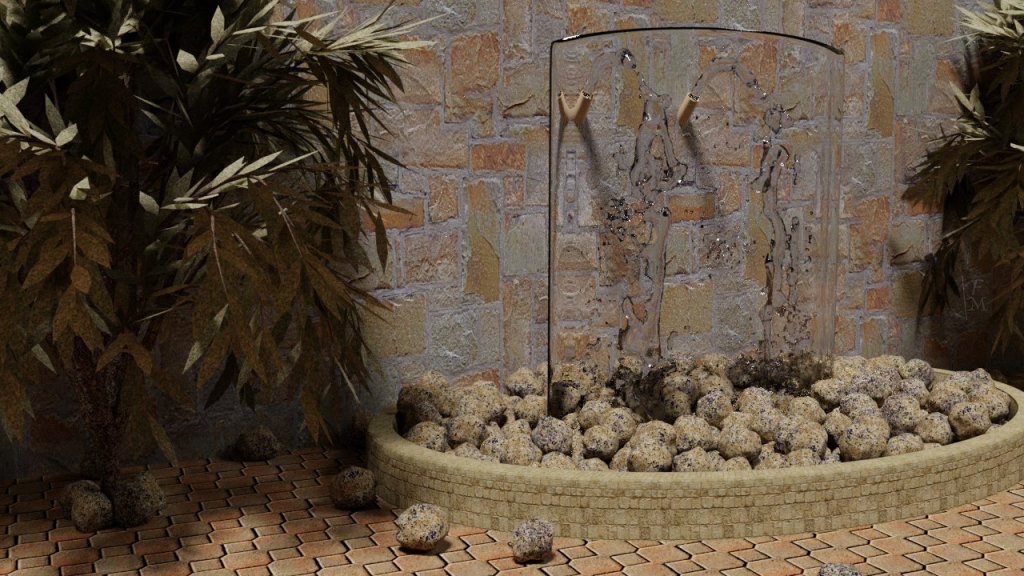
Plants are from the sapling add-on presets. Render time should be under three hours for a fifteen second animation so I'll do it. The fluid simulation took about an hour. I should add some of the rocks to the interact with the water.
- Attachments
-
I prefer dangerous freedom over peaceful servitude. -- Thomas Jefferson/Jean Jacques Rousseau
-
Finis
- Captain
- Posts: 5410
- Joined: 21 May 2009, 18:26
- Type the number ten into the box: 0
- Location: America!
Re: Potpourri March 2018 challenge WIP
Preview of the animation. I set the frame rate to 30 for animation but when I do this opengl render it is at 24fps. I use this quick render to test the speed and look. When the frame rate is not the same then opengl is not good for that test.
Any Blender users know how to change the frame rate for opengl render?
The plants move some for wind. Sapling is good for that but hard to use. I might look for ways to get the trees to react to force fields with Sapling's armature but not its animation.
The finished animation will take a bit over four hours to render all the frame images with cycles. Hitfilm Express to put it together.
For curiosity I compared a cpu render vs a gpu render. Gpu 3x faster. (GTX1060 vs AMD FX8320)
The glass wall is not present in the preview since it is opaque in solid view. There are two places that appear to have constant obstacles but there is nothing there. It isn't obvious in full renders. Hopefully it won't be in the finished movie.
Any Blender users know how to change the frame rate for opengl render?
The plants move some for wind. Sapling is good for that but hard to use. I might look for ways to get the trees to react to force fields with Sapling's armature but not its animation.
The finished animation will take a bit over four hours to render all the frame images with cycles. Hitfilm Express to put it together.
For curiosity I compared a cpu render vs a gpu render. Gpu 3x faster. (GTX1060 vs AMD FX8320)
The glass wall is not present in the preview since it is opaque in solid view. There are two places that appear to have constant obstacles but there is nothing there. It isn't obvious in full renders. Hopefully it won't be in the finished movie.
I prefer dangerous freedom over peaceful servitude. -- Thomas Jefferson/Jean Jacques Rousseau
-
Finis
- Captain
- Posts: 5410
- Joined: 21 May 2009, 18:26
- Type the number ten into the box: 0
- Location: America!
Re: Potpourri March 2018 challenge WIP
There it is.
I prefer dangerous freedom over peaceful servitude. -- Thomas Jefferson/Jean Jacques Rousseau
-
Draise

- Captain
- Posts: 3200
- Joined: 21 Sep 2009, 19:33
- Type the number ten into the box: 0
- Location: Bogota, Colombia
Re: Potpourri March 2018 challenge WIP
Me gusta mucho. I think this is one of your better renders you've done. And it's nice you're getting more into animation, and simulations.
-
Draise
- Captain
- Posts: 3200
- Joined: 21 Sep 2009, 19:33
- Type the number ten into the box: 0
- Location: Bogota, Colombia
Re: Potpourri March 2018 challenge WIP
Under Render Dimensions (in the Properties view>Render tab) you can set the FPS. The OpenGl renderer should output in the same FPS as your final render.Finis wrote: 19 Mar 2018, 17:33 Any Blender users know how to change the frame rate for opengl render?
Added note: Depending on your system that previews the file sequence, specially if it's an image sequence, will influence the FPS. For example DJV Viewer will play the FPS to whatever you want. Unless you're rendering into an Mp4, then you'll have to define the playback fps of the playback client.
-
Finis
- Captain
- Posts: 5410
- Joined: 21 May 2009, 18:26
- Type the number ten into the box: 0
- Location: America!
Re: Potpourri March 2018 challenge WIP
@Draise Thanks!
Yeah, for the finished video I computed the number of frames needed and had blender make that many images. Then HitFilm could have used them at any fps.
For the opengl render (render menu->opengl render animation) to an mp4 it did 24 fps even though the properties->render tab said 29.xx. I found on the web that setting the fps in user preferences->system->screencast was the solution for opengl to a movie file. I set that to 30 and then the mp4 played at the speed from the render tab. Looks like that setting is the fastest an opengl animation will go.
I used simpler render settings than above. Just low samples and changed denoise to less smoothed settings. Still 21 to 29 seconds per frame. Still Filmic. Might do a high samples render and put it here.
Yeah, for the finished video I computed the number of frames needed and had blender make that many images. Then HitFilm could have used them at any fps.
For the opengl render (render menu->opengl render animation) to an mp4 it did 24 fps even though the properties->render tab said 29.xx. I found on the web that setting the fps in user preferences->system->screencast was the solution for opengl to a movie file. I set that to 30 and then the mp4 played at the speed from the render tab. Looks like that setting is the fastest an opengl animation will go.
I used simpler render settings than above. Just low samples and changed denoise to less smoothed settings. Still 21 to 29 seconds per frame. Still Filmic. Might do a high samples render and put it here.
I prefer dangerous freedom over peaceful servitude. -- Thomas Jefferson/Jean Jacques Rousseau
-
Finis
- Captain
- Posts: 5410
- Joined: 21 May 2009, 18:26
- Type the number ten into the box: 0
- Location: America!
Re: Potpourri March 2018 challenge WIP
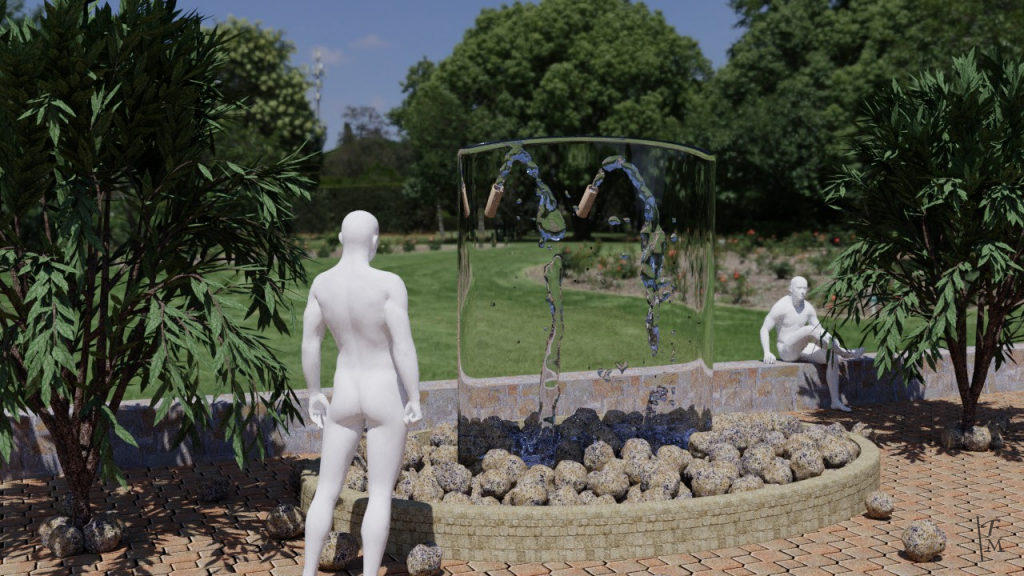
With hdri.
- Attachments
-
I prefer dangerous freedom over peaceful servitude. -- Thomas Jefferson/Jean Jacques Rousseau
-
Finis
- Captain
- Posts: 5410
- Joined: 21 May 2009, 18:26
- Type the number ten into the box: 0
- Location: America!
Re: Potpourri March 2018 challenge WIP
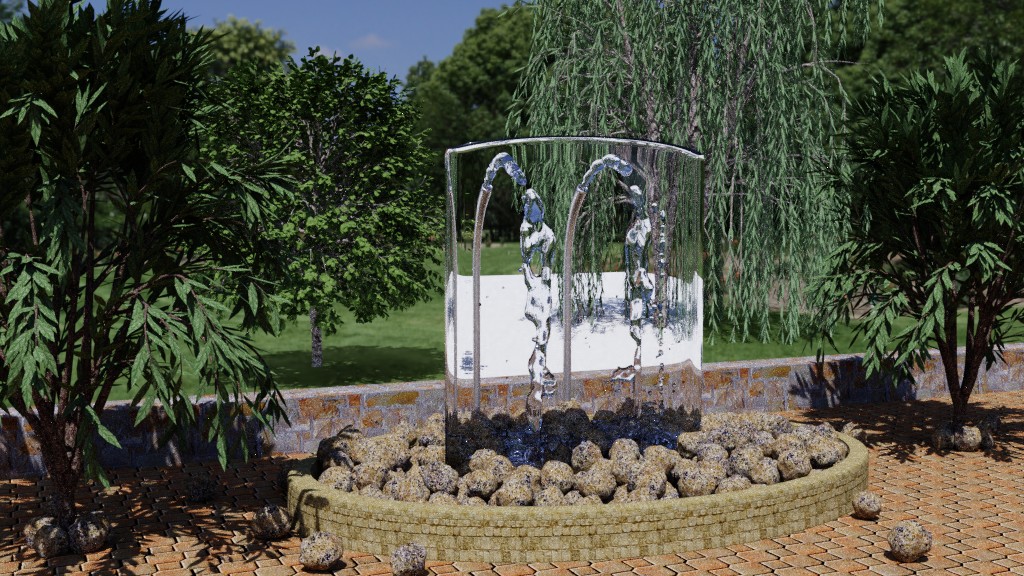
How to fix shadow catcher? There is a shadow catcher plane just beyond the wall. It gives the trees shadows on the hdri background. The plane appears white through the glass. Solutions?
- Attachments
-
I prefer dangerous freedom over peaceful servitude. -- Thomas Jefferson/Jean Jacques Rousseau
-
Draise
- Captain
- Posts: 3200
- Joined: 21 Sep 2009, 19:33
- Type the number ten into the box: 0
- Location: Bogota, Colombia
Re: Potpourri March 2018 challenge WIP
Render fountain on another layer.
Only render shadows of fountain on background objects but essentially make it invisible in one layer. Shadow catcher will work. Then render the fountain with no shadow catcher. Composite them both. Fountain with alpha over background rendered correctly without fountain (only it's shadows).
Only render shadows of fountain on background objects but essentially make it invisible in one layer. Shadow catcher will work. Then render the fountain with no shadow catcher. Composite them both. Fountain with alpha over background rendered correctly without fountain (only it's shadows).
-
Finis
- Captain
- Posts: 5410
- Joined: 21 May 2009, 18:26
- Type the number ten into the box: 0
- Location: America!
Re: Potpourri March 2018 challenge WIP
Blah! Too much trouble. But it looks like that is the only way. People are having trouble with it appearing in reflections too. They have to give the catcher a material, which has to match the background image, and move and scale it to fit so the reflection looks right. That is ridiculous. It should have remained experimental in 2.79 because it is not ready.
Hopefully it will be fixed so it always invisible everywhere except the shadows. For now though it is like you, Draise, said unless someone knows of something else.
Hopefully it will be fixed so it always invisible everywhere except the shadows. For now though it is like you, Draise, said unless someone knows of something else.
I prefer dangerous freedom over peaceful servitude. -- Thomas Jefferson/Jean Jacques Rousseau
-
Draise
- Captain
- Posts: 3200
- Joined: 21 Sep 2009, 19:33
- Type the number ten into the box: 0
- Location: Bogota, Colombia
Re: Potpourri March 2018 challenge WIP
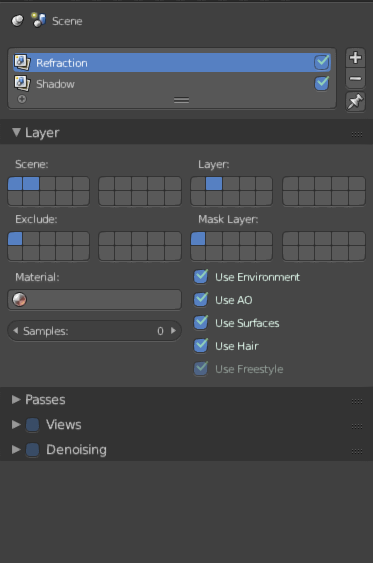
Render pass workflow is.... really an industry standard. Only in game engines have they really tackled this due to the nature of not being a raytracer. I don't know of a raytrace renderer who has solved this issue.
I have attached the basic passes of how I would render them out to save you some discovering how.
Then in the compositor I'd just use Alpha Over or Mix nodes for the two lanes and composite.
A good thing about passes is each can have different render settings, so something like AO only would have a quarter quality than the beauty image (and the beauty wouldn't have AO) so you save time rendering by dropping the AO quality. (and you get control of tuning the AO after you've rendered in the compositing nodes)
I have attached the basic passes of how I would render them out to save you some discovering how.
Then in the compositor I'd just use Alpha Over or Mix nodes for the two lanes and composite.
A good thing about passes is each can have different render settings, so something like AO only would have a quarter quality than the beauty image (and the beauty wouldn't have AO) so you save time rendering by dropping the AO quality. (and you get control of tuning the AO after you've rendered in the compositing nodes)
- Attachments
-
-

-
Finis
- Captain
- Posts: 5410
- Joined: 21 May 2009, 18:26
- Type the number ten into the box: 0
- Location: America!
Re: Potpourri March 2018 challenge WIP
Render passes/compositing standard for pros, of course. Useful for some things, of course. Must use that to fix shadow catcher bugs, ludicrous. The blender shadow catcher is not finished enough to be released other than as experimental or in a beta. No big deal ... passes/compositing shouldn't be needed but they can work around the problem ... or is the problem bigger than shadow catchers? See below.
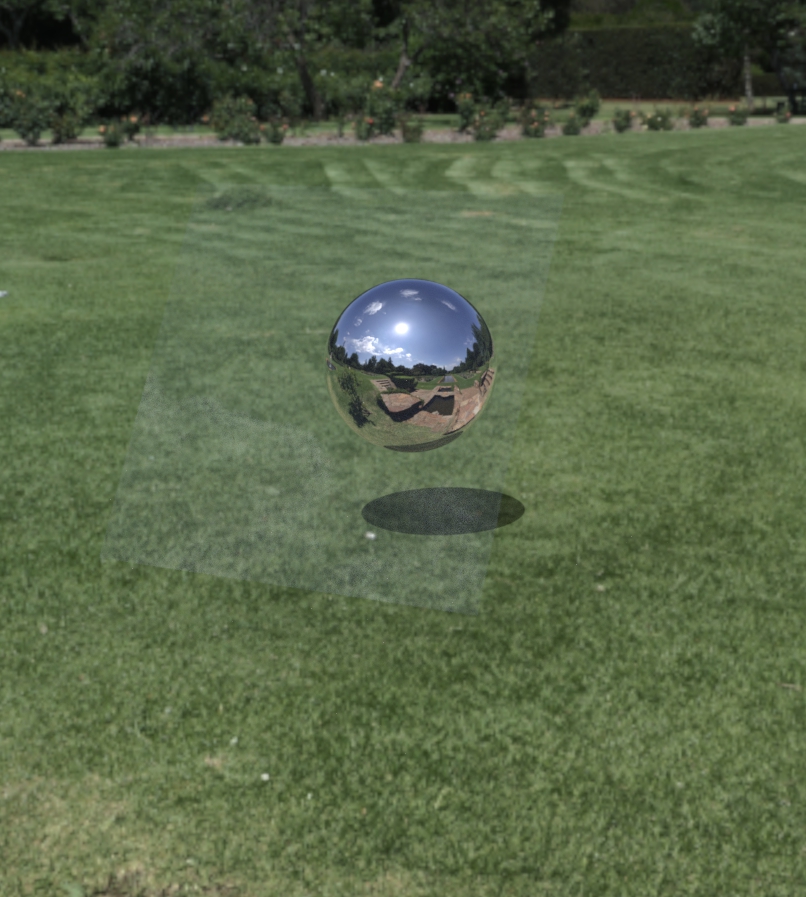
Here is a shadow catcher test with Iray in Daz. No problems with reflecting the catcher or it appearing through glass. The ground is HDRI which is also the only light. There is a glass plane in front of the ball. No passes needed. No layers needed. No compositing needed. Rendered in seconds so passes/compositing equals effort wasted.
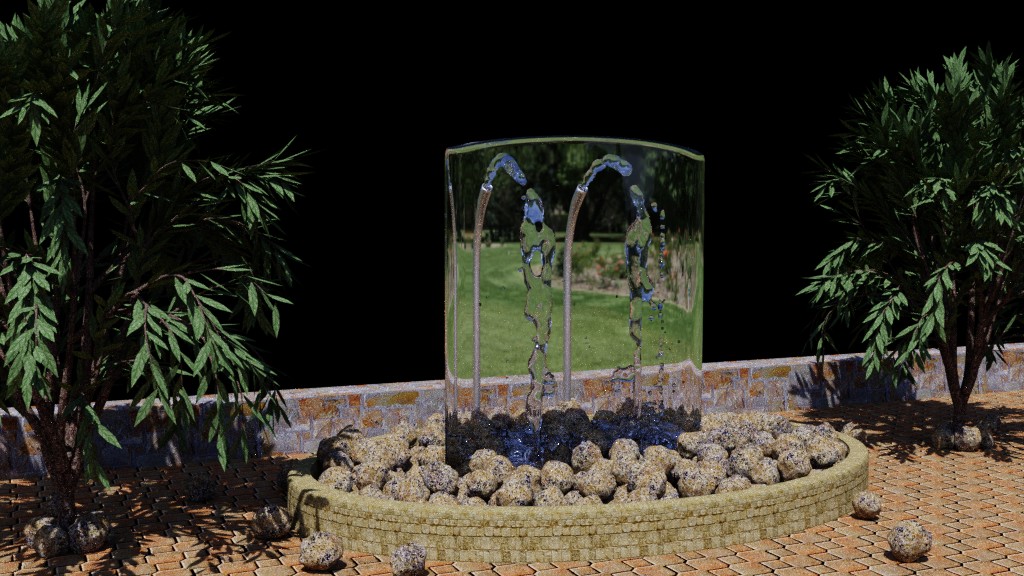
I put the two trees and the shadow catcher, which are beyond the wall, on another layer. I set Transparent on in Render->Film so the hdri would give light but not appear in the render. That creates a transparency where it would have been. Problem if I needed reflection of it in the glass. Then I would render the "beyond the wall" layer with hdri visible and put them together in Paint Shop. Except the hdri still shows through the glass! So the glass bsdf shader shows whatever is behind it whether it should or not. I tried mixing a transparency shader node and using the principled bsdf. Didn't work either.
I need the view through the glass to be a transparent background to see the other layer.
(The black part is transparent in a png.)
I'll try the more complicated layering scheme you described. Looks like good stuff to learn anyway. I think the problem now is that things show through the glass when they shouldn't. Since this is a hobby picture I should wait for the bugs to be fixed or rearrange it so the catcher isn't needed but I don't want to.
Here is a shadow catcher test with Iray in Daz. No problems with reflecting the catcher or it appearing through glass. The ground is HDRI which is also the only light. There is a glass plane in front of the ball. No passes needed. No layers needed. No compositing needed. Rendered in seconds so passes/compositing equals effort wasted.
I need the view through the glass to be a transparent background to see the other layer.
(The black part is transparent in a png.)
I prefer dangerous freedom over peaceful servitude. -- Thomas Jefferson/Jean Jacques Rousseau
-
Finis
- Captain
- Posts: 5410
- Joined: 21 May 2009, 18:26
- Type the number ten into the box: 0
- Location: America!
Re: Potpourri March 2018 challenge WIP
EDIT: Nope, didn't get it. The shadows are also not present with the action below. Re-thinking it that makes sense.
Got it!
Select the shadow catcher object. Go to its Object panel. In Cycles Settings->Ray Visibility uncheck Transmission. Then it looks right through the glass!
Got it!
Select the shadow catcher object. Go to its Object panel. In Cycles Settings->Ray Visibility uncheck Transmission. Then it looks right through the glass!
I prefer dangerous freedom over peaceful servitude. -- Thomas Jefferson/Jean Jacques Rousseau
-
Finis
- Captain
- Posts: 5410
- Joined: 21 May 2009, 18:26
- Type the number ten into the box: 0
- Location: America!
Re: Potpourri March 2018 challenge WIP
OK. The problem is not with the shadow catcher. Blender has a problem with glass. Looking through glass to a transparent background won't work. That is why Render->Film->transparent shows the hdri through the glass. The catcher's transparent parts show white through glass so again it is transparency.
Current solution: coming soon.
Future solution: The cutting edge 2.79 available from the "Blender Bot" (I don't know what that is) has a new feature Transparent Glass. It is a checkbox near the Film->transparent box. That might fix this. Better if they would fix glass and reflections so they don't show invisible things.
Draise: Thanks for the info. about layers, masks, passes, and so forth. It is good stuff to know, introduced me to features I hadn't explored, and will be useful in future projects.
I'll post an April challenge soon.
Current solution: coming soon.
Future solution: The cutting edge 2.79 available from the "Blender Bot" (I don't know what that is) has a new feature Transparent Glass. It is a checkbox near the Film->transparent box. That might fix this. Better if they would fix glass and reflections so they don't show invisible things.
Draise: Thanks for the info. about layers, masks, passes, and so forth. It is good stuff to know, introduced me to features I hadn't explored, and will be useful in future projects.
I'll post an April challenge soon.
I prefer dangerous freedom over peaceful servitude. -- Thomas Jefferson/Jean Jacques Rousseau
-
RAYMAN

- Captain
- Posts: 2547
- Joined: 21 May 2009, 18:56
Re: Potpourri March 2018 challenge WIP
Much easier! Just copy in the shadow in post pro!
Blender isnt production quality Im afraid!
On paper its not bad and it has good functions!
But it simply lacks...quality!
Cinema 4d costs money ... but you import fbx and it works! Import it in Blender and its always hit and miss! Sometimes it works ..but sometimes not!
Dont know..its a well known issue..and even the boss of Blender admits....the industry doesnt make it easy for Blender! They always slightly change specs ie in formats.. against compatability!
Blender isnt production quality Im afraid!
On paper its not bad and it has good functions!
But it simply lacks...quality!
Cinema 4d costs money ... but you import fbx and it works! Import it in Blender and its always hit and miss! Sometimes it works ..but sometimes not!
Dont know..its a well known issue..and even the boss of Blender admits....the industry doesnt make it easy for Blender! They always slightly change specs ie in formats.. against compatability!
-
Finis
- Captain
- Posts: 5410
- Joined: 21 May 2009, 18:26
- Type the number ten into the box: 0
- Location: America!
Re: Potpourri March 2018 challenge WIP
@Rayman. Agreed, Blender isn't production level but I'd qualify that as dependent on what you want to produce. I think many Blender users are hobbyists like me where the main factor is price but people do use it for professional work.
The problem with shadow catcher's invisible part showing through the glass prevented doing it in a single render like would be possible in Iray/Daz. Working around that with compositing as recommend require transparency behind the glass but like the shadow catcher the hdri background also appeared through the glass when it shouldn't. Counter measures for that didn't work. There are probably things I didn't find to try. So making appropriate layers or masks wouldn't work due to glass transparency trouble.
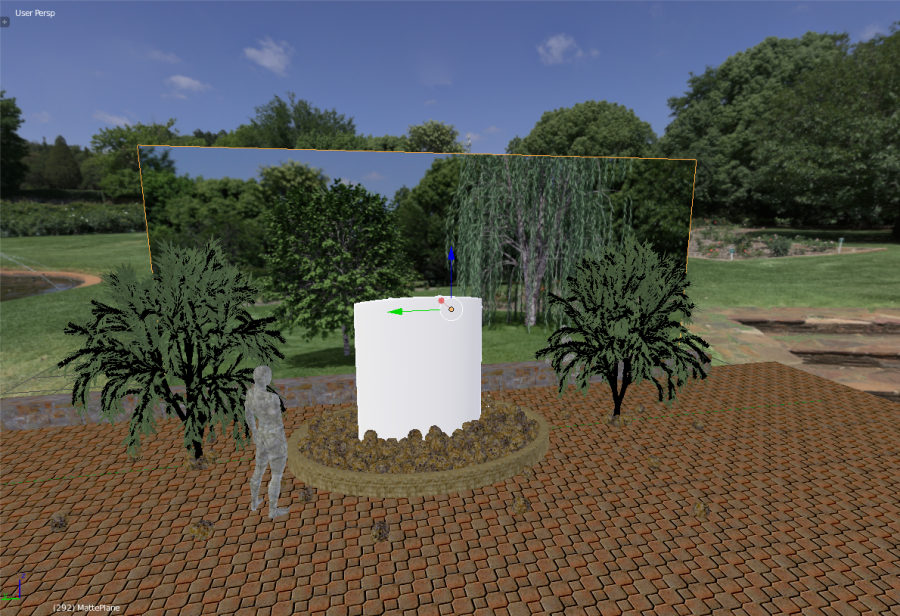
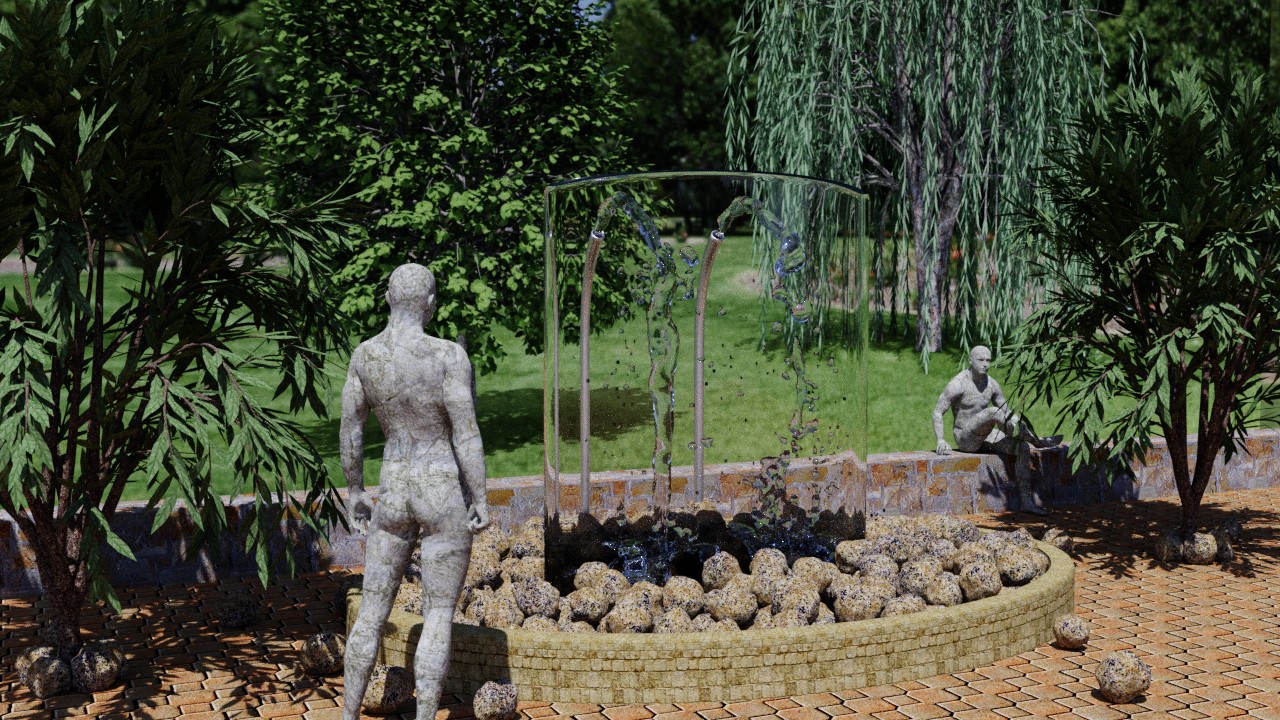
Ordinary objects appear without trouble through the glass. I made an image of the background trees and the hdri. With no glass the shadow catcher worked. Then I applied that image to a plane behind the foreground objects as shown below. The hdri is not visible in the finished picture but does provide the light.
The problem with shadow catcher's invisible part showing through the glass prevented doing it in a single render like would be possible in Iray/Daz. Working around that with compositing as recommend require transparency behind the glass but like the shadow catcher the hdri background also appeared through the glass when it shouldn't. Counter measures for that didn't work. There are probably things I didn't find to try. So making appropriate layers or masks wouldn't work due to glass transparency trouble.
Ordinary objects appear without trouble through the glass. I made an image of the background trees and the hdri. With no glass the shadow catcher worked. Then I applied that image to a plane behind the foreground objects as shown below. The hdri is not visible in the finished picture but does provide the light.
I prefer dangerous freedom over peaceful servitude. -- Thomas Jefferson/Jean Jacques Rousseau
-
Dragneye

- Lieutenant
- Posts: 906
- Joined: 02 Sep 2009, 22:09
Re: Potpourri March 2018 challenge WIP
Very nice work Finis.
I'm working on a scene with glass so all this effort may be useful. Have to look into these details.
Draise, thanks for sharing.
I'm working on a scene with glass so all this effort may be useful. Have to look into these details.
Draise, thanks for sharing.
-
Draise
- Captain
- Posts: 3200
- Joined: 21 Sep 2009, 19:33
- Type the number ten into the box: 0
- Location: Bogota, Colombia
Re: Potpourri March 2018 challenge WIP
Final images are great. Glad you got it sorted. Good work.
Lately I've ditched all raytracing software due to the annoying headaches and times and only render realtime in Unreal Engine or others. I prefer seeing what you'll get...
Keep them coming!
Lately I've ditched all raytracing software due to the annoying headaches and times and only render realtime in Unreal Engine or others. I prefer seeing what you'll get...
Keep them coming!
-
Finis
- Captain
- Posts: 5410
- Joined: 21 May 2009, 18:26
- Type the number ten into the box: 0
- Location: America!
Re: Potpourri March 2018 challenge WIP
Yeah, I'm looking at eevee or similar for a larger project later on. Mostly it is the speed to render lots of frames.
Thanks y'all. Dragneye, I used the glass bsdf shader to make it easy. It worked ok for regular stuff. Just things that should be transparent or invisible cause trouble when seen through glass. I think there are node recipes for better glass.
The final renders have many samples and no denoise since the water looks better. Still mysterious darkness in the water at the bottom.
April challenge coming probably tonight.
Thanks y'all. Dragneye, I used the glass bsdf shader to make it easy. It worked ok for regular stuff. Just things that should be transparent or invisible cause trouble when seen through glass. I think there are node recipes for better glass.
The final renders have many samples and no denoise since the water looks better. Still mysterious darkness in the water at the bottom.
April challenge coming probably tonight.
I prefer dangerous freedom over peaceful servitude. -- Thomas Jefferson/Jean Jacques Rousseau
-
RAYMAN
- Captain
- Posts: 2547
- Joined: 21 May 2009, 18:56
Re: Potpourri March 2018 challenge WIP
Just downloaded Prorender for Blender! Its free and pretty awsome! Played with it yesterday! Only flaw is there is no direct conversion of Blender materials just of cycles materials! Which lets me need to take one more unnecessary step... !
Conversion from Blender to Cycles and then from Cycles to Prorender nodes!
But its blindingly fast and quite nicely looking and best of all its free and uses 2 cards simultaniously one even cl and one cuda!
Plus ita hybrid gpu and cpu...so no more running out of memory!
Conversion from Blender to Cycles and then from Cycles to Prorender nodes!
But its blindingly fast and quite nicely looking and best of all its free and uses 2 cards simultaniously one even cl and one cuda!
Plus ita hybrid gpu and cpu...so no more running out of memory!
-
Finis
- Captain
- Posts: 5410
- Joined: 21 May 2009, 18:26
- Type the number ten into the box: 0
- Location: America!
Re: Potpourri March 2018 challenge WIP
Prorender looks great. Will definitely try it. Eevee will be well integrated with Blender someday but it isn't out yet and Prorender is probably better.
Why the Blender internal step? Start with cycles or if possible make your materials for Prorender from the beginning when you know you'll use it. Well, I'll find out when I try it.
Why the Blender internal step? Start with cycles or if possible make your materials for Prorender from the beginning when you know you'll use it. Well, I'll find out when I try it.
I prefer dangerous freedom over peaceful servitude. -- Thomas Jefferson/Jean Jacques Rousseau
-
RAYMAN
- Captain
- Posts: 2547
- Joined: 21 May 2009, 18:56
Re: Potpourri March 2018 challenge WIP
Why? Quite simple because I do my modeling in Moi3d or in a special houses builder...and then in Sketchup! Thats 1000x faster..plus its faster to texture and to render! In Sketchup 95% of the parts are instances..and with the Sketchup plugin which is also free they also come in as instances! That way you can build sets that are 100x bigger with the same hardware footprint!!!
They come into Blender and texture inside Blenderengine but not in cycles texture!
So I have to run the converter skript to cycles! Which isnt a big deal! I have to open Blender again..or a differnt version of Blender and run the Prorender converter! Everything still 100x faster the building fro scratch inside Blender!
In Sketchup Kitbashing realy makes sense..they remain instances..and can be all retextured and changed in one go!!!!!
Its also the best way to use TS in the workflow!
Export to Sketchup!
By the way Sketchup is free for personal work!
They come into Blender and texture inside Blenderengine but not in cycles texture!
So I have to run the converter skript to cycles! Which isnt a big deal! I have to open Blender again..or a differnt version of Blender and run the Prorender converter! Everything still 100x faster the building fro scratch inside Blender!
In Sketchup Kitbashing realy makes sense..they remain instances..and can be all retextured and changed in one go!!!!!
Its also the best way to use TS in the workflow!
Export to Sketchup!
By the way Sketchup is free for personal work!
-
Finis
- Captain
- Posts: 5410
- Joined: 21 May 2009, 18:26
- Type the number ten into the box: 0
- Location: America!
Re: Potpourri March 2018 challenge WIP
Aw. I can't try Prorender now because it needs Windows 10 to use Nvidia cards. I'll try it whenever I get win 10 or if it can use win 8.1 in the future. I like the all-in-one nature of Blender but "jack of all trades -- master of none". Cycles is cool but an Iray level renderer for Blender would be nice and with its add on/plug in Prorender can do that. I'll need eevee or Draisian realtime workflow for speed on some things.
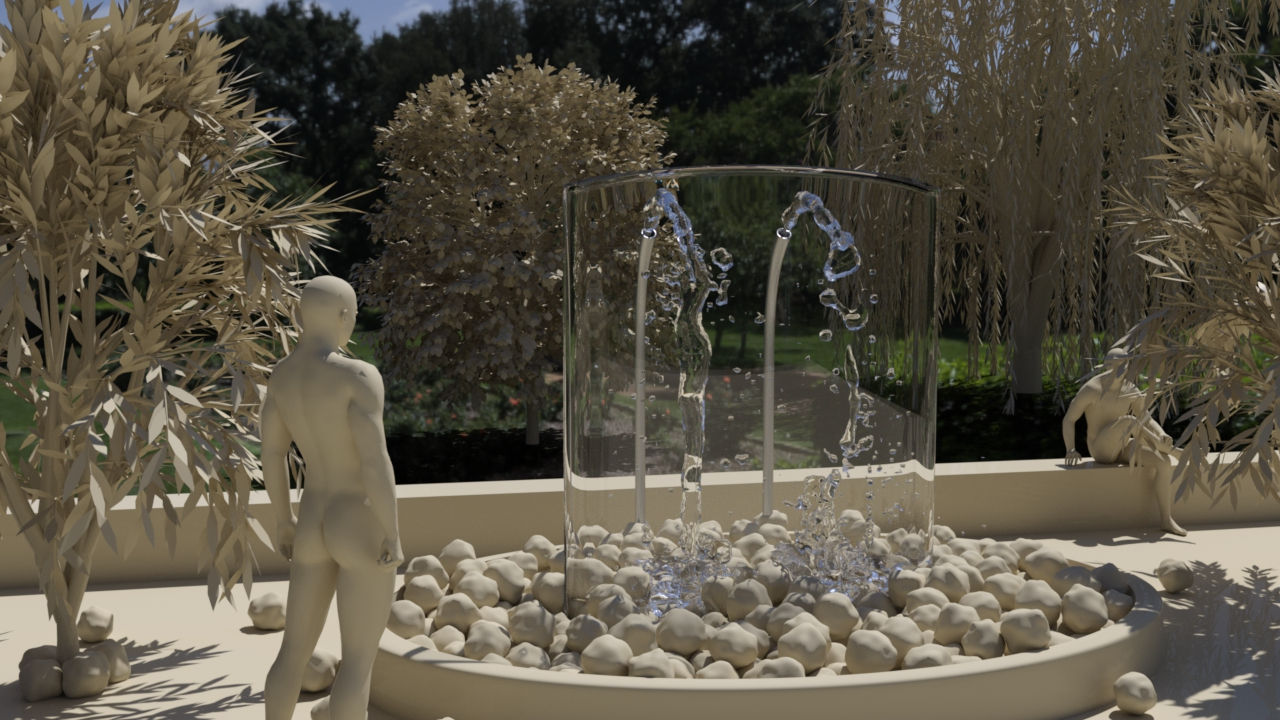
Here is a test of the scene in Iray/Daz. It is the glass, water, and shadow catcher I'm comparing. The cycles renders above haven't nearly enough samples or bounces to compare render times or overall image quality. The Iray render has very good water and glass using the preset materials. I've seen good water done with cycles so that may be a matter of me learning the material nodes for it. It was rendered in one pass, one image, no compositing or background plane. I like the brighter hdri in cycles. There is probably a way to adjust that in both programs. The cycles glass had little reflection. Iray glass does.
This rendered in 12 minutes in Iray. I tried various combinations of hardware with Iray and a simple scene. (GTX 1060 3gb, GT 640, CPU) Usually the 640 runs the screen and the 1060 is free for renders. Adding the CPU and/or the 640 is slower than just the 1060. I didn't try CPU only.
Here is a test of the scene in Iray/Daz. It is the glass, water, and shadow catcher I'm comparing. The cycles renders above haven't nearly enough samples or bounces to compare render times or overall image quality. The Iray render has very good water and glass using the preset materials. I've seen good water done with cycles so that may be a matter of me learning the material nodes for it. It was rendered in one pass, one image, no compositing or background plane. I like the brighter hdri in cycles. There is probably a way to adjust that in both programs. The cycles glass had little reflection. Iray glass does.
This rendered in 12 minutes in Iray. I tried various combinations of hardware with Iray and a simple scene. (GTX 1060 3gb, GT 640, CPU) Usually the 640 runs the screen and the 1060 is free for renders. Adding the CPU and/or the 640 is slower than just the 1060. I didn't try CPU only.
- Attachments
-
I prefer dangerous freedom over peaceful servitude. -- Thomas Jefferson/Jean Jacques Rousseau
-
RAYMAN
- Captain
- Posts: 2547
- Joined: 21 May 2009, 18:56
Re: Potpourri March 2018 challenge WIP
looks good! Iray is also very good!
Yeah it takes some testing to get things done well inside Blenders gpu rendering! Have you downloaded some materials..there is some awsome free stuff around!
try this!
http://blendermada.com/materials/detail/93-reflection/
Yeah it takes some testing to get things done well inside Blenders gpu rendering! Have you downloaded some materials..there is some awsome free stuff around!
try this!
http://blendermada.com/materials/detail/93-reflection/
-
Finis
- Captain
- Posts: 5410
- Joined: 21 May 2009, 18:26
- Type the number ten into the box: 0
- Location: America!
Re: Potpourri March 2018 challenge WIP
@Rayman, Thanks! I watch videos and read tutorials for materials but I should have thought that there would but sources of them around. I'll start collecting a library of them. I'll also learn from the pre-made ones.
I prefer dangerous freedom over peaceful servitude. -- Thomas Jefferson/Jean Jacques Rousseau