Here is a different version of the Teleporter made by Dele here:
http://forums1.caligari.com/truespace/s ... ostcount=1"
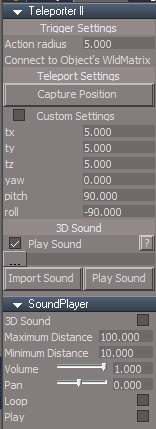
This version includes a 3D Sound Player.
Also supports being encapsulted several levels deep if necessary.
Connect your Object's WldMatrix that you want to use a the Trigger to the Teleporter's Matrix attribute.
This will also be used for the 3D Sound's Obj Position.
tS761 Teleporter ll
-
trueBlue

- Captain
- Posts: 5548
- Joined: 06 Jul 2009, 22:50
- Type the number ten into the box: 10
tS761 Teleporter ll
- Attachments
-
- Capture2.PNG (10.35 KiB) Viewed 668 times
-
- Teleporter ll.zip
- (60.5 KiB) Downloaded 58 times
Last edited by trueBlue on 27 Oct 2009, 13:27, edited 1 time in total.
-
3dvisuals dude

- Chief Warrant Officer
- Posts: 643
- Joined: 03 Jun 2009, 02:53
- Type the number ten into the box: 0
Re: tS761 Teleporter ll
I like this version, thanks! I will play with it some more. already have tonight! : )

-
Morion
- Petty Officer Third Class
- Posts: 18
- Joined: 23 May 2009, 06:38
Re: tS761 Teleporter ll
Nice one! Actually managed to download it (cause it is a tiny file), and ran it attached to a mirror flame plate. Really nice sound. I take it that the tx, ty, tz values represent the point that the avatar(viewer) is translated to relative to the teleporter gate? Good fun!! 
-
trueBlue
- Captain
- Posts: 5548
- Joined: 06 Jul 2009, 22:50
- Type the number ten into the box: 10
Re: tS761 Teleporter ll
There is two ways to get the coordinates that a user gets teleported to.
1.) Navigate around your view to the spot you want then select the Capture Position button.
or
2.) With the Custom Settings 'checked' you can enter your coordinates manually.
1.) Navigate around your view to the spot you want then select the Capture Position button.
or
2.) With the Custom Settings 'checked' you can enter your coordinates manually.
-
Morion
- Petty Officer Third Class
- Posts: 18
- Joined: 23 May 2009, 06:38
Re: tS761 Teleporter ll
Thanks trueBlue. I have since taken the time to view the instruction video and it is all much clearer now. 
-
3dvisuals dude
- Chief Warrant Officer
- Posts: 643
- Joined: 03 Jun 2009, 02:53
- Type the number ten into the box: 0
Re: tS761 Teleporter ll
I have an issue with the door triggers which Dele created for us all, namely that when I try and place them along with a structure encapsulated together in 3D, the door mechanism/trigger fails.trueBlue wrote:Here is a different version of the Teleporter made by Dele here:
http://forums1.caligari.com/truespace/s ... ostcount=1"
This version includes a 3D Sound Player.
Also supports being encapsulted several levels deep if necessary.
Connect your Object's WldMatrix that you want to use a the Trigger to the Teleporter's Matrix attribute.
This will also be used for the 3D Sound's Obj Position.
In the new teleportation trigger you created above, what method did you use which I might similarly use to overcome the similar issue of scripts failing when encapsulated in 3d with other objects?
Thanks in advance for the advice!
-
trueBlue
- Captain
- Posts: 5548
- Joined: 06 Jul 2009, 22:50
- Type the number ten into the box: 10
Re: tS761 Teleporter ll
Here you go 3DVD:
viewtopic.php?t=978"
viewtopic.php?t=978"
-
3dvisuals dude
- Chief Warrant Officer
- Posts: 643
- Joined: 03 Jun 2009, 02:53
- Type the number ten into the box: 0

