Here it is folks. Enjoy!
EDIT August 5 2011:
I added another zip file: OBJ_FULL_08052011.
This zip file contains the plugin and readme, which explains the installation process.
Also, it contains the truespace scene object which allows export of OBJ procedural animation.
The use of this node is explained in the Readme file.
Lastly, the vcredistx86.exe is also included in the zip file.
In addition, I am releasing the source code for the OBJ package.
This is in the zip file: OBJ_Pkg_InWork_07052011.zip
The zip file contains the Intellisense database. I believe, this will help you
when you are studying the code. You may need to change some #include lines
to get this to compile. That depends on where you unzip this code.
This plugin can be used as a baseline for importing and exporting other 3d file formats.
Modifications are required for reading input data file formats, and writing to
output data file formats.
For example, reading DXF files, and writing out to DXF files. Yeah that's an old format
but it's what I am thinking of right at the moment.
If you have any questions about the source code let's discuss it. I am happy to help,
as this will help increase the longevity of trueSpace.
FREE OBJ IMPORT / EXPORT FOR WORKSPACE PKG
-
froo
- Captain
- Posts: 2554
- Joined: 22 May 2009, 12:13
FREE OBJ IMPORT / EXPORT FOR WORKSPACE PKG
- Attachments
-
- OBJ_Pkg_InWork_07052011.zip
- (13.85 MiB) Downloaded 309 times
-
- OBJ_FULL_08052011.zip
- (1.88 MiB) Downloaded 360 times
-
clintonman

- Captain
- Posts: 5659
- Joined: 21 May 2009, 21:08
- Type the number ten into the box: 0
- Location: California
-
Steinie

- Captain
- Posts: 2958
- Joined: 21 May 2009, 17:38
- Type the number ten into the box: 10
Re: FREE OBJ IMPORT / EXPORT FOR WORKSPACE PKG
Your Obj Importer is pulling in Sculptris Models into workSpace/trueSpace with no problems.
Thanks Jason!
Thanks Jason!
-
froo
- Captain
- Posts: 2554
- Joined: 22 May 2009, 12:13
Re: FREE OBJ IMPORT / EXPORT FOR WORKSPACE PKG
Welcome Clinton!
Welcome Steinie! I am really glad that it works!
I do hope that everyone can get a lot of use out of it.
When I get a chance in the near future, I will release the source code as well.
I don't think I need to worry about putting licensing stuff in there. Maybe just my
name. And resume.
Welcome Steinie! I am really glad that it works!
I do hope that everyone can get a lot of use out of it.
When I get a chance in the near future, I will release the source code as well.
I don't think I need to worry about putting licensing stuff in there. Maybe just my
name. And resume.
-
Tiles

- Master Chief Petty Officer
- Posts: 401
- Joined: 27 May 2009, 08:34
Re: FREE OBJ IMPORT / EXPORT FOR WORKSPACE PKG
Thanks for this gift froo 
Free Gamegraphics, Freeware Games http://reinerstilesets.de
-
froo
- Captain
- Posts: 2554
- Joined: 22 May 2009, 12:13
Re: FREE OBJ IMPORT / EXPORT FOR WORKSPACE PKG
Welcome Tiles!
All I ask is that all you folks put it to good use!
Froo
All I ask is that all you folks put it to good use!
Froo
-
Wigand
- Senior Chief Petty Officer
- Posts: 204
- Joined: 21 May 2009, 17:38
Re: FREE OBJ IMPORT / EXPORT FOR WORKSPACE PKG
Thank you froo.
How can I install the rsx object?
If I drag and drop it into a library and double click it, I get an error.
I still use trueSpace7.61 Beta8
How can I install the rsx object?
If I drag and drop it into a library and double click it, I get an error.
I still use trueSpace7.61 Beta8
-
froo
- Captain
- Posts: 2554
- Joined: 22 May 2009, 12:13
Re: FREE OBJ IMPORT / EXPORT FOR WORKSPACE PKG
Hi Wigand.
I uploaded another zip file to the first post in this thread.
The new zip file contains:
the rsx plugin file
the readme, which explains the installation process, along with usage of the OBJ procedural animation export
(some Link Editor work is required for this)
vcredistx86.exe, required for computers without the Visual Studio software development environment
I can put together an example using the procedural animation export. I may have one on my computer.
I uploaded another zip file to the first post in this thread.
The new zip file contains:
the rsx plugin file
the readme, which explains the installation process, along with usage of the OBJ procedural animation export
(some Link Editor work is required for this)
vcredistx86.exe, required for computers without the Visual Studio software development environment
I can put together an example using the procedural animation export. I may have one on my computer.
-
Wigand
- Senior Chief Petty Officer
- Posts: 204
- Joined: 21 May 2009, 17:38
Re: FREE OBJ IMPORT / EXPORT FOR WORKSPACE PKG
Thank you froo, now I got it! 
(I did not realized that .rsx was a plugin file )
)
(I did not realized that .rsx was a plugin file
)-
froo
- Captain
- Posts: 2554
- Joined: 22 May 2009, 12:13
Re: FREE OBJ IMPORT / EXPORT FOR WORKSPACE PKG
Steinie reported some issues with export, namely,
textures are missing, and objects are inverted in other applications.
So, I will be working on resolving that. I will get it done as soon as I
can, though off-work hours may be limited. I have the original-original
source code so that's a good place to start.
Please, let me know if you have any issues as well. If you don't tell me,
I can't fix them.
Thanks
Froo
textures are missing, and objects are inverted in other applications.
So, I will be working on resolving that. I will get it done as soon as I
can, though off-work hours may be limited. I have the original-original
source code so that's a good place to start.
Please, let me know if you have any issues as well. If you don't tell me,
I can't fix them.
Thanks
Froo
-
froo
- Captain
- Posts: 2554
- Joined: 22 May 2009, 12:13
Re: FREE OBJ IMPORT / EXPORT FOR WORKSPACE PKG
I think I found the problem, though, I am not sure how it happened.
Must be the poltergeist. Or my absent minded alter ego. Or, most likely,
absent-minded me.
For some reason, I multiplied the x-ordinate of each vertex by -1, twice.
Effectively, un-doing what I wanted to do. Sort of like, .... nevermind.
Bonehead mistake:
multiply x ordinate by -1
temp.x = temp.x * -1;
copy vertex
tfPoint = temp;
now, once again, bonehead mistake, multiply x ordinate by -1
tfPoint.x *= -1;
-1 * -1 = 1 * 1 = Doing Absolutely Nothing
Let's see what Steinie finds. I hope this does it once and for all.
Must be the poltergeist. Or my absent minded alter ego. Or, most likely,
absent-minded me.
For some reason, I multiplied the x-ordinate of each vertex by -1, twice.
Effectively, un-doing what I wanted to do. Sort of like, .... nevermind.
Bonehead mistake:
multiply x ordinate by -1
temp.x = temp.x * -1;
copy vertex
tfPoint = temp;
now, once again, bonehead mistake, multiply x ordinate by -1
tfPoint.x *= -1;
-1 * -1 = 1 * 1 = Doing Absolutely Nothing
Let's see what Steinie finds. I hope this does it once and for all.
-
froo
- Captain
- Posts: 2554
- Joined: 22 May 2009, 12:13
Re: FREE OBJ IMPORT / EXPORT FOR WORKSPACE PKG
Based on Steinie's feedback, I made some fixes to the package.
We both found a few minor problems in this latest build, so I will
get those fixed.
Problems fixed:
object appears mirrored after importing into application
selected faces were in 'the back'; i.e. not visible
Textures import with model (for the most part; see below)
Problems to fix:
Some textures do not import properly into application
Some triangles are inverted when imported into application
We both found a few minor problems in this latest build, so I will
get those fixed.
Problems fixed:
object appears mirrored after importing into application
selected faces were in 'the back'; i.e. not visible
Textures import with model (for the most part; see below)
Problems to fix:
Some textures do not import properly into application
Some triangles are inverted when imported into application
-
froo
- Captain
- Posts: 2554
- Joined: 22 May 2009, 12:13
Re: FREE OBJ IMPORT / EXPORT FOR WORKSPACE PKG
Ok; looks like we're pretty much there.
However, there appear to be some problems with the trueSpace data stream for Material Indexes.
This means, each triangle is assigned a material index. If you have multiple materials, then each
triangle will have only one of those material indexes associated with it.
The problem is, sometimes the stream does not contain the correct material index for each triangle.
Some are correct, others are not. If I have one material, some triangles have a material index of: 4, or 9, or, 34784759326 (garbage).
I only use the stream if it exists. Existence is supposed to mean: VALID.
The end result is, on export, the triangles are sorted by material. If a triangle uses a 'non-existent' material index,
essentially the triangle is not written to the output file. This will result in one or more 'voids' in your object
when you import into another application.
EDIT:
Therefore, your mileage with exporting objects with materials may vary. If you have problems with texture export,
the simplest course of action is to texture in another application.
I will be preparing this latest build for upload shortly.
In addition, I plan to release the source code. Other import/export plugins can be developed from this code.
Most of the code can be reused. The code sections requiring change are those pertinent to reading other file formats
(for import), and writing truespace data out to other formats (for export).
Please ask if you have any questions.
However, there appear to be some problems with the trueSpace data stream for Material Indexes.
This means, each triangle is assigned a material index. If you have multiple materials, then each
triangle will have only one of those material indexes associated with it.
The problem is, sometimes the stream does not contain the correct material index for each triangle.
Some are correct, others are not. If I have one material, some triangles have a material index of: 4, or 9, or, 34784759326 (garbage).
I only use the stream if it exists. Existence is supposed to mean: VALID.
The end result is, on export, the triangles are sorted by material. If a triangle uses a 'non-existent' material index,
essentially the triangle is not written to the output file. This will result in one or more 'voids' in your object
when you import into another application.
EDIT:
Therefore, your mileage with exporting objects with materials may vary. If you have problems with texture export,
the simplest course of action is to texture in another application.
I will be preparing this latest build for upload shortly.
In addition, I plan to release the source code. Other import/export plugins can be developed from this code.
Most of the code can be reused. The code sections requiring change are those pertinent to reading other file formats
(for import), and writing truespace data out to other formats (for export).
Please ask if you have any questions.
-
froo
- Captain
- Posts: 2554
- Joined: 22 May 2009, 12:13
Re: FREE OBJ IMPORT / EXPORT FOR WORKSPACE PKG
I have uploaded the latest build of the OBJ package. It is in the first post of this thread.
Check the 'EDIT' section of that post for information. Here is a copy of that info:
I added another zip file: OBJ_FULL_08052011.
This zip file contains the plugin and readme, which explains the installation process.
Also, it contains the truespace scene object which allows export of OBJ procedural animation.
The use of this node is explained in the Readme file.
Lastly, the vcredistx86.exe is also included in the zip file.
In addition, I am releasing the source code for the OBJ package.
This is in the zip file: OBJ_Pkg_InWork_07052011.zip
The zip file contains the Intellisense database. I believe, this will help you
when you are studying the code. You may need to change some #include lines
to get this to compile. That depends on where you unzip this code.
This plugin can be used as a baseline to import and export other 3d file formats.
Modifications are required for reading input data file formats, and writing to
output data file formats.
For example, reading DXF files, and writing out to DXF files. Yeah that's an old format
but it's what I am thinking of right at the moment.
If you have any questions about the source code let's discuss it. I am happy to help,
as this will help increase the longevity of trueSpace.
Check the 'EDIT' section of that post for information. Here is a copy of that info:
I added another zip file: OBJ_FULL_08052011.
This zip file contains the plugin and readme, which explains the installation process.
Also, it contains the truespace scene object which allows export of OBJ procedural animation.
The use of this node is explained in the Readme file.
Lastly, the vcredistx86.exe is also included in the zip file.
In addition, I am releasing the source code for the OBJ package.
This is in the zip file: OBJ_Pkg_InWork_07052011.zip
The zip file contains the Intellisense database. I believe, this will help you
when you are studying the code. You may need to change some #include lines
to get this to compile. That depends on where you unzip this code.
This plugin can be used as a baseline to import and export other 3d file formats.
Modifications are required for reading input data file formats, and writing to
output data file formats.
For example, reading DXF files, and writing out to DXF files. Yeah that's an old format
but it's what I am thinking of right at the moment.
If you have any questions about the source code let's discuss it. I am happy to help,
as this will help increase the longevity of trueSpace.
-
Saul
- Senior Chief Petty Officer
- Posts: 308
- Joined: 22 May 2009, 16:50
Re: FREE OBJ IMPORT / EXPORT FOR WORKSPACE PKG
Thanks Froo
'....DXF files. Yeah that's an old format....'
But still incredibly usefull!
Autocad to illustrator to tS, any which way.
'....DXF files. Yeah that's an old format....'
But still incredibly usefull!
Autocad to illustrator to tS, any which way.
-
froo
- Captain
- Posts: 2554
- Joined: 22 May 2009, 12:13
Re: FREE OBJ IMPORT / EXPORT FOR WORKSPACE PKG
Say, if you have downloaded the source code, can you just post a message here
saying you grabbed it, or send me a PM or email? I'm just curious who has
acquired it; you never know when I need to ask you a question, or you need
to ask one! I am more than happy to help, by answering questions.
Thanks!
Froo
saying you grabbed it, or send me a PM or email? I'm just curious who has
acquired it; you never know when I need to ask you a question, or you need
to ask one! I am more than happy to help, by answering questions.
Thanks!
Froo
-
clintonman
- Captain
- Posts: 5659
- Joined: 21 May 2009, 21:08
- Type the number ten into the box: 0
- Location: California
Re: FREE OBJ IMPORT / EXPORT FOR WORKSPACE PKG
Got it.froo wrote:Say, if you have downloaded the source code, can you just post a message here
saying you grabbed it, or send me a PM or email? I'm just curious who has
acquired it; you never know when I need to ask you a question, or you need
to ask one! I am more than happy to help, by answering questions.
Thanks!
Froo
-
v3rd3
- Lieutenant Commander
- Posts: 1191
- Joined: 21 May 2009, 20:04
Re: FREE OBJ IMPORT / EXPORT FOR WORKSPACE PKG
I downloaded the source though I expect it will be quite some time before I try to work with it.
Thanks for doing this froo I really appreciate the opportunity to look over your shoulder.
Thanks for doing this froo I really appreciate the opportunity to look over your shoulder.
-
froo
- Captain
- Posts: 2554
- Joined: 22 May 2009, 12:13
Re: FREE OBJ IMPORT / EXPORT FOR WORKSPACE PKG
Thanks clinton. Glad to help v3rd3. 
Have a good one!
Froo
Have a good one!
Froo
-
froo
- Captain
- Posts: 2554
- Joined: 22 May 2009, 12:13
Re: FREE OBJ IMPORT / EXPORT FOR WORKSPACE PKG
Hey folks.
Steinie has reported that the OBJ exporter converts quads to triangles.
I have a question.
Do you only see triangles being exported? Or do you see a combination of quads/ngons/triangles?
In my tests, I have seen a mixture, not triangles exclusively.
Please let me know.
thanks,
Jason
Steinie has reported that the OBJ exporter converts quads to triangles.
I have a question.
Do you only see triangles being exported? Or do you see a combination of quads/ngons/triangles?
In my tests, I have seen a mixture, not triangles exclusively.
Please let me know.
thanks,
Jason
-
Tiles
- Master Chief Petty Officer
- Posts: 401
- Joined: 27 May 2009, 08:34
Re: FREE OBJ IMPORT / EXPORT FOR WORKSPACE PKG
Hi Jason,
It exports tris and quads fine here. The only problem i have is that the exported mesh arrived with flipped normals in Blender. Not 100% sure if i run the latest version of the im and exporter though. A way to see the version number would be neat. Or have i overlooked it?
While at not sure, not sure if this was ever fixed that the Importer had a little precision problem at the last decimal value. I once stumbled across it at a very big and somehow regular mesh, which showed a very visible stairs effect while the one from the Modelside was a bit smoother. Looking at the written values lets me think that the problem may still exist. Sometimes zeros makes a difference ...
Here an extract of the vertices part from Blender:
One more thing. Both buttons names starts with Load Obj. Not a big deal. But i try to load again and again with the save button ...
Attached my testobject
It exports tris and quads fine here. The only problem i have is that the exported mesh arrived with flipped normals in Blender. Not 100% sure if i run the latest version of the im and exporter though. A way to see the version number would be neat. Or have i overlooked it?
While at not sure, not sure if this was ever fixed that the Importer had a little precision problem at the last decimal value. I once stumbled across it at a very big and somehow regular mesh, which showed a very visible stairs effect while the one from the Modelside was a bit smoother. Looking at the written values lets me think that the problem may still exist. Sometimes zeros makes a difference ...
Here an extract of the vertices part from Blender:
And now the same mesh from your Obj exporter ...o Mesh_Default
v 0.188679 -0.109080 -0.188679
v 0.325000 -0.090000 -0.325000
There are lots of zeros missing. You might notice that the group name is also missing ...v 0.188679 -0.10908 -0.188679
v 0.325 -0.09 -0.325
One more thing. Both buttons names starts with Load Obj. Not a big deal. But i try to load again and again with the save button ...
Attached my testobject
- Attachments
-
- pad.rar
- (37.55 KiB) Downloaded 243 times
Free Gamegraphics, Freeware Games http://reinerstilesets.de
-
Tiles
- Master Chief Petty Officer
- Posts: 401
- Joined: 27 May 2009, 08:34
Re: FREE OBJ IMPORT / EXPORT FOR WORKSPACE PKG
Correction, Import arrives triangulated.
Free Gamegraphics, Freeware Games http://reinerstilesets.de
-
froo
- Captain
- Posts: 2554
- Joined: 22 May 2009, 12:13
Re: FREE OBJ IMPORT / EXPORT FOR WORKSPACE PKG
Thanks Tiles. I'll take a look.
-
froo
- Captain
- Posts: 2554
- Joined: 22 May 2009, 12:13
Re: FREE OBJ IMPORT / EXPORT FOR WORKSPACE PKG
Well I loaded your object Tiles; it has a nice uniform mesh order.
Then I exported, and reimported.
On re-import, the mesh does not have a very nice uniform mesh order:
Faces are composed of odd shaped chunks. Although the
OBJ file has no more than 4 vertices to a face, I see some
selected faces in tS that have 7 vertices. Strange.
At least it works, but it could be better.
It looks like there have been some downloads of the source code so
perhaps someone out there can solve this. I don't think I can do much
more with it; it would take me a long time I think, to get it the way it
should be.
One interesting idea would be to force quad output, and quad input.
Anyone have some good ideas/algorithms for that?
Barring that, is it possible (Steinie?) to take the model exported using this package, and retopologize it in
Sculptris or Argile, or another 3d app?
Then I exported, and reimported.
On re-import, the mesh does not have a very nice uniform mesh order:
Faces are composed of odd shaped chunks. Although the
OBJ file has no more than 4 vertices to a face, I see some
selected faces in tS that have 7 vertices. Strange.
At least it works, but it could be better.
It looks like there have been some downloads of the source code so
perhaps someone out there can solve this. I don't think I can do much
more with it; it would take me a long time I think, to get it the way it
should be.
One interesting idea would be to force quad output, and quad input.
Anyone have some good ideas/algorithms for that?
Barring that, is it possible (Steinie?) to take the model exported using this package, and retopologize it in
Sculptris or Argile, or another 3d app?
-
Tiles
- Master Chief Petty Officer
- Posts: 401
- Joined: 27 May 2009, 08:34
Re: FREE OBJ IMPORT / EXPORT FOR WORKSPACE PKG
Thanks froo. At least you had a look at it
Free Gamegraphics, Freeware Games http://reinerstilesets.de
-
froo
- Captain
- Posts: 2554
- Joined: 22 May 2009, 12:13
Re: FREE OBJ IMPORT / EXPORT FOR WORKSPACE PKG
Thanks Tiles.
I still want to take a look at why it is doing that. I tried last night but I guess I was more tired
than I originally thought. Been a hectic week: getting new PC setup, dealing with stupid USB
wideband receiver useless piece of crap, running LAN cable, dealing with Comcast and homeowner,
discussing strategies on wiring the place, working late as a result, etc. So anyway. Beer
makes it aaaaalllll better....

So anyway, I don't know why my code can take 4 vertices, create some triangles, and suddenly,
trueSpace (or my code?) thinks there are 7 vertices in the face I just created. I say this because
when I enter edit mode and make a selection, I get an awkward shape selected, not always a
simple triangle, or quad. When I compare my imported 'pad' to your 'pad', the shapes look different:
edges, etc. I'll have to run this in debug mode to see if my code is doing that, or tS is, for some reason.
The hard part about doing this plugin stuff is, when it doesn't work as expected, it's hard to tell whether
it's my code, or a bug in tS. While I can safely say, it is more likely that it is my code, since I don't have the
experience the developers did, I also know that the SDK and tS are unfinished. And it's hard to ask, because
Tomas can be hard to get ahold of sometimes. And I can be that way as well I suppose.
I still want to take a look at why it is doing that. I tried last night but I guess I was more tired
than I originally thought. Been a hectic week: getting new PC setup, dealing with stupid USB
wideband receiver useless piece of crap, running LAN cable, dealing with Comcast and homeowner,
discussing strategies on wiring the place, working late as a result, etc. So anyway. Beer
makes it aaaaalllll better....
So anyway, I don't know why my code can take 4 vertices, create some triangles, and suddenly,
trueSpace (or my code?) thinks there are 7 vertices in the face I just created. I say this because
when I enter edit mode and make a selection, I get an awkward shape selected, not always a
simple triangle, or quad. When I compare my imported 'pad' to your 'pad', the shapes look different:
edges, etc. I'll have to run this in debug mode to see if my code is doing that, or tS is, for some reason.
The hard part about doing this plugin stuff is, when it doesn't work as expected, it's hard to tell whether
it's my code, or a bug in tS. While I can safely say, it is more likely that it is my code, since I don't have the
experience the developers did, I also know that the SDK and tS are unfinished. And it's hard to ask, because
Tomas can be hard to get ahold of sometimes. And I can be that way as well I suppose.
-
froo
- Captain
- Posts: 2554
- Joined: 22 May 2009, 12:13
Re: FREE OBJ IMPORT / EXPORT FOR WORKSPACE PKG
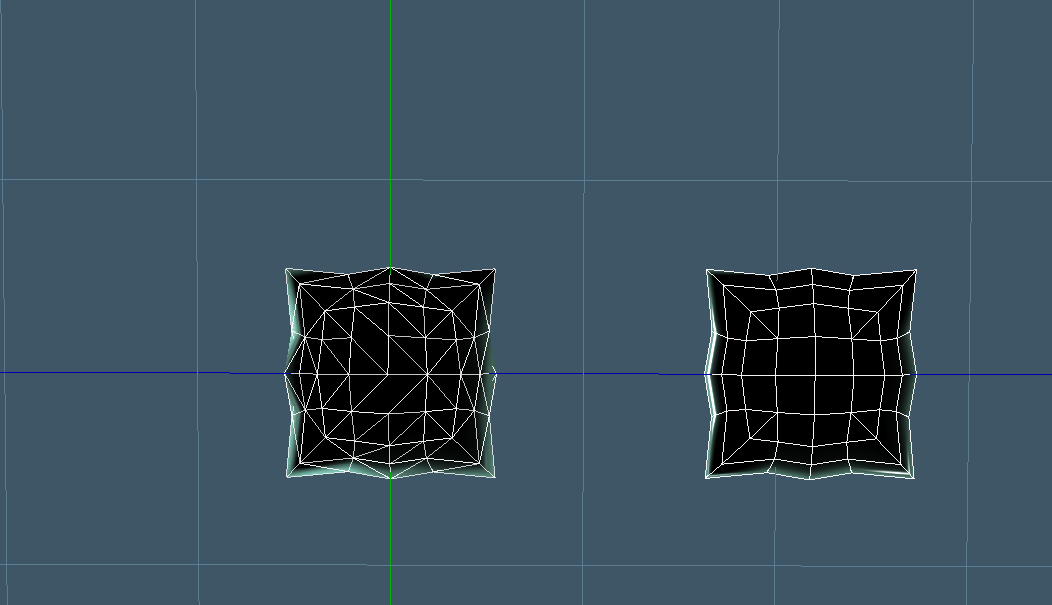
This picture shows the original object on the right (Tiles' pad object), and the same item, after exporting from trueSpace,
then reimporting into trueSpace (on the left). This is a view from the underside.
Doesn't quite look the same does it?
The OBJ package seems to work well enough I suppose. At least the data gets imported.
Is it 'good enough', or are there situations where the results are unacceptable? If the results
are always acceptable, then I can leave the code alone. I don't want to waste time trying to
improve it if it's not necessary to do so.
Also, if you want to take a crack at improving the code yourself, the function where all the
'triangulation' activity takes place, is: CRcCvrtToRsObj::Load_Face( ... )
Let me know.
Thanks
then reimporting into trueSpace (on the left). This is a view from the underside.
Doesn't quite look the same does it?
The OBJ package seems to work well enough I suppose. At least the data gets imported.
Is it 'good enough', or are there situations where the results are unacceptable? If the results
are always acceptable, then I can leave the code alone. I don't want to waste time trying to
improve it if it's not necessary to do so.
Also, if you want to take a crack at improving the code yourself, the function where all the
'triangulation' activity takes place, is: CRcCvrtToRsObj::Load_Face( ... )
Let me know.
Thanks
- Attachments
-
-
Steinie
- Captain
- Posts: 2958
- Joined: 21 May 2009, 17:38
- Type the number ten into the box: 10
Re: FREE OBJ IMPORT / EXPORT FOR WORKSPACE PKG
Well you have done a lot for us Jason. If it was my code this would bug me.
I would suggest at least looking at it once or better yet do what you just did
and ask others to check it out. Is this code functional, yes! It is when we use it
for animation the problems could happen. Heck I might be the only one with any
issues at all and my problems are no big deal.
I would suggest at least looking at it once or better yet do what you just did
and ask others to check it out. Is this code functional, yes! It is when we use it
for animation the problems could happen. Heck I might be the only one with any
issues at all and my problems are no big deal.
-
froo
- Captain
- Posts: 2554
- Joined: 22 May 2009, 12:13
Re: FREE OBJ IMPORT / EXPORT FOR WORKSPACE PKG
Thanks Bob.
It does bug me. I did not realize how 'mangled' the mesh looks on import.
On one hand, I feel the results suck, although they are 'functional'; and I want to fix it.
On the other hand, if it's not being used much, then I don't want to waste time working on it.
It's hard to put it down, but it's also hard to pick it back up.
It'd also be good if someone else with more knowledge about this could start up a dialog
with me to help me understand what the heck is wrong with it. Meh. I think I need to
go back to pencil and paper with this thing.
Thanks!
It does bug me. I did not realize how 'mangled' the mesh looks on import.
On one hand, I feel the results suck, although they are 'functional'; and I want to fix it.
On the other hand, if it's not being used much, then I don't want to waste time working on it.
It's hard to put it down, but it's also hard to pick it back up.
It'd also be good if someone else with more knowledge about this could start up a dialog
with me to help me understand what the heck is wrong with it. Meh. I think I need to
go back to pencil and paper with this thing.
Thanks!
-
froo
- Captain
- Posts: 2554
- Joined: 22 May 2009, 12:13
Re: FREE OBJ IMPORT / EXPORT FOR WORKSPACE PKG
Ok. It appears this is beyond my control. I will check with Tomas as soon as I can.
Here's the deal.
Tiles' pad object has no more than 4 vertices and 2 triangles in each face.
When I ran the code in debug mode, I checked these values in several relevant
place, where triangulation occurs. After triangulation, I never have more than
2 triangles generated per face.
I add these triangles to the triangle stream for trueSpace.
After this, I have no control over how trueSpace decides how to configure
the triangle stream into faces. That being said, there is a Face stream, but
Tomas stated some months ago, that it does not work. I will ask him about it,
to see if I can use it, to force trueSpace to handle the triangles the way we want:
as quads, or whatever. But I doubt it is possible.
Even though I create no more than 2 triangles per face on Tiles' object,
when I enter edit mode, I see that trueSpace has decided to create ngons.
Attached is a picture depicting the situation. On the left is Tiles' original object.
On the right, is the imported object, in edit mode, with one face selected, and one
face hovered over with the mouse. That's how I get 2 faces highlighted. As you
can see, these are both NGONS. I have no control over this at this time. This is
what I will ask Tomas about.
Here's the deal.
Tiles' pad object has no more than 4 vertices and 2 triangles in each face.
When I ran the code in debug mode, I checked these values in several relevant
place, where triangulation occurs. After triangulation, I never have more than
2 triangles generated per face.
I add these triangles to the triangle stream for trueSpace.
After this, I have no control over how trueSpace decides how to configure
the triangle stream into faces. That being said, there is a Face stream, but
Tomas stated some months ago, that it does not work. I will ask him about it,
to see if I can use it, to force trueSpace to handle the triangles the way we want:
as quads, or whatever. But I doubt it is possible.
Even though I create no more than 2 triangles per face on Tiles' object,
when I enter edit mode, I see that trueSpace has decided to create ngons.
Attached is a picture depicting the situation. On the left is Tiles' original object.
On the right, is the imported object, in edit mode, with one face selected, and one
face hovered over with the mouse. That's how I get 2 faces highlighted. As you
can see, these are both NGONS. I have no control over this at this time. This is
what I will ask Tomas about.
- Attachments
-

-
Tiles
- Master Chief Petty Officer
- Posts: 401
- Joined: 27 May 2009, 08:34
Re: FREE OBJ IMPORT / EXPORT FOR WORKSPACE PKG
Seems that i have hit a vital part again, heh. Sorry
Well, i know the Obj file format just a little bit, just enough to know what does what. And i know no real programming language besides a bit Javascript from Unity. So all i can give is some food for thought. Most probably not of real use
That said, when you have four edges, and you end with seven vertices, then there could be something wrong with the indexing i guess. Obj can reuse vertices. That`s where it is different from let`s say X, which writes its own vertices for every face. Another thing is seven less four makes three, and that`s a tri. Maybe that`s another hint, one tri too much somewhere?
What is also interesting is that you write tris out of a obj file that is made of quads. The vertices/face index is already quadrified. One line one face. So from my point of being a noob all there is left is to read the faces index and its corresponding vertices position as they are written in the Obj file. But i guess it`s not so easy because at one point you have to convert it to the truespace internal mesh handing, which works with tris, right? Well, was worth a thought ...
Another thought, Blender has a proper working Obj Im- and Exporter. And it is open source. Maybe you could have a look at how they handle things there?
And last but not least, as you already have mentioned, maybe it is not your importer, but a problem at trueSpace end?
Well, i know the Obj file format just a little bit, just enough to know what does what. And i know no real programming language besides a bit Javascript from Unity. So all i can give is some food for thought. Most probably not of real use
That said, when you have four edges, and you end with seven vertices, then there could be something wrong with the indexing i guess. Obj can reuse vertices. That`s where it is different from let`s say X, which writes its own vertices for every face. Another thing is seven less four makes three, and that`s a tri. Maybe that`s another hint, one tri too much somewhere?
What is also interesting is that you write tris out of a obj file that is made of quads. The vertices/face index is already quadrified. One line one face. So from my point of being a noob all there is left is to read the faces index and its corresponding vertices position as they are written in the Obj file. But i guess it`s not so easy because at one point you have to convert it to the truespace internal mesh handing, which works with tris, right? Well, was worth a thought ...
Another thought, Blender has a proper working Obj Im- and Exporter. And it is open source. Maybe you could have a look at how they handle things there?
And last but not least, as you already have mentioned, maybe it is not your importer, but a problem at trueSpace end?
Free Gamegraphics, Freeware Games http://reinerstilesets.de
-
froo
- Captain
- Posts: 2554
- Joined: 22 May 2009, 12:13
Re: FREE OBJ IMPORT / EXPORT FOR WORKSPACE PKG
Hi Tiles.
I just posted a message; it's the last one on page 3.
Although my code correctly generates no more than 2 triangles per face
on import, and I see in the obj file which I exported, that there are no more
than 4 vertices per face, trueSpace decides to create NGONS out of
the data that I provide.
thanks
Froo
I just posted a message; it's the last one on page 3.
Although my code correctly generates no more than 2 triangles per face
on import, and I see in the obj file which I exported, that there are no more
than 4 vertices per face, trueSpace decides to create NGONS out of
the data that I provide.
thanks
Froo
-
froo
- Captain
- Posts: 2554
- Joined: 22 May 2009, 12:13
Re: FREE OBJ IMPORT / EXPORT FOR WORKSPACE PKG
So, with all that being said, ...
The obj importer reads each face, and generates triangles for that face:
one or more. Each triangle is added to the triangle stream.
Once all faces have been processed, and all triangles added to the
triangle stream, the obj importer puts this data on the output mesh
connector. That's when trueSpace gets it.
At this point, I am pretty sure that trueSpace makes faces out of the
triangle stream. I don't think the obj package has anything to do with that.
And that is where we are, at this point in time:
the obj package does its job, but there are new features that would be good
to have.
So. There are two ways this can be approached. Both offer the same solution.
If I enable topology operations (finding two triangle 'faces' and combining them
into a 'quad'), I can analyze the mesh and make quads. That's the primary solution.
As far as implementing that solution, it could be done either as part of the obj
package, or as a separate plugin.
Remember how David (trueBlue) showed us how to quadrify faces? I was hoping
we could do that, after obj import. I still can't seem to get that to work btw.
I tried in 7.61 and it does not work. I must be doing something wrong.
Bottom line is, the obj package is doing its job, but trueSpace is making NGons
out of the data the obj package provides. So, additional processing is required
to get it the way we want. Whether that is done as a separate plugin, as part
of the obj plugin, or just using the quadrify tool (if we could get it to work!).
trueBlue, could you offer a step by step approach to using that thing? Quadrify?
I'll try again but I don't know what I'm doing wrong.
Ok; I'm done for now.
The obj importer reads each face, and generates triangles for that face:
one or more. Each triangle is added to the triangle stream.
Once all faces have been processed, and all triangles added to the
triangle stream, the obj importer puts this data on the output mesh
connector. That's when trueSpace gets it.
At this point, I am pretty sure that trueSpace makes faces out of the
triangle stream. I don't think the obj package has anything to do with that.
And that is where we are, at this point in time:
the obj package does its job, but there are new features that would be good
to have.
So. There are two ways this can be approached. Both offer the same solution.
If I enable topology operations (finding two triangle 'faces' and combining them
into a 'quad'), I can analyze the mesh and make quads. That's the primary solution.
As far as implementing that solution, it could be done either as part of the obj
package, or as a separate plugin.
Remember how David (trueBlue) showed us how to quadrify faces? I was hoping
we could do that, after obj import. I still can't seem to get that to work btw.
I tried in 7.61 and it does not work. I must be doing something wrong.
Bottom line is, the obj package is doing its job, but trueSpace is making NGons
out of the data the obj package provides. So, additional processing is required
to get it the way we want. Whether that is done as a separate plugin, as part
of the obj plugin, or just using the quadrify tool (if we could get it to work!).
trueBlue, could you offer a step by step approach to using that thing? Quadrify?
I'll try again but I don't know what I'm doing wrong.
Ok; I'm done for now.
-
Draise

- Captain
- Posts: 3200
- Joined: 21 Sep 2009, 19:33
- Type the number ten into the box: 0
- Location: Bogota, Colombia
Re: FREE OBJ IMPORT / EXPORT FOR WORKSPACE PKG
Cool! Thanks much, it's a very handy plugin!
-
froo
- Captain
- Posts: 2554
- Joined: 22 May 2009, 12:13
Re: FREE OBJ IMPORT / EXPORT FOR WORKSPACE PKG
You're welcome Draise.
I am glad it is useful.
Froo
I am glad it is useful.
Froo
-
Draise
- Captain
- Posts: 3200
- Joined: 21 Sep 2009, 19:33
- Type the number ten into the box: 0
- Location: Bogota, Colombia
Re: FREE OBJ IMPORT / EXPORT FOR WORKSPACE PKG
Ah.. how do you import polygonal objects? Like.. without it triangulating?
-
froo
- Captain
- Posts: 2554
- Joined: 22 May 2009, 12:13
Re: FREE OBJ IMPORT / EXPORT FOR WORKSPACE PKG
Hi Draise.
Internally, trueSpace handles all polygons as triangle sets.
I think this question came up before. Steinie, Tiles, and some other
folks reported the issue. I don't think it is something I can fix.
At least, not in the near term.
Internally, trueSpace handles all polygons as triangle sets.
I think this question came up before. Steinie, Tiles, and some other
folks reported the issue. I don't think it is something I can fix.
At least, not in the near term.
-
Tiles
- Master Chief Petty Officer
- Posts: 401
- Joined: 27 May 2009, 08:34
Re: FREE OBJ IMPORT / EXPORT FOR WORKSPACE PKG
Hm, the bridge transfers quads. So there must be a way to tell the workspace not to "use" tris. (of course it still uses tris internally in the underlying geometry)
Draise, when you need proper Obj im and export with quads, then the Modeler is your best bet at the moment. The internal Obj im and exporter is flawed, but the LUUV Plugin does a good job here. You just need to load the LUUV plugin. It comes with tS.
Draise, when you need proper Obj im and export with quads, then the Modeler is your best bet at the moment. The internal Obj im and exporter is flawed, but the LUUV Plugin does a good job here. You just need to load the LUUV plugin. It comes with tS.
Free Gamegraphics, Freeware Games http://reinerstilesets.de
-
froo
- Captain
- Posts: 2554
- Joined: 22 May 2009, 12:13
Re: FREE OBJ IMPORT / EXPORT FOR WORKSPACE PKG
I have to say, Tiles is correct, Draise.
About the one thing I could try, is to not use the triangulator class
that is available in the trueSpace Workspace SDK (Software Development Kit).
The one thing I have always found odd is, some faces give me the wrong number
of triangles, when the face is triangulated. The developer said that should never
happen, but it happens a lot. Or, my code is 'backwards' somewhere. It's very
complex, so it takes a significant amount of time to invest, to isolate the problem.
I haven't had the time required to really spend on it so I had to put it down.
About the one thing I could try, is to not use the triangulator class
that is available in the trueSpace Workspace SDK (Software Development Kit).
The one thing I have always found odd is, some faces give me the wrong number
of triangles, when the face is triangulated. The developer said that should never
happen, but it happens a lot. Or, my code is 'backwards' somewhere. It's very
complex, so it takes a significant amount of time to invest, to isolate the problem.
I haven't had the time required to really spend on it so I had to put it down.
-
Draise
- Captain
- Posts: 3200
- Joined: 21 Sep 2009, 19:33
- Type the number ten into the box: 0
- Location: Bogota, Colombia
Re: FREE OBJ IMPORT / EXPORT FOR WORKSPACE PKG
Hmm.... sounds awfully complicated. I eventually used the LUUV plugin to import the obj on the model side, as it's quite accurate, as mentioned!.... Later I saved a rsobj to then use in Rosetta.
I'm liking rosetta, and this plugin, as it exports polygons (surprisingly flawlessly) and UV's quite nicely. But to import anything, you have to do a few more tricks....
I think I'm gonna switch to the FBX importer thread, as it looks promising. I just don't know how to not crash TS when using it!
And TS exports directX files well, how come it doesn't import them? Is there a way?
(Oh why oh why am I not rich so I can pay people to develop stuff!? One day, oneday.. I'd give yous a job! )
I'm liking rosetta, and this plugin, as it exports polygons (surprisingly flawlessly) and UV's quite nicely. But to import anything, you have to do a few more tricks....
I think I'm gonna switch to the FBX importer thread, as it looks promising. I just don't know how to not crash TS when using it!
And TS exports directX files well, how come it doesn't import them? Is there a way?
(Oh why oh why am I not rich so I can pay people to develop stuff!? One day, oneday.. I'd give yous a job!
)-
froo
- Captain
- Posts: 2554
- Joined: 22 May 2009, 12:13
Re: FREE OBJ IMPORT / EXPORT FOR WORKSPACE PKG
Heh thanks for that Draise.
It seems there's not much interest anyways; so trying to fix
the OBJ package is not an efficient use of my time.
I want to make some simpler things though.
And, I need to help a friend out with some testing anyway.
It seems there's not much interest anyways; so trying to fix
the OBJ package is not an efficient use of my time.
I want to make some simpler things though.
And, I need to help a friend out with some testing anyway.
-
Draise
- Captain
- Posts: 3200
- Joined: 21 Sep 2009, 19:33
- Type the number ten into the box: 0
- Location: Bogota, Colombia
Re: FREE OBJ IMPORT / EXPORT FOR WORKSPACE PKG
Sounds good! Yeah, migrated back to the workspace/model version and expanded clintons LUUV script in workspace side to work with a button on the workspace side, so I don't even have to switch sides to get my polygonal obj into workspace. I only copied his script to the "Kernel root/Scripts/Custom Commands/" then made a little button with all the stuff.
It's cool someone attempted to it. I think if I make a convincing product here with TS, maybe I can start up a latin and south american movement to develop this software. Doors are opening here. Tho it may have to start with south american wages...... BUT I like the ease of use and it's concepts... Other programs sometimes lack, this was certainly ahead of it's time, and potentially still can be. =)
It's cool someone attempted to it. I think if I make a convincing product here with TS, maybe I can start up a latin and south american movement to develop this software. Doors are opening here. Tho it may have to start with south american wages...... BUT I like the ease of use and it's concepts... Other programs sometimes lack, this was certainly ahead of it's time, and potentially still can be. =)
-
froo
- Captain
- Posts: 2554
- Joined: 22 May 2009, 12:13
Re: FREE OBJ IMPORT / EXPORT FOR WORKSPACE PKG
Good.
I just feel disappointed that it does not work as well as is desired.
There is too much triangulation going on. At the same time though,
it appears there are not many trueSpace users. So that kind of
defeats my motivation for reworking it. I posted the source code some
time ago, so if someone has more time and energy (and know-how)
to get it done, they are more than welcome.
There are a couple areas to look into. Reading the data from a file is
not one of them. That's easy.
The problem (i.e. where I think the code needs rework) starts when
the face is projected onto a plane. The plane itself has to be determined;
it's not as simple as x, y, or z. Once that's determined, then the face can be
projected. Then, this 2D representation of the face is loaded into a
Caligari-provided triangulator. That's another class which I have doubts about.
I have doubts because, when I load the vertices counterclockwise, oftentimes
the triangle count is wrong. I know to expect: NumVerts - 2 triangles. Often,
the triangle count is less than that; usually off by 1 or two. In that situation,
I reload the triangulator, with the vertices in the Clockwise direction. That usually
works. But, sometimes even that fails and I have to revert to a brute force method.
The developer indicated, that I should never have this problem. But, I strongly suspect
there is a bug in there.
Why?
The triangulator is supposed to handle faces with 'holes'. I think that algorithm has a
flaw.
I considered investigating/researching triangulation methods and just doing my own.
Maybe I will still do that, because this is a Thorn In My Side. But, I figured, the developer
is waaay smarter than me. Then again, they were on a very tight schedule and some
things were left, unfixed. So. I personally believe the triangulator algorithm has some
serious issues.
So there you go.
I just feel disappointed that it does not work as well as is desired.
There is too much triangulation going on. At the same time though,
it appears there are not many trueSpace users. So that kind of
defeats my motivation for reworking it. I posted the source code some
time ago, so if someone has more time and energy (and know-how)
to get it done, they are more than welcome.
There are a couple areas to look into. Reading the data from a file is
not one of them. That's easy.
The problem (i.e. where I think the code needs rework) starts when
the face is projected onto a plane. The plane itself has to be determined;
it's not as simple as x, y, or z. Once that's determined, then the face can be
projected. Then, this 2D representation of the face is loaded into a
Caligari-provided triangulator. That's another class which I have doubts about.
I have doubts because, when I load the vertices counterclockwise, oftentimes
the triangle count is wrong. I know to expect: NumVerts - 2 triangles. Often,
the triangle count is less than that; usually off by 1 or two. In that situation,
I reload the triangulator, with the vertices in the Clockwise direction. That usually
works. But, sometimes even that fails and I have to revert to a brute force method.
The developer indicated, that I should never have this problem. But, I strongly suspect
there is a bug in there.
Why?
The triangulator is supposed to handle faces with 'holes'. I think that algorithm has a
flaw.
I considered investigating/researching triangulation methods and just doing my own.
Maybe I will still do that, because this is a Thorn In My Side. But, I figured, the developer
is waaay smarter than me. Then again, they were on a very tight schedule and some
things were left, unfixed. So. I personally believe the triangulator algorithm has some
serious issues.
So there you go.
-
Finis

- Captain
- Posts: 5410
- Joined: 21 May 2009, 18:26
- Type the number ten into the box: 0
- Location: America!
Re: FREE OBJ IMPORT / EXPORT FOR WORKSPACE PKG
I intend to migrate to other 3D software since TS will eventually fade away. That doesn't mean that I don't like TS as much as all the TS users here or that I won't use it at all. Most of my pictures are made with TS only. I don't currently know how to use any other modeling software except specialty generators, like Plant Studio, to support TS. So don't take the following as a anti-TS thing.
Also note that Draise and several people here do have, and use, other software including the expensive stuff. (Some of those folks can probably afford that ... others ... hmm ...) They still find TS good for some things but usually not as their main 3D tool.
The effort invested by some to fix or use TS's broken or unfinished parts amazes me. Yes the various user interfaces* of TS are great but why not expend the effort on learning software with a future instead of on giving CPR to a corpse? It just seems that effort is being applied in the wrong places.
The high speed graphics card based rendering is appearing all over the place in other programs. TS and Roman were ahead of the others on that but it will mature in the other programs.
*For those who can't live without "the" TS interface: Which one? Everyone says how great "the" interface is but we are using at least 3 user interfaces with TS. Some like the workspace, some like the 3D widgets of model side, some (like me) use model side's icons and menus and not the widgets.
Also note that Draise and several people here do have, and use, other software including the expensive stuff. (Some of those folks can probably afford that ... others ... hmm ...) They still find TS good for some things but usually not as their main 3D tool.
The effort invested by some to fix or use TS's broken or unfinished parts amazes me. Yes the various user interfaces* of TS are great but why not expend the effort on learning software with a future instead of on giving CPR to a corpse? It just seems that effort is being applied in the wrong places.
The high speed graphics card based rendering is appearing all over the place in other programs. TS and Roman were ahead of the others on that but it will mature in the other programs.
*For those who can't live without "the" TS interface: Which one? Everyone says how great "the" interface is but we are using at least 3 user interfaces with TS. Some like the workspace, some like the 3D widgets of model side, some (like me) use model side's icons and menus and not the widgets.
I prefer dangerous freedom over peaceful servitude. -- Thomas Jefferson/Jean Jacques Rousseau
-
Draise
- Captain
- Posts: 3200
- Joined: 21 Sep 2009, 19:33
- Type the number ten into the box: 0
- Location: Bogota, Colombia
Re: FREE OBJ IMPORT / EXPORT FOR WORKSPACE PKG
Hmm.. Maybe I'll start a new general discussion thread about GPU renders and stuff. =P
vi ... f=4&t=3078
vi ... f=4&t=3078
-
froo
- Captain
- Posts: 2554
- Joined: 22 May 2009, 12:13
Re: FREE OBJ IMPORT / EXPORT FOR WORKSPACE PKG
Well that is what I was struggling with some time ago, Finis.
Was it worth the effort of trying to 'fix' things?
That's also why I dropped the Nurbs tool. What was the point?
There are many other tools out there that do the job very well.
Cool Draise
Was it worth the effort of trying to 'fix' things?
That's also why I dropped the Nurbs tool. What was the point?
There are many other tools out there that do the job very well.
Cool Draise
-
Tiles
- Master Chief Petty Officer
- Posts: 401
- Joined: 27 May 2009, 08:34
Re: FREE OBJ IMPORT / EXPORT FOR WORKSPACE PKG
Blender is a nice bet for hobby developers. It has all the thinks where tS lacks, like a working bones system, fluids, etc. . It has a superbig community. And lots to do to make folks happy. And it is open source.
The only really weak side of Blender is the poly modeling. I tried to model in Blender, and it was a pain. You can feel the missing N-Gon support at every corner, especially at the tools. Polymodeling is the thing that keeps me at trueSpace. That`s where tS is still miles ahead. And i fear it will last that way some more time. Bmesh is still not in the trunk, heh.
The only really weak side of Blender is the poly modeling. I tried to model in Blender, and it was a pain. You can feel the missing N-Gon support at every corner, especially at the tools. Polymodeling is the thing that keeps me at trueSpace. That`s where tS is still miles ahead. And i fear it will last that way some more time. Bmesh is still not in the trunk, heh.
Free Gamegraphics, Freeware Games http://reinerstilesets.de
-
froo
- Captain
- Posts: 2554
- Joined: 22 May 2009, 12:13
Re: FREE OBJ IMPORT / EXPORT FOR WORKSPACE PKG
I like the 'open source' aspect of blender. I am still interested in experimenting with a fluid
simulator. The code is there for the blender fluid simulator, so I could learn a lot by
studying that code. Or, just have fun making fluids.
simulator. The code is there for the blender fluid simulator, so I could learn a lot by
studying that code. Or, just have fun making fluids.
-
v3rd3
- Lieutenant Commander
- Posts: 1191
- Joined: 21 May 2009, 20:04
Re: FREE OBJ IMPORT / EXPORT FOR WORKSPACE PKG
froo I am using VS 2005 ... do I need to include ATL in the project set up?
Don't get too excited I just want to have a look and see what I might learn.
Tah
Don't get too excited I just want to have a look and see what I might learn.
Tah
-
clintonman
- Captain
- Posts: 5659
- Joined: 21 May 2009, 21:08
- Type the number ten into the box: 0
- Location: California
Re: FREE OBJ IMPORT / EXPORT FOR WORKSPACE PKG
I didn't create the luuv script for workspace.Draise wrote:Sounds good! Yeah, migrated back to the workspace/model version and expanded clintons LUUV script in workspace side to work with a button on the workspace side, so I don't even have to switch sides to get my polygonal obj into workspace. I only copied his script to the "Kernel root/Scripts/Custom Commands/" then made a little button with all the stuff.
It's cool someone attempted to it. I think if I make a convincing product here with TS, maybe I can start up a latin and south american movement to develop this software. Doors are opening here. Tho it may have to start with south american wages...... BUT I like the ease of use and it's concepts... Other programs sometimes lack, this was certainly ahead of it's time, and potentially still can be. =)
-
clintonman
- Captain
- Posts: 5659
- Joined: 21 May 2009, 21:08
- Type the number ten into the box: 0
- Location: California
Re: FREE OBJ IMPORT / EXPORT FOR WORKSPACE PKG
I know how you feel and I'm considering doing the same thing, control triangulation for ngons import(or maybe it was export)(maybe both? It's been a while). Someone mentioned using Blender code as a basis, but Blender is limited to tris and quads so it may not help with ngons. In any case I'll let you know what I find out.froo wrote:Good.
I just feel disappointed that it does not work as well as is desired.
...
...
I considered investigating/researching triangulation methods and just doing my own.
Maybe I will still do that, because this is a Thorn In My Side. But, I figured, the developer
is waaay smarter than me. Then again, they were on a very tight schedule and some
things were left, unfixed. So. I personally believe the triangulator algorithm has some
serious issues.
So there you go.
-
Draise
- Captain
- Posts: 3200
- Joined: 21 Sep 2009, 19:33
- Type the number ten into the box: 0
- Location: Bogota, Colombia
Re: FREE OBJ IMPORT / EXPORT FOR WORKSPACE PKG
Huh?I didn't create the luuv script for workspace.
But I thought....

- Capture.PNG (93.41 KiB) Viewed 3485 times
oops!

-
clintonman
- Captain
- Posts: 5659
- Joined: 21 May 2009, 21:08
- Type the number ten into the box: 0
- Location: California
Re: FREE OBJ IMPORT / EXPORT FOR WORKSPACE PKG
I'm Clinton Reese.Draise wrote:Huh?I didn't create the luuv script for workspace.
You didn't do this plugin? I must have mixed the names up.
oops!
-
froo
- Captain
- Posts: 2554
- Joined: 22 May 2009, 12:13
Re: FREE OBJ IMPORT / EXPORT FOR WORKSPACE PKG
I don't think so v3rd3.v3rd3 wrote:froo I am using VS 2005 ... do I need to include ATL in the project set up?
Don't get too excited I just want to have a look and see what I might learn.
Tah
Open one of the RsExamples plugins, and take a look at a couple of the project settings to be sure.
ATL may be handy, but not necessary, I don't think.
-
v3rd3
- Lieutenant Commander
- Posts: 1191
- Joined: 21 May 2009, 20:04
Re: FREE OBJ IMPORT / EXPORT FOR WORKSPACE PKG
kk thanks froo