Hi there! Ten years after I'm back! I've been out for awhile due to health problems. I've lost lots of things even my plugins also, so THANK YOU to have hosted them. I made this new plugin as a SDK re-learning.
The plugin get the material settings for the current selected object. Like the "Inspect tool" but without the need of picking through or hiding nested objects
to achieve the ones you want the material will get/set on.
Just use either the "Object Info" panel or the "Scene Manager" to select the object and left-click the plugin icon.
The plugin works also with the mouse-click selection, of course.
Plugin: tSXGetMaterial
-
Fenerit

- Senior Chief Petty Officer
- Posts: 173
- Joined: 21 Nov 2011, 19:19
- Type the number ten into the box: 9
Plugin: tSXGetMaterial
-
clintonman

- Captain
- Posts: 5659
- Joined: 21 May 2009, 21:08
- Type the number ten into the box: 0
- Location: California
Re: Plugin: tSXGetMaterial
It has been a long time. welcome back! 
-
Fenerit
- Senior Chief Petty Officer
- Posts: 173
- Joined: 21 Nov 2011, 19:19
- Type the number ten into the box: 9
Re: Plugin: tSXGetMaterial
Thanks, Clinton! As a guest I've read all your topics in the last month, by the way. Nice, very nice works.
-
Emmanuel

- Chief Warrant Officer
- Posts: 670
- Joined: 14 Jun 2009, 06:47
Re: Plugin: tSXGetMaterial
Thank you for this new Fenerit tool!
A new plugin for truespace, modeler side, is always a major event.
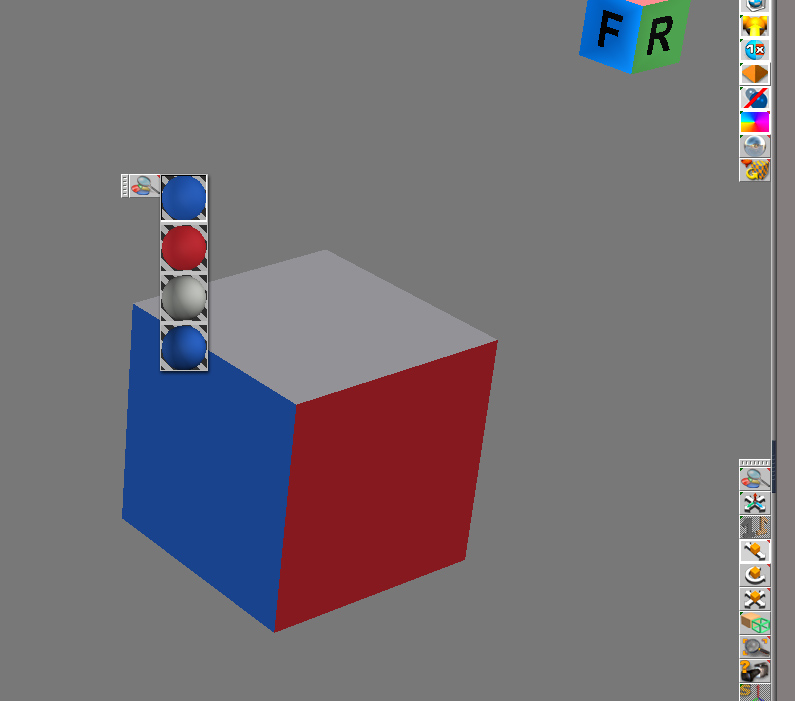
Do you plan to add some improvements ? Multi-material support would be a must, with a compact menu to display the different materials applied on the selected object and the ability to pick the desired one in a click.
I know we can do that with the Scene Material List tool but this one is slow, and all materials from the whole scene are mixed together, with no option to get the materials of a specific object.
A new plugin for truespace, modeler side, is always a major event.
Do you plan to add some improvements ? Multi-material support would be a must, with a compact menu to display the different materials applied on the selected object and the ability to pick the desired one in a click.
I know we can do that with the Scene Material List tool but this one is slow, and all materials from the whole scene are mixed together, with no option to get the materials of a specific object.
-
Fenerit
- Senior Chief Petty Officer
- Posts: 173
- Joined: 21 Nov 2011, 19:19
- Type the number ten into the box: 9
Re: Plugin: tSXGetMaterial
Hi Emmanuel, comment ça va? Merci for your feedback and suggestion. I will take a look for that, albeit I don't have tS 7.x so I cannot "mimick" such a feature, but I think to have understood what you are in search for. Not sure how the things could works on million faces poly, though. 
P.S.
I forgot mentioning that this plugin get the material also for hidden objects.
P.S.
I forgot mentioning that this plugin get the material also for hidden objects.
-
Fenerit
- Senior Chief Petty Officer
- Posts: 173
- Joined: 21 Nov 2011, 19:19
- Type the number ten into the box: 9
Re: Plugin: tSXGetMaterial
Some progress...
- added n-faces index list; each face returns its material;
- polyhs can be overall painted with the material of the selected face;
- each face can be painted with the material of another face;
...
- added n-faces index list; each face returns its material;
- polyhs can be overall painted with the material of the selected face;
- each face can be painted with the material of another face;
...
-
Emmanuel
- Chief Warrant Officer
- Posts: 670
- Joined: 14 Jun 2009, 06:47
Re: Plugin: tSXGetMaterial

-
Fenerit
- Senior Chief Petty Officer
- Posts: 173
- Joined: 21 Nov 2011, 19:19
- Type the number ten into the box: 9
Re: Plugin: tSXGetMaterial
I'm afraid this workaround is going into a messy thing. MaterialIDs does return the corrected face material but the selected face doesn't match the corrected ID... 
-
Fenerit
- Senior Chief Petty Officer
- Posts: 173
- Joined: 21 Nov 2011, 19:19
- Type the number ten into the box: 9
Re: Plugin: tSXGetMaterial
Well... I found a way to circumvent that. It's a bit weird and need you re-maps the face of existing polyhs works because the faces will swap the materials (scramble); thereafter the problem is gone: plugin face paint and brush tool face paint will works together following the same material IDs sequence. In short, for new projects, the procedure is to paint faces then hit the button "fix material" and the materials will swaps on right IDs for both way of painting. In this way textures and whatever shaders are returned in correct way. Saved project files seem works well once reloaded and modified. Of course you need to paint faces two times. Pretty unuseful maybe.
-
Fenerit
- Senior Chief Petty Officer
- Posts: 173
- Joined: 21 Nov 2011, 19:19
- Type the number ten into the box: 9
Re: Plugin: tSXGetMaterial
Ok, problem solved! 
-
Fenerit
- Senior Chief Petty Officer
- Posts: 173
- Joined: 21 Nov 2011, 19:19
- Type the number ten into the box: 9
Re: Plugin: tSXGetMaterial
Hi! I'm ready with a beta version of this workaround on matIDs. Few remarks. I do not like when the plugins' windows opens always in the same screen place, nor I like to write within the registry, so I've implemented basic read/write .INI file. In tS 6.6 the call for the path is:
{
string file = tsxGetTSDir(e_tsxPATH_WORKDIR);
file += "\\tsx\\plugindir\\plugin.ini"
return (file);
}
Whichever plugs unzipped along its folder inside the "tsx" directory will write/read the .INI.
Somebody could tell me please whether tS7.x has the same API directive and what is the main plugin folder? The API should to handle the hard drive, at the least. I'm asking for because this tiny mismatch (if any) is cause of malfunctions.
{
string file = tsxGetTSDir(e_tsxPATH_WORKDIR);
file += "\\tsx\\plugindir\\plugin.ini"
return (file);
}
Whichever plugs unzipped along its folder inside the "tsx" directory will write/read the .INI.
Somebody could tell me please whether tS7.x has the same API directive and what is the main plugin folder? The API should to handle the hard drive, at the least. I'm asking for because this tiny mismatch (if any) is cause of malfunctions.
-
borgcone

- Chief Petty Officer
- Posts: 134
- Joined: 06 May 2018, 21:09
- Type the number ten into the box: 10
- Location: Japan, or sometimes behind a borg cube
Re: Plugin: tSXGetMaterial
Fenerit wrote: 05 Jul 2023, 14:24 ... I made this new plugin as a SDK re-learning.
Do you mean the Model side (i.e. tS6.6)? If so, I think that you can know from tsxAPI66.doc and header files in the tS66 SDK whether there are the same API functions you need are or not .Fenerit wrote: 16 Jul 2023, 22:29 Somebody could tell me please whether tS7.x has the same API directive ...
It's tS\tsx folder under the installed path (if my understanding is right). In case that you installed tS7.61 just under C:\, the main plugin folder for Model side is;Fenerit wrote: 16 Jul 2023, 22:29 ... and what is the main plugin folder?
C:\trueSpace761\tS\tsx\
Your plugin simulates "Inspect tool" fairly faithfully (with many detailed parameters
 ). If I may add, the setting for "Material light emission" (a lamp icon in the tS6.6 top bar of "Material editor") seems to be missing. The tsxMaterialGetEmission() and e_tsxLT_OBJECT (a member of enum tsxLIGHT_TYPE) were added for it at tS6.0.
I also have ever tried similar things using my plugin, but the plan fell through because I was not able to break through the wall for a tS with localization (My tS5.1 Japanese version includes many Japanese words as parameter name).
For your information, using my plugin, you can execute almost all tSX API functions of tS4-tS6 from user Python scripts. It may help you to make your tSx mockup without repeating to build C/C++ programs and to place it to tsx folder. As a result, you should be able to concentrate to "trial and error" or to develop logic.
Re: Primitive tsxPython (ptsxpy), another Python interpreter plugin for tS series
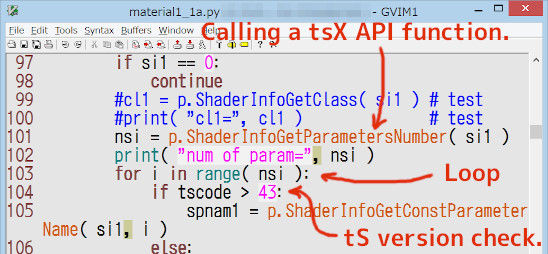
The above post by me is an example script for material setting (see next of a robot). The script only creates several simple objects and paints a material to each of them, but is doing other many things like; to get the DLL directory, to search for the default texture map file "CALIGARI.JPG", to search for a shader by name using tsxShaderGetInternalName(), to check tS versions, to allocate/read/write memory area for C/C++ structs/variables for tSX API functions, etc.
borgcone ... or 3DfromNULL at https://biglode.com/ptsxpy
-
Fenerit
- Senior Chief Petty Officer
- Posts: 173
- Joined: 21 Nov 2011, 19:19
- Type the number ten into the box: 9
Re: Plugin: tSXGetMaterial
Hallo Borgcone; thanks for your feedback and to point me at your scripts. I will dig into your work surely! About the tsxMaterialGetEmission issue, I acknowledge that missing but I do not think is implemented correctly. Doesn't work at all for me. Maybe are just me who is unable to code that, but lights says that the structure is still material, not light. e_tsxLT_OBJECT is returned as structure material not light data type in debug mode.
tsxGetLightType does't return anything through it.
tsxGetLightType does't return anything through it.
-
Fenerit
- Senior Chief Petty Officer
- Posts: 173
- Joined: 21 Nov 2011, 19:19
- Type the number ten into the box: 9
Re: Plugin: tSXGetMaterial
As suggested by Emmanuel, this plugin would be an extended version of the plugins above.
GUIDE:
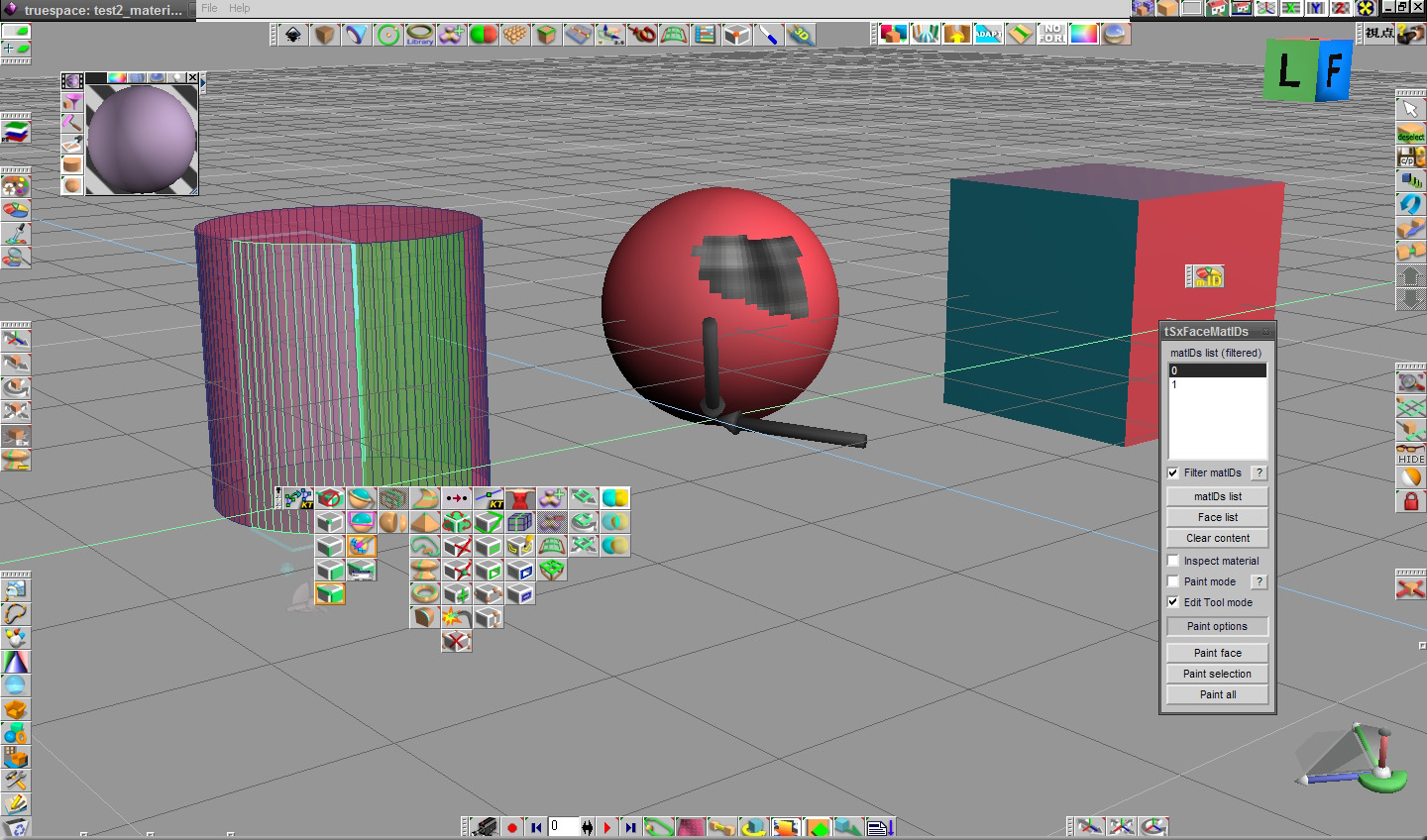
- The list window;
The main visualizer. Single click will select matID or face of the polyhedron, depends on which "list" button is pressed.
- Filter matIDs;
This option filter out duplicate matIDs entry (faces doesn't have duplicates). Multiface polyhedrons sharing the same material returns the same IDs
Useful for a quick inspection. Press 'Face list' button to switch in list mode.
Enable the 'Inspect material' option, press 'matIDs list' or 'Face list' end click on entries to inspect the material."
- matIDs list;
Get the faces matIDs of the polyhedron. New polhys or "all-painted" polyhs always have faces with IDs zero (see below).
- Face list;
Get the list of polyhs' faces.
- Inspect material;
The main manager. Get the material for multi-material polyhedrons. See below.
- Paint mode;
This option enable painting in both modes: matIDs and faces. This option will paint face one by one.
For painting multi-selected faces use 'Edit Tool' option: select faces with the tools, assign material and press 'Paint selection'.
NOTE:
When faces have all matID#0 just one face will be painted indefinitely.
Switch to 'Face list' for painting faces, face zero also. Once all faces have the material assigned then can be painted in both mode.
Selected faces will have the thin line of selection on screen. Then refresh matIDs list to show the face materials IDs assigned.
This option and 'Inspect material' are mutually excluding in order to assign materials through the Material Editor. In this way
a material can be copied and applyed elsewhere.
- "Paint all";
Will apply materials on the whole polyhs.
KNOW LIMITATION:
- This version doesn't return material emission settings.
Please, take a look at the "readme.txt" inside the pack for installation. There are two version: 53_66 and 76. They have different plugin's path.
REMOVED BY ME: SEE THE RELEVANT PLUGIN THREAD
- The list window;
The main visualizer. Single click will select matID or face of the polyhedron, depends on which "list" button is pressed.
- Filter matIDs;
This option filter out duplicate matIDs entry (faces doesn't have duplicates). Multiface polyhedrons sharing the same material returns the same IDs
Useful for a quick inspection. Press 'Face list' button to switch in list mode.
Enable the 'Inspect material' option, press 'matIDs list' or 'Face list' end click on entries to inspect the material."
- matIDs list;
Get the faces matIDs of the polyhedron. New polhys or "all-painted" polyhs always have faces with IDs zero (see below).
- Face list;
Get the list of polyhs' faces.
- Inspect material;
The main manager. Get the material for multi-material polyhedrons. See below.
- Paint mode;
This option enable painting in both modes: matIDs and faces. This option will paint face one by one.
For painting multi-selected faces use 'Edit Tool' option: select faces with the tools, assign material and press 'Paint selection'.
NOTE:
When faces have all matID#0 just one face will be painted indefinitely.
Switch to 'Face list' for painting faces, face zero also. Once all faces have the material assigned then can be painted in both mode.
Selected faces will have the thin line of selection on screen. Then refresh matIDs list to show the face materials IDs assigned.
This option and 'Inspect material' are mutually excluding in order to assign materials through the Material Editor. In this way
a material can be copied and applyed elsewhere.
- "Paint all";
Will apply materials on the whole polyhs.
KNOW LIMITATION:
- This version doesn't return material emission settings.
Please, take a look at the "readme.txt" inside the pack for installation. There are two version: 53_66 and 76. They have different plugin's path.
REMOVED BY ME: SEE THE RELEVANT PLUGIN THREAD
Last edited by Fenerit on 29 Jul 2023, 19:06, edited 2 times in total.
-
borgcone
- Chief Petty Officer
- Posts: 134
- Joined: 06 May 2018, 21:09
- Type the number ten into the box: 10
- Location: Japan, or sometimes behind a borg cube
Re: Plugin: tSXGetMaterial
Fenerit wrote: 18 Jul 2023, 22:38 ... About the tsxMaterialGetEmission issue ... Doesn't work at all for me. ... tsxGetLightType does't return anything through it.
I've just tried to get the emission. In case where "Use material light" in the Material Editor is OFF, as you wrote, the emission information doesn't seem to come from the object. In case of ON in the Material EditorFenerit wrote: 19 Jul 2023, 15:06 KNOW LIMITATION:
- This version doesn't return material emission settings.
, tsxMaterialGetEmission() seems to work for an object's material and returns a non-zero pointer to a tsxLIGHT, moreover tsxLightGetType() returns 9 (i.e. e_tsxLT_OBJECT).I can't say for certain because I didn't thoroughly examine around the shader parameters etc., but as far as I know, there is no way to set the "Use material light" using the Model side tsxAPI, so we seem not to be able to get the emission state stably from the material of objects using the Model side tsxAPI (as you wrote).
borgcone ... or 3DfromNULL at https://biglode.com/ptsxpy
-
Fenerit
- Senior Chief Petty Officer
- Posts: 173
- Joined: 21 Nov 2011, 19:19
- Type the number ten into the box: 9
Re: Plugin: tSXGetMaterial
 I wish thanks you for having found time to play with that and confirm my suspects.
-
borgcone
- Chief Petty Officer
- Posts: 134
- Joined: 06 May 2018, 21:09
- Type the number ten into the box: 10
- Location: Japan, or sometimes behind a borg cube
Re: Plugin: tSXGetMaterial
A question still remains; Why can the tS's "Inspect tool" extract the emission state from an object while tsxAPI cannot do? Hard-coded in tS?
Since then, I compared two memory areas pointed by the tsxMATERIAL* of an object with emission between the "Use material light" On and Off in order to find the flag indicating the emission state. The spec of the struct for tsxMATERIAL is not opened. I found a string "ObjectLight" near the area pointed by (void *)( (void *)( ( (tsxMATERIAL*)materialptr ) + 2 ) + 10 ), but was not able to find the value 0x09 (e_tsxLT_OBJECT) nor the flag interlocked with the "Use material light".
Well, such "undocumented" is common occurrence for tsxAPI and it should be a trivial matter for many tS users.
Since then,
I compared two memory areas pointed by the tsxMATERIAL* of an object with emission between the "Use material light" On and Off in order to find the flag indicating the emission state. The spec of the struct for tsxMATERIAL is not opened. I found a string "ObjectLight" near the area pointed by (void *)( (void *)( ( (tsxMATERIAL*)materialptr ) + 2 ) + 10 ), but was not able to find the value 0x09 (e_tsxLT_OBJECT) nor the flag interlocked with the "Use material light".Well, such "undocumented" is common occurrence for tsxAPI and it should be a trivial matter for many tS users.
borgcone ... or 3DfromNULL at https://biglode.com/ptsxpy