Hey guys!
I've been experimenting with photorealistic aluminum can shading for an upcoming short film.
The can will be composited into camera-matched footage and rendered with an HDRI/reference photo captured on-set.
I've attached an image of what I've come up with so far, using the Aluminum shader in Simbiont.
It doesn't "feel" right so far. I need to boost the specular/highs, and play with adding a subtle smudge/grime layer over the top with a custom reflectance map.
Can you guys recommend a better shader or method for trueSpace 6/7?
Most realistic aluminum can shader?
-
frank
- Senior Chief Petty Officer
- Posts: 161
- Joined: 28 May 2009, 13:25
Most realistic aluminum can shader?
- Attachments
-

-
Draise

- Captain
- Posts: 3200
- Joined: 21 Sep 2009, 19:33
- Type the number ten into the box: 0
- Location: Bogota, Colombia
Re: Most realistic aluminum can shader?
Blinn shader and an incidence based reflection or an anisotropic specular on top might make it better.
Your specular look a lot like metallic plastic with reflection. It's nice, but you need yes... tighter smoother molecules chunks with angles. Like aluminum. That means strong sharp specular with angled reflections that might have a subtle anisotropic blur to the reflections closer to the eye to surface.
Sometimes understanding how light bounces off a microsurface will clarify what you need to try do on the shader. And trying to get that in the software is something else usually but it's all tricks and illusions to master. I think the modelside works on a phong shader model but I'm not sure.
But they look great thus far! Really nice can model. Really believable.
Your specular look a lot like metallic plastic with reflection. It's nice, but you need yes... tighter smoother molecules chunks with angles. Like aluminum. That means strong sharp specular with angled reflections that might have a subtle anisotropic blur to the reflections closer to the eye to surface.
Sometimes understanding how light bounces off a microsurface will clarify what you need to try do on the shader. And trying to get that in the software is something else usually but it's all tricks and illusions to master. I think the modelside works on a phong shader model but I'm not sure.
But they look great thus far! Really nice can model. Really believable.
-
Finis

- Captain
- Posts: 5410
- Joined: 21 May 2009, 18:26
- Type the number ten into the box: 0
- Location: America!
Re: Most realistic aluminum can shader?
Good model. Believable crushing.
"incidence based reflection" = Fresnel in many renderers.
Consider that parts of the surface are bare aluminum, the top and bottom, and parts are the coating or decal with the images and text, the side. The coating is probably plastic. So some light hits aluminum, some hits plastic, while other light passes through plastic to bounce off of aluminum and return. Two texture layers: metal and plastic. It is also possible that the whole exterior is coated and there is no bare metal.
"incidence based reflection" = Fresnel in many renderers.
Consider that parts of the surface are bare aluminum, the top and bottom, and parts are the coating or decal with the images and text, the side. The coating is probably plastic. So some light hits aluminum, some hits plastic, while other light passes through plastic to bounce off of aluminum and return. Two texture layers: metal and plastic. It is also possible that the whole exterior is coated and there is no bare metal.
I prefer dangerous freedom over peaceful servitude. -- Thomas Jefferson/Jean Jacques Rousseau
-
frank
- Senior Chief Petty Officer
- Posts: 161
- Joined: 28 May 2009, 13:25
Re: Most realistic aluminum can shader?
Great feedback, guys! Thank you!
I did experiment with an anisotrophic layer for the top and bottom of the can, to better simulate a brushed aluminum look to help "scatter" the light out better, but ended up going with a brushed bump map instead.
Here's where I'm at so far. (Three layers: First is basic aluminum, second is aluminum with a label mask, so that where the "print" is, there is a bit more diffusion/brightness and less refl + spec. The third layer is a grime/smudge layer.)
The other half of the equation in selling the effect (it has to do with telekinesis / making things float) is getting the physics + animation right.
I will experiment further with incident-based reflection. I remember using that (Yamaneko Fresnel?) for a car shader and it had a very nice look in that the reflectance changed realistically when the camera was low to the surface.
Again, I appreciate the feedback so far!
I did experiment with an anisotrophic layer for the top and bottom of the can, to better simulate a brushed aluminum look to help "scatter" the light out better, but ended up going with a brushed bump map instead.
Here's where I'm at so far. (Three layers: First is basic aluminum, second is aluminum with a label mask, so that where the "print" is, there is a bit more diffusion/brightness and less refl + spec. The third layer is a grime/smudge layer.)
The other half of the equation in selling the effect (it has to do with telekinesis / making things float) is getting the physics + animation right.
I will experiment further with incident-based reflection. I remember using that (Yamaneko Fresnel?) for a car shader and it had a very nice look in that the reflectance changed realistically when the camera was low to the surface.
Again, I appreciate the feedback so far!
- Attachments
-

-
spacekdet

- Captain
- Posts: 1810
- Joined: 27 May 2009, 15:00
- Type the number ten into the box: 10
- Location: On the day shift at the Utility Muffin Research Kitchen
Re: Most realistic aluminum can shader?
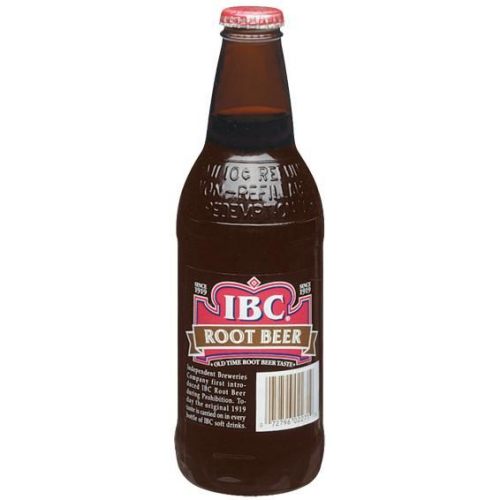
Well, there's your problem right there.
It's the wrong brand of root beer.
It's the wrong brand of root beer.
-
frank
- Senior Chief Petty Officer
- Posts: 161
- Joined: 28 May 2009, 13:25
Re: Most realistic aluminum can shader?
Ol' Spacekdet! How ya doin, man?!?
I actually like IBC! Didn't know y'all had that up in Yankee land!
I actually like IBC! Didn't know y'all had that up in Yankee land!
-
marcel

- Captain
- Posts: 2247
- Joined: 21 May 2009, 19:52
- Type the number ten into the box: 0
- Location: paris - France
Re: Most realistic aluminum can shader?
Aluminium have no reflect. It is not polished. It is the varnish on the can that create this illusion.
For a photorealism image you can create a transparency object as a new skin around a matte aluminium can. You will have more control for the textur.
In TS you can use the multi layer paint shader with aluminium option for the can and a dielectric or glass shader with a little refraction for the varnish. The transparency skin don't cast the shadow.
For a photorealism image you can create a transparency object as a new skin around a matte aluminium can. You will have more control for the textur.
In TS you can use the multi layer paint shader with aluminium option for the can and a dielectric or glass shader with a little refraction for the varnish. The transparency skin don't cast the shadow.
Design - illustration - Animation
http://www.crea-vision.fr
http://www.crea-vision.fr
-
frank
- Senior Chief Petty Officer
- Posts: 161
- Joined: 28 May 2009, 13:25
Re: Most realistic aluminum can shader?
Thank you for the suggestion, Marcel!marcel wrote:Aluminium have no reflect. It is not polished. It is the varnish on the can that create this illusion.
For a photorealism image you can create a transparency object as a new skin around a matte aluminium can. You will have more control for the textur.
In TS you can use the multi layer paint shader with aluminium option for the can and a dielectric or glass shader with a little refraction for the varnish. The transparency skin don't cast the shadow.
I've taken your advice and started experimenting with two separate objects (ie. base = aluminum via Multi-Layer paint shader, duplicate object = clear coating (shadow-casting disabled).
However, I'm getting unexpected results with the multi-layer paint shader. For example, I turn Reflection all the way down to zero, and still get reflections, based on the Transmission value.
If I turn Transmission all the way down, I get no reflections, but the entire thing is very dark.
I've attached a screengrab showing my settings. (Original can is on the right, new work-in-progress using your suggestion is on the left.)
The goal is to get this looking like basic raw aluminum, before I throw the Dielectric/clear/gloss on top of everything.
I appreciate any additional help you can provide!
Last edited by frank on 09 Dec 2022, 21:28, edited 1 time in total.
-
frank
- Senior Chief Petty Officer
- Posts: 161
- Joined: 28 May 2009, 13:25
Re: Most realistic aluminum can shader?
OK... I see "metallic f." is apparently the value that affects reflection. I turned this value down and reflection is gone.
I'll continue to experiment.
I'll continue to experiment.
-
frank
- Senior Chief Petty Officer
- Posts: 161
- Joined: 28 May 2009, 13:25
Re: Most realistic aluminum can shader?
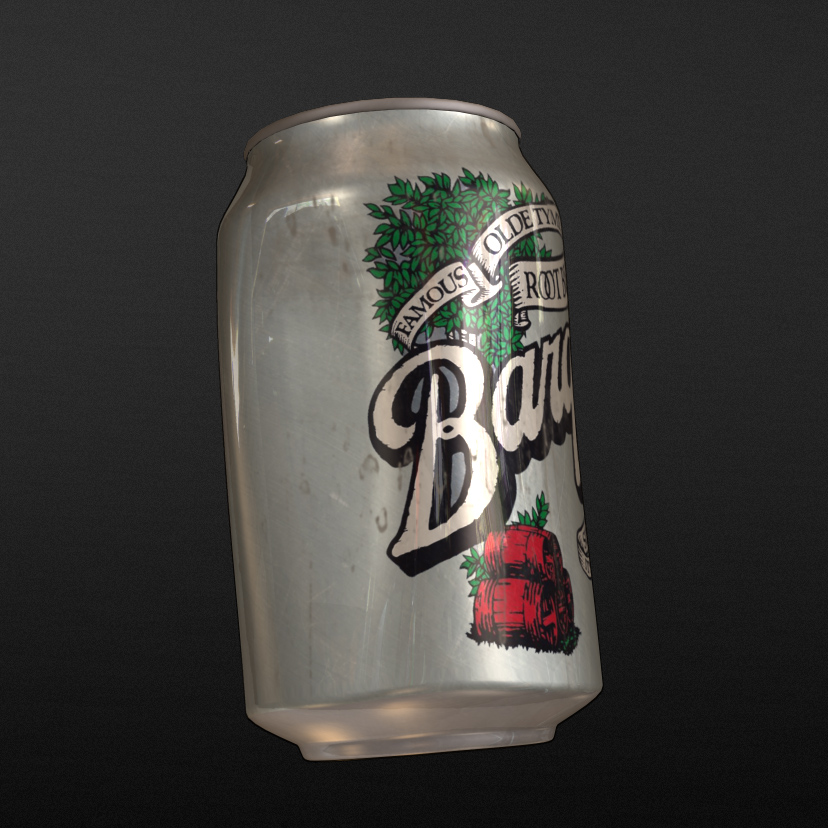
This is probably about as good as I can make it, though I know it's still not where it SHOULD be (at least, compared to the real reference can sitting right next to my computer.)
I didn't have any success with anisotrophic, multi-layer paint, or Caligari metal shaders, so I stuck with Simbiont's Tinfoil.
The duplicated "clear coat" object is shaded with Yamaneko Fresnel, and the grime and smudge layer is applied over that.
I didn't have any success with anisotrophic, multi-layer paint, or Caligari metal shaders, so I stuck with Simbiont's Tinfoil.
The duplicated "clear coat" object is shaded with Yamaneko Fresnel, and the grime and smudge layer is applied over that.
- Attachments
-
Last edited by frank on 22 Feb 2016, 22:54, edited 1 time in total.
-
v3rd3
- Lieutenant Commander
- Posts: 1191
- Joined: 21 May 2009, 20:04
Re: Most realistic aluminum can shader?
That is really good frank... I think you are in the game of micro adjustments at this point.
Just a thought....could you tried a render with other objects in the scene? The "lacquer" layer may play out a bit differently with other objects to reflect/refract..... and some reflection of the light from the other objects onto the can .
Just a thought....could you tried a render with other objects in the scene? The "lacquer" layer may play out a bit differently with other objects to reflect/refract..... and some reflection of the light from the other objects onto the can .
-
v3rd3
- Lieutenant Commander
- Posts: 1191
- Joined: 21 May 2009, 20:04
Re: Most realistic aluminum can shader?
This site has some interesting data on metal properties..,..http://refractiveindex.info/?shelf=main ... page=Rakic
-
frank
- Senior Chief Petty Officer
- Posts: 161
- Joined: 28 May 2009, 13:25
Re: Most realistic aluminum can shader?
Thanks, v3rd3!
I feel like there should be more "scattering" underneath the lacquer layer, but I may stick with it like it is.
Having a look at that link. Thanks! ...now to figure out how to translate this into tS.
I feel like there should be more "scattering" underneath the lacquer layer, but I may stick with it like it is.
Having a look at that link. Thanks! ...now to figure out how to translate this into tS.
-
v3rd3
- Lieutenant Commander
- Posts: 1191
- Joined: 21 May 2009, 20:04
Re: Most realistic aluminum can shader?
I can't go into detail I really don't understand much myself but on the model side refraction is one of the sliders in the reflectance channel of metal materials.
On the workspace side the "shiny metals" shader has a reflectance value.
Whether changing those values has the desired effect or not or whether using the real value as a relative measure helps I have no idea.
On the workspace side the "shiny metals" shader has a reflectance value.
Whether changing those values has the desired effect or not or whether using the real value as a relative measure helps I have no idea.
-
frank
- Senior Chief Petty Officer
- Posts: 161
- Joined: 28 May 2009, 13:25
Re: Most realistic aluminum can shader?
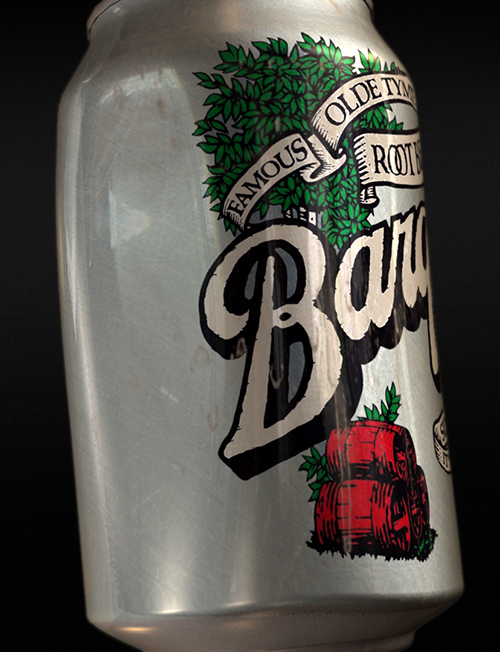
Here's the latest adjustment. In this case, I manipulated the HDRI environment map so that there is vertical blurring of the lights, to help achieve some spreading/scatter effect in the surface reflections.
The .HDR files are built from multiple exposures of a reflective ball captured on set, so that the can will reflect light from the actual light sources.
I will likely opt for practical effects + wire removal for some shots, and CG for the master shots / wides.
The .HDR files are built from multiple exposures of a reflective ball captured on set, so that the can will reflect light from the actual light sources.
I will likely opt for practical effects + wire removal for some shots, and CG for the master shots / wides.
- Attachments
-
-
Draise
- Captain
- Posts: 3200
- Joined: 21 Sep 2009, 19:33
- Type the number ten into the box: 0
- Location: Bogota, Colombia
Re: Most realistic aluminum can shader?
That last one looks great! !!!! 
-
v3rd3
- Lieutenant Commander
- Posts: 1191
- Joined: 21 May 2009, 20:04
Re: Most realistic aluminum can shader?
frank that is really good.
-
frank
- Senior Chief Petty Officer
- Posts: 161
- Joined: 28 May 2009, 13:25
Re: Most realistic aluminum can shader?
Thanks for the feedback, guys!
-
frank
- Senior Chief Petty Officer
- Posts: 161
- Joined: 28 May 2009, 13:25
Re: Most realistic aluminum can shader?
I forgot to come back here and post the link to the finished film! 
Ultimately, I used trueSpace in one shot - the rest were all practical/in-camera effects.
https://www.youtube.com/watch?v=xyFjglis-Z4"
Ultimately, I used trueSpace in one shot - the rest were all practical/in-camera effects.
https://www.youtube.com/watch?v=xyFjglis-Z4"
-
spacekdet
- Captain
- Posts: 1810
- Joined: 27 May 2009, 15:00
- Type the number ten into the box: 10
- Location: On the day shift at the Utility Muffin Research Kitchen
Re: Most realistic aluminum can shader?
This was wonderful.
Really liked the music.
Thanks for sharing it with us.
Really liked the music.
Thanks for sharing it with us.
-
frank
- Senior Chief Petty Officer
- Posts: 161
- Joined: 28 May 2009, 13:25
Re: Most realistic aluminum can shader?
Thanks so much, ol' buddy! Really happy you enjoyed it!spacekdet wrote:This was wonderful.
Really liked the music.
Thanks for sharing it with us.
Hope things are going well up in low-temperature land.
-
Finis
- Captain
- Posts: 5410
- Joined: 21 May 2009, 18:26
- Type the number ten into the box: 0
- Location: America!
Re: Most realistic aluminum can shader?
Awesome can. Beautiful movie. I liked Knothole Peptalk too.
I prefer dangerous freedom over peaceful servitude. -- Thomas Jefferson/Jean Jacques Rousseau
-
v3rd3
- Lieutenant Commander
- Posts: 1191
- Joined: 21 May 2009, 20:04
Re: Most realistic aluminum can shader?
Great stuff Frank. I enjoyed the film.
-
frank
- Senior Chief Petty Officer
- Posts: 161
- Joined: 28 May 2009, 13:25
Re: Most realistic aluminum can shader?
Thanks so much, guys!