I'm new to modeling however, I've rendered a couple vehicles and my goal is to upload my work to various sites & I also would like to print the images. My question is which file extension type should I save the file as? Also, once the work is saved, what is the export process & what is a good program to export the file to so I can display the vehicles at certain angles to display to others?
Any help would be greatly appreciated
Roger
Export image
-
kingcaliber
- Seaman Recruit
- Posts: 3
- Joined: 19 Feb 2011, 15:41
- Type the number ten into the box: 9
Export image
-
kingcaliber
- Seaman Recruit
- Posts: 3
- Joined: 19 Feb 2011, 15:41
- Type the number ten into the box: 9
Re: Export image
By the way I'm using Truespace 7.61
Thanks again
Roger
Thanks again
Roger
-
v3rd3
- Lieutenant Commander
- Posts: 1191
- Joined: 21 May 2009, 20:04
Re: Export image
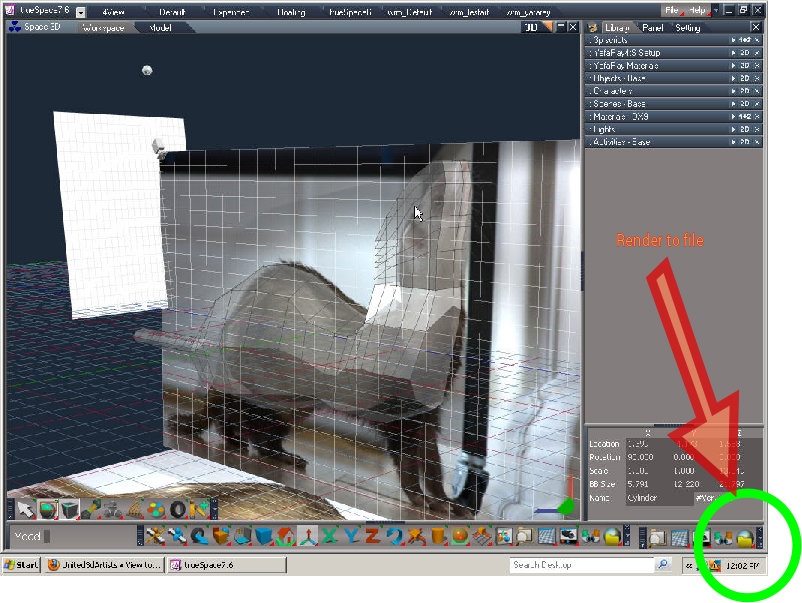
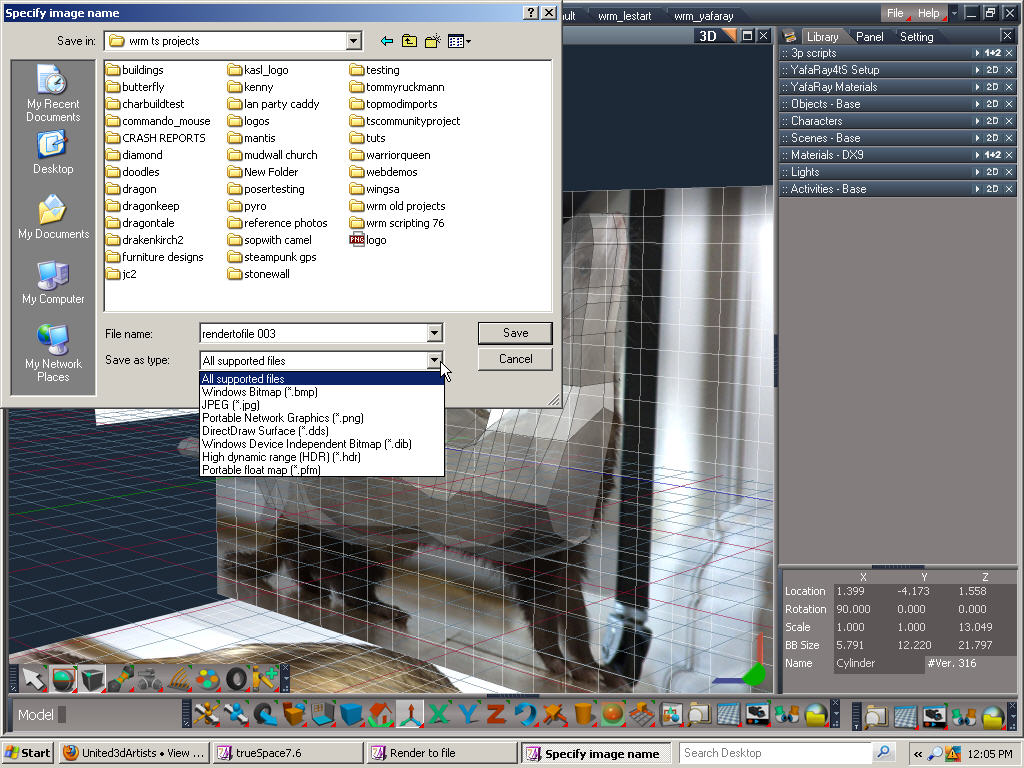
The workflow to render still images directly from ts workspace side is illustrated below... render to file button bottom right choose image dimensions then name file and choose available type.
If you need help deciding the file types to suit the job you need to consider what you want to do.
Web stuff or things to display on monitors usually don't need more than 72 dpi jpeg or png.
If you are rendering an image as an input to a secondary process you need to consider the quality you need to work with that tool. Anything print I typically use 600 dpi just cuz that is what my printers support. If you have a printer that supports a higher resolution use that. Just one caveat that usually catches people by surprise......
Printers have memory. If your image is larger than that your print job will crap out.
To show your models to someone realtime.... why not just load them up with TS. It is free and you can create composite scenes pretty quickly.
If you need help deciding the file types to suit the job you need to consider what you want to do.
Web stuff or things to display on monitors usually don't need more than 72 dpi jpeg or png.
If you are rendering an image as an input to a secondary process you need to consider the quality you need to work with that tool. Anything print I typically use 600 dpi just cuz that is what my printers support. If you have a printer that supports a higher resolution use that. Just one caveat that usually catches people by surprise......
Printers have memory. If your image is larger than that your print job will crap out.
To show your models to someone realtime.... why not just load them up with TS. It is free and you can create composite scenes pretty quickly.
- Attachments
-
-
-

-
bitkar

- Captain
- Posts: 2089
- Joined: 16 Mar 2010, 07:14
- Type the number ten into the box: 0
- Location: Czech Republic
Re: Export image
use jpeg for user type printouts. if you need a comercial printing company, they will need a TIFF or PDF:X in CMYK color space. So you need to render jpeg and use photoshop to convert it.
commercial prints are in 300dpi, that is enough quality.
commercial prints are in 300dpi, that is enough quality.
Michal aka bitkar
tS freak since tS2 (1998) and forever (tS7.61 modeler)
tS freak since tS2 (1998) and forever (tS7.61 modeler)