Hmmm....no one seems to be here....Ok, guess I'll have to kick off the New User area with the first post.....
Just thought I'd try the Glass Shader (DX9/D3D Material) on WS side, but seems everytime I load it and apply it, then begin moving some of the shader settings in the panel, TS crashes & I have to close the program. I've heard there were still some unresolved bugs on ws side, maybe this is one?
Anyone ever have this happen?
Thanks!
Paul
v3rd3
Lieutenant Commander
Posts:1191
Joined: 21 May 2009, 20:04
Re: TS Crashes - Glass Shader
Postby v3rd3 »
I have not run into any problems (yet?) with DX materials crashing TS...
does the error repeat when you do this or is this a one time thing?
if it repeats can you post your scene just before the crash or a screenshot to help us get some clues?
Jack Edwards
Senior Chief Petty Officer
Posts:181
Joined: 22 May 2009, 04:28
Re: TS Crashes - Glass Shader
Postby Jack Edwards »
The shaders use HLSL so it could be video driver related. Are you using 7.61 or 7.6?
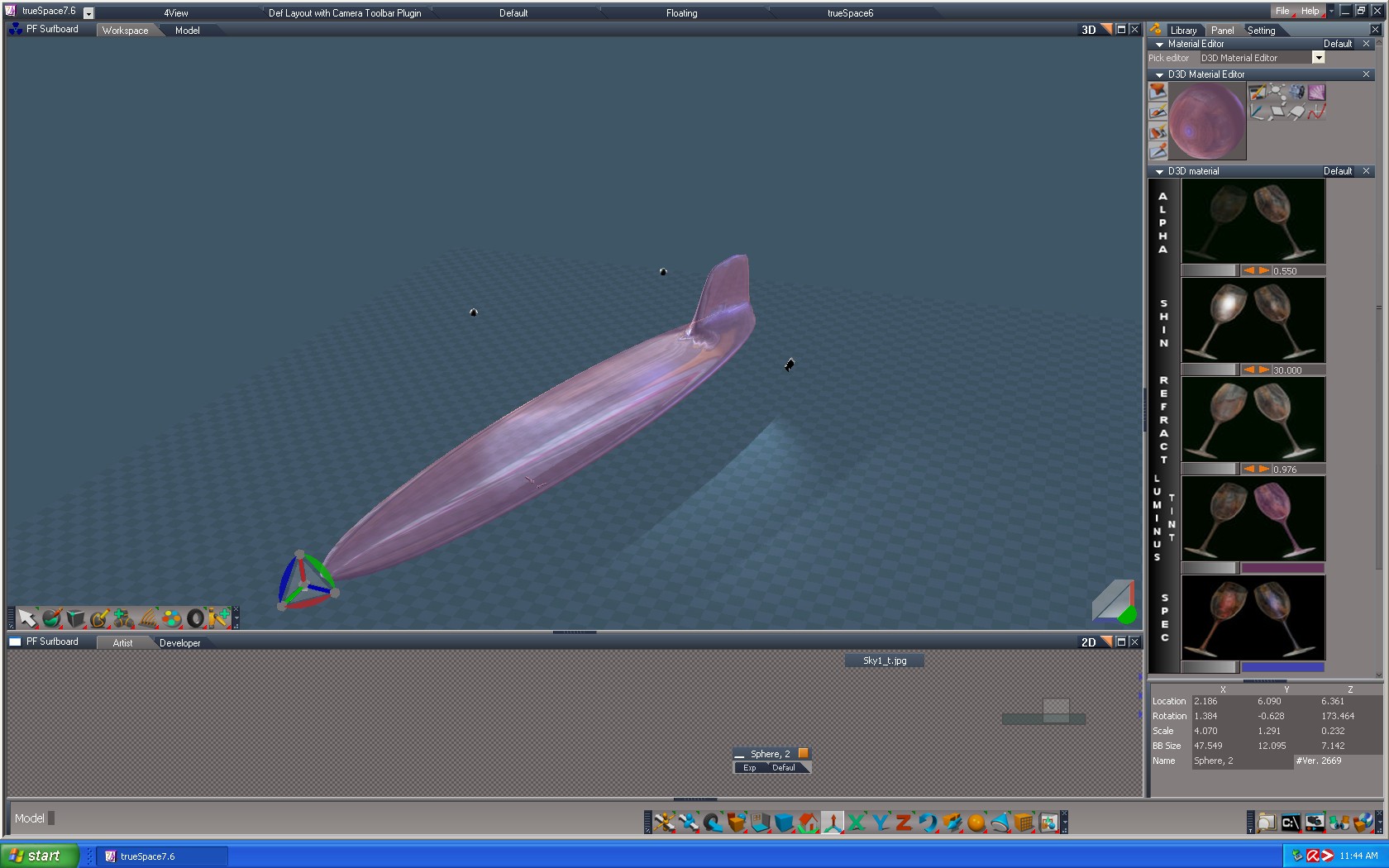
Happened a couple of times in a row. One thing I forgot to mention is that I had only one object in the scene, and I had already applied a sky (bitmap I think) to the object, then when I tried to apply the Glass Shader it got applied, but crash came when I began moving the glass shader adjustments in the panel (because I really don't know what those adjustments are for, again, just experimenting). Maybe because I was trying to put one over the other & TS won’t allow multilayers?
Which raises another question: Once I apply a texture/shader/bump to an object, does each additional texture I add replace the one already applied, or just go over the top of what’s there? How can I remove all the textures so I’m left with the original one that was there when I drew the object? All I could find in ME was “paint over exisiting texture” (I think it’s a paint roller icon). I do this when experimenting with many textures to get an idea how they will look on the object.
I’ll try re-creating the problem, if it continues to crash I’ll put up a screenshot.
Thanks!
Paul
Musikman
Chief Petty Officer
Posts:104
Joined: 21 May 2009, 18:31
Type the number ten into the box: 0
Location: USA
Re: TS Crashes - Glass Shader
Postby Musikman »
Ok, crashed again, here is the screenshot just before. Right after I took the snapshot I moved one of the glass shader sliders just a bit and crashed right away.
Attachments
Jack Edwards
Senior Chief Petty Officer
Posts:181
Joined: 22 May 2009, 04:28
Re: TS Crashes - Glass Shader
Postby Jack Edwards »
That's one of Noko's custom shaders. My guess is that it's likely a video memory or video driver issue. How much ram do you have on your video card?
TrueSpace doesn't support layered materials, so painting a new material replaces the old one. You can paint materials per face by selecting faces in Mesh Edit mode and applying the material that way. To get back to a plain solid material drag the Solid Material from the Materials - DX9 library onto your model. The solid one is the plain looking yellow ball.
I have a Sapphire Radeon 512MB vid card. Guess I'll just not use that shader, will use a different one.
Just curious, is there another glass shader besides that one on ws side? Or is there one on the Model side?
For example, let's say I wanted to make a drinking glass for a scene and apply a glass effect to a cylinder. Any suggestions? Thanks!
Paul
Jack Edwards
Senior Chief Petty Officer
Posts:181
Joined: 22 May 2009, 04:28
Re: TS Crashes - Glass Shader
Postby Jack Edwards »
Hi Paul,
A 512 MB card should be fine. So my guess is possibly a driver issue, do you get crashing regularly with trueSpace when working in Workspace?
The "alpha bacteria" shader is what you want. It's used in the YafaRay4tS Glass material, so you could use that until we figure out what's causing you to crash.
No, I don't usually get crashes with TS, not much at all it's been pretty good so far. I'll try to see if I can get a screen shot of the error message, forgot to catch that last time, don't know if it's just a generic message or could specifically tell us something. It's the one that asks if I want to send a crash report file.
Tried the Alpha Bacteria shader and that seems to work well, so I'll just use that since I'm just experimenting. (I wouldn't have known by the name that it was a glass shader! Sounds like some kind of disease! ) Thanks Jack


 ) Thanks Jack