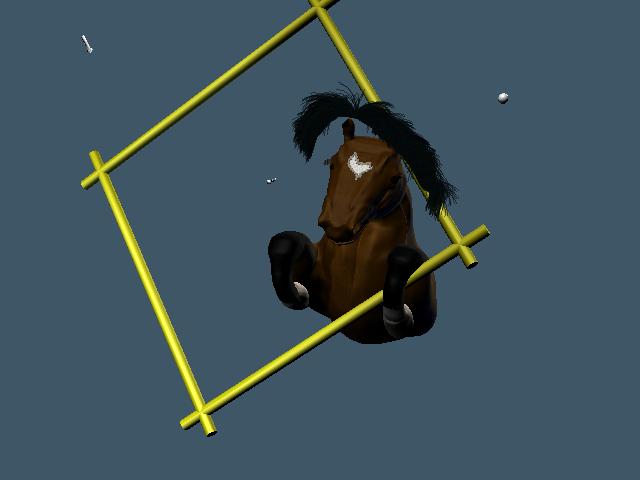
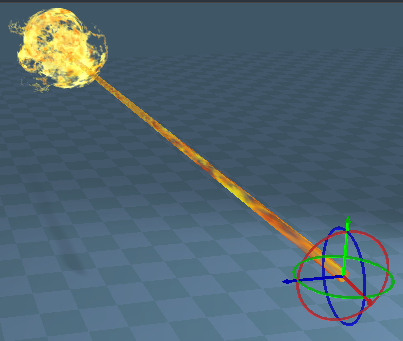
I need to animate a fire-breathing effect and am using the ts-e material in a sphere as fireball with a cylinder as its tail. The ts-e resource scene of the fire and smoke is great, and if I orient the cylinder correctly, the base of the fire bulk will be on the fireball end. I understand the PC controllers and can figure out how to manipulate them so that the breath appears, expands, culminates in the fireball, disperses, and retracts as a faded out material.
I need a reality check. The PA controllers operate on the center point of an object; this I understand. The fade pulsator should provide the appearance, expansion, dispersal and retraction of the effect. The zigzagger controller should provide the movement of the effect from its point of origin to its point of dispersal. My Architect's mind says that this should work. Is there a better way? Someone here has got to have created a fire-breathing effect and I'd appreciate their insight.
PA - Fire Breathing
-
dreamcatcher107
- Petty Officer First Class
- Posts: 70
- Joined: 23 Aug 2009, 16:26
- Type the number ten into the box: 0
- Location: Illinois, USA
PA - Fire Breathing
-
dreamcatcher107
- Petty Officer First Class
- Posts: 70
- Joined: 23 Aug 2009, 16:26
- Type the number ten into the box: 0
- Location: Illinois, USA
Re: PA - Fire Breathing
I have hooded up the zigzagger and pulsator to the fireball tail. The pulsater needs to be delayed half way through the zigzagger and can't quite figure out the process. What do I need to use in order to delay the timer?
-
trueBlue

- Captain
- Posts: 5548
- Joined: 06 Jul 2009, 22:50
- Type the number ten into the box: 10
Re: PA - Fire Breathing
Here is a Triggered Loop that Dele made. You can set the Trigger Timer where the Loop Out will start.
FYI: You can set the Axis of your Cylinder at it's end.
FYI: You can set the Axis of your Cylinder at it's end.
- Attachments
-
-
- Triggered Loop v1.0.zip
- (7 KiB) Downloaded 341 times
-
dreamcatcher107
- Petty Officer First Class
- Posts: 70
- Joined: 23 Aug 2009, 16:26
- Type the number ten into the box: 0
- Location: Illinois, USA
Re: PA - Fire Breathing
Thanks Trueblue. How do I physically relocate the 'working point' of the cylinder so that the zigzagger/pulsator operates from the end of the cylinder? It seems to make much more sense that a breath of fire emanates and expands from the point of origin rather than its object center...
-
trueBlue
- Captain
- Posts: 5548
- Joined: 06 Jul 2009, 22:50
- Type the number ten into the box: 10
Re: PA - Fire Breathing
You can enable the Axis tool here on your selected object.
- Attachments
-

- Capture.PNG (58.12 KiB) Viewed 6620 times
-
dreamcatcher107
- Petty Officer First Class
- Posts: 70
- Joined: 23 Aug 2009, 16:26
- Type the number ten into the box: 0
- Location: Illinois, USA
Re: PA - Fire Breathing
Thanks again.
Duh. I previously found that but must have had a 'brain fart'.
How versed are you in fire animation? It seems like a tutorial would be a great addition. When (not if) I complete this, I'd be willing to contribute and you seem to be a longtime user, if not company person. We should talk.
Duh. I previously found that but must have had a 'brain fart'.
How versed are you in fire animation? It seems like a tutorial would be a great addition. When (not if) I complete this, I'd be willing to contribute and you seem to be a longtime user, if not company person. We should talk.
-
dreamcatcher107
- Petty Officer First Class
- Posts: 70
- Joined: 23 Aug 2009, 16:26
- Type the number ten into the box: 0
- Location: Illinois, USA
Re: PA - Fire Breathing
I now have the first of the fireball spheres at the end of the fire cylinder created and hooked up to a zigzagger. The axes are correctly aligned, but I can't synch the movement to coincide with the ending expansion of the cylinder 'exhale' itself, which is also connected to a pulsator. The sphere moves too quickly. These are separate objects as I have yet to attach a pulsator to the fireball sphere in order to expand it, that must function independently from that of the flame cylinder.
I've manipulated the speed controls and tz amounts to no avail. I'm still missing something. It travels the correct length so tz is not the problem, and if I modify the speed of either the master timer or tz timer, it still doesn't synch up. I am using the same master timer for both processes. Is that the problem? A triggered loop won't help as the fireball moves great on the front end but too quickly on the expanded result, separating from the cylinder itself as it's already in the pulsator's contraction. How do I create a process that slows down the sphere's movement?
Perhaps I need to modify the pulsator directly but realize that it will affect the front end movement of the fireball. All help and assistance is greatly appreciated.
I've manipulated the speed controls and tz amounts to no avail. I'm still missing something. It travels the correct length so tz is not the problem, and if I modify the speed of either the master timer or tz timer, it still doesn't synch up. I am using the same master timer for both processes. Is that the problem? A triggered loop won't help as the fireball moves great on the front end but too quickly on the expanded result, separating from the cylinder itself as it's already in the pulsator's contraction. How do I create a process that slows down the sphere's movement?
Perhaps I need to modify the pulsator directly but realize that it will affect the front end movement of the fireball. All help and assistance is greatly appreciated.
-
trueBlue
- Captain
- Posts: 5548
- Joined: 06 Jul 2009, 22:50
- Type the number ten into the box: 10
Re: PA - Fire Breathing
Do you have the Flow Controllers? You could add a Speed Controller for the movement and a seperate Speed Controller for the scaling all off the same Master Timer.
-
dreamcatcher107
- Petty Officer First Class
- Posts: 70
- Joined: 23 Aug 2009, 16:26
- Type the number ten into the box: 0
- Location: Illinois, USA
Re: PA - Fire Breathing
Thanks Trueblue, but the speed controller is not the solution, as I delve deeper. There is a disparity between the maximum pulse of the exhaling snort and maximum location of the fireball at its end. I need that fireball to pause where it is for 0.4 seconds before resuming its retractive corse on its zigzagger to coincide with the action of the snort pulsator. Does such a controller function exist, and if so, how is this application fitted to it?
It seems to me that it needs an off/on switch to creat the delay, and I will pursue my research in that direction until a more definitive solution is provided by any of the forum. I must be undertaking a process that few have little knowledge of... as an Architect, I have always pushed the limits of understanding in the search for achieving the dreamed goal. There has got to be a way.
It is a bit suprising to me. The graphic arts (to me) have always consisted as still (static) and motion (dynamic) endeavors. Who in these forums is in the motion picture industry I continue to wonder?
It seems to me that it needs an off/on switch to creat the delay, and I will pursue my research in that direction until a more definitive solution is provided by any of the forum. I must be undertaking a process that few have little knowledge of... as an Architect, I have always pushed the limits of understanding in the search for achieving the dreamed goal. There has got to be a way.
It is a bit suprising to me. The graphic arts (to me) have always consisted as still (static) and motion (dynamic) endeavors. Who in these forums is in the motion picture industry I continue to wonder?
-
trueBlue
- Captain
- Posts: 5548
- Joined: 06 Jul 2009, 22:50
- Type the number ten into the box: 10
Re: PA - Fire Breathing
Yeah it was just a hunch. It is really hard to help without actually seeing the project.
Have you thought about doing this in Animation Editor? Here is a quick a dirty example. If you record the different actions as individual Clips, then it would be easy to Copy, Paste, Shrink, Expand, and Combine the wanted effects.
Have you thought about doing this in Animation Editor? Here is a quick a dirty example. If you record the different actions as individual Clips, then it would be easy to Copy, Paste, Shrink, Expand, and Combine the wanted effects.
- Attachments
-
- FlameAnim.zip
- (149.66 KiB) Downloaded 317 times
-
dreamcatcher107
- Petty Officer First Class
- Posts: 70
- Joined: 23 Aug 2009, 16:26
- Type the number ten into the box: 0
- Location: Illinois, USA
Re: PA - Fire Breathing
I finally figured out the timing in movement between the breathing and fireball; it took a triggered loop set to the variance to make it move correctly. The ball now sits on the end of the breath and can be further pulsed so as to expand and contract. Following this, the collective will be hooked up to a pulse fader so the retraction can't fully be visualized.
I surmise that additional fireballs will add to the effect, now that this block of learning has been achieved. Thanks to Trueblue for pointing me in the direction of controllers.
I surmise that additional fireballs will add to the effect, now that this block of learning has been achieved. Thanks to Trueblue for pointing me in the direction of controllers.
-
dreamcatcher107
- Petty Officer First Class
- Posts: 70
- Joined: 23 Aug 2009, 16:26
- Type the number ten into the box: 0
- Location: Illinois, USA
Re: PA - Fire Breathing
I now have a fire snorting horse with a fireball at its end. The combination of controllers has achieved my desired result for the fire aspect of the project. I now need to add the smoke of the fire itself and am playing with the material aspect of additional spheres that will comprise this.
Do I need a separate 'smoke' bitmap or can I modify the DX fire material somehow to change it into smoke? If I can modify the existing material, it would be much simpler...but I'm still searching for this part of the puzzle. Who has done this before?
Do I need a separate 'smoke' bitmap or can I modify the DX fire material somehow to change it into smoke? If I can modify the existing material, it would be much simpler...but I'm still searching for this part of the puzzle. Who has done this before?
-
trueBlue
- Captain
- Posts: 5548
- Joined: 06 Jul 2009, 22:50
- Type the number ten into the box: 10
Re: PA - Fire Breathing
Most likely the easiest solution would be to open the C:\trueSpace76\tS\PDFMan\resources\chapter5\tS-E_Shader\tS-E_Fire_and_Smoke_Example.RsScn and Material Inspect the Smoke object. Then save it as a D3D Material. Are you going to submit a peek at what you have created so far?
-
dreamcatcher107
- Petty Officer First Class
- Posts: 70
- Joined: 23 Aug 2009, 16:26
- Type the number ten into the box: 0
- Location: Illinois, USA
Re: PA - Fire Breathing
Thanks Trueblue. You put me onthe right track to where I was simply able to extract the smoke Dx material and save it into the master library, drop it into the objects in the LE and change hook-ups. I'll post a work in progress peek, but I need to hide all the wdgets in order to clean up the screen. Just how do I do that? When I'm ready to post the work, what format is easily uploadable to the forum?
-
dreamcatcher107
- Petty Officer First Class
- Posts: 70
- Joined: 23 Aug 2009, 16:26
- Type the number ten into the box: 0
- Location: Illinois, USA
Re: PA - Fire Breathing
I have completed the timing of the breathing and snorting of fire, but am having a problem with rotating the compiled object of the horse. These two files show starting point and partial point of rotation. There are three problems. The first is that, though I have the overall object axis centrally located within the body of the horse, it does not 'spin' on a yaw that maintains it's position but acts like the orbiter controller. Second, the hair of the mane and forelock move too quickly, though encompassed as a part of the overall object. Finally, there is an eyelash that does not move at all.
I think that this is a matter of aligning all the specific axes of the abberant object with that of the horse body itself, but don't actually know. Anybody have a fix for this as I struggle for the hit-and-miss solution?
I think that this is a matter of aligning all the specific axes of the abberant object with that of the horse body itself, but don't actually know. Anybody have a fix for this as I struggle for the hit-and-miss solution?