Hi, I use Autocad to draw some shapes and save it in DXF after which I use Truespace to open it . The shapes do come out as it is when I lathe it ( as outline ) . However, the center of the shape is hollow. Can anyone tell me how to make the whole shape solid?
many thanks
HOw to make solid when import DXF files?
-
roltancc
- Petty Officer Third Class
- Posts: 10
- Joined: 19 May 2010, 07:16
HOw to make solid when import DXF files?
-
v3rd3
- Lieutenant Commander
- Posts: 1191
- Joined: 21 May 2009, 20:04
Re: HOw to make solid when import DXF files?
TS is not a solid body tool. I think dxf import was created to allow us to import CAD models for animation purposes only.
What was your plan for working on the model? Perhaps we can help.
What was your plan for working on the model? Perhaps we can help.
-
roltancc
- Petty Officer Third Class
- Posts: 10
- Joined: 19 May 2010, 07:16
Re: HOw to make solid when import DXF files?
I can draw shapes better in Autocad. however, when I import them into Truespace I get the shape alright ( I do a sweep) , but it is hollow inside. Is there and tools or adds on to filled up the center hollows so that it become solid?
Thanks
Thanks
-
v3rd3
- Lieutenant Commander
- Posts: 1191
- Joined: 21 May 2009, 20:04
Re: HOw to make solid when import DXF files?
Sorry if I was not clear Roltan.... the object in TS will never be solid.
-
froo
- Captain
- Posts: 2554
- Joined: 22 May 2009, 12:13
Re: HOw to make solid when import DXF files?
well, I wonder about this; what if you use the shell tool, and set the radius/depth to 0?
I don't have tS right in front of me, so do not remember the exact term used.
I don't have tS right in front of me, so do not remember the exact term used.
-
stan
- Master Chief Petty Officer
- Posts: 584
- Joined: 21 May 2009, 17:20
Re: HOw to make solid when import DXF files?
you could try this plugin 'solidify' found on this site http://www.lunadude.com/rsrc_trueSpace.htm download works directly from moomman's
use: converts imported models to solid objects
use: converts imported models to solid objects
-
roltancc
- Petty Officer Third Class
- Posts: 10
- Joined: 19 May 2010, 07:16
Re: HOw to make solid when import DXF files?
stan wrote:you could try this plugin 'solidify' found on this site http://www.lunadude.com/rsrc_trueSpace.htm download works directly from moomman's
use: converts imported models to solid objects
Thank Stan,
I've download the plugin, but it doesn't seems to work. But this is probably what I am looking for . a Plugin to Solidify a shape.
-
stan
- Master Chief Petty Officer
- Posts: 584
- Joined: 21 May 2009, 17:20
Re: HOw to make solid when import DXF files?
maybe you could post an imported object here so others can actually see the issue. you might just need to create a face from edges.
-
v3rd3
- Lieutenant Commander
- Posts: 1191
- Joined: 21 May 2009, 20:04
Re: HOw to make solid when import DXF files?
Let me add some confusion to this discussion.
It is my understanding that the term solid suggests that the model created is a solid object as opposed to a hollow mesh representing a solid object.
The term solid model is also used to describe a mesh without any holes in it.
Following the first definition TS will never create a solid object as it is a mesh based tool.
Relative to the second definition the Solidify plugin will seek out holes in an object and attempt to fill the holes with faces. Without the plugin you will have to look for the holes in your model.
My guess had been that roltancc was referring to the first definition given his background with Autocad.
It is my understanding that the term solid suggests that the model created is a solid object as opposed to a hollow mesh representing a solid object.
The term solid model is also used to describe a mesh without any holes in it.
Following the first definition TS will never create a solid object as it is a mesh based tool.
Relative to the second definition the Solidify plugin will seek out holes in an object and attempt to fill the holes with faces. Without the plugin you will have to look for the holes in your model.
My guess had been that roltancc was referring to the first definition given his background with Autocad.
-
marcel

- Captain
- Posts: 2247
- Joined: 21 May 2009, 19:52
- Type the number ten into the box: 0
- Location: paris - France
Re: HOw to make solid when import DXF files?
I use the tSConvPack21 to import/export autocad DWG files with TS.
You can also use an OBJ Exporter for AutoCAD and use Luuv to read the .obj with TS.
You need to try different solution to find the best for you.
You can also use an OBJ Exporter for AutoCAD and use Luuv to read the .obj with TS.
You need to try different solution to find the best for you.
Design - illustration - Animation
http://www.crea-vision.fr
http://www.crea-vision.fr
-
roltancc
- Petty Officer Third Class
- Posts: 10
- Joined: 19 May 2010, 07:16
Re: HOw to make solid when import DXF files?
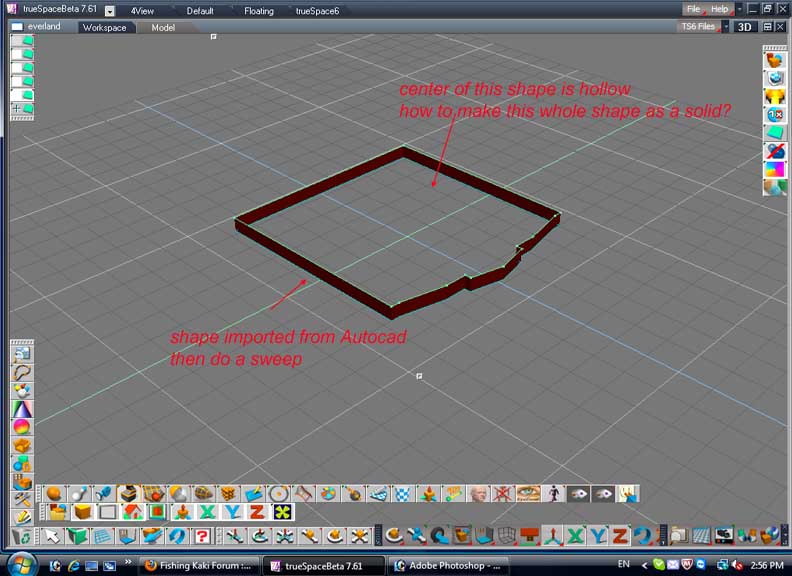
Sorry for the confusion. let me see if I can a picture up and show you guys what I mean.
1) firstly I draw a shape in Autocad and save it under .dxf
2) i open object in TS and do a sweep so the shape kinda have a wall as in the picture.
The thing is, if I rotate the object the center is empty except the wall can be seen.
How do I get this whole shape as one "solid" object? ( meaning the center should have a face? which I can add in some holes )
1) firstly I draw a shape in Autocad and save it under .dxf
2) i open object in TS and do a sweep so the shape kinda have a wall as in the picture.
The thing is, if I rotate the object the center is empty except the wall can be seen.
How do I get this whole shape as one "solid" object? ( meaning the center should have a face? which I can add in some holes )
- Attachments
-
-
stan
- Master Chief Petty Officer
- Posts: 584
- Joined: 21 May 2009, 17:20
Re: HOw to make solid when import DXF files?
if imported as poly ..use add face tool
if nurbs . use cap tool
if nurbs . use cap tool
-
marcel
- Captain
- Posts: 2247
- Joined: 21 May 2009, 19:52
- Type the number ten into the box: 0
- Location: paris - France
Re: HOw to make solid when import DXF files?
If you can't add a face the problem is different:
It seem the shape imported from autocad is not closed. It is only a line with a thick thin, not a face. A closed shape appear as a face when you import it on TS. Can you post your dxf to see where is the problem? and post a dwg file of this shape. I can try other way to resolve the problem.
It seem the shape imported from autocad is not closed. It is only a line with a thick thin, not a face. A closed shape appear as a face when you import it on TS. Can you post your dxf to see where is the problem? and post a dwg file of this shape. I can try other way to resolve the problem.
Design - illustration - Animation
http://www.crea-vision.fr
http://www.crea-vision.fr
-
RAYMAN

- Captain
- Posts: 2547
- Joined: 21 May 2009, 18:56
Re: HOw to make solid when import DXF files?
Quite frankly if you have a very complex floorplan I understand why you want to import via DXF
otherwise I dont understand them reason for using that workflow in the first place.
Yes you can fill up those faces like Stan said.
But even if I had to use autocad files as a floorplan I´d use Sketchup instead of Truespace for that task.
its much easier to make such kind of buildings with it and you can move walls even after your project is finished.
You have much more control over the final building. You can use the free version for it and export with Collada.
Otherwise if you dont use it why dont you start the project in Truespace ?
Peter
otherwise I dont understand them reason for using that workflow in the first place.
Yes you can fill up those faces like Stan said.
But even if I had to use autocad files as a floorplan I´d use Sketchup instead of Truespace for that task.
its much easier to make such kind of buildings with it and you can move walls even after your project is finished.
You have much more control over the final building. You can use the free version for it and export with Collada.
Otherwise if you dont use it why dont you start the project in Truespace ?
Peter
-
marcel
- Captain
- Posts: 2247
- Joined: 21 May 2009, 19:52
- Type the number ten into the box: 0
- Location: paris - France
Re: HOw to make solid when import DXF files?
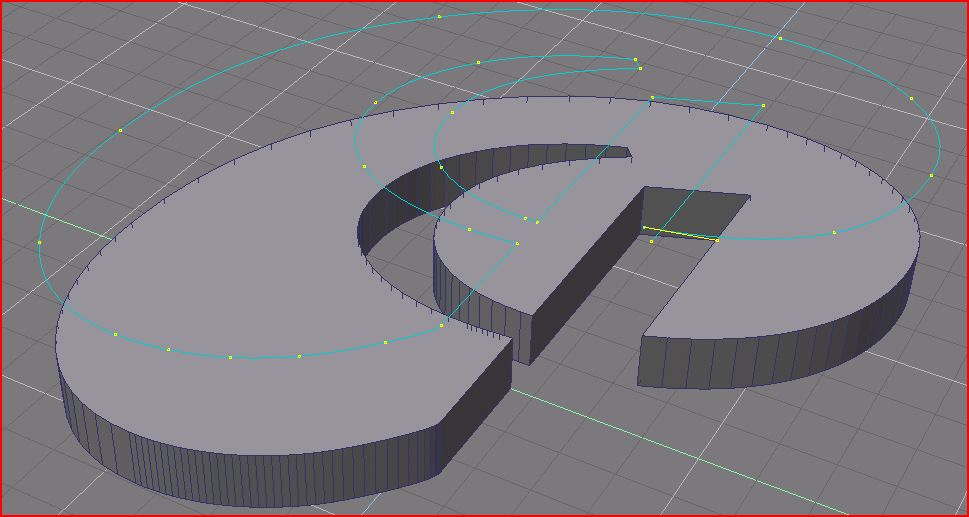
The TS convertion pack can import Autocad file without the need to convert in another format. Here is a sample made with it. You can convert Autocad polyline (dwg) to face or curve.
- Attachments
-
-

- setting.jpg (31.26 KiB) Viewed 4967 times
Design - illustration - Animation
http://www.crea-vision.fr
http://www.crea-vision.fr
-
marcel
- Captain
- Posts: 2247
- Joined: 21 May 2009, 19:52
- Type the number ten into the box: 0
- Location: paris - France
Re: HOw to make solid when import DXF files?
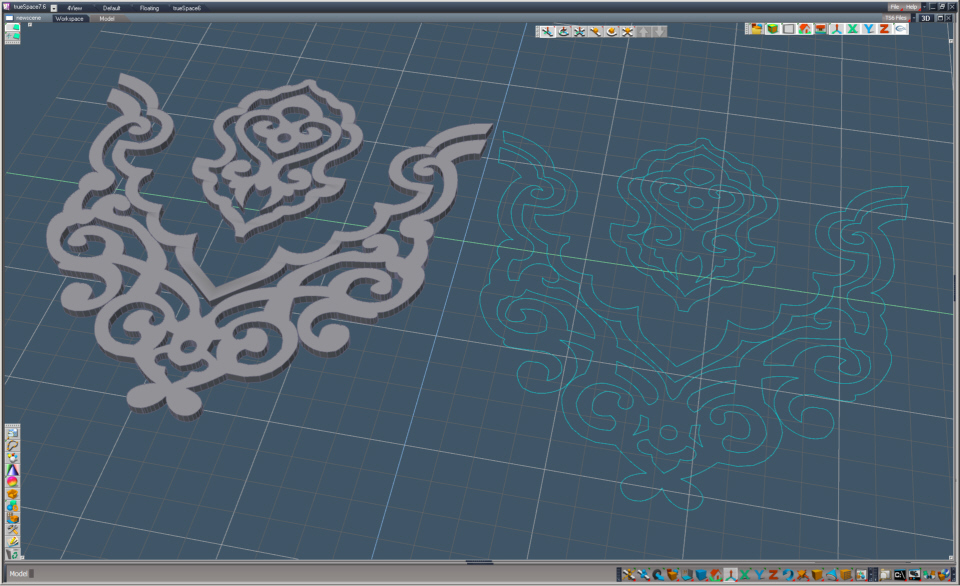
And it work with complex shape with holes. 
At the right: the autocad polyline imported as curve
At the left: the same file converted as face then sweep.
ps: you can also draw with Illustrator cs then export a dwg file to TS as a curve or face. TS read only the version7 of Illustrator (ai, pdf), with this way i can import most recents file (or i use moi3d). Don't forget to use different soft when you can't do what you want.
At the right: the autocad polyline imported as curve
At the left: the same file converted as face then sweep.
ps: you can also draw with Illustrator cs then export a dwg file to TS as a curve or face. TS read only the version7 of Illustrator (ai, pdf), with this way i can import most recents file (or i use moi3d). Don't forget to use different soft when you can't do what you want.
- Attachments
-
Design - illustration - Animation
http://www.crea-vision.fr
http://www.crea-vision.fr
-
roltancc
- Petty Officer Third Class
- Posts: 10
- Joined: 19 May 2010, 07:16
Re: HOw to make solid when import DXF files?
marcel wrote:And it work with complex shape with holes.
At the right: the autocad polyline imported as curve
At the left: the same file converted as face then sweep.
ps: you can also draw with Illustrator cs then export a dwg file to TS as a curve or face. TS read only the version7 of Illustrator (ai, pdf), with this way i can import most recents file (or i use moi3d). Don't forget to use different soft when you can't do what you want.
This sounds like what I am looking for.. Where do I get the TS conversion pack?
Sorry I am fairly new with TS.
Thanks
-
roltancc
- Petty Officer Third Class
- Posts: 10
- Joined: 19 May 2010, 07:16
Re: HOw to make solid when import DXF files?
yes I import it as poly.. where is the add face command? I don't seems to find it.stan wrote:if imported as poly ..use add face tool
if nurbs . use cap tool
thanks
-
bkjernisted
- Chief Petty Officer
- Posts: 114
- Joined: 23 May 2009, 06:10
Re: HOw to make solid when import DXF files?
How do you import a dxf profile as nurbs into truespace? My objective is to take the profile and and sweep it along a 90 degree path. I am Importing from Rhino 3d version 4. Can I do the same thing with a capped and closed polygon profile? Thanks!
-
bkjernisted
- Chief Petty Officer
- Posts: 114
- Joined: 23 May 2009, 06:10
Re: HOw to make solid when import DXF files?
I've figured it out. Sorry to waste so many peoples time.
-
froo
- Captain
- Posts: 2554
- Joined: 22 May 2009, 12:13
Re: HOw to make solid when import DXF files?
You didn't waste anyone's time bkjernisted.
Everyone is here to help.
Everyone is here to help.
-
clintonman

- Captain
- Posts: 5659
- Joined: 21 May 2009, 21:08
- Type the number ten into the box: 0
- Location: California
Re: HOw to make solid when import DXF files?
I think if you ask a question and figure it out for yourself you should also put the answer here on the forums. Otherwise someone in the future may ask the same questions and see the answer, "I figured it out". Their face will look like this -bkjernisted wrote:I've figured it out. Sorry to waste so many peoples time.


-
bkjernisted
- Chief Petty Officer
- Posts: 114
- Joined: 23 May 2009, 06:10
Re: HOw to make solid when import DXF files?
Read the manual under macrosweep. If for example if a handrail that does a 90 degree turn is smaller at the turn simlply use the cage at the joint to scale it bigger. Scale it proprtionally and I set the grid to .1. Play with the settings in Rhino3d dxf settings but use 2004 lines like mentioned earlier. Go to Forrester Mouldings for DWG cad files. Hope this is helpful.
-
tamaran
- Seaman Recruit
- Posts: 4
- Joined: 25 Jun 2012, 19:04
- Type the number ten into the box: 9
Re: HOw to make solid when import DXF files?
I'm looking for the solidify plug-in mentioned in this thread that was listed on http://www.lunadude.com/tS/tS-3dplugs.htm"
but is no longer available anywhere.
If someone still has it can you upload it, please?
but is no longer available anywhere.
If someone still has it can you upload it, please?
-
spacekdet

- Captain
- Posts: 1810
- Joined: 27 May 2009, 15:00
- Type the number ten into the box: 10
- Location: On the day shift at the Utility Muffin Research Kitchen
Re: HOw to make solid when import DXF files?
Not sure how it works in 7/Workspace. Should be ok in Model.
- Attachments
-
- solidify.zip
- No warranty expressed or implied.
Use at your own risk.
Actual mileage may vary. - (70.74 KiB) Downloaded 280 times
-
tamaran
- Seaman Recruit
- Posts: 4
- Joined: 25 Jun 2012, 19:04
- Type the number ten into the box: 9
Re: HOw to make solid when import DXF files?
Thank you very much.
It should do as stated on the original Caligari page
It should do as stated on the original Caligari page
for (CAD) closed watertight surfaces in stl/dxf that are not solid in any generic 3D modeller.A Solid object is specified as an object that does not have "holes" in the surface or that it does not contain edges where the surface ends. This extension patches such "holes" and connects "edges" by new faces.
-
BNG

- Chief Warrant Officer
- Posts: 684
- Joined: 16 Oct 2009, 03:26
- Type the number ten into the box: 0
- Location: Texas
Re: HOw to make solid when import DXF files?
Have you checked the options in your modeling program? Perhaps you can tweak the default settings to get what your looking for rather then drag it in to a another modeling and trying to fix it that way. Truespace is a great product, but imported modls usually lead to more problems rather then solve them.roltancc wrote:stan wrote:you could try this plugin 'solidify' found on this site http://www.lunadude.com/rsrc_trueSpace.htm download works directly from moomman's
use: converts imported models to solid objects
Thank Stan,
I've download the plugin, but it doesn't seems to work. But this is probably what I am looking for . a Plugin to Solidify a shape.
Casual Truespace 3D modeling hobbyist. My Truespace blog and simple 3d Modeling Tutorials for Casual Model Makers.