Hello pals,
Hope someone could help me.
I just installed trueSpace 6.6 SP2 and also ts 7.61 Beta 8 Full Version on my computer and on both version when I want to switch to D3D View an error shows saying "Cannot switch to D3D. Switching to wireframe instead".
I installed trueSpace on Window 7 64-bit, installed DirectX 9.0c, the latest drivers for my NVidia GeForce GTX Titan video card and also tried to start trueSpace using the CTRL key pressed at the startup.
Do you know where can be the problem ?
Any advice ?
Thanks a lot in advance.
Roberto.
Problem to enable DirectX ...
-
ROB_DF_MX
- Seaman
- Posts: 5
- Joined: 14 Mar 2015, 22:42
- Type the number ten into the box: 10
- Location: Mexico City, Mexico
Problem to enable DirectX ...
- Attachments
-

- D3D_Error.jpg (41.36 KiB) Viewed 5313 times
-
Draise

- Captain
- Posts: 3200
- Joined: 21 Sep 2009, 19:33
- Type the number ten into the box: 0
- Location: Bogota, Colombia
Re: Problem to enable DirectX ...
Are you working in the lagacy model side?
-
spacekdet

- Captain
- Posts: 1810
- Joined: 27 May 2009, 15:00
- Type the number ten into the box: 10
- Location: On the day shift at the Utility Muffin Research Kitchen
Re: Problem to enable DirectX ...
A couple things to try: (tS 6)
Right click D3D icon and check the settings panel.
Play around with those.
Also try holding Control key while double clicking icon to start trueSpace.
Configure tS panel should pop up.
Choose DirectX in 'Real Time Mode'
( the 'Pixmap Mode' is settings for wireframe mode)
Right click D3D icon and check the settings panel.
Play around with those.
Also try holding Control key while double clicking icon to start trueSpace.
Configure tS panel should pop up.
Choose DirectX in 'Real Time Mode'
( the 'Pixmap Mode' is settings for wireframe mode)
-
spacekdet
- Captain
- Posts: 1810
- Joined: 27 May 2009, 15:00
- Type the number ten into the box: 10
- Location: On the day shift at the Utility Muffin Research Kitchen
Re: Problem to enable DirectX ...
DirectX Update from Microsoft: https://www.microsoft.com/en-us/downloa ... aspx?id=35"
-
ROB_DF_MX
- Seaman
- Posts: 5
- Joined: 14 Mar 2015, 22:42
- Type the number ten into the box: 10
- Location: Mexico City, Mexico
Re: Problem to enable DirectX ...
Guys,
Thanks a lot for trying to help me on this.
I already tried your advice but with no luck.
Here I attach the D3D Mode dialog screen capture with my settings.
I also installed the latest DirectX 9.0c files.
Same problem with trueSpace 6.6 and trueSpace 7.61 Beta8
trueSpace does not allow me to set DirectX Mode.
What else can I try ?
This high end hardware should run it.
Roberto.
Thanks a lot for trying to help me on this.
I already tried your advice but with no luck.
Here I attach the D3D Mode dialog screen capture with my settings.

- D3D_Mode.jpg (13.67 KiB) Viewed 5300 times
Same problem with trueSpace 6.6 and trueSpace 7.61 Beta8
trueSpace does not allow me to set DirectX Mode.
What else can I try ?
This high end hardware should run it.
Roberto.
-
Emmanuel

- Chief Warrant Officer
- Posts: 670
- Joined: 14 Jun 2009, 06:47
Re: Problem to enable DirectX ...
I had this issue a while ago after I upgraded from NVidia to AMD. It was a driver conflict problem.
Try to remove every remaining of your current graphic driver, and make sure you have no AMD or Nvidia programs. Then restart the computer, and install a reliable driver version (the latest may not be the best).
Try to remove every remaining of your current graphic driver, and make sure you have no AMD or Nvidia programs. Then restart the computer, and install a reliable driver version (the latest may not be the best).
-
BNG

- Chief Warrant Officer
- Posts: 684
- Joined: 16 Oct 2009, 03:26
- Type the number ten into the box: 0
- Location: Texas
Re: Problem to enable DirectX ...
ROB_DF_MX wrote:Hello pals,
Hope someone could help me.
I just installed trueSpace 6.6 SP2 and also ts 7.61 Beta 8 Full Version on my computer and on both version when I want to switch to D3D View an error shows saying "Cannot switch to D3D. Switching to wireframe instead".
I installed trueSpace on Window 7 64-bit, installed DirectX 9.0c, the latest drivers for my NVidia GeForce GTX Titan video card and also tried to start trueSpace using the CTRL key pressed at the startup.
Do you know where can be the problem ?
Any advice ?
Thanks a lot in advance.
Was it working prior to installing SP2? If so then try uninstalling SP2.
Roberto.
Casual Truespace 3D modeling hobbyist. My Truespace blog and simple 3d Modeling Tutorials for Casual Model Makers.
-
ROB_DF_MX
- Seaman
- Posts: 5
- Joined: 14 Mar 2015, 22:42
- Type the number ten into the box: 10
- Location: Mexico City, Mexico
Re: Problem to enable DirectX ...
Hi BNG,
It was a clean install for both versions of trueSpace.
In the case of trueSpace 6.6 the full version I have install the SP2 automatically, I do not need to install the Service Packs apart.
It looks like a NVidia Driver problem or bug somewhere.
At this time I am trying with a bunch of drivers released for my video card. Installing one by one.
Hope to find one to enable the D3D view.
It was a clean install for both versions of trueSpace.
In the case of trueSpace 6.6 the full version I have install the SP2 automatically, I do not need to install the Service Packs apart.
It looks like a NVidia Driver problem or bug somewhere.
At this time I am trying with a bunch of drivers released for my video card. Installing one by one.
Hope to find one to enable the D3D view.
-
marcel

- Captain
- Posts: 2247
- Joined: 21 May 2009, 19:52
- Type the number ten into the box: 0
- Location: paris - France
Re: Problem to enable DirectX ...
I can't enable D3D view on a big Windows (2560x1440) but it work with Opengl.
I can enable D3D on a smaller windows. I think it is a problem of TS.
what is the resolution of your screen?
I can enable D3D on a smaller windows. I think it is a problem of TS.
what is the resolution of your screen?
Design - illustration - Animation
http://www.crea-vision.fr
http://www.crea-vision.fr
-
Emmanuel
- Chief Warrant Officer
- Posts: 670
- Joined: 14 Jun 2009, 06:47
Re: Problem to enable DirectX ...
That's right. Here, I can place a 1910*1170 Modeler window on a second monitor but if I go above 2000 pixels width, the D3D is gone.marcel wrote:I can't enable D3D view on a big Windows (2560x1440) but it work with Opengl.
I can enable D3D on a smaller windows. I think it is a problem of TS.
-
marcel
- Captain
- Posts: 2247
- Joined: 21 May 2009, 19:52
- Type the number ten into the box: 0
- Location: paris - France
Re: Problem to enable DirectX ...
2000 pixels for D3D seem to be the limit of the software. Not a problem of driver or ram.
Design - illustration - Animation
http://www.crea-vision.fr
http://www.crea-vision.fr
-
ROB_DF_MX
- Seaman
- Posts: 5
- Joined: 14 Mar 2015, 22:42
- Type the number ten into the box: 10
- Location: Mexico City, Mexico
Re: Problem to enable DirectX ...
Thank you Marcel !!!
You have found the reason for this problem.
I am running trueSpace at a resolution of 2560 x 1600 pixels.
Here are my findings, my monitor and graphics card support the following resolutions:
800 x 600
1024 x 768
1152 x 864
1176 x 664
1280 x 720
1280 x 768
1280 x 800
1280 x 960
1280 x 1024
1360 x 768
1366 x 768
1600 x 900
1600 x 1024
1600 x 1200
1680 x 1050
1768 x 992
1920 x 1080
1920 x 1200
1920 x 1440
2048 x 1536
Only at the following resolutions "D3D View" stops working on my system:
2560 x 1440
2560 x 1600
Gracias amigo Marcel.
You have found the reason for this problem.
I am running trueSpace at a resolution of 2560 x 1600 pixels.
Here are my findings, my monitor and graphics card support the following resolutions:
800 x 600
1024 x 768
1152 x 864
1176 x 664
1280 x 720
1280 x 768
1280 x 800
1280 x 960
1280 x 1024
1360 x 768
1366 x 768
1600 x 900
1600 x 1024
1600 x 1200
1680 x 1050
1768 x 992
1920 x 1080
1920 x 1200
1920 x 1440
2048 x 1536
Only at the following resolutions "D3D View" stops working on my system:
2560 x 1440
2560 x 1600
Gracias amigo Marcel.
-
FHembree

- Master Chief Petty Officer
- Posts: 337
- Joined: 21 Feb 2011, 17:43
- Type the number ten into the box: 9
Re: Problem to enable DirectX ...
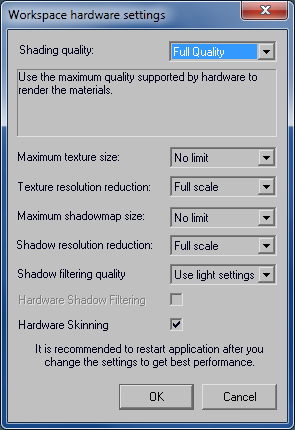
Have you tried adjusting the >file> WH setting menu.
Attached is what I use.
I can save render images up to max setting allowed by output, 7680x4800.
TS start-up config is set for Direct-x.
Attached is what I use.
I can save render images up to max setting allowed by output, 7680x4800.
TS start-up config is set for Direct-x.
- Attachments
-
-