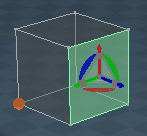
Experimental Object Navigation Widget

User avatar
clintonman
Captain
Posts: 5659
Joined: 21 May 2009, 21:08
Type the number ten into the box: 0
Location: California

Experimental Object Navigation Widget

Post by clintonman »

ObjectWidgetExperiment.jpg
ObjectWidgetStandard.jpg
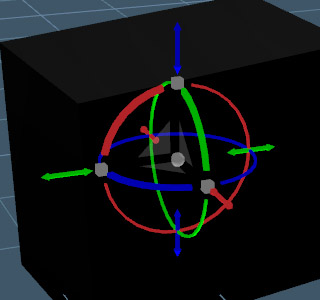
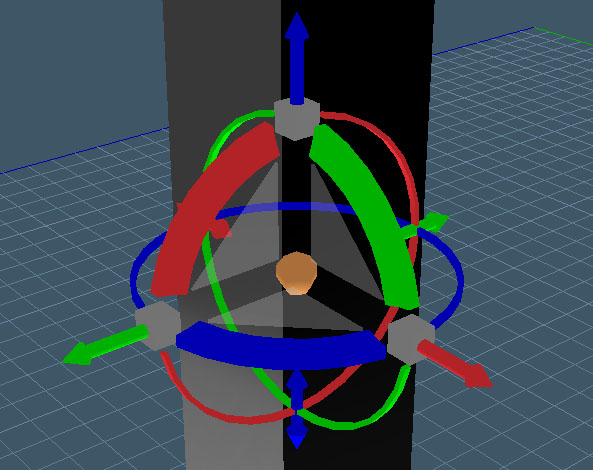
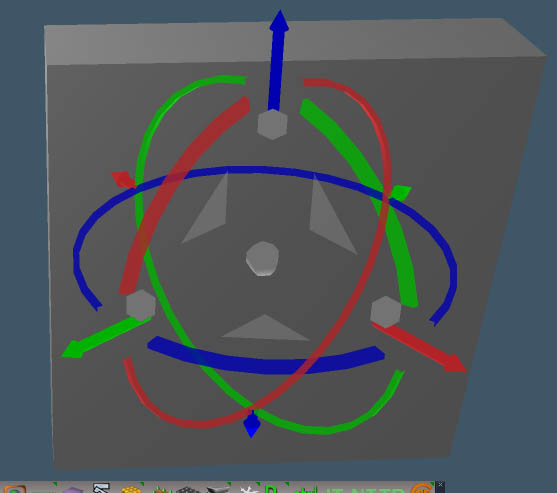
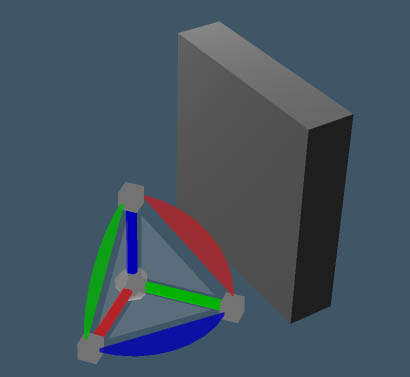
These widgets are a little different than the built in widgets. I made it because the widget is often hidden behind the 3d window border or behind toolbars near window borders and I also wanted to be able to tell at a glance which direction the + or - XYZ is running.

Differences:
Bigger, but not by scaling
Deactivated the widget's look at camera option, so no flipping
Left drag on arcs rotates around the anchor point/pivot
Right drag on arcs normal truespace style rotate around the object center
The center ball is located at the object anchor/pivot instead of the bounding box center so the center of rotation is visible.
Has standard RGB=XYZ colors
Not as pretty for sure, but may work better for me, we'll see...

Short term plan is to test it and to make the 2D move triangles less transparent, and tweak their positioning.

Requires the Unofficial trueSpace update
Install by loading the files into Widgets/Select
Shift click on the object nav widget until it shows

To uninstall make one of the normal widgets active then delete the nodes or just reset to default context.

Also attached is the scene file I'm using to develop this.
Attachments
WidgetScene.RsScn
(1.98 MiB) Downloaded 294 times
Default object navigation widgetONW8.RsObj
(396.51 KiB) Downloaded 276 times
Default object navigation widgetONW7.RsObj
(371.15 KiB) Downloaded 269 times
Clinton Reese

http://clintons3d.com
User avatar
Draise
Captain
Posts: 3200
Joined: 21 Sep 2009, 19:33
Type the number ten into the box: 0
Location: Bogota, Colombia

Re: Experimental Object Navigation Widget

Post by Draise »

Curious widget. The big one was.. it's big. I wish making widgets in Blender was as easy as it is in trueSpace. I'd so nice to have the internals exposed in nodes.
User avatar
clintonman
Captain
Posts: 5659
Joined: 21 May 2009, 21:08
Type the number ten into the box: 0
Location: California

Re: Experimental Object Navigation Widget

Post by clintonman »

ObjectNavWidget2.jpg
ObjectNavWidget2.jpg (42.93 KiB) Viewed 4710 times
Changes:
Made the triangles more centrally located.
Moved the scale boxes in line with the rotations arcs.
Made the "front" sections of the arcs thicker, closed the open ends and removed the transparency.
Small change to the translation arrows.

I think for the final version I'll try it with a smaller size.

Edit:
Forgot to mention the reasons for the changes. In the previous version I was having trouble finding the scale cubes and 2D translation triangles. The rotation arcs were confusing because couldn't tell the orientation. Getting rid of the transparency helped to show which ring was in front instead of blending together. The back translation arrow was too short to grab conveniently.
Attachments
Default object navigation widgetONW8e768.RsObj
(497.73 KiB) Downloaded 263 times
Default object navigation widgetONW77877.RsObj
(472.23 KiB) Downloaded 302 times
Clinton Reese

http://clintons3d.com
User avatar
trueBlue
Captain
Posts: 5548
Joined: 06 Jul 2009, 22:50
Type the number ten into the box: 10

Re: Experimental Object Navigation Widget

Post by trueBlue »

Took your widget for a spin...
Super like that your widget is NOT hidden behind the 3d window border or behind toolbars near window borders!
Notice that the triangles get clumped together at times. Might want to enable Look at Camera for the triangles.
The Object Move, Rotate, and Scale simple scripts, have a Model Status message (Shift + MMB select empty space to exit) that is longer true in the current updates.
I have found that the status message does not work very well with the Undo history.
Might also want to change the Widget's ID attribute.
You mention that "The center ball is located at the object anchor/pivot instead of the bounding box center so the center of rotation is visible." How is the center of rotation visible or different from the original widgets?
User avatar
Finis
Captain
Posts: 5410
Joined: 21 May 2009, 18:26
Type the number ten into the box: 0
Location: America!

Re: Experimental Object Navigation Widget

Post by Finis »

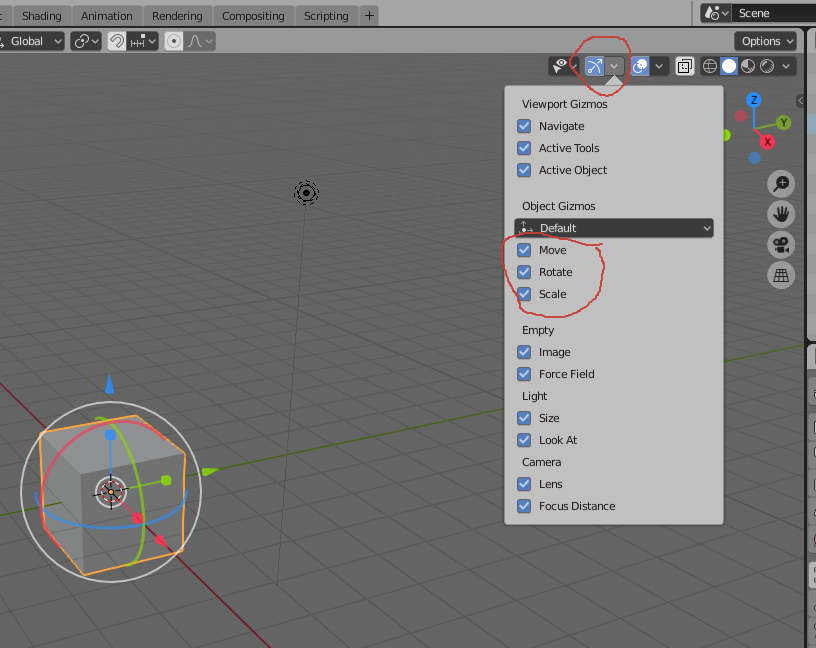
Draise wrote: 04 Sep 2019, 16:20I wish making widgets in Blender was as easy as it is in trueSpace.
@Draise Don't know about "making" them but this turns it on in Blender.
bnavw.jpg
I prefer dangerous freedom over peaceful servitude. -- Thomas Jefferson/Jean Jacques Rousseau
User avatar
clintonman
Captain
Posts: 5659
Joined: 21 May 2009, 21:08
Type the number ten into the box: 0
Location: California

Re: Experimental Object Navigation Widget

Post by clintonman »

trueBlue wrote: 09 Feb 2020, 17:10 Took your widget for a spin...
Super like that your widget is NOT hidden behind the 3d window border or behind toolbars near window borders!
Notice that the triangles get clumped together at times. Might want to enable Look at Camera for the triangles.
The Object Move, Rotate, and Scale simple scripts, have a Model Status message (Shift + MMB select empty space to exit) that is longer true in the current updates.
I have found that the status message does not work very well with the Undo history.
Might also want to change the Widget's ID attribute.
You mention that "The center ball is located at the object anchor/pivot instead of the bounding box center so the center of rotation is visible." How is the center of rotation visible or different from the original widgets?
Fixed the center of the widget to the intended anchor origin, removed the help and changed the triangles to look at the camera(very nice :bananathumb: ).
Attachments
Default object navigation widgetONW8a692.RsObj
(497.57 KiB) Downloaded 282 times
Default object navigation widgetONW7b30a.RsObj
(472.06 KiB) Downloaded 275 times
Clinton Reese

http://clintons3d.com
User avatar
trueBlue
Captain
Posts: 5548
Joined: 06 Jul 2009, 22:50
Type the number ten into the box: 10

Re: Experimental Object Navigation Widget

Post by trueBlue »

Hummm… looks like you lost the ability to Left drag on arcs to rotate around the anchor point/pivot
Do you notice the flashing of a Ghost Widget going from the Axis to widget's Docking position?
Perhaps because you are using Transforms verses Eulers?
User avatar
clintonman
Captain
Posts: 5659
Joined: 21 May 2009, 21:08
Type the number ten into the box: 0
Location: California

Re: Experimental Object Navigation Widget

Post by clintonman »

trueBlue wrote: 09 Feb 2020, 19:26 Hummm… looks like you lost the ability to Left drag on arcs to rotate around the anchor point/pivot
Do you notice the flashing of a Ghost Widget going from the Axis to widget's Docking position?
Perhaps because you are using Transforms verses Eulers?
Ugh, bitten in the butt once again by the crazy trueSpace pivot system.
Clinton Reese

http://clintons3d.com
User avatar
clintonman
Captain
Posts: 5659
Joined: 21 May 2009, 21:08
Type the number ten into the box: 0
Location: California

Re: Experimental Object Navigation Widget

Post by clintonman »

ObjectNavWidget3.jpg
No way to make it work the way I want, so here's the compromise.
From left to right:
Axis tool used, set to the bottom - center indicator still at center
Mesh vertices point edited, no axis. - center at world origin as a result of the point edit
Unmodified mesh.

Not shown but if you flatten the axis on the left mesh the center indicator moves to the bottom.
Attachments
SomeWidgetTests.RsScn
(1.07 MiB) Downloaded 233 times
Default object navigation widgetONW882ef.RsObj
(497.63 KiB) Downloaded 273 times
Default object navigation widgetONW7e522.RsObj
(472.11 KiB) Downloaded 275 times
Clinton Reese

http://clintons3d.com
User avatar
trueBlue
Captain
Posts: 5548
Joined: 06 Jul 2009, 22:50
Type the number ten into the box: 10

Re: Experimental Object Navigation Widget

Post by trueBlue »

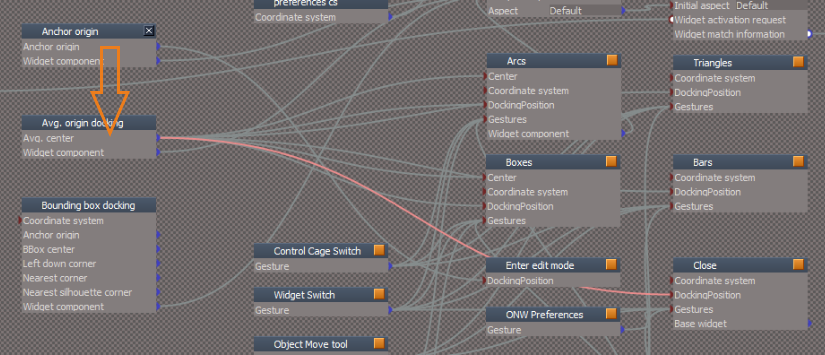
If your goal was to move the Sphere to the Pivot.
Try changing the docking as shown.
tempsnip.png
Move the other connectors as shown
Other connectors.png
Disconnect this in Arcs to restore RMB + Drag to Rotate from Pivot
RMB Drag.PNG
RMB Drag.PNG (10.35 KiB) Viewed 4702 times
Results:
Widget @ object
Sphere @ Pivot
Results.PNG
Results.PNG (32.45 KiB) Viewed 4702 times
User avatar
clintonman
Captain
Posts: 5659
Joined: 21 May 2009, 21:08
Type the number ten into the box: 0
Location: California

Re: Experimental Object Navigation Widget

Post by clintonman »

Goal is to see where the center of rotation is. Problem is that it is different for various configurations. tS rotates around the bounding box center, or around the axis or around the mesh zero point. I don't think there's any way to satisfy all 3 with 1 widget.
Clinton Reese

http://clintons3d.com
User avatar
trueBlue
Captain
Posts: 5548
Joined: 06 Jul 2009, 22:50
Type the number ten into the box: 10

Re: Experimental Object Navigation Widget

Post by trueBlue »

Maybe there is! :idea:
With the Axis widget opened, run:

Code: Select all

Node.Disconnect("/Widgets/Tools/Axes widget/Avg. origin docking", "Avg. center", "/Widgets/Tools/Axes widget/Arcs", "DockingPosition")
Node.Disconnect("/Widgets/Tools/Axes widget/Avg. origin docking", "Avg. center", "/Widgets/Tools/Axes widget/Arrows", "DockingPosition")
Pivot.PNG
Pivot.PNG (6.39 KiB) Viewed 4638 times
To restore, run:

Code: Select all

Node.Disconnect("/Widgets/Tools/Axes widget/Avg. origin docking", "Avg. center", "/Widgets/Tools/Axes widget/Arcs", "DockingPosition")
Node.Disconnect("/Widgets/Tools/Axes widget/Avg. origin docking", "Avg. center", "/Widgets/Tools/Axes widget/Arrows", "DockingPosition")
Node.ConnectTo("/Widgets/Tools/Axes widget/Avg. origin docking", "Avg. center", "/Widgets/Tools/Axes widget/Arcs", "DockingPosition")
Node.ConnectTo("/Widgets/Tools/Axes widget/Avg. origin docking", "Avg. center", "/Widgets/Tools/Axes widget/Arrows", "DockingPosition")
User avatar
clintonman
Captain
Posts: 5659
Joined: 21 May 2009, 21:08
Type the number ten into the box: 0
Location: California

Re: Experimental Object Navigation Widget

Post by clintonman »

trueBlue wrote: 10 Feb 2020, 14:16 Maybe there is! :idea:
With the Axis widget opened, run:

Code: Select all

Node.Disconnect("/Widgets/Tools/Axes widget/Avg. origin docking", "Avg. center", "/Widgets/Tools/Axes widget/Arcs", "DockingPosition")
Node.Disconnect("/Widgets/Tools/Axes widget/Avg. origin docking", "Avg. center", "/Widgets/Tools/Axes widget/Arrows", "DockingPosition")
Pivot.PNG

To restore, run:

Code: Select all

Node.Disconnect("/Widgets/Tools/Axes widget/Avg. origin docking", "Avg. center", "/Widgets/Tools/Axes widget/Arcs", "DockingPosition")
Node.Disconnect("/Widgets/Tools/Axes widget/Avg. origin docking", "Avg. center", "/Widgets/Tools/Axes widget/Arrows", "DockingPosition")
Node.ConnectTo("/Widgets/Tools/Axes widget/Avg. origin docking", "Avg. center", "/Widgets/Tools/Axes widget/Arcs", "DockingPosition")
Node.ConnectTo("/Widgets/Tools/Axes widget/Avg. origin docking", "Avg. center", "/Widgets/Tools/Axes widget/Arrows", "DockingPosition")
I don't see how changing the axis widget helps the object navigation widgets. Also in the last sample scene the first and second meshes don't have an axis.
Clinton Reese

http://clintons3d.com
User avatar
clintonman
Captain
Posts: 5659
Joined: 21 May 2009, 21:08
Type the number ten into the box: 0
Location: California

Re: Experimental Object Navigation Widget

Post by clintonman »

ObjectNavWidget4.jpg
I think this is my final version for the object nav widget.

The spaces between the widget elements has been reduced. The large spaces made it difficult to see some of the elements and see their relationship to each other. The widget is still a little bit larger than standard.
The rotation controls are thicker and the open faces were closed. The arrow translation controls are shorter. The triangle translation controls open faces have been closed in and they are less transparent. The center control has an orange color.

Fixed the naming so the unofficial update widget scale control will work.

Requires the Unofficial trueSpace update
Install by loading the files into Widgets/Select
Shift click on the object nav widget until it shows

To uninstall make one of the normal widgets active then delete the nodes or just reset to default context
Attachments
Default object navigation widgetONW8ac7f.RsObj
(445.65 KiB) Downloaded 306 times
Default object navigation widgetONW70996.RsObj
(420.23 KiB) Downloaded 288 times
Clinton Reese

http://clintons3d.com
User avatar
clintonman
Captain
Posts: 5659
Joined: 21 May 2009, 21:08
Type the number ten into the box: 0
Location: California

Re: Experimental Object Navigation Widget

Post by clintonman »

ObjectNavUE4.jpg
A little side note. It looks like Unreal VR Editor universal widget was inspired by trueSpace.
You can see that the x/red and y/green are kindof reversed. That's because UE4 is z up right handed and trueSpace is z up left handed coordinates.
Clinton Reese

http://clintons3d.com
User avatar
trueBlue
Captain
Posts: 5548
Joined: 06 Jul 2009, 22:50
Type the number ten into the box: 10

Re: Experimental Object Navigation Widget

Post by trueBlue »

clintonman wrote: 14 Mar 2020, 02:24 ObjectNavWidget4.jpg
I think this is my final version for the object nav widget.

The spaces between the widget elements has been reduced. The large spaces made it difficult to see some of the elements and see their relationship to each other. The widget is still a little bit larger than standard.
The rotation controls are thicker and the open faces were closed. The arrow translation controls are shorter. The triangle translation controls open faces have been closed in and they are less transparent. The center control has an orange color.

Fixed the naming so the unofficial update widget scale control will work.

Requires the Unofficial trueSpace update
Install by loading the files into Widgets/Select
Shift click on the object nav widget until it shows

To uninstall make one of the normal widgets active then delete the nodes or just reset to default context
There is a few things that both of your widgets are not compatible with the Unofficial Updates
ONW Preferences.png
ONW Preferences.png (4.28 KiB) Viewed 4564 times
On Operating Visibilty - 'Partially works'
Look at Camera - 'Does not work and messes up your widgets'
Docking - Bounding Box Center - 'Does not work and messes up your widgets'
Workaround - Looks like your Bounding Box Center node is not needed, not sure though. Removing it makes it compatible with the above 'Docking - Bounding Box Center' script

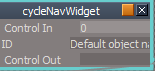
Widget Switch / cycleNavWidget 'ID' attribute
CycleNavWidget.png
CycleNavWidget.png (3.92 KiB) Viewed 4560 times
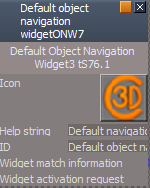
Change the ID in both widgets
Default object navigation widgetONW7
And
Default object navigation widgetONW8

Additionally on the front panels too
Front panel.png
Front panel.png (14.59 KiB) Viewed 4560 times
User avatar
clintonman
Captain
Posts: 5659
Joined: 21 May 2009, 21:08
Type the number ten into the box: 0
Location: California

Re: Experimental Object Navigation Widget

Post by clintonman »

trueBlue wrote: 14 Mar 2020, 17:16
There is a few things that both of your widgets are not compatible with the Unofficial Updates
ONW Preferences.png
On Operating Visibilty - 'Partially works'
Look at Camera - 'Does not work and messes up your widgets'
Docking - Bounding Box Center - 'Does not work and messes up your widgets'
Workaround - Looks like your Bounding Box Center node is not needed, not sure though. Removing it makes it compatible with the above 'Docking - Bounding Box Center' script

Widget Switch / cycleNavWidget 'ID' attribute
CycleNavWidget.png
Change the ID in both widgets
Default object navigation widgetONW7
And
Default object navigation widgetONW8

Additionally on the front panels too
Front panel.png
Thanks, I'll take a look.

Dont understand what you say about the ID. Looks like cycleNavWidget already has those values.
Clinton Reese

http://clintons3d.com
User avatar
trueBlue
Captain
Posts: 5548
Joined: 06 Jul 2009, 22:50
Type the number ten into the box: 10

Re: Experimental Object Navigation Widget

Post by trueBlue »

Maybe it was the front panel's ID that needed to be changed.
When testing I was getting an error.
Let me know if it would be easier to change those button scripts, making them compatible with your widgets.
User avatar
clintonman
Captain
Posts: 5659
Joined: 21 May 2009, 21:08
Type the number ten into the box: 0
Location: California

Re: Experimental Object Navigation Widget

Post by clintonman »

Updated from trueBlue notes.

Added proper ID to the nodes.
Removed the Bounding Box Center node which wasn't doing anything.

To be compatible these 2 lines can be added to the top of each the on/off button scripts of the Object Navigation Widgets node.

Code: Select all

if(Node.Value("/Widgets/Select/Default object navigation widget", "ID") == "Default object navigation widgetONW7") return;
if(Node.Value("/Widgets/Select/Default object navigation widget", "ID") == "Default object navigation widgetONW8") return;
Edit:
Also note that these widgets don't use the tS default color scheme, but uses the XYZ=RGB color scheme.
Attachments
Default object navigation widgetONW7ac4c.RsObj
(420.23 KiB) Downloaded 279 times
Default object navigation widgetONW8152e.RsObj
(445.64 KiB) Downloaded 291 times
Clinton Reese

http://clintons3d.com
User avatar
trueBlue
Captain
Posts: 5548
Joined: 06 Jul 2009, 22:50
Type the number ten into the box: 10

Re: Experimental Object Navigation Widget

Post by trueBlue »

clintonman wrote: 14 Mar 2020, 20:49 Updated from trueBlue notes.

Added proper ID to the nodes.
Removed the Bounding Box Center node which wasn't doing anything.
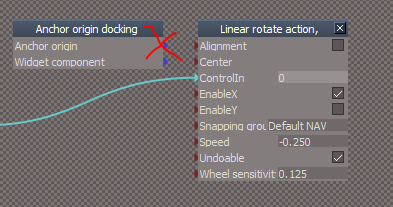
Is this the node that you mentioned was removed?
Is it needed?
BBDocking.png
User avatar
clintonman
Captain
Posts: 5659
Joined: 21 May 2009, 21:08
Type the number ten into the box: 0
Location: California

Re: Experimental Object Navigation Widget

Post by clintonman »

trueBlue wrote: 19 Mar 2020, 00:04
clintonman wrote: 14 Mar 2020, 20:49 Updated from trueBlue notes.

Added proper ID to the nodes.
Removed the Bounding Box Center node which wasn't doing anything.
Is this the node that you mentioned was removed?
Is it needed?
BBDocking.png
Yep, and nope it's not needed.
Clinton Reese

http://clintons3d.com

Return to “Workspace Side”