Face to Face Object Snapping

free scripts, plugins, models, textures
User avatar
clintonman
Captain
Posts: 5659
Joined: 21 May 2009, 21:08
Type the number ten into the box: 0
Location: California

Face to Face Object Snapping

Post by clintonman »

New script will snap objects together based on face selection.
face2faceSnapping.jpg
Image shows yellow cylinders that have been face snapped into place on the blue torus.

http://www.clintons3d.com/plugins/trues ... index.html"

Update:

Added a RMB = copy behavior - thanks trueBlue for the copy function
The update is available on the website and here for convenience
Attachments
install face to face snap Button v1.5.zip
(32.33 KiB) Downloaded 302 times
Last edited by clintonman on 18 Feb 2010, 17:01, edited 1 time in total.
Clinton Reese

http://clintons3d.com
pugman 1
Captain
Posts: 1555
Joined: 21 May 2009, 19:26
Type the number ten into the box: 0
Location: Germany

Re: Face to Face Object Snapping

Post by pugman 1 »

Hi clintonman, thank you so much for what you
are doing here. i think you and true blue will soon
have ts8 the way you are going.
maybe possible, :bananathumb: :bananacool2: reformed ts7
thanks again Ralph
User avatar
LeonRegis
Captain
Posts: 1946
Joined: 18 Aug 2009, 17:36
Type the number ten into the box: 0
Location: Brazil/Earth/Orion Arm/Milky Way/4th Dimension/This Universe/Multiverse???/Singularity???

Re: Face to Face Object Snapping

Post by LeonRegis »

Thank you very much men! it seems really cool! Can we snap a group or snap in a face loop?

Thanks
Be the change you want to see in the world. - Mohandas Gandhi
User avatar
clintonman
Captain
Posts: 5659
Joined: 21 May 2009, 21:08
Type the number ten into the box: 0
Location: California

Re: Face to Face Object Snapping

Post by clintonman »

leonregis wrote:Thank you very much men! it seems really cool! Can we snap a group or snap in a face loop?

Thanks
Sorry, but no to both questions. It only works with single mesh objects and only with single face selections.
Clinton Reese

http://clintons3d.com
User avatar
LeonRegis
Captain
Posts: 1946
Joined: 18 Aug 2009, 17:36
Type the number ten into the box: 0
Location: Brazil/Earth/Orion Arm/Milky Way/4th Dimension/This Universe/Multiverse???/Singularity???

Re: Face to Face Object Snapping

Post by LeonRegis »

Anyway it's amazing, keep the good work!
Be the change you want to see in the world. - Mohandas Gandhi
User avatar
Steinie
Captain
Posts: 2958
Joined: 21 May 2009, 17:38
Type the number ten into the box: 10

Re: Face to Face Object Snapping

Post by Steinie »

Face2Face example showing how cool this is.
Thanks Clintonman!
Attachments
Face2Face.zip
(652.52 KiB) Downloaded 297 times
User avatar
LeonRegis
Captain
Posts: 1946
Joined: 18 Aug 2009, 17:36
Type the number ten into the box: 0
Location: Brazil/Earth/Orion Arm/Milky Way/4th Dimension/This Universe/Multiverse???/Singularity???

Re: Face to Face Object Snapping

Post by LeonRegis »

Great example Steinie, much better than click and drag to the position, or copy the location of the object and put it there. :worship:
Be the change you want to see in the world. - Mohandas Gandhi
User avatar
clintonman
Captain
Posts: 5659
Joined: 21 May 2009, 21:08
Type the number ten into the box: 0
Location: California

Re: Face to Face Object Snapping

Post by clintonman »

Steinie wrote:Face2Face example showing how cool this is.
Thanks Clintonman!
Wow, that's interesting. I wrote it like so:

select 2 objects
push the button
select face on first object
select face on second object

you changed the order and it still works

select 2 objects
enter PE mode
select face on first object
ctrl select face on second object
push the button
Clinton Reese

http://clintons3d.com
User avatar
trueBlue
Captain
Posts: 5548
Joined: 06 Jul 2009, 22:50
Type the number ten into the box: 10

Re: Face to Face Object Snapping

Post by trueBlue »

This is great Clinton! Thank you!
Since this is a Face to Face Snap tool, I have two suggestions:

1.) Add a script at the end of your chain of scripts that runs this command:
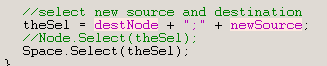
Node.Value('/Preferences/Mesh Editor Settings','PE selection mode') = 'face'

2.) Make the pivotParent Invisible.
User avatar
clintonman
Captain
Posts: 5659
Joined: 21 May 2009, 21:08
Type the number ten into the box: 0
Location: California

Re: Face to Face Object Snapping

Post by clintonman »

trueBlue wrote:This is great Clinton! Thank you!
Since this is a Face to Face Snap tool, I have two suggestions:

1.) Add a script at the end of your chain of scripts that runs this command:
Node.Value('/Preferences/Mesh Editor Settings','PE selection mode') = 'face'

2.) Make the pivotParent Invisible.
Before the script moves the object it has to exit out of PW mode so why set selection mode to face when it's done?

The pivotParent isn't in the scene after the script is installed. I think you need to remove the installer node from the scene.
Clinton Reese

http://clintons3d.com
User avatar
trueBlue
Captain
Posts: 5548
Joined: 06 Jul 2009, 22:50
Type the number ten into the box: 10

Re: Face to Face Object Snapping

Post by trueBlue »

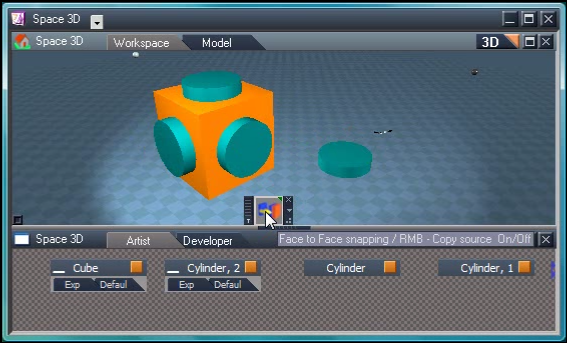
Well for me before I added this command to your script (see capture), the script was changing from Face Selection to Point Selection. So when I was wanting to use your tool more then once, I had to switch to Face Selection again. I understand about the pivotParent object only showing during installation, I was just suggesting that you set it to Invisible. I'll leave up to you if you want to make the changes or not.
Attachments
Capture.PNG
User avatar
clintonman
Captain
Posts: 5659
Joined: 21 May 2009, 21:08
Type the number ten into the box: 0
Location: California

Re: Face to Face Object Snapping

Post by clintonman »

trueBlue wrote:Well for me before I added this command to your script (see capture), the script was changing from Face Selection to Point Selection. So when I was wanting to use your tool more then once, I had to switch to Face Selection again. I understand about the pivotParent object only showing during installation, I was just suggesting that you set it to Invisible. I'll leave up to you if you want to make the changes or not.
I see. It would be useful for the "Steinie" workflow. It won't take a lot of time to make the changes and I don't see any negative impact, so consider it done(soon). If I had not seen the Steine way I wouldn't bother because the script changes to face select when it starts.

Edit: The requested changes are in place now. Thanks for the feedback.
Clinton Reese

http://clintons3d.com
User avatar
trueBlue
Captain
Posts: 5548
Joined: 06 Jul 2009, 22:50
Type the number ten into the box: 10

Re: Face to Face Object Snapping

Post by trueBlue »

Thanks Clinton. I added a Copy Source to your Face to Face Object Snapping script.
LMB = Snap Face to Face
RMB = Copy source On/Off

Video included showing it's use.
Capture.PNG
Attachments
Face to Face Object snapping.zip
(386.42 KiB) Downloaded 285 times
User avatar
clintonman
Captain
Posts: 5659
Joined: 21 May 2009, 21:08
Type the number ten into the box: 0
Location: California

Re: Face to Face Object Snapping

Post by clintonman »

trueBlue wrote:Thanks Clinton. I added a Copy Source to your Face to Face Object Snapping script.
LMB = Snap Face to Face
RMB = Copy source On/Off

Video included showing it's use.
The attachment Capture.PNG is no longer available
Good idea. What do you think of this change. LMB = move and RMB = copy. That way you don't have to keep track of what state the script is in.

One more thing, you might want to change the name of the button or make the script the same name as the original. That way it installs a new button or replaces the old script and button. As it is now it replaces the button and adds a new script.
Attachments
Face to Face Snapping 2a.zip
(32.21 KiB) Downloaded 266 times
Clinton Reese

http://clintons3d.com
User avatar
trueBlue
Captain
Posts: 5548
Joined: 06 Jul 2009, 22:50
Type the number ten into the box: 10

Re: Face to Face Object Snapping

Post by trueBlue »

Better idea with the copy flag!
I did not mess with your install script and I never really noticed the duplication because I always answered Yes to replace the button and script. However I do notice that if they exist and you answer No, that is when the duplication happens. Also if you answer No to replace the button (1st Question) you do not have the opportunity to replace the script (2nd Question).
Edit: Here is what I came up with, with regards to the install script.
Attachments
tS761 Face to Face Snapping.zip
(38.49 KiB) Downloaded 291 times
User avatar
clintonman
Captain
Posts: 5659
Joined: 21 May 2009, 21:08
Type the number ten into the box: 0
Location: California

Re: Face to Face Object Snapping

Post by clintonman »

trueBlue wrote:Better idea with the copy flag!
I did not mess with your install script and I never really noticed the duplication because I always answered Yes to replace the button and script. However I do notice that if they exist and you answer No, that is when the duplication happens. Also if you answer No to replace the button (1st Question) you do not have the opportunity to replace the script (2nd Question).
Edit: Here is what I came up with, with regards to the install script.
That isn't happening for me. I don't get any duplicates if the names match. The No on the first question = abort is by design since I can't think of any cases where you would want to update the button but not the script and it serves as a safety in case somehow 2 buttons with the same name but different functions won't override each other.

Edit: That explanation doesn't make sense. What I mean to say(I think) is that the the script update requires the button update since it might depend on it, but it's possible to install a button that does not use an external script. So you get 2 questions instead of one. It all boils down to giving the option to not overwrite any existing elements.

Here is the updated script(I'll add it to the first post). It doesn't have your updated installer since I didn't know about it till now and I can't reproduce the problem of duplicates anyway. One last enhancement is that the script maintains the apparent selection so it's easier to copy/move several times without the need to update the selection every time.
Clinton Reese

http://clintons3d.com
User avatar
trueBlue
Captain
Posts: 5548
Joined: 06 Jul 2009, 22:50
Type the number ten into the box: 10

Re: Face to Face Object Snapping

Post by trueBlue »

Way cool it keeps getting better and better. Nice touch Clinton!
It was not working for me as intended until I reversed the order of the selection as shown:
Attachments
Capture.PNG
Capture.PNG (2.75 KiB) Viewed 5593 times
User avatar
clintonman
Captain
Posts: 5659
Joined: 21 May 2009, 21:08
Type the number ten into the box: 0
Location: California

Re: Face to Face Object Snapping

Post by clintonman »

trueBlue wrote:Way cool it keeps getting better and better. Nice touch Clinton!
It was not working for me as intended until I reversed the order of the selection as shown:
I suspect it has to do with the way it is run. I think if you run it after entering PE mode it reverses the behavior. If both objects are not in PE mode it works as expected.
Clinton Reese

http://clintons3d.com
User avatar
trueBlue
Captain
Posts: 5548
Joined: 06 Jul 2009, 22:50
Type the number ten into the box: 10

Re: Face to Face Object Snapping

Post by trueBlue »

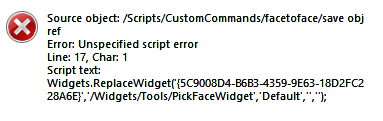
Error
Capture2.PNG
Select 2 Objects in PE mode.
Select your Face Snap button.
RMB in View to exit PE mode.

Suggestion:
Save and Restore the current PE selection mode.

Code: Select all

Node.Value('/Preferences/Mesh Editor Settings','PE selection mode') = Node.Value(System.ThisOwner() + "/selectFaceMode", "PEselectionMode")
User avatar
clintonman
Captain
Posts: 5659
Joined: 21 May 2009, 21:08
Type the number ten into the box: 0
Location: California

Re: Face to Face Object Snapping

Post by clintonman »

New version:


Fixed crash when exit PE mode before tool is complete
restores previous PE selection mode
if start in PE mode stays in PE mode
automatic installer
improved button highlighting and gui id
Clinton Reese

http://clintons3d.com
User avatar
clintonman
Captain
Posts: 5659
Joined: 21 May 2009, 21:08
Type the number ten into the box: 0
Location: California

Re: Face to Face Object Snapping

Post by clintonman »

Update September 2020

I resurrected and updated this old script because I found the RMB copy to be awkward to use and I wanted the option to run the tool in object mode, not just point edit mode.

Updated to include the Unofficial Update enhancements.
RMB opens a panel to choose the copy option, instead of doing the copy action directly.
Toolbar button and script will work in object mode.
updated installer to persistent style

http://clintons3d.com/plugins/truespace ... facetoface
Clinton Reese

http://clintons3d.com
User avatar
trueBlue
Captain
Posts: 5548
Joined: 06 Jul 2009, 22:50
Type the number ten into the box: 10

Re: Face to Face Object Snapping

Post by trueBlue »

Great update! :worship:
User avatar
clintonman
Captain
Posts: 5659
Joined: 21 May 2009, 21:08
Type the number ten into the box: 0
Location: California

Re: Face to Face Object Snapping

Post by clintonman »

Update October 2020

Complete rewrite of the tool.
Uses a plugin based widget to get triangle face selections
Does not use point edit mode.
Works with lights and cameras.
Copy option snaps the copy instead of the original object
Works with objects inside groups(maybe new, not sure)

http://clintons3d.com/plugins/truespace ... facetoface

requires latest plugin, Clintons3dPlugin.rsx, available here:
http://clintons3d.com/plugins/truespace ... index.html

INSTALLER BUG: FIXING NOW

WEBSITE IS DOWN. Will try again later

Website is back up, and the corrected installer has been uploaded.
Clinton Reese

http://clintons3d.com
User avatar
trueBlue
Captain
Posts: 5548
Joined: 06 Jul 2009, 22:50
Type the number ten into the box: 10

Re: Face to Face Object Snapping

Post by trueBlue »

Looks like your installer is not installing the PickFaceWidget
Error.png
Error.png (9.02 KiB) Viewed 3165 times
PluginInstalled.png
User avatar
clintonman
Captain
Posts: 5659
Joined: 21 May 2009, 21:08
Type the number ten into the box: 0
Location: California

Re: Face to Face Object Snapping

Post by clintonman »

trueBlue wrote: 14 Oct 2020, 03:22 Looks like your installer is not installing the PickFaceWidget

Error.png
PluginInstalled.png

you were too quick, that's the installer bug mentioned above.
I'm on a different machine now, I'll download and make sure the good one made it up.

Edit: Yep, verified, you were too quick, the good installer is up and working now.

Edit: Since you ran the bad installer you will want to delete the PickSelect node from inside /Widgets/Tools, that was the bug in the installer.
Clinton Reese

http://clintons3d.com
User avatar
trueBlue
Captain
Posts: 5548
Joined: 06 Jul 2009, 22:50
Type the number ten into the box: 10

Re: Face to Face Object Snapping

Post by trueBlue »

Thanks!
I forgot to mention that I think you need to install your plugin and reboot tS before running the installer
This screen shot is taken from the Log View during installation
Screenshot 2020-10-13 171448.png
Screenshot 2020-10-13 171448.png (3.89 KiB) Viewed 3156 times
It is working really well, nice work!
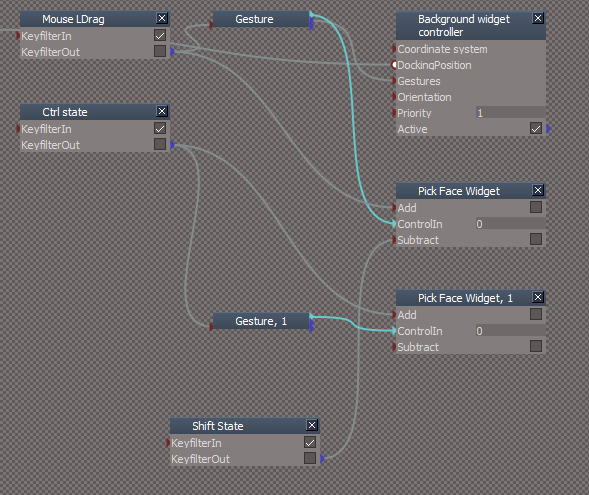
I like trueSpace's Select by Painting (LMB + Drag)
This setup allows you to use both LMB + Drag and Ctrl + Pick
SelectByPainting.png
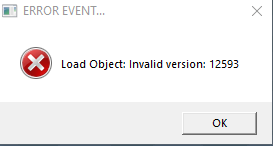
Another issue on a Context Reset
ErrorLoadObject.png
ErrorLoadObject.png (6.25 KiB) Viewed 3148 times
ErrorOnResetDefaultContext.png
ErrorOnResetDefaultContext.png (9.12 KiB) Viewed 3148 times
Looks like this is the problem
debuglog.png
User avatar
clintonman
Captain
Posts: 5659
Joined: 21 May 2009, 21:08
Type the number ten into the box: 0
Location: California

Re: Face to Face Object Snapping

Post by clintonman »

trueBlue wrote: 14 Oct 2020, 08:56 Thanks!
I forgot to mention that I think you need to install your plugin and reboot tS before running the installer
This screen shot is taken from the Log View during installation
Screenshot 2020-10-13 171448.png

It is working really well, nice work!
I like trueSpace's Select by Painting (LMB + Drag)
This setup allows you to use both LMB + Drag and Ctrl + Pick
SelectByPainting.png

Another issue on a Context Reset
ErrorLoadObject.png
ErrorOnResetDefaultContext.png
Looks like this is the problem
debuglog.png
Interesting setup, I'll give it a try.

Context reset no debug.log here. What's inside of it?

If you want to protect against invalid file types you can do something like this to the loop for ReloadCustomScripts command

Code: Select all

	for (; !filesEnum.atEnd(); filesEnum.moveNext()) {
		var thefile = filesEnum.item();
		var basename = fso.GetBaseName(thefile);
		if(Node.Exists("Scripts/CustomCommands/" + basename)) continue;
		//check valid extension
		var ext = fso.GetExtensionName(thefile);
		if(ext.toLowerCase() != "rsobj") continue;
		RsFileIO.LoadObject(thefile, "Scripts/CustomCommands/");
	}
Clinton Reese

http://clintons3d.com
User avatar
trueBlue
Captain
Posts: 5548
Joined: 06 Jul 2009, 22:50
Type the number ten into the box: 10

Re: Face to Face Object Snapping

Post by trueBlue »

After further investigation, it looks like it was created before installing your Face to Face snapping.
Tuesday, ‎October ‎13, ‎2020, ‏‎11:11:43 AM
Have zero idea how it was created.
Here is what the log reads"

Code: Select all

[1013/111143.365:ERROR:directory_reader_win.cc(43)] FindFirstFile: The system cannot find the path specified. (0x3)
User avatar
clintonman
Captain
Posts: 5659
Joined: 21 May 2009, 21:08
Type the number ten into the box: 0
Location: California

Re: Face to Face Object Snapping

Post by clintonman »

I tried your widget setup, but now the shift and ctrl are fighting each other. Shift to deselect is sometimes ignored.
Clinton Reese

http://clintons3d.com
User avatar
clintonman
Captain
Posts: 5659
Joined: 21 May 2009, 21:08
Type the number ten into the box: 0
Location: California

Re: Face to Face Object Snapping

Post by clintonman »

I just realized I forgot to note on the website that holding both ctrl and shift will toggle the selection.
Clinton Reese

http://clintons3d.com
User avatar
trueBlue
Captain
Posts: 5548
Joined: 06 Jul 2009, 22:50
Type the number ten into the box: 10

Re: Face to Face Object Snapping

Post by trueBlue »

LMB + Drag, Ctrl + LMB, and Shift + LMB works perfect for me
Maybe your missing something?
Also added

Code: Select all

if(Node.SubObjectCount("/D3DView")==0) return;
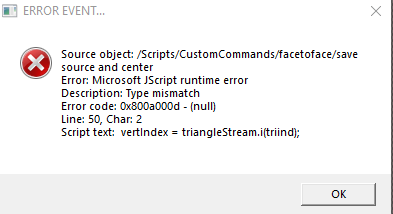
to the top of the save obj ref and save obj ref2 scripts
Stops the Status message and loading your widget if a user has the Model view open and no Workspace 3D View
Or with trying to use it with only a Link Editor view
User avatar
clintonman
Captain
Posts: 5659
Joined: 21 May 2009, 21:08
Type the number ten into the box: 0
Location: California

Re: Face to Face Object Snapping

Post by clintonman »

Thanks for the modelspace tip.
Sounds like you're avoiding shift + LMB drag.
Clinton Reese

http://clintons3d.com
User avatar
trueBlue
Captain
Posts: 5548
Joined: 06 Jul 2009, 22:50
Type the number ten into the box: 10

Re: Face to Face Object Snapping

Post by trueBlue »

Shift is not setup with a LMB state
Is there anyway to stop this error when you right click and the Source does not have a selection?
Right click with no selection on the Source object.png
Right click with no selection on the Source object.png (10.96 KiB) Viewed 3471 times
User avatar
clintonman
Captain
Posts: 5659
Joined: 21 May 2009, 21:08
Type the number ten into the box: 0
Location: California

Re: Face to Face Object Snapping

Post by clintonman »

trueBlue wrote: 14 Oct 2020, 15:46 Shift is not setup with a LMB state
Is there anyway to stop this error when you right click and the Source does not have a selection?
Right click with no selection on the Source object.png
You found a bug.
change to this in "save source and center" and "save destination and center" nodes

Code: Select all

//if(dataS == "" || dataArr.length < 2 || dataArr[0] == "") {
if(dataS == "" || dataArr.length < 2 || dataArr[0] == "" || dataArr[1] == "") {
Clinton Reese

http://clintons3d.com
User avatar
trueBlue
Captain
Posts: 5548
Joined: 06 Jul 2009, 22:50
Type the number ten into the box: 10

Re: Face to Face Object Snapping

Post by trueBlue »

Dat works, thanks!
I separated the Status message in the save obj ref2 script to get a better idea with the two Right click events and Coping the Source
Added a Copy boolean and hooked it up

Code: Select all

	if(!Node.ConExists("Status Line", "Model"))
		Node.ConCreate("Status Line", "Model", "string", 4);
//Node.Value("Status Line", "Model") = "Select the Destination Face - Ctrl+LMB add to selection, Shift+LMB remove from selection, RMB commit selection";

if(Copy)
Node.Value("Status Line", "Model") = "Destination - RMB snap Copy to selection / RMB Cancel";
else
Node.Value("Status Line", "Model") = "Destination - RMB snap to selection";
User avatar
clintonman
Captain
Posts: 5659
Joined: 21 May 2009, 21:08
Type the number ten into the box: 0
Location: California

Re: Face to Face Object Snapping

Post by clintonman »

One more thing, you need to change the name of your modified widget. Maybe call it "FaceToFaceWidget" and change the code to use it instead of "PickFaceWidget".
Clinton Reese

http://clintons3d.com
User avatar
trueBlue
Captain
Posts: 5548
Joined: 06 Jul 2009, 22:50
Type the number ten into the box: 10

Re: Face to Face Object Snapping

Post by trueBlue »

Thanks!
I made the changes and saved the script and Widgets.
When I Reset the Default Context, the Load error and debug.log reappeared in your CustomScriptsStore folder.
So something is not right.
Is this debug.log file coming from your new plugin?
User avatar
clintonman
Captain
Posts: 5659
Joined: 21 May 2009, 21:08
Type the number ten into the box: 0
Location: California

Re: Face to Face Object Snapping

Post by clintonman »

trueBlue wrote: 14 Oct 2020, 16:58 Thanks!
I made the changes and saved the script and Widgets.
When I Reset the Default Context, the Load error and debug.log reappeared in your CustomScriptsStore folder.
So something is not right.
Is this debug.log file coming from your new plugin?
Like I said before, I reset context and don't get any debug.log file. I don't think I installed it to the latest unofficial update version of tS yet, maybe that's a factor.
Clinton Reese

http://clintons3d.com
User avatar
clintonman
Captain
Posts: 5659
Joined: 21 May 2009, 21:08
Type the number ten into the box: 0
Location: California

Re: Face to Face Object Snapping

Post by clintonman »

Test results were negative.
install latest UU and reset default, no debug
install face to face - can see errors mentioned
reset default, no debug
look at widget - pink outline as expected
uninstall the plugin and close ts
overwrite the rsx file with the latest with support for the face picking
start tS, install the plugin
widget node still pink as expected
reset default context, no debug, widget node no longer pink

Edit:
Recall that you run in vista compatibility mode, tried that still nothing
Clinton Reese

http://clintons3d.com
User avatar
trueBlue
Captain
Posts: 5548
Joined: 06 Jul 2009, 22:50
Type the number ten into the box: 10

Re: Face to Face Object Snapping

Post by trueBlue »

Can you test this example?
Create two Primitive Cubes
Evenly Scale one of the Cubes
Select the other Cube
Start Face to Face and select the Cube's faces on one side
RMB click
Select the smaller Cube's faces on one side
RMB click to Snap it to the larger Cube

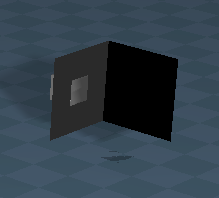
For me, the larger Cube's Normal looks inside out. :cry:
User avatar
clintonman
Captain
Posts: 5659
Joined: 21 May 2009, 21:08
Type the number ten into the box: 0
Location: California

Re: Face to Face Object Snapping

Post by clintonman »

I don't see anything unusual. Tried snapping smaller to larger and larger to smaller.
Clinton Reese

http://clintons3d.com
User avatar
trueBlue
Captain
Posts: 5548
Joined: 06 Jul 2009, 22:50
Type the number ten into the box: 10

Re: Face to Face Object Snapping

Post by trueBlue »

clintonman wrote: 14 Oct 2020, 17:36 Test results were negative.
install latest UU and reset default, no debug
install face to face - can see errors mentioned
reset default, no debug
look at widget - pink outline as expected
uninstall the plugin and close ts
overwrite the rsx file with the latest with support for the face picking
start tS, install the plugin
widget node still pink as expected
reset default context, no debug, widget node no longer pink

Edit:
Recall that you run in vista compatibility mode, tried that still nothing
Wow!
Try googling
ERROR:directory_reader_win.cc(43)]
User avatar
clintonman
Captain
Posts: 5659
Joined: 21 May 2009, 21:08
Type the number ten into the box: 0
Location: California

Re: Face to Face Object Snapping

Post by clintonman »

Looks like you're not alone.
Clinton Reese

http://clintons3d.com
User avatar
trueBlue
Captain
Posts: 5548
Joined: 06 Jul 2009, 22:50
Type the number ten into the box: 10

Re: Face to Face Object Snapping

Post by trueBlue »

Must of had a bad Clintons3dPlugin
Installed a new one and it has resolved the previous issue :D
Ugh!
That was short lived :(
Normalissue.png
Normalissue.png (9.53 KiB) Viewed 3278 times
Edit: Installed your latest Face to Face and I still have the above issue!
User avatar
clintonman
Captain
Posts: 5659
Joined: 21 May 2009, 21:08
Type the number ten into the box: 0
Location: California

Re: Face to Face Object Snapping

Post by clintonman »

That's weird, can you share the scene. Maybe a before and after version?
Clinton Reese

http://clintons3d.com
User avatar
trueBlue
Captain
Posts: 5548
Joined: 06 Jul 2009, 22:50
Type the number ten into the box: 10

Re: Face to Face Object Snapping

Post by trueBlue »

Before & After
Attachments
Before.RsScn
(1.03 MiB) Downloaded 213 times
After.RsScn
(1.03 MiB) Downloaded 235 times
User avatar
clintonman
Captain
Posts: 5659
Joined: 21 May 2009, 21:08
Type the number ten into the box: 0
Location: California

Re: Face to Face Object Snapping

Post by clintonman »

I don't think it has anything to do with the plugin/script. Your after scene looks normal here.
I'll try the link from your PM.
Clinton Reese

http://clintons3d.com
User avatar
clintonman
Captain
Posts: 5659
Joined: 21 May 2009, 21:08
Type the number ten into the box: 0
Location: California

Re: Face to Face Object Snapping

Post by clintonman »

Correction, I see your bad after scene now. Maybe I loaded the before scene by accident.

Edit: Nope, Correct scene, I had show back faces turned on because of the NURBS dev I've been doing.
Last edited by clintonman on 15 Oct 2020, 19:52, edited 1 time in total.
Clinton Reese

http://clintons3d.com
User avatar
clintonman
Captain
Posts: 5659
Joined: 21 May 2009, 21:08
Type the number ten into the box: 0
Location: California

Re: Face to Face Object Snapping

Post by clintonman »

Looks like the cube has negative scale values.
I can simulate the effect using the code below. This will turn a mesh inside out. It will not fix the inside out cube because trueSpace seems to read the values as positive even if they are negative.

Code: Select all

fs = Node.FirstSelected()
ma = System.CreateDO("Math Package/Matrix Float Data")
ma = Node.Value(fs, "Matrix");
sx = ma.GetScaleX();
sy = ma.GetScaleY();
sz = ma.GetScaleZ();

sx = -sx;
sy = -sy
sz = -sz;
ma.SetScaleX(sx)
ma.SetScaleY(sy)
ma.SetScaleZ(sz)
Node.Value(fs, "Matrix") = ma
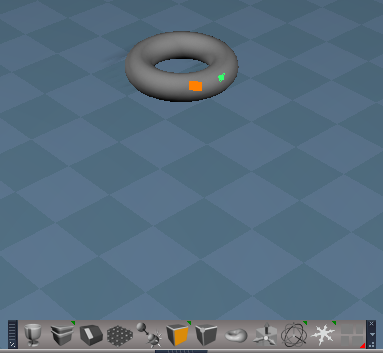
Clinton Reese

http://clintons3d.com
User avatar
clintonman
Captain
Posts: 5659
Joined: 21 May 2009, 21:08
Type the number ten into the box: 0
Location: California

Re: Face to Face Object Snapping

Post by clintonman »

trueBlue wrote: 16 Oct 2020, 13:25 ...
Question...
What is the purpose of the indicator in the center of the triangle selection?
Makes selecting small triangles messy, IMHO :ugeek:
triangleDeselected.jpg
The dots make it easier to see which triangles are selected. Image shows a kind of simulation with point edit triangle edges on the left and the face widget selection on the right, each with 1 "triangle" deselected.
Clinton Reese

http://clintons3d.com
User avatar
trueBlue
Captain
Posts: 5548
Joined: 06 Jul 2009, 22:50
Type the number ten into the box: 10

Re: Face to Face Object Snapping

Post by trueBlue »

Thank you for the explanation.
What I was referring to, is selecting small triangles.
The dots/squares become larger then the triangle edge's highlight
SmalltriangleSelection.png
SmalltriangleSelection.png (48.03 KiB) Viewed 3214 times
User avatar
clintonman
Captain
Posts: 5659
Joined: 21 May 2009, 21:08
Type the number ten into the box: 0
Location: California

Re: Face to Face Object Snapping

Post by clintonman »

trueBlue wrote: 16 Oct 2020, 15:01 Thank you for the explanation.
What I was referring to, is selecting small triangles.
The dots/squares become larger then the triangle edge's highlight
SmalltriangleSelection.png
Yeah, I'm aware of that. I might add a dot size control or auto sizing or something. Right now it's not even clear how big a size value is. Now the size is something like 9 or 10. 9 or 10 what's? It's not meters and it doesn't seem to be pixels. It'll take a little time to figure out because of the dev cycle:
close tS
make a change to the plugin code
compile the plugin code
start truespace
test it and hope it doesn't crash tS
repeat until it works/figure it out
Clinton Reese

http://clintons3d.com
User avatar
trueBlue
Captain
Posts: 5548
Joined: 06 Jul 2009, 22:50
Type the number ten into the box: 10

Re: Face to Face Object Snapping

Post by trueBlue »

Yikes!
Baby steps takes hours! :bananatyping:
Having preferences would be great...
dot size control or auto sizing, and No dot!
Thinking ahead, in case you develop other tools, like your Face to Face Snap...
If you incorporated your PickFace inside your Face to Face Snap scripts, you could have unique preferences verses global.
User avatar
clintonman
Captain
Posts: 5659
Joined: 21 May 2009, 21:08
Type the number ten into the box: 0
Location: California

Re: Face to Face Object Snapping

Post by clintonman »

Well, there's good news, the dot size is pixels after all. So there won't be any auto-sizing, just a size control.
Clinton Reese

http://clintons3d.com
User avatar
clintonman
Captain
Posts: 5659
Joined: 21 May 2009, 21:08
Type the number ten into the box: 0
Location: California

Re: Face to Face Object Snapping

Post by clintonman »

In your pm you mentioned that if you enable the copy option the inversion happens every other copy. So I tried it and finally saw what you saw. It only happens for me on the second time, not every other time.
This fixes it for me.You will need to test since we don't have the same results. I removed the unselect because it already is set to happen in the next command node.

bottom of the transform script:

Code: Select all

	var sx = sourceMatrix.GetScaleX();
	var sy = sourceMatrix.GetScaleY();
	var sz = sourceMatrix.GetScaleZ();

	sourceMatrix.SetScaleX(sx);
	sourceMatrix.SetScaleY(sy);
	sourceMatrix.SetScaleZ(sz);

	Node.Value(sourceNode, "Matrix") = sourceMatrix;

//if(!Copy) {
//Space.Unselect()		
//}
Clinton Reese

http://clintons3d.com
User avatar
trueBlue
Captain
Posts: 5548
Joined: 06 Jul 2009, 22:50
Type the number ten into the box: 10

Re: Face to Face Object Snapping

Post by trueBlue »

Added your code

Code: Select all

if(!Copy) {
Space.Unselect()		
}
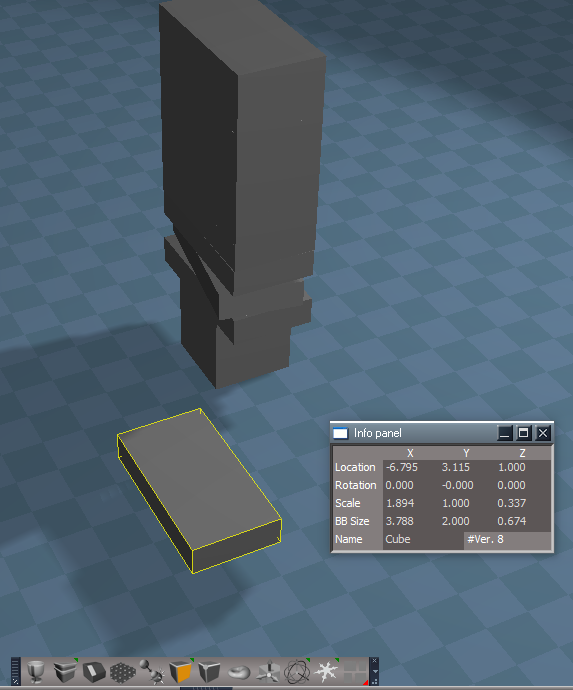
The above is for when Copy is false, to give an indication of when the tool ends and also disabling the toolbar icon commands.
The next script, Copy is true, the Source is selected, which enables the toolbar icon commands.
I also added UserInterface.OpenToolPanelViewEx2("" , "" ,"Scripts/CustomCommands/facetoface", 3, 1, 0); in this next script
.
.
.
RotationChanges.png
Cube selected is the Source shown in the Info panel
The bottom other Cube, 1 is an unmodified primitive(1st Destination)
Checked "Copy Source"
Selected the Cube's top two faces as the Source
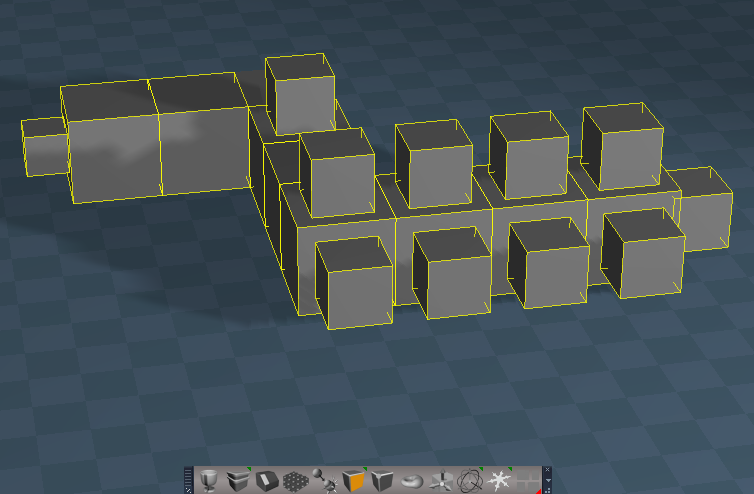
Selected the Cube, 1 top two faces as the Destination and Snap
Selected the Cube, 2 top two faces as the Destination and Snap
repeat...

Results:
The Z rotation is different on the 3rd, 4th, 5th and 6th copies, and the rest are 0
User avatar
trueBlue
Captain
Posts: 5548
Joined: 06 Jul 2009, 22:50
Type the number ten into the box: 10

Re: Face to Face Object Snapping

Post by trueBlue »

Reinstalled tS761Std
Installed the tS761Std Beta UU that includes my additional Pick Face Widget, and the additional code from the previous post for the transform script
No inside out meshes!!!
No debug.log files!

Everything seems to be working as expected except what I posted in the previous post with the Rotation Z values issue. :D
Screenshot 2020-10-17 090911.png
Also added...

Code: Select all

	var rx = sourceMatrix.GetPitch()
	var ry = sourceMatrix.GetRoll()
	var rz = sourceMatrix.GetYaw()

	sourceMatrix.SetPitch(rx)
	sourceMatrix.SetRoll(ry)
	sourceMatrix.SetYaw(rz)
to see it that helped, but no cigar.

Edit: 20 minutes latter...
Made some changes to the script
debug.log created in:
C:\trueSpace761Std/debug.log
User avatar
clintonman
Captain
Posts: 5659
Joined: 21 May 2009, 21:08
Type the number ten into the box: 0
Location: California

Re: Face to Face Object Snapping

Post by clintonman »

Do you use Chrome or the new Edge browser? The internet at the moment is blaming them for the debug log. Seems it was showing up on their desktops. Maybe it shows in trueSpace because you spend more time in tS folders. All wild guesses.
Clinton Reese

http://clintons3d.com
User avatar
trueBlue
Captain
Posts: 5548
Joined: 06 Jul 2009, 22:50
Type the number ten into the box: 10

Re: Face to Face Object Snapping

Post by trueBlue »

clintonman wrote: 17 Oct 2020, 16:59 Do you use Chrome or the new Edge browser? The internet at the moment is blaming them for the debug log. Seems it was showing up on their desktops. Maybe it shows in trueSpace because you spend more time in tS folders. All wild guesses.
I am using Edge and do not have Chrome installed.
Microsoft Edge is based on Chromium
Been having issues with Edge, ever since the Win10 2004 update

Guessing that the debug.log was created when I had an error.
From the Rosetta.log

Code: Select all

09:31:46.206 ERR   Source object: /Scripts/CustomCommands/RectSelect/RMB Error: Microsoft JScript runtime error Description: 'Rectangle' is undefined Error code: 0x800a1391 - (null) Line: 5, Char: 0 Script text:  if(Rectangle) {    0x80020101  [RcScriptCmd.cpp(1170)]
Does RcScriptCmd.cpp(1170) having any meaning to you?
User avatar
clintonman
Captain
Posts: 5659
Joined: 21 May 2009, 21:08
Type the number ten into the box: 0
Location: California

Re: Face to Face Object Snapping

Post by clintonman »

Nope, doesn't mean anything to me.
Clinton Reese

http://clintons3d.com
User avatar
trueBlue
Captain
Posts: 5548
Joined: 06 Jul 2009, 22:50
Type the number ten into the box: 10

Re: Face to Face Object Snapping

Post by trueBlue »

Getting closer to what I think is happening with these debug.log files popping up.
Cortana is evil :evil:
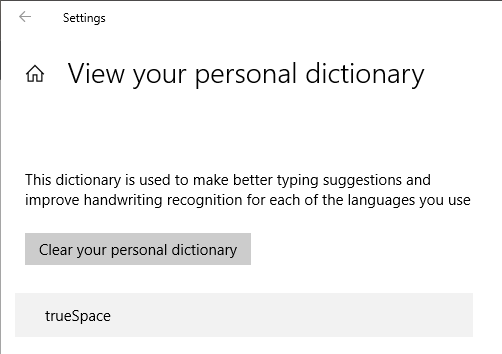
Why in the hell would "Inking and typing personalization" / "Getting to know you" / "Personal dictionary", list trueSpace as a personal dictionary???
WTF.png
User avatar
clintonman
Captain
Posts: 5659
Joined: 21 May 2009, 21:08
Type the number ten into the box: 0
Location: California

Re: Face to Face Object Snapping

Post by clintonman »

Wild, I wonder how that happened.
Clinton Reese

http://clintons3d.com

Return to “Repositorium”