FPN Camera Keyframer

free scripts, plugins, models, textures
User avatar
clintonman
Captain
Posts: 5659
Joined: 21 May 2009, 21:08
Type the number ten into the box: 0
Location: California

FPN Camera Keyframer

Post by clintonman »

FPNcameraKeyframer.jpg
FPNcameraKeyframer.jpg (12.08 KiB) Viewed 2687 times
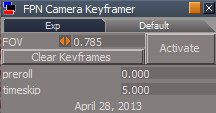
I created another FPN Camera Keyframer based on the script of the same name found in the tS761 Update objects library.

Here's what's different:
It captures the keys to memory and then writes them to the timeline after the capture is complete.
It captures while the scene animation is playing instead of using a timer to control the time.
It captures motion and FOV animation.
It has a button for clearing out all the keyframes.
Behind the scenes it uses a pair of custom Watchdog scripts that look for changes in the matrix and the camera FOV.

It does not have a panel that automatically opens.

http://www.clintons3d.com/plugins/trues ... index.html"
Clinton Reese

http://clintons3d.com
User avatar
Draise
Captain
Posts: 3200
Joined: 21 Sep 2009, 19:33
Type the number ten into the box: 0
Location: Bogota, Colombia

Re: FPN Camera Keyframer

Post by Draise »

Very good upgrade! Does this work only with First Person Navigation cameras, or any camera with any navigation type (like rotate globally)??
User avatar
clintonman
Captain
Posts: 5659
Joined: 21 May 2009, 21:08
Type the number ten into the box: 0
Location: California

Re: FPN Camera Keyframer

Post by clintonman »

Draise wrote:Very good upgrade! Does this work only with First Person Navigation cameras, or any camera with any navigation type (like rotate globally)??
Actually, it's a camera with scripting bolted onto it. It could be made into a regular camera be removing the FPN navigation commands from the button. I think I can add that in as an option. I'll let you know what I find.
Clinton Reese

http://clintons3d.com
User avatar
clintonman
Captain
Posts: 5659
Joined: 21 May 2009, 21:08
Type the number ten into the box: 0
Location: California

Re: FPN Camera Keyframer

Post by clintonman »

It was an easy change and it's now called the "Camera Keyframer". There are 2 new options: A check box for using FPN mode and another check box to enable switching the 3D view to the camera.
Clinton Reese

http://clintons3d.com

Return to “Repositorium”