And Now What?. . . .
-
MikeNTX

- Petty Officer Second Class
- Posts: 24
- Joined: 22 May 2009, 00:09
- Type the number ten into the box: 0
- Location: Texas
And Now What?. . . .
That is the question I have now days, what do I do after trueSpace? I have used it since I bought a copy of version 5.1 and always up upgraded it with a lot of hard earned $$. trueSpace was a good fit for me for me doing this just as a hobby. I could come up with fairly good images but not spend a fortune on it. But now it is plain that trueSpace is dead and no further work will happen with it. So I need to move on and find something else to use. Blender is one idea but to me it has the most non intuitive interface I have ever seen. Blender's new v2.5 looks a lot better but seems work on it is very slow. Does anyone else have suggestions what is a good replacement for tS?
-
Finis

- Captain
- Posts: 5410
- Joined: 21 May 2009, 18:26
- Type the number ten into the box: 0
- Location: America!
Re: And Now What?. . . .
TS has spoiled many of us since it is easy to learn and easy to use compared to others. I'll probably learn Blender as a replacement. We have to accept that the other programs aren't going to be as easy as TS.
I'm sure several members will post advice here but also try searching the forum because there have been many discussions of where to go now. Rayman's posts often note free or cheap 3D software that can be used together in powerful ways.
Free or cheap versions of Vue and Carrera seem popular lately.
I'm sure several members will post advice here but also try searching the forum because there have been many discussions of where to go now. Rayman's posts often note free or cheap 3D software that can be used together in powerful ways.
Free or cheap versions of Vue and Carrera seem popular lately.
I prefer dangerous freedom over peaceful servitude. -- Thomas Jefferson/Jean Jacques Rousseau
-
RAYMAN

- Captain
- Posts: 2547
- Joined: 21 May 2009, 18:56
Re: And Now What?. . . .
When I hear that people want to move to Blender its very often the fact that its basicaly free software that makes it so apealing.
Its actualy always a good idea to learn some Blender as its a quite powerfull software.
But we need more information on what you want to do in the future.
That very much explains what software would fit your workflow best.
Its also a question of personal preferences.....style etc.
Are you doing animations ? Character animations ?
If you are into architecture mostly you could get away with free without using Blender... like building your models with Sketchup
and rendering with Kerkythea. or you could go Thea or Vray standalone and just buy a modeler.
For character animations Daz 3d studio is free and very good.......
Vue is also a good software if you want to make very big scenes and if you want to use ecosystems for billions of instances on average systems.
A very good all round solution can be Carrara 8 Pro.......
Some people like Lightwave as a full package and its probably also one of the less expensive...(lots of lowcost and free plugs)
Are you doing lots of booleans then its maybe preferable to use a nurbs solution for modeling like Moi 3d.
Tons of options that are pretty easy to use and in an average price range.....
Only real good advice I can give you is try out the software with trial versions.....
You will see pretty quickly what you like and dislike......
Peter
Its actualy always a good idea to learn some Blender as its a quite powerfull software.
But we need more information on what you want to do in the future.
That very much explains what software would fit your workflow best.
Its also a question of personal preferences.....style etc.
Are you doing animations ? Character animations ?
If you are into architecture mostly you could get away with free without using Blender... like building your models with Sketchup
and rendering with Kerkythea. or you could go Thea or Vray standalone and just buy a modeler.
For character animations Daz 3d studio is free and very good.......
Vue is also a good software if you want to make very big scenes and if you want to use ecosystems for billions of instances on average systems.
A very good all round solution can be Carrara 8 Pro.......
Some people like Lightwave as a full package and its probably also one of the less expensive...(lots of lowcost and free plugs)
Are you doing lots of booleans then its maybe preferable to use a nurbs solution for modeling like Moi 3d.
Tons of options that are pretty easy to use and in an average price range.....
Only real good advice I can give you is try out the software with trial versions.....
You will see pretty quickly what you like and dislike......
Peter
-
lothissen

- Petty Officer First Class
- Posts: 68
- Joined: 07 Jun 2009, 14:31
- Type the number ten into the box: 0
Re: And Now What?. . . .
I stuggled to find a program i was comforable with after truespace. I'm just getting to grips with using a Lightwave/ 3D Coat mix. It's a great combo. Using 3D Coat with a graphics tablet takes a little getting used to but but you can do thing quickly that would take hours in a polygon modeller. I've been using 3d Coat to make terrain recently, here's a shot of the first stage of an iron-age type hill fort i'm in the middle of:

--------------------===============AKA Jayr===============--------------------
------------------=========3D Coat -Lightwave- Messiah=========------------------
------------------=========3D Coat -Lightwave- Messiah=========------------------
-
Steve

- Master Chief Petty Officer
- Posts: 394
- Joined: 29 Jun 2009, 10:20
- Type the number ten into the box: 0
- Location: Hiding (Like a ninja)
Re: And Now What?. . . .
Brb, just going to fetch my socks that blew offlothissen wrote:I stuggled to find a program i was comforable with after truespace. I'm just getting to grips with using a Lightwave/ 3D Coat mix. It's a great combo. Using 3D Coat with a graphics tablet takes a little getting used to but but you can do thing quickly that would take hours in a polygon modeller. I've been using 3d Coat to make terrain recently, here's a shot of the first stage of an iron-age type hill fort i'm in the middle of:
-
lothissen
- Petty Officer First Class
- Posts: 68
- Joined: 07 Jun 2009, 14:31
- Type the number ten into the box: 0
Re: And Now What?. . . .
Thanks, but that is really easy to do in 3D Coat so i don't think i can take much credit. You just setup a mask in the backgound and when you draw on the object the background embeds it's texture on it. This took less than 2 minutes:

This one was done by putting a roof-tile texture in the background:

You still have to retopologize to get it out of 3D Coat and into another program but i think the results are worth it.
This one was done by putting a roof-tile texture in the background:
You still have to retopologize to get it out of 3D Coat and into another program but i think the results are worth it.
--------------------===============AKA Jayr===============--------------------
------------------=========3D Coat -Lightwave- Messiah=========------------------
------------------=========3D Coat -Lightwave- Messiah=========------------------
-
MikeNTX
- Petty Officer Second Class
- Posts: 24
- Joined: 22 May 2009, 00:09
- Type the number ten into the box: 0
- Location: Texas
Re: And Now What?. . . .
You're right I should have said what I like to do and use tS for. Most of what I go for is photo realistic scenes. From indoors to some outdoor scenes too. This is why I loved VRay a lot because of it's ability to do radiosity and SSS (though I find it does not seem to want to run under Windows 7). I did most of my model work with Rhino then import it into tS. I have wanted to get more into animation of just pure 3D work of integrating 3D and regular video too.RAYMAN wrote:But we need more information on what you want to do in the future.
That very much explains what software would fit your workflow best.
-
marcel

- Captain
- Posts: 2247
- Joined: 21 May 2009, 19:52
- Type the number ten into the box: 0
- Location: paris - France
Re: And Now What?. . . .
If you need photo realistic scenes, the most important is to choose your render engine. Then you can test the compatibility of different software with your render engine. For modeling there is too many software and you need several software because they are often specialized (and it is a good thing). Most difficult is to find your principal software (the center of your work with the render engine and import/export with your other soft): is a matter of affinity.
Design - illustration - Animation
http://www.crea-vision.fr
http://www.crea-vision.fr
-
RAYMAN
- Captain
- Posts: 2547
- Joined: 21 May 2009, 18:56
Re: And Now What?. . . .
If you work with Rhino why dont you try the new Thea render engine. Its very fast and maximum photorealistic.MikeNTX wrote:You're right I should have said what I like to do and use tS for. Most of what I go for is photo realistic scenes. From indoors to some outdoor scenes too. This is why I loved VRay a lot because of it's ability to do radiosity and SSS (though I find it does not seem to want to run under Windows 7). I did most of my model work with Rhino then import it into tS. I have wanted to get more into animation of just pure 3D work of integrating 3D and regular video too.RAYMAN wrote:But we need more information on what you want to do in the future.
That very much explains what software would fit your workflow best.
http://www.thearender.com/cms/"
Also try to get the Sketchup exporter it even works with the free version of Sketchup.
There is an exporter for Rhino. Also look into Moi 3d as this is copy and paste with Rhino only much easier and faster to use from the same guy who made Rhino many years
ago.... Michael . http://moi3d.com/"
All of these software have trials so that you can try it out yourself.
Moi3d has both a neverending nonsave trial and a 30 day saveable trial that also does copy and paste with Rhino.
Thea trial is sizelimited and watermarked but you can also get the exporters for the trial....
Peter
-
Moonman

- Petty Officer First Class
- Posts: 58
- Joined: 21 May 2009, 22:15
- Type the number ten into the box: 0
Re: And Now What?. . . .
Anybody seen/tried Sculptris? http://www.sculptris.com/
It is free (as in beer), and seems to work like Zbrush or Mudbox. Could be fun.
It is free (as in beer), and seems to work like Zbrush or Mudbox. Could be fun.
-
v3rd3
- Lieutenant Commander
- Posts: 1191
- Joined: 21 May 2009, 20:04
Re: And Now What?. . . .
Seen it, downloaded it, played with it. Very nice simple sculpting tool.... great fun
-
Benji
- Senior Chief Petty Officer
- Posts: 280
- Joined: 22 May 2009, 01:23
Re: And Now What?. . . .
Scupltris is different from 3dcoat or Zbrush (I think) in that it recalculates the mesh density when you add geometry. This means that you can drag out an arm, and the polygons won't be stretched. 3dcoat achieves something similar with voxels.
For me, Sculptris does most of what I wanted 3dcoat to do, but costs nothing. Awesome app.
For me, Sculptris does most of what I wanted 3dcoat to do, but costs nothing. Awesome app.
-
v3rd3
- Lieutenant Commander
- Posts: 1191
- Joined: 21 May 2009, 20:04
Re: And Now What?. . . .
I like sculptris but the mesh it produces goes high poly pretty quickly.
-
Steinie

- Captain
- Posts: 2958
- Joined: 21 May 2009, 17:38
- Type the number ten into the box: 10
Re: And Now What?. . . .
Did you set the "Detail" (Q) to a lower value?v3rd3 wrote:I like sculptris but the mesh it produces goes high poly pretty quickly.
This is really an awesome program. To think the author gave this out for free
is amazing.
-
Benji
- Senior Chief Petty Officer
- Posts: 280
- Joined: 22 May 2009, 01:23
Re: And Now What?. . . .
Yes, this is a downside, but you could do several things to make it go away. One is to use blender to decimate or retopo the mesh, and then also bake it as a displacement and/or normal map. Or you could make a base mesh in truespace (etc.) first and then do your thing with sculptris and bake it using blender, smak, xnormal etc.I like sculptris but the mesh it produces goes high poly pretty quickly.
I'm sure there are many ways to do this sort of thing now (perhaps it deserves it's own thread).....
There is a cool-looking app called Balancer by a company called Atangeo that looks very nice for decimating models, but it costs 50 bucks.
-
Prodigy

- Site Admin
- Posts: 957
- Joined: 21 May 2009, 14:46
- Type the number ten into the box: 0
- Location: Uruguay
Re: And Now What?. . . .
WOOOOW!!! It's AMAZING!! Great treasure Moonman!! 
it is perfect for one project that i'm working!!!
it is perfect for one project that i'm working!!!
๑۩۞۩๑ prodigy ๑۩۞۩๑
-
marcel
- Captain
- Posts: 2247
- Joined: 21 May 2009, 19:52
- Type the number ten into the box: 0
- Location: paris - France
Re: And Now What?. . . .
Balancer is a good thing to use the models made with all these software like sculptris. The best would be to do the same thing with quad to have a low quad poly useful for SDS. Maybe convert a complex trianguled object to a quad object is difficult to do...
Design - illustration - Animation
http://www.crea-vision.fr
http://www.crea-vision.fr
-
RAYMAN
- Captain
- Posts: 2547
- Joined: 21 May 2009, 18:56
Re: And Now What?. . . .
Its like making oranges from orangejuice !marcel wrote:Balancer is a good thing to use the models made with all these software like sculptris. The best would be to do the same thing with quad to have a low quad poly useful for SDS. Maybe convert a complex trianguled object to a quad object is difficult to do...
Every piece as difficult as making nurbs from polys......
Why would you want to SdS something that has already been detailed ?
For good character animations e.g. you dont necessarily need quads !
Have you ever looked at the topology of a Poser or daz base model ?
They are not all quads. some are but some are not.....
There are a few ways to go one is retopology the other is poly reduction the next is building lower poly meshes outside eg zbrush and by making a displacement
etc etc.
Peter
- Attachments
-
-
marcel
- Captain
- Posts: 2247
- Joined: 21 May 2009, 19:52
- Type the number ten into the box: 0
- Location: paris - France
Re: And Now What?. . . .
Rayman: "Why would you want to SdS something that has already been detailed ?"
What i said was just convert triangle to quad would be a good tool.
hight poly is interesting for many small detail (as a scan).
quad sds is interesting to smooth surface or edit (as a nurb).
polys for many detail or polys to smooth is two thing very different for me. It depend of what you do.
Sure do a ugly monster need more small details than a smooth surface.
What i said was just convert triangle to quad would be a good tool.
hight poly is interesting for many small detail (as a scan).
quad sds is interesting to smooth surface or edit (as a nurb).
polys for many detail or polys to smooth is two thing very different for me. It depend of what you do.
Sure do a ugly monster need more small details than a smooth surface.
Design - illustration - Animation
http://www.crea-vision.fr
http://www.crea-vision.fr
-
v3rd3
- Lieutenant Commander
- Posts: 1191
- Joined: 21 May 2009, 20:04
Re: And Now What?. . . .
If you can't quad, tri, tri, tri again! 
-
Benji
- Senior Chief Petty Officer
- Posts: 280
- Joined: 22 May 2009, 01:23
Re: And Now What?. . . .
Heh.....
It's true that you don't necessarily need a normal/ displacement map, especially since Sculptris can paint bump maps for the micro-detail in the first place. It just depends how you want to work, how many objects in your scene etc.
A tri to quad tool would be excellent. I remember reading about a shifty way to do this in 6.6, but I never got it to work.
It's true that you don't necessarily need a normal/ displacement map, especially since Sculptris can paint bump maps for the micro-detail in the first place. It just depends how you want to work, how many objects in your scene etc.
A tri to quad tool would be excellent. I remember reading about a shifty way to do this in 6.6, but I never got it to work.
-
Prodigy
- Site Admin
- Posts: 957
- Joined: 21 May 2009, 14:46
- Type the number ten into the box: 0
- Location: Uruguay
Re: And Now What?. . . .
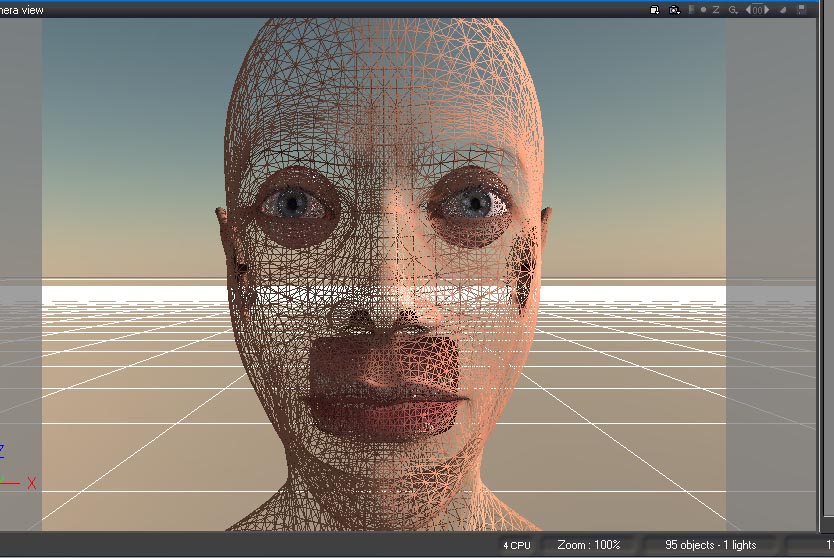
WOW! i love scupltris!!! it's perfect! and it works perfect with Froo's Object importer! 
i made this model from 0 and just took a few hours..
i made this model from 0 and just took a few hours..
- Attachments
-

๑۩۞۩๑ prodigy ๑۩۞۩๑
-
Prodigy
- Site Admin
- Posts: 957
- Joined: 21 May 2009, 14:46
- Type the number ten into the box: 0
- Location: Uruguay
Re: And Now What?. . . .
here is the model if anyone wants to play with..
- Attachments
-
- abc.rar
- (681.53 KiB) Downloaded 181 times
๑۩۞۩๑ prodigy ๑۩۞۩๑