tS7.61 Isometric Camera
To use this in Model
Use - View from Object for this camera.
Use - Camera Zoom.
Use Workspace's Ortho Widget.
Model scene with 4 ISO cameras:
tS76 Workspace - Isometric Eye Camera
-
trueBlue
- Captain
- Posts: 5548
- Joined: 06 Jul 2009, 22:50
- Type the number ten into the box: 10
tS76 Workspace - Isometric Eye Camera
-
Rhino169
- Senior Chief Petty Officer
- Posts: 201
- Joined: 29 Nov 2009, 03:15
Re: tS76 Workspace - Isometric Eye Camera
Works perfectly trueblue...Thanks!
It seems to be one of those missing functionality items that should have been there in truespace from the beginning.
-
Rhino169
- Senior Chief Petty Officer
- Posts: 201
- Joined: 29 Nov 2009, 03:15
Re: tS76 Workspace - Isometric Eye Camera
Trueblue...What is the proper procedure for loading this item?
I get an error message when I try to use from the LE.
-
trueBlue
- Captain
- Posts: 5548
- Joined: 06 Jul 2009, 22:50
- Type the number ten into the box: 10
Re: tS76 Workspace - Isometric Eye Camera
I downloaded this again and tried it tS761 within the LE and the Stack/Panels. It works without errors. So not sure what the problem is. This is for Workspace Views only.
-
Rhino169
- Senior Chief Petty Officer
- Posts: 201
- Joined: 29 Nov 2009, 03:15
Re: tS76 Workspace - Isometric Eye Camera
trueblue,
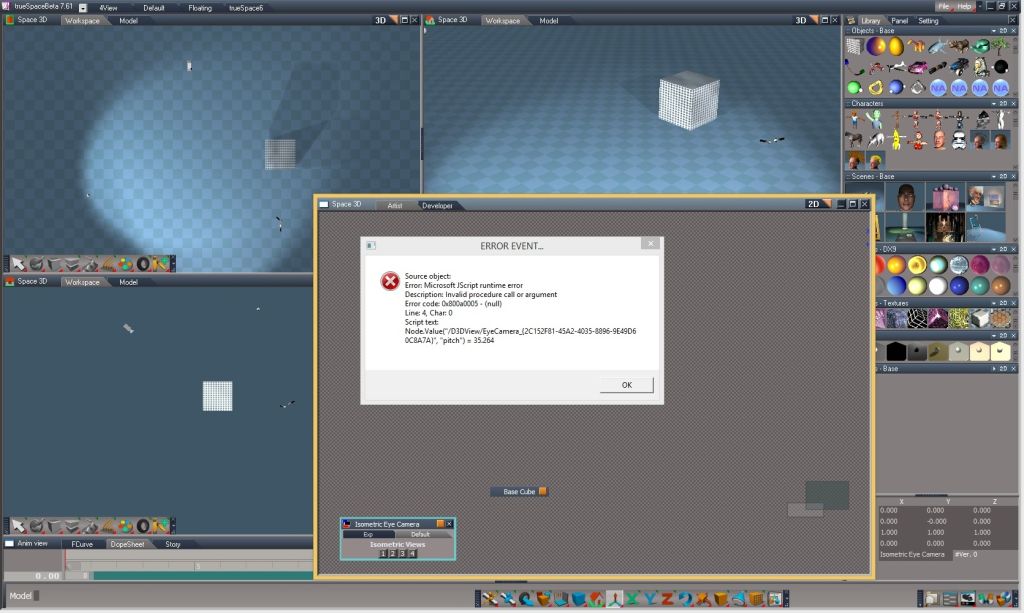
Below is the error message I get when I run it.
I have it working on my older computer with windows xp.
My new machine has windows 8.1, so I 'm not sure if that would cause an error.
Let me know if you see something there.
Thanks for your help.
Jeff
Below is the error message I get when I run it.
I have it working on my older computer with windows xp.
My new machine has windows 8.1, so I 'm not sure if that would cause an error.
Let me know if you see something there.
Thanks for your help.
Jeff
-
trueBlue
- Captain
- Posts: 5548
- Joined: 06 Jul 2009, 22:50
- Type the number ten into the box: 10
Re: tS76 Workspace - Isometric Eye Camera
The only time I get that error is when there is a Model view open. I also notice it only works in one Workspace view. Note Workspace has an official ISO view.
-
Rhino169
- Senior Chief Petty Officer
- Posts: 201
- Joined: 29 Nov 2009, 03:15
Re: tS76 Workspace - Isometric Eye Camera
trueblue,
It does work fine now in the default view in Workspace. Thanks!
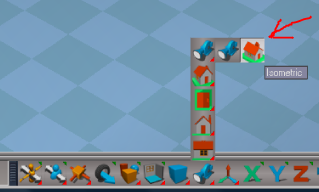
There already is a ISO view in TS7.61? I thought you generated the isometric eye camera because there wasn't a view?
Please let me know where I can find this other tool.
Thanks!
It does work fine now in the default view in Workspace. Thanks!
There already is a ISO view in TS7.61? I thought you generated the isometric eye camera because there wasn't a view?
Please let me know where I can find this other tool.
Thanks!
-
trueBlue
- Captain
- Posts: 5548
- Joined: 06 Jul 2009, 22:50
- Type the number ten into the box: 10
Re: tS76 Workspace - Isometric Eye Camera
In the Workspace toolbar.
- Attachments
-

- Capture.PNG (49.37 KiB) Viewed 7246 times
-
trueBlue
- Captain
- Posts: 5548
- Joined: 06 Jul 2009, 22:50
- Type the number ten into the box: 10
Re: tS76 Workspace - Isometric Eye Camera
Updated this project!
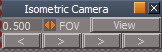
Select the buttons to go full circle around the Isometric view.
The camera looks at the center of World space.
Select the buttons to go full circle around the Isometric view.
The camera looks at the center of World space.