Playin' around...

User avatar
Dragneye
Lieutenant
Posts: 906
Joined: 02 Sep 2009, 22:09

Playin' around...

Post by Dragneye »

Just playing around with various rigs. This is the Blender Sintel rig from the short movie of the same name. Facial bones didn't work so no face work.
She frowns/playfully pouts, winks, smiles, and then shows off for the animator :)
(I would go at least one more round with refining the movements if it were a finished product)

https://www.youtube.com/watch?v=d5MzMc6bdP0"

PS: if anyone has any experience and would like to show me why i couldn't get the head rig working, I'd be glad to share the file.
Yes, I could go to the Blender forums and resolve it. But I'm asking here... my old haunt. wink wink nudge nudge... know what I mean? Know what I mean?
... any takers?
User avatar
Draise
Captain
Posts: 3200
Joined: 21 Sep 2009, 19:33
Type the number ten into the box: 0
Location: Bogota, Colombia

Re: Playin' around...

Post by Draise »

That is a great animation, I like how much you are improving and where you are going with it all! I saw it a while back, but just wanted to say, you are getting to awesome levels!

Keep at it.
User avatar
Dragneye
Lieutenant
Posts: 906
Joined: 02 Sep 2009, 22:09

Re: Playin' around...

Post by Dragneye »

Hey Draise. Thank you for the comments and the encouragement.
Very cool of you.

Wanting to do animation is what got me started in this new brave world called 3D. Opposite of what I heard often before, I think for one to have any hope of being part of 'the industry' nowadays, specialization is the key not jack-of-all-trades like its been. My forte is modeling but the end goal has always been... making my paintings move.
You will be seeing more of me in this area.

I do hope more people here get the itch and try their hand at this.

Draise, have you dabbled with animating in Blender?
User avatar
Dragneye
Lieutenant
Posts: 906
Joined: 02 Sep 2009, 22:09

Re: Playin' around...

Post by Dragneye »

A quicky testing a back flip
https://www.youtube.com/watch?v=IVDVWFtdaOA"
User avatar
seppgirty
Master Chief Petty Officer
Posts: 354
Joined: 22 May 2009, 03:34
Type the number ten into the box: 0
Location: pittsburgh Pa.

Re: Playin' around...

Post by seppgirty »

Beautiful job Dragon eye. Are you using mocap or key framing for your animation?
truespace 3.2, 5.2, 6.6, ani-pack, flash plugin,........ you can check out my films athttp://www.chaosbrosfilms.com
User avatar
Draise
Captain
Posts: 3200
Joined: 21 Sep 2009, 19:33
Type the number ten into the box: 0
Location: Bogota, Colombia

Re: Playin' around...

Post by Draise »

Nice! I would tuck her legs in with the spin more though, have you ever tried doing a flip with your legs out? *nearly breaks neck on trampoline as kid* It's looking good, the buildup is nice, and the follow through too.

I love the progress, and thank you so much for sharing animation on here! :)

You can put in youtube link code in the youtube tags so you can watch directly in the forums, btw.

Code: Select all

[youtube]IVDVWFtdaOA[/youtube]
I haven't tried animating too much in Blender, only some motion graphics. I like the potential of it, but.. I want to take a few Blender courses on it with due time - I see great potential with it. So will do later on in life - hoping the viewport and realtime lighting improve with time (trueSpace handles way more geometry better, surprisingly, maybe not so fast rigging, but more geometry that's for sure).

I will update progress on these forums though, Blender Forms overwhelm me. :mrgreen:

Glad you are too.
User avatar
Dragneye
Lieutenant
Posts: 906
Joined: 02 Sep 2009, 22:09

Re: Playin' around...

Post by Dragneye »

Thanks seppgirty. Doin' it ole style; key framing by hand. Mocap is great but it is just too ... too perfect/easy. I won't learn as deeply (I'm speaking as an artist).

It's the future though. Soon we'll be cheering and voting on virtual actors at the Oscars and 'creating' films simply by thinking them out; bada bing... instant movie. Heck, did you all know they have a machine like a 3D printer; but it creates... food!? So, I can have instant popcorn, watching my instant virtual 3D movie I created a few minutes ago, and when it all ends I get up in front of my virtual adoring fans at the virtual premiere of my movie as the director and take questions, signing virtual autographs.
How 'virtually' beautiful. we'll get everything we want when we want and... it's all imaginary. But we'll feel great. (change 'virtual/instant' to 'fake' and ya get the idea)
And then one day I turn to my instant friend and ask, "Maaan... you remember when we used to do it by hand? When we could smell the oil paint; touch the bolt... write on paper?"
In a slight robotic voice my 3D drinking buddy will reply, "No d-ude. Tell me all about it". As I turn to reply, happy that someone cares to hear what I have to say, I see no one there, just an empty circular room; my Holo-room. Or is it Hollow-room? Content, but all imaginary.

lol
See what happens Sepp when an artist's mind gets to travellin'? :)

Hey Draise, thanks for the comments. Neither of the last two are finished. Yeah, the beginning looks pretty ok. I'm trying for a few things right now. Testing things out for creating my complete, most efficient rig, warm up for a short I'm working on, and most efficient animating process.
I'm studying parkour moves to improve my vision of the movements. Its amazing to see how many minute unnoticed actions we perform in between the main actions. Awesome to watch these bodies move in general.
Thanks for the code! Will try it next round.
Very true abt tucking in the knees/legs. I used footage of a back flip but on the ground not from a height. What's funny is when you see the actual flip it looks 'wrong'. But it can't be cuz, well that was reality so, lol. It is what it is.
Actually (though I have to study it more), stretching of body parts when trying for a realistic representation of the action seems to be happening in real life not only in cartoons (I stretched parts at the beginning of the flip which I think added to the nice flow at that point).
Glad you understand. This place is like a comfy friends house... who loves 3D. Fond memories here, appreciation, respect. Would love to see the folks here try their hand at animating. It's work but boy does it help the imagination. Hey, maybe it could be one of the challenges: everyone gets the same simple rig and they well, animate something.
User avatar
Finis
Captain
Posts: 5410
Joined: 21 May 2009, 18:26
Type the number ten into the box: 0
Location: America!

Re: Playin' around...

Post by Finis »

Good creatin' there Dragneye.

I see that too, that sometimes reality doesn't look real or right. I think when we try to create realistic CG, or other media, we are making it look as we expect reality to be. Real reality is messy and the unexpected happens.
I prefer dangerous freedom over peaceful servitude. -- Thomas Jefferson/Jean Jacques Rousseau
User avatar
Dragneye
Lieutenant
Posts: 906
Joined: 02 Sep 2009, 22:09

Re: Playin' around...

Post by Dragneye »

Very true Finis. Like I like to say... "It's all in the details".

From me to all of you...

https://www.youtube.com/watch?v=Y9KqVCGpKoc[/youtube]
User avatar
Dragneye
Lieutenant
Posts: 906
Joined: 02 Sep 2009, 22:09

Re: Playin' around...

Post by Dragneye »

Here's a test I'm doing with Blender's Grease Pencil (tool used to add like pencil strokes within a file for drawing, annotations, etc).
The animation is less than 2 seconds but can't figure out how to stretch/slow it down so it's more viewable.
When I figure it out will share but if anyone's interested how the scene looks here's a screen shot...
GREASE_MTN SUN test 1.jpg
User avatar
Draise
Captain
Posts: 3200
Joined: 21 Sep 2009, 19:33
Type the number ten into the box: 0
Location: Bogota, Colombia

Re: Playin' around...

Post by Draise »

I use the grease pencil for animatics.

The best way to stetch it out is using propotional selection in the Dopesheet for the greasepencil. Or selecting all your keyframes with the CTRL+A to select all, or B to box select and just using S to scale it (from the current time).
User avatar
Dragneye
Lieutenant
Posts: 906
Joined: 02 Sep 2009, 22:09

Re: Playin' around...

Post by Dragneye »

Thanks Draise. The thing is, to render at 24 fps with the Grease pencil I would have to basically create key frames every frame to get a smooth effect. I'm trying to see how to cheat (become more efficient) while getting a desired effect. For example, the animation I will show is keyed every 4 frames basically. The thought was to render and then just stretch the footage (a few minutes effort as opposed to keying every frame) but can't figure out how to do it in Blender or the other simple vid editor I have.

This G pencil is cool. Its like animating old style, drawing with colored pencils, frame by frame/cell by cell.
User avatar
Draise
Captain
Posts: 3200
Joined: 21 Sep 2009, 19:33
Type the number ten into the box: 0
Location: Bogota, Colombia

Re: Playin' around...

Post by Draise »

Hmm... VirtualDub with AviSynth scripts really has some awesome slowmotion interpolators. You could try that to interpolate your frames, or make new ones to stretch out your animation.
User avatar
Dragneye
Lieutenant
Posts: 906
Joined: 02 Sep 2009, 22:09

Re: Playin' around...

Post by Dragneye »

Might just go with Magix I think. Cheap and useful for now but thanks for the heads up. Will see if it has what I need with the trial version.
So here it is (should have rendered it small for better viewing). Just keyed the clouds every frame to get smoothness, and used opacity variance to see what effect I can create.

https://www.youtube.com/watch?v=5VoDMOiRnrw[/youtube]
User avatar
Dragneye
Lieutenant
Posts: 906
Joined: 02 Sep 2009, 22:09

Re: Playin' around...

Post by Dragneye »

Here's what I been working on lately. Just practicing People.
This was an iteration, and the next one is the latest.

http://www.youtube.com/watch?v=HFdLyAbm ... e=youtu.be"

http://www.youtube.com/watch?v=wNqclZPU ... e=youtu.be"

Been having a laugh cuz the more I work on it for hours thinking its improving, the worse it seems to get.
User avatar
Draise
Captain
Posts: 3200
Joined: 21 Sep 2009, 19:33
Type the number ten into the box: 0
Location: Bogota, Colombia

Re: Playin' around...

Post by Draise »

They are getting great! :D

I recommend more spine curveture when she walks, shoulders, hip wiggle, etc. Add slight lean, you can't walk upright physically without some kind of shift in the center of gravity. But it's great. His expression is hilarious..

Hehe.. sometimes starting over is the way to go.

But also a structured way to tackle what you want to do will greatly improve the efficiency! If you block out your poses, and then time them, then work on "tweening" curves and keyframes - then you will get a better finished animation - because you started on the "right foot". I have to do that if I want to make good animations quickly without making a bad one by overworking it with not so good planning.

As most pro animators say, animation is 50% research and planning.
User avatar
Dragneye
Lieutenant
Posts: 906
Joined: 02 Sep 2009, 22:09

Re: Playin' around...

Post by Dragneye »

Hey Draise. Sorry for the delay in reply. Just got back on the net.
Yeah, getting rid of keys and starting over sometimes is best. Did it a bunch of times with her walk. 'On paper' the model walk seems quite straight forward. But those dang nuances :)
I know what you mean about curvature. The guy has an extra control for the waist. The girl don't. Lesson learned.
As for 'planning', keepin' it loose, man. Very on the fly if ya know what I mean... man.
Anyway, on with the show
(hmm, refine and finish the actions so far or, trudge on with the whole skit?)
User avatar
Dragneye
Lieutenant
Posts: 906
Joined: 02 Sep 2009, 22:09

Re: Playin' around...

Post by Dragneye »

This is what I was working on Nov 1st so I'll just continue here for the challenge, to keep the clutter down.
So, I was working specifically on the girl's walk in the beginning of the clip. Will share something soon.
User avatar
Draise
Captain
Posts: 3200
Joined: 21 Sep 2009, 19:33
Type the number ten into the box: 0
Location: Bogota, Colombia

Re: Playin' around...

Post by Draise »

Looking forward to it Dragoneye!
User avatar
Dragneye
Lieutenant
Posts: 906
Joined: 02 Sep 2009, 22:09

Re: Playin' around...

Post by Dragneye »

Thanks Draise.
Did a lil work since the 1st, but I don't see much improvement since then so I'll post it now.

https://youtu.be/_o8MsBjgAkU"

https://youtu.be/_o8MsBjgAkU[/youtube]
User avatar
Dragneye
Lieutenant
Posts: 906
Joined: 02 Sep 2009, 22:09

Re: Playin' around...

Post by Dragneye »

Uhhhhh.... lost the drive last night. It had ALL my Blender/3D assets on it.
Ummmm... gonna have to get back to you all on this.
User avatar
Draise
Captain
Posts: 3200
Joined: 21 Sep 2009, 19:33
Type the number ten into the box: 0
Location: Bogota, Colombia

Re: Playin' around...

Post by Draise »

Whaaat?! You lost a whole hard drive? It died? You misplaced it? Thats' terrible!
User avatar
Dragneye
Lieutenant
Posts: 906
Joined: 02 Sep 2009, 22:09

Re: Playin' around...

Post by Dragneye »

Dunno what happened. Yes, the drive wasn't being read, and then when I would try anything, the puter would freeze to the point that even Task Manager couldn't end tasks.
Another 'beepin' shock. I put my art on an external drive in case I lose the puter (like all the info I lost last time) and now the external drive bugged.
Whateverrrr...
Anyway, my best guess was it was the file I was working on so when I finally got back in I deleted that file.
That was my entry...
lol... but everything seems to be working for now.
It's all good. It was just a fun one and I have spent way too much time creating a back story to fit what I wanted to practice. But... I made a commitment here and I can make lemonade with this lemon scare I just got. So, I continue --
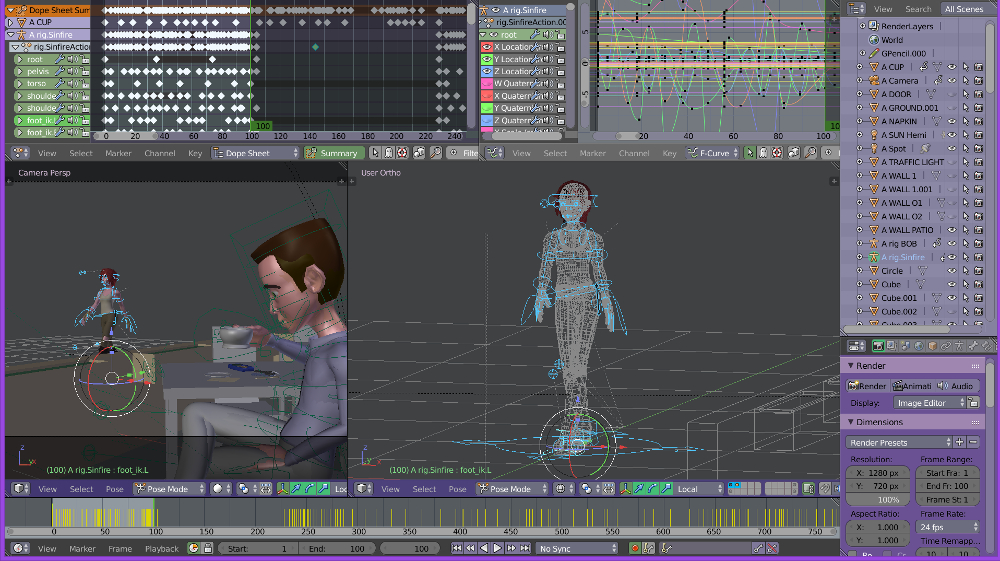
The storyline - she walks past sexy-like, he gets interested. She keeps walking, he shrugs it off. As he sips his coffee, (out of view to him) she jumps up and around the building behind him and ends up walking past him once again in the same way a minute later. Deja vu for him, so he talks to her. Which is exactly what she was after. Enticing him for a free meal/coffee/whatever. - (the female model is Sintel from the Blender movie 'Sintel'. She's portrayed as a street urchin kinda kid so that was the inspiration for her actions).
What I originally wanted to practice with this animatic is, 1. body dynamics (the sexy female walk and her jumping around later) 2. facial expressions (her facial rig is frozen so she's out)
Ain't worried abt the story though. For my final entry here I want to have perfected her sexy walk, his expressions, and she jumping around later on.
User avatar
Dragneye
Lieutenant
Posts: 906
Joined: 02 Sep 2009, 22:09

Re: Playin' around...

Post by Dragneye »


This will have to be the final entry. Short on time.
Nov 1 Challenge_Sinfire Strut.jpg
User avatar
Draise
Captain
Posts: 3200
Joined: 21 Sep 2009, 19:33
Type the number ten into the box: 0
Location: Bogota, Colombia

Re: Playin' around...

Post by Draise »

This should be in the polls! :P

Return to “Animation”