My Building TSX

Gwydion
Petty Officer Second Class
Posts: 20
Joined: 21 Jun 2009, 13:34

My Building TSX

Post by Gwydion »

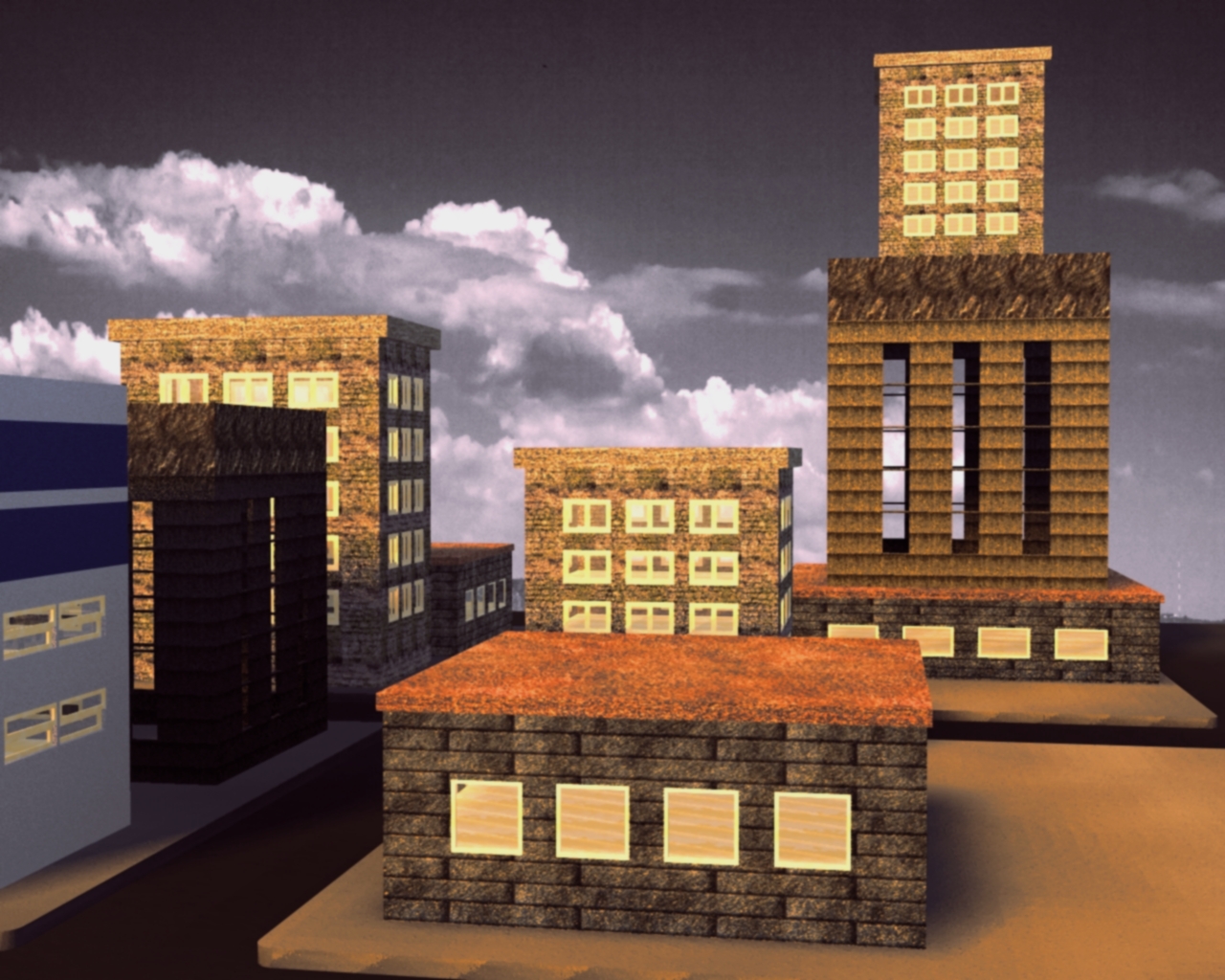
These are a few shots of my Building TSX in progress, the first is a basic, second is the same but with an alternate window style, and the third shows a 3rd window style.
More styles coming soon, along with a full set of creation/randomization features to make Cities/Buildings.


Looking for a couple Beta Testers who can look beyond obvious mistakes and give suggestions on functionality they would most like to see added first, and what they like/dislike about the interface.

For any additional questions you can reach me at words_of_kindness@yahoo.com, but please respond here for communities sake if its not personal/private/absurd. :)

Image
Image
Image
User avatar
xtetra
Petty Officer Second Class
Posts: 34
Joined: 22 May 2009, 05:35

Re: My Building TSX

Post by xtetra »

Interesting idea for a plug-in. I think it could be pretty handy. :bananathumb: I'd be very happy to Beta Test it for you. PM me with the download info if you like.

Does the plug-in automatically assign textures or are they added after the fact?
Gwydion
Petty Officer Second Class
Posts: 20
Joined: 21 Jun 2009, 13:34

Re: My Building TSX

Post by Gwydion »

Good number of Views but few replies, even a hey your buildings suck would be welcome folks :)

As to your question Xtetra...
My original idea had been to let people input general dynamics of a city

Big/Small, Modern/retro, etc and let it full auto gen, or a single building at a time etc.

Then I got to thinking, I need to implement texturing/poly tools anyhow, so there should be a "toggle-able" switch to go from fun mode (for beginners) to a full creation mode for users who know TS already.

Right now I can manually assign the pre-built in shaders from truespace to walls, windows, frames (of windows) and floors, Independantly....

I plan to go with a layerd structure approach on the app, City first, which will create X random buildings according to theme, then a Building button if you just want 1 building etc etc etc on down to a floor or window etc.

The buildings I posted were each created by my app, I took about 20 seconds to decide on the textures/shaders for each, and then it took 10 - 25 seconds to build it, and about 4 to render it. (2.5 gig machine) 3 gig memory, Windows Vista Ultimate. Truespace 6.5 (in gamespace and model side of 7.6 its alot slower due to the way it updates after each boolean cut/merge) but I think I can improve that nicely too in the final approach.

So to answer you MORE directly, Yes you can apply the shaders you like, (Right now there are only the most obvious ones loaded) plastics woods metals, bricks for buildings etc, I didn't do "brick" for windows for instance, though I can see a purpose in those. Thats why I want testers, "Hey Chad, can we get the funky green swirly texture for windows? that would be neat!.... Why sure, let me go ahead and just put everything in, etc"

Or let the user add/remove textures based on whats available to their program, including custom shaders.

There is no download link just yet, but you will find it on my homepage at http://www.chaddowell.com"
when its ready, (there is 1 glaring bug I am just too ashamed of to let the program out just yet)

And it doesn't do any auto checking yet, for instance if your building is 6 units wide, and you ask for 6 windows each 2 units wide, the booleans DO get mangled badly, right now I have been working on code efficiency, and readability, as well as reliability....

and there is one feature that came from early early alpha that isn't intuitive, once I remove and fix those 2 issues it will be up at my page, :)
User avatar
nigec
Master Chief Petty Officer
Posts: 561
Joined: 21 May 2009, 18:46

Re: My Building TSX

Post by nigec »

Sorry I was one of those people who went. "ooooooooh that looks good!! :worship: :worship: " then went elsewhere, well it was sunny and the road was calling :mrgreen: !

Anyway, less of the excuses ;) seriously it looks really cool and I'll gladly help beta test, a lot of times I've wanted a built up area but just couldn't be a**ed to build them :roll:
Gwydion
Petty Officer Second Class
Posts: 20
Joined: 21 Jun 2009, 13:34

Re: My Building TSX

Post by Gwydion »

No problem Nigec, I just thought wow, if there is that little interest perhaps I am making the wrong tool :)
v3rd3
Lieutenant Commander
Posts: 1191
Joined: 21 May 2009, 20:04

Re: My Building TSX

Post by v3rd3 »

There is always interest in new tools. Everybody in this community is really busy right now with life, downloading everything they can from the Califorums and other projects.

Just so you know, I am designing a similar tool for the workspace side for one of my projects.
User avatar
ranger0101
Master Chief Petty Officer
Posts: 363
Joined: 22 May 2009, 13:15
Type the number ten into the box: 0
Location: Orrville Ohio U.S.A.

Re: My Building TSX

Post by ranger0101 »

Wow!! I would not have thought it possible to do such a thing with a plug in.. It is this kind of inovation that is going to add life and loggevity to TrueSpace... Rely great work. I would love to help bata test this but I cant even run TrueSpace untill I replace my dead video card on my good machine.
I can't wate to see what you come up with next.


:bananathumb: Cheers :bananathumb:

Tim K /ranger0101
In order to Create Art... You must first learn to See...
My Website http://www.theartoftimkoons.yolasite.com
Gwydion
Petty Officer Second Class
Posts: 20
Joined: 21 Jun 2009, 13:34

Re: My Building TSX

Post by Gwydion »

v3rd3 Hey, good to hear, I was going to go workspace with it as well once I finished model side, and hoping to take it to other software platforms as well, I wish you success, in fact with the power of workspace probably fantastic success.


I have to admit some selfishness in wanting to sell the product when done, and was leary of workspace and how well I could keep my I.P. and all that.

I am an idealist I have no problem with the idea of "my work for your work" tradeoffs etc, however I do wanna eat :) and I hope to do this kind of thing for a living one day :)

Anyhow, I wish you great progress!!!
v3rd3
Lieutenant Commander
Posts: 1191
Joined: 21 May 2009, 20:04

Re: My Building TSX

Post by v3rd3 »

Don't apologize for wanting to get something in return for your efforts.
Wally
Seaman
Posts: 7
Joined: 21 May 2009, 19:37

Re: My Building TSX

Post by Wally »

Hey Gwydion,

That is a great idea for a plugin. Keep it coming!

Wally
Gwydion
Petty Officer Second Class
Posts: 20
Joined: 21 Jun 2009, 13:34

Re: My Building TSX

Post by Gwydion »

Thank you Wally, and here is a 4th pic for everyone, note these are side by side windows, the kind that open out or in, not sliders.

Thats picture 3 above. Whats next?

Well I have been asked to make an improved tool based on the Idea of CopyEx, I need that kind of functionality in my
program anyhow so i will work those things together.

THEN, Doors, stairs and such are coming, as well as proper roofs, and I am thinking some gutters, these are little features that will really round buildings out.

Right now its a basic toy but I want to make a poly draw/sweep version very soon, so people can build buildings as fast and stylized as they prefer, It shouldn't be impossible with what the sdk has to offer. I just have to figure out how I want to do it.

Image
User avatar
ranger0101
Master Chief Petty Officer
Posts: 363
Joined: 22 May 2009, 13:15
Type the number ten into the box: 0
Location: Orrville Ohio U.S.A.

Re: My Building TSX

Post by ranger0101 »

WOW!! Just got the tsx.... Thanks Gwydion!! :bananahi:

The single building took about two minutes to generate. The small city scene took about an hour and fifteen minutes....
Oh..ya.. I should mention that the machine I am currently using is a P2-450 with 192 meg ram and a 8 meg onboard video card... Oh.. Did I mention I'm using the tsx in TrueSpace 6.6..
This plug in is rely Cool.. Some u/v tools would be a great addition and I hear thats in the works. The ability to set the highth of the bottom of the window in respect to the floor would be cool too.
The setup inter face is slick, clean and very easy to use.

It's going to be a lot of fun playing with this as things move along.

More To Come.
Cheers
Tim K / ranger0101
In order to Create Art... You must first learn to See...
My Website http://www.theartoftimkoons.yolasite.com
Gwydion
Petty Officer Second Class
Posts: 20
Joined: 21 Jun 2009, 13:34

Re: My Building TSX

Post by Gwydion »

No worries on the "bottom floor" windows, the truth of it is, I would say this project is only...
2% complete.

Basically the ground floor doesn't support windows at the moment because I am deciding on the best way to
implement doors etc. (I mean door, put one in right?) Yes it is that easy, but assigning where they go etc is harder.

Basically right now the buildings are generated in a very simple fashion, my dream at 100% is a Full on city generation AND design tool, so clicking on a window, and moving it live, or a door etc, and having it update the geometry.

I stepped back for a few days to work on a CopyExPlus tool a person here on the boards asked me if I could do.

So far thats coming along quite well, with the former support of everything in CopyEx, plus some save/load buttons to quicksave/load favorites, the ability to name the saves etc.

I am working on some code right now to let the user copy from original or the newly made object, which should act nicely as an array tool for folks who don't have one they like, and I am trying to work out a way to load all the paramaters of a shader... copy 1 is green, copy 2 is darker green...etc or completely randomized

Here is a pic so far. (colors not yet implemented)

Image
User avatar
nigec
Master Chief Petty Officer
Posts: 561
Joined: 21 May 2009, 18:46

Re: My Building TSX

Post by nigec »

something I did earlier, its just something really quick putting some buildings in context, and some BS
Nez
Petty Officer Third Class
Posts: 11
Joined: 28 May 2009, 12:22

Re: My Building TSX

Post by Nez »

An interesting concept to be sure although I'm a little alarmed at the 'generation' times being cited in the example above - at those rates a full city could take a very long time....
be interested to see how you're coping with different building typologies - buildings with 'discrete' windows through a facade are only one 'stlye' as opposed to 'curtain walling' systems for example.

Are you planning to include non-cuboid buildings too, and those where the floor 'plate' changes size at height (e.g. reduced floor area on buildings such as Empire State were dictated by strict planning laws on building silhouette/set-backs)?

I'm interested to see you working on an enhanced CopyEx too though - I still use the old version routinely in 5.1 and 7.6 modelside and like it a lot...
Gwydion
Petty Officer Second Class
Posts: 20
Joined: 21 Jun 2009, 13:34

Re: My Building TSX

Post by Gwydion »

Hi nez, note that the building times above were on a P2-450 with 192 meg ram and a 8 meg onboard video card

Now I am spoiled with a 2.5 Gig/4 Gig ram machine with a...well a very nice vid card (though in truth I believe
its the processor more than anything that gives me my speed)

my render times for similar buildings above are closer to say, 15 seconds first, 20 second, plus 5 for each after.

Its also my beta, I was having troubles with pointers in my code, and had issues "copying" objects so I had to recreate
windows each time, basicaly, the creation time will drop dramatically. (As a note, create a city by hand) and tell me how long that takes ;) hehee, thats why this tsx is coming around, I have had several reasons for a full city but even 1 building was taking awhile.

Curtain walling not familiar with that term, however as for Empire state buildings, curved buildings, "odd" buildings, I say
Yes yes and yes, for circular buildings its not too bad, circle math is largely taken care of for me, but when we get into wavy buildings etc, its more complicated, the tsx will have to improvise any creative thing a person wants to do.

That means "I" personally will have to understand it, implement it and make it real. Right now we get cubes, in a few days
we get cubes plus Tiers, later we get rounded buildings etc. its 2% done, so I expect it to be 50 times better when finished.


Thats why I wanted Beta testers, tell me what YOU want, tell me what YOU need, if I can't do it now, I will study the math, and the possibilites of doing it through the SDK and give what YOU as users want.

Yes when its a full on sellable tool, I may sell it. Or I may just give it away, (note helpful beta testers will be seeing the product all along) and the first X testers will be getting it free in all its incarnations, because THEY are helping me make it a great tool for everyone :D


So This week a Building,
Next week doors/stairs,
Next Week after Tiers and different floor sizes.

:)
User avatar
ranger0101
Master Chief Petty Officer
Posts: 363
Joined: 22 May 2009, 13:15
Type the number ten into the box: 0
Location: Orrville Ohio U.S.A.

Re: My Building TSX

Post by ranger0101 »

Just playing with this cool tool.. Retextured the shells.. Added some roof caps, just cubes... Stacked some... streched some.. elongated one..

More to come.
Cheers
Ranger0101
Attachments
Getting a bit mor familiar with the tool..
In order to Create Art... You must first learn to See...
My Website http://www.theartoftimkoons.yolasite.com
Gwydion
Petty Officer Second Class
Posts: 20
Joined: 21 Jun 2009, 13:34

Re: My Building TSX

Post by Gwydion »

Hello everyone, first my apologies for slow updates, I got quite busy with some class work and a secondary project I needed to finish (CopyExPlus) an improved version of the Old and faithful CopyEx tool. I don't own the rights to the original mind you but the basic functionality is good to have and another person asked me to make an improved version of the Original.

BUT the good news is all that I learned doing that one will imrpove the Building tsx as well.

The old building that took 15-20 seconds to build, now takes around 3 - 5....so a slight speed boost.

It did take me 3 minutes to make a 20 story building with 200 windows per side though, (10 x 20). But I have a few more ideas on speed improvements that I hope will half that. I know 90 seconds is still forever in the land of computers and make believe but for a nice building, not so bad.

The truth is that building ended up being 30k vertices, and like 22k faces..I wouldn't expect someone to make a city out of that many things anyhow.

But I am planning (down the road) do put in some lod effects, you know Cube with detailed map from X distance, actual load and poly render when closer, I have to play with it more first. Depending on load times, vs render times etc, different things will be more effective on different machines.

And as computers become more powerful, so too will the tool.

But then, start a job, leave for work, 8 hours later / 90 seconds.... thats 320 ish buildings (actually 160 or so) as more is added its lows....still a nice sized city while you are off to work. of course you would also be talking an absurd number of vertices at that rate. 160 x 22k anyone? 3.5m verts are a bit silly for anyone. again though, with decals and image mapping, etc and only polys on the nearby stuff I am not worried about feasability.

I have had some reports from one of my Beta Testers that the buildings are nicely exportable with the right settings into other 3d apps and some game software. So I am thinking alot more work is still required but the basic premise of the tool is shaping up nicely.


More so, if anyone has tsx building experience I would love to chat with you and learn new tricks and maybe share a few myself.

Thanks!

Chad.
User avatar
RAYMAN
Captain
Posts: 2547
Joined: 21 May 2009, 18:56

Re: My Building TSX

Post by RAYMAN »

I´d love to see something like this for Sketchup and that would be also a very great success becuse there are all the people
who are deeply into architecture.... a random citygenerator......
Actually it should be much easier to be able to use the component system as this would enable you to use instancing.
Render engines like Kerkythea use these instances also internaly and you get much greater cities. same as the instances in Vue...
When youve built those up there it would be cool to transpond them to truespace with an instance system which truespace doesnt have yet and
lacks badly because its bnot very good with high poly count...
Peter
Ps there are some cool projects going on with Blender - citygenerator 0.3
and there is this site where the company procedural actually started !
http://www.vision.ee.ethz.ch/~pmueller/ ... gine/Front"

http://blenderartists.org/forum/showthr ... 15&page=23"
<object width="425" height="344"><param name="movie" value="http://www.youtube.com/v/DE4cVrALNJM&co ... ram><param name="allowFullScreen" value="true"></param><param name="allowScriptAccess" value="always"></param><embed src="http://www.youtube.com/v/DE4cVrALNJM&co ... edded&fs=1" type="application/x-shockwave-flash" allowfullscreen="true" allowScriptAccess="always" width="425" height="344"></embed></object>[/youtube]
<object width="425" height="344"><param name="movie" value="http://www.youtube.com/v/WBfYcjsAcgs&co ... ram><param name="allowFullScreen" value="true"></param><param name="allowScriptAccess" value="always"></param><embed src="http://www.youtube.com/v/WBfYcjsAcgs&co ... edded&fs=1" type="application/x-shockwave-flash" allowfullscreen="true" allowScriptAccess="always" width="425" height="344"></embed></object>[/youtube]
User avatar
marcel
Captain
Posts: 2247
Joined: 21 May 2009, 19:52
Type the number ten into the box: 0
Location: paris - France

Re: My Building TSX

Post by marcel »

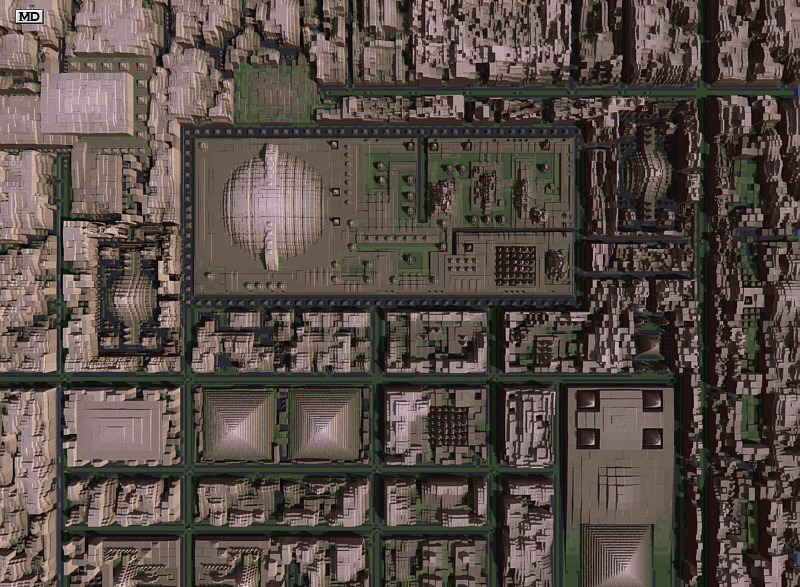
Good project Rayman. I made a city with 2 000 000 buildings in 1996! It was already a similar technique developed by NASA. Computers in 1996 did not have enough power to do it in traditional 3d. We are beginning to rediscover some techniques that were forgotten. The picture is about 1 per cent of the town.
Attachments
IMAGE040.jpg
IMAGE039.jpg
Design - illustration - Animation
http://www.crea-vision.fr
User avatar
RAYMAN
Captain
Posts: 2547
Joined: 21 May 2009, 18:56

Re: My Building TSX

Post by RAYMAN »

Great work Marcel !
Blender city generator also exports and so I made this short test and exported into Vue and used them inside ecosystems
so lots of possibilities ;)
Its also very easy to use the citygenerator you dont have to know very much about blender to use it and you can
import what you make into Truespce if its not to high poly ..
User avatar
RAYMAN
Captain
Posts: 2547
Joined: 21 May 2009, 18:56

Re: My Building TSX

Post by RAYMAN »

An interesting link for you...
from the man of procedural.... (city engine)
http://www.vision.ee.ethz.ch/~pmueller/ ... tions.html"
Galane
Chief Petty Officer
Posts: 111
Joined: 30 Aug 2009, 10:45

Re: My Building TSX

Post by Galane »

Wow! This is amazing, especially for a TSX. Click, *boom*. A building.
User avatar
3dfrog
Senior Chief Petty Officer
Posts: 175
Joined: 21 May 2009, 21:09

Re: My Building TSX

Post by 3dfrog »

Interesting plugin. I like this. Do you have a screenshot of the plugin interface so we can get an idea how it works. Veeery cooool.

edit, sorry missed image on second page, looks cool, keep us up to date :)
Gwydion
Petty Officer Second Class
Posts: 20
Joined: 21 Jun 2009, 13:34

Re: My Building TSX

Post by Gwydion »

Currently my building tsx is in its infancy, its more of a proof of concept than anything else.
I had to take a break from it to work on a project called CopyEX Plus, which is a revamp and improvement on the old classic CopyEx tool.

Tada Its done. The CopyEx tool that is. So now I can return to my building TSX full time.
You can find the CopyEx Tool here in the work in progress area as well, while its basically finished I really want to tweak a few things and hear from many users to find out if I have perhaps missed a step somewhere, so I can perfect it for all.

Whats new in the CopyEx Plus Tool?
Multiple Copies at a single click, with offsets applied to each one, boolean union and grouping, save/load slots.

Beware the boolean union it uses TS's union so its only as good as they made it!, also if copying something like nurbs you will want to turn those into polyhedrons first.

I find it a powerful tool as it is, but I am hoping to add a few functions or minor scriptability, for instance
copying around a central point to create spirals etc.

Return to “Work in Progress”