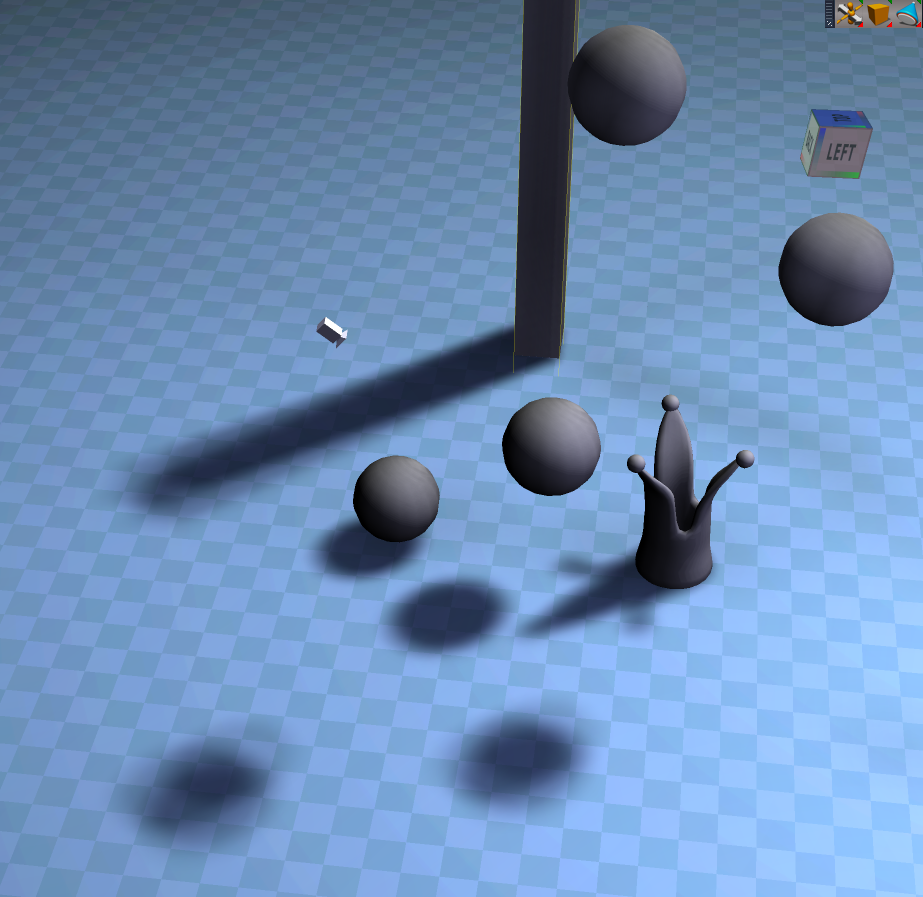
Here is a little old trick I used to do (a long time ago) to simulate raycasted shadows by using mapped shadow lights.
Due to the atmosphere, shadows thin out and get blurrier the further away the shadow gets. It's very typical of thick atmospheres, fog, etc. It is barely noticeable in broad daylight, but under clouds, or muggy weather, you can see it. It also is nice to have shadows thin out, maybe eventually dissappearing.
So to simlate it, I took my fake ambient occlusion light setup, set the main light to a third of the strength, then copied it 3 times, at 3 slightly different angles from each other.
I maybe rotated them by 10 or 5 degrees to get the effect. Due to the already blurry shadow, the 3 blended to create a nifty little effect of a very very thick atmosphere that thins out.
I had to drop the shadowmap to 2000 cause my card was getting jittery.
**I also found out how to cut the shadow distance from the object to be exact. Just change the depth bias of the light to a very low number!
Tip: if you want loooong shadows, you may need many more shadows to help with the blurry fade effect. Sometimes the shadows can seperate, and it looks like.. well like what it is, 3 different lights casting 3 different shadows.
This trick works in most other programs too. I am not sure if it beats GI renders, but if you want to control some shadows better, this helps!!
Enjoy.
(Oh! the crown I made for a short animation series I had to do over the weekend. In 4 days have to produce 12 minutes of animation and production, from nothing to everything!! It has been a marathon! Lots of cutting corners... )
Mirky Shadows in realtime/shadow maps
-
Draise

- Captain
- Posts: 3200
- Joined: 21 Sep 2009, 19:33
- Type the number ten into the box: 0
- Location: Bogota, Colombia
Mirky Shadows in realtime/shadow maps
- Attachments
-
-


-
Draise
- Captain
- Posts: 3200
- Joined: 21 Sep 2009, 19:33
- Type the number ten into the box: 0
- Location: Bogota, Colombia
Re: Mirky Shadows in realtime/shadow maps
Oh, here is a more exaggerated version of the shadow injcase you didn't notice!
Another tip, you can get a cooler blur look by keeping the "mid" light 2 thirds the filter size of the other blur lights to harden the shadow center a bit. I did it in this example, and I also increased the blur distance by increasing the filter size of all 3 lights. Again, only 3 lights for that awwwwwesome shadow in REALTIME!
Another tip, you can get a cooler blur look by keeping the "mid" light 2 thirds the filter size of the other blur lights to harden the shadow center a bit. I did it in this example, and I also increased the blur distance by increasing the filter size of all 3 lights. Again, only 3 lights for that awwwwwesome shadow in REALTIME!
- Attachments
-

-
Draise
- Captain
- Posts: 3200
- Joined: 21 Sep 2009, 19:33
- Type the number ten into the box: 0
- Location: Bogota, Colombia
Re: Mirky Shadows in realtime/shadow maps
Oh, and here is another example. Again, the downside of only using 3 lights is that the further away a shadow is from contact, you start to notice 3 shadows.
In this case, according to need, you use more lights (or "rays") or decrease the lights' angle, or increase the shadow filtersize.
But you get the idea. Also I theorize that if you use many "rays" or lights then each having smaller maps would still look great. (due to a cummulitive mapsize for the ONE shadow) thus saving on gpu.
Also, I only used 3 lights in a linear array in this example. Better to do it all in a radial array with like 5 (one center, 4 other angles) or more "rays".
In this case, according to need, you use more lights (or "rays") or decrease the lights' angle, or increase the shadow filtersize.
But you get the idea. Also I theorize that if you use many "rays" or lights then each having smaller maps would still look great. (due to a cummulitive mapsize for the ONE shadow) thus saving on gpu.
Also, I only used 3 lights in a linear array in this example. Better to do it all in a radial array with like 5 (one center, 4 other angles) or more "rays".
- Attachments
-
-


-
Draise
- Captain
- Posts: 3200
- Joined: 21 Sep 2009, 19:33
- Type the number ten into the box: 0
- Location: Bogota, Colombia
Re: Mirky Shadows in realtime/shadow maps
Here is a fix I made. I just had 5 lights this time, and fixed the angles, and the problem dissappeared, as predicted! Also, played around with different filter settings and got quite a nice effect!
Also, light strength is kinda related to the light color brightness. Forgot to mention it.
Also, light strength is kinda related to the light color brightness. Forgot to mention it.
- Attachments
-
-

-
froo
- Captain
- Posts: 2554
- Joined: 22 May 2009, 12:13
Re: Mirky Shadows in realtime/shadow maps
Very nice work Draise! Looks like you caught on to trueSpace quick!