Hello All,
I'm a TS user from way back in the early 1990s. Glad to find this forum and see that there are still TS users out there!
I have recently been working with the 6.6 modeler within 7.6 on a project. I'm having an issue where when I add a camera to a scene and scale it down to fit the scene, the camera rotates and gets stuck pointing up or down and then I can't rotate back into any needed positions. Any ideas?
Thanks,
Rick
Camera stuck after scale
-
invendev
- Seaman
- Posts: 9
- Joined: 27 Feb 2011, 17:54
- Type the number ten into the box: 9
Camera stuck after scale
-
Breech Block

- Master Chief Petty Officer
- Posts: 482
- Joined: 13 Jun 2009, 20:31
Re: Camera stuck after scale
Hi invendev, and welcome to the U3DA forum. Can't say I have ever experienced the problem you descibed. You haven't accidentally toggled one of the navigation widgets have you?

-
invendev
- Seaman
- Posts: 9
- Joined: 27 Feb 2011, 17:54
- Type the number ten into the box: 9
Re: Camera stuck after scale
Thanks Chief,
Can't see that I'm doing anything out of the ordinary. This is a perplexing one. When I try to rotate the camera back to the proper view it begins to rotate a few degrees and then just snaps back to its position pointing up or down. I'll keep trying...
Can't see that I'm doing anything out of the ordinary. This is a perplexing one. When I try to rotate the camera back to the proper view it begins to rotate a few degrees and then just snaps back to its position pointing up or down. I'll keep trying...
-
spacekdet

- Captain
- Posts: 1810
- Joined: 27 May 2009, 15:00
- Type the number ten into the box: 10
- Location: On the day shift at the Utility Muffin Research Kitchen
Re: Camera stuck after scale
A couple things to check:
Is Grid Mode toggled on? If so, turn it off, then see if you can rotate the camera.
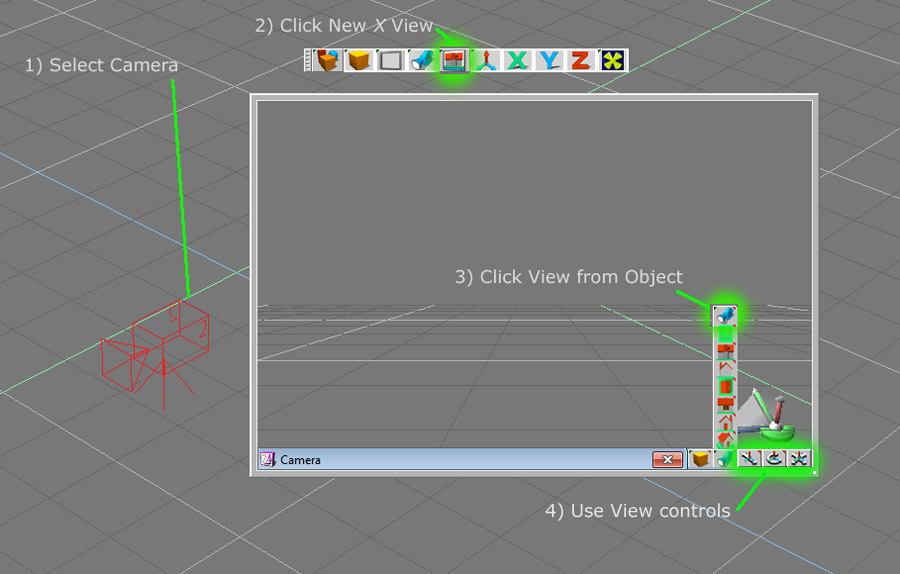
Open a new Small View window, then with the camera object selected, choose 'View from object' in the new view window.
The view will switch to what the camera 'sees'.
Now use the Eye Move/Rotate icons in the small window to readjust the view.
If all else fails, you can select another object and use the 'Look At Current Object' tool (or double mouse wheel click) to point the camera at that object.
UPDATE: Perhaps you have the camera animated?
Is Grid Mode toggled on? If so, turn it off, then see if you can rotate the camera.
Open a new Small View window, then with the camera object selected, choose 'View from object' in the new view window.
The view will switch to what the camera 'sees'.
Now use the Eye Move/Rotate icons in the small window to readjust the view.
If all else fails, you can select another object and use the 'Look At Current Object' tool (or double mouse wheel click) to point the camera at that object.
UPDATE: Perhaps you have the camera animated?
-
invendev
- Seaman
- Posts: 9
- Joined: 27 Feb 2011, 17:54
- Type the number ten into the box: 9
Re: Camera stuck after scale
Hi Space,
Nope, grid is not on.
I currently have a window that is the view from the camera. I cannot control camera from any of the windows.
This is too weird. I must be overlooking something...
Camera has not been animated yet, but I can see how using "look at" should solve things. I'll test soon.
Thanks!
Nope, grid is not on.
I currently have a window that is the view from the camera. I cannot control camera from any of the windows.
This is too weird. I must be overlooking something...
Camera has not been animated yet, but I can see how using "look at" should solve things. I'll test soon.
Thanks!
-
Breech Block
- Master Chief Petty Officer
- Posts: 482
- Joined: 13 Jun 2009, 20:31
Re: Camera stuck after scale
Why not save the scene and post it on the forum so we can download it. That way, we can have a play with it to see if we can resolve the issue for you.
-
invendev
- Seaman
- Posts: 9
- Joined: 27 Feb 2011, 17:54
- Type the number ten into the box: 9
Re: Camera stuck after scale
Here is a scene with a camera that is stuck.
Thanks for checking it.
Thanks for checking it.
- Attachments
-
- camera_test.zip
- (181.91 KiB) Downloaded 224 times
-
invendev
- Seaman
- Posts: 9
- Joined: 27 Feb 2011, 17:54
- Type the number ten into the box: 9
Re: Camera stuck after scale
Can anyone who has downloaded the scene confirm that this issue is happening?
-
Breech Block
- Master Chief Petty Officer
- Posts: 482
- Joined: 13 Jun 2009, 20:31
Re: Camera stuck after scale
I have just this second downloaded the scene and found the camera moved freely on all 3 axis's at the first attempt.
-
Finis

- Captain
- Posts: 5410
- Joined: 21 May 2009, 18:26
- Type the number ten into the box: 0
- Location: America!
Re: Camera stuck after scale
I downloaded it and the problem did not happen for me. That means it is some setting that is not saved in a scene. I suspect grid snap or such but I don't use those kind of things so others will know more about that.
I prefer dangerous freedom over peaceful servitude. -- Thomas Jefferson/Jean Jacques Rousseau
-
invendev
- Seaman
- Posts: 9
- Joined: 27 Feb 2011, 17:54
- Type the number ten into the box: 9
Re: Camera stuck after scale
ok. Thanks for checking. I'll try to figure out what it is on my end that's different.
-
v3rd3
- Lieutenant Commander
- Posts: 1191
- Joined: 21 May 2009, 20:04
Re: Camera stuck after scale
Just a thought ... do you have the "snap to" feature turned on for your mouse? It could be trying to relocate when the mouse moves causing the problem.
-
spacekdet
- Captain
- Posts: 1810
- Joined: 27 May 2009, 15:00
- Type the number ten into the box: 10
- Location: On the day shift at the Utility Muffin Research Kitchen
Re: Camera stuck after scale
If you're using 7.6, turn the Bridge to 'Off'.
I saw the same issue you did- scale the camera and it would flip down and afterward be very reluctant to rotate.
Once I turned off the bridge, the problem went away.
For what it's worth, I don't think the scale of the camera makes any difference. You can leave it big and the view is the same as a small scaled down camera.
I saw the same issue you did- scale the camera and it would flip down and afterward be very reluctant to rotate.
Once I turned off the bridge, the problem went away.
For what it's worth, I don't think the scale of the camera makes any difference. You can leave it big and the view is the same as a small scaled down camera.
-
invendev
- Seaman
- Posts: 9
- Joined: 27 Feb 2011, 17:54
- Type the number ten into the box: 9
Re: Camera stuck after scale
Awesome!
Thanks kdet. It looks like that solved things.
It was driving me nuts.
I would rather work on the model side because of its familiarity. Is this going to be a bad idea as I get into a large project? I'm still somewhat confused as to how TS6 functions within 7.6. I have 5.5 but would really like to use the layers feature of 6.
Anyway, I appreciate all who took time to help out.
Thanks kdet. It looks like that solved things.
It was driving me nuts.
I would rather work on the model side because of its familiarity. Is this going to be a bad idea as I get into a large project? I'm still somewhat confused as to how TS6 functions within 7.6. I have 5.5 but would really like to use the layers feature of 6.
Anyway, I appreciate all who took time to help out.
-
Finis
- Captain
- Posts: 5410
- Joined: 21 May 2009, 18:26
- Type the number ten into the box: 0
- Location: America!
Re: Camera stuck after scale
Glad to hear that is fixed. Now let's see your work!
The model side is TS 6.x plus a few goodies. It is the last old fashioned TS. Workspace is the unfinished new TS. The bridge links the two. If you are only using model side then keep the bridge turned off. I very seldom use anything from workspace but others like it. There is a TS6 tab but I'm not sure what that is for since model side is TS 6.x.
The model side is TS 6.x plus a few goodies. It is the last old fashioned TS. Workspace is the unfinished new TS. The bridge links the two. If you are only using model side then keep the bridge turned off. I very seldom use anything from workspace but others like it. There is a TS6 tab but I'm not sure what that is for since model side is TS 6.x.
I prefer dangerous freedom over peaceful servitude. -- Thomas Jefferson/Jean Jacques Rousseau
-
invendev
- Seaman
- Posts: 9
- Joined: 27 Feb 2011, 17:54
- Type the number ten into the box: 9
Re: Camera stuck after scale
Thanks Finis.
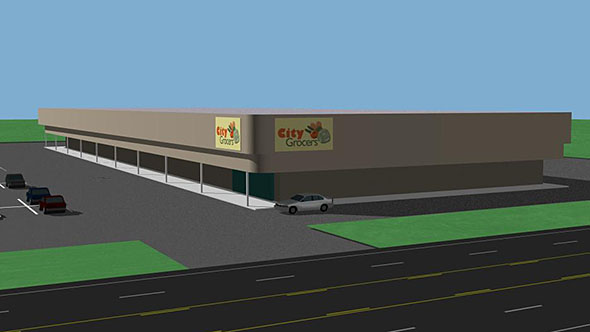
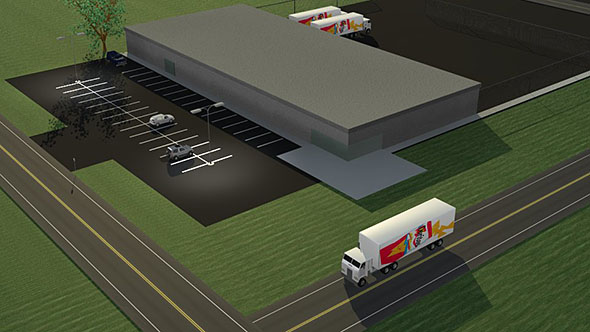
Here are a few shots from the project. Very basic stuff because I am so out of touch with TS, but I'm (re)learning.
Here are a few shots from the project. Very basic stuff because I am so out of touch with TS, but I'm (re)learning.
- Attachments
-
-
-