Light View Widget and Camera for UU

User avatar
clintonman
Captain
Posts: 5659
Joined: 21 May 2009, 21:08
Type the number ten into the box: 0
Location: California

Light View Widget and Camera for UU

Post by clintonman »

View the scene through the spot light without using a panel button.
Less overhead for cameras in the scene - has fewer nodes by default, additional nodes are loaded as needed for the synchronization process.
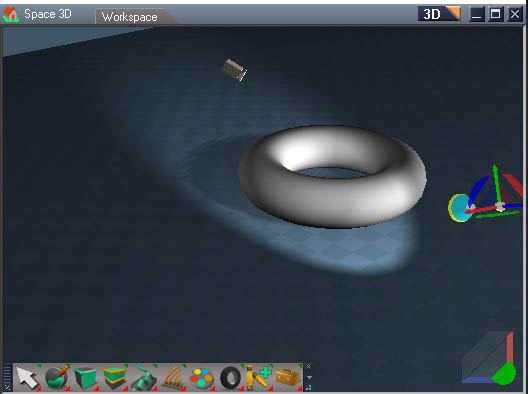
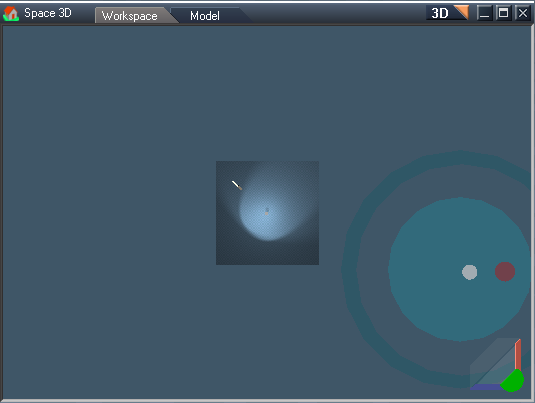
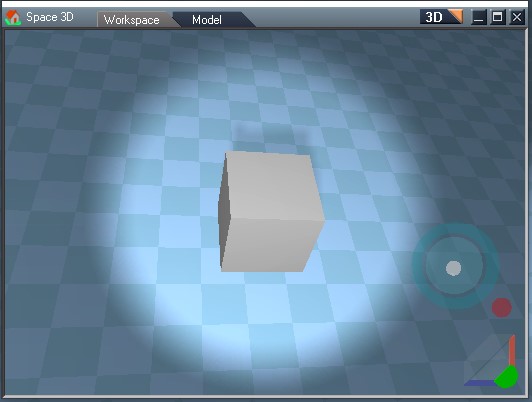
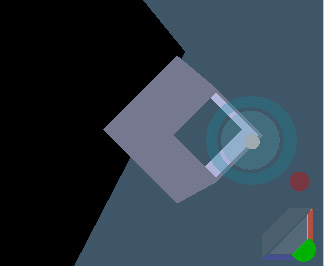
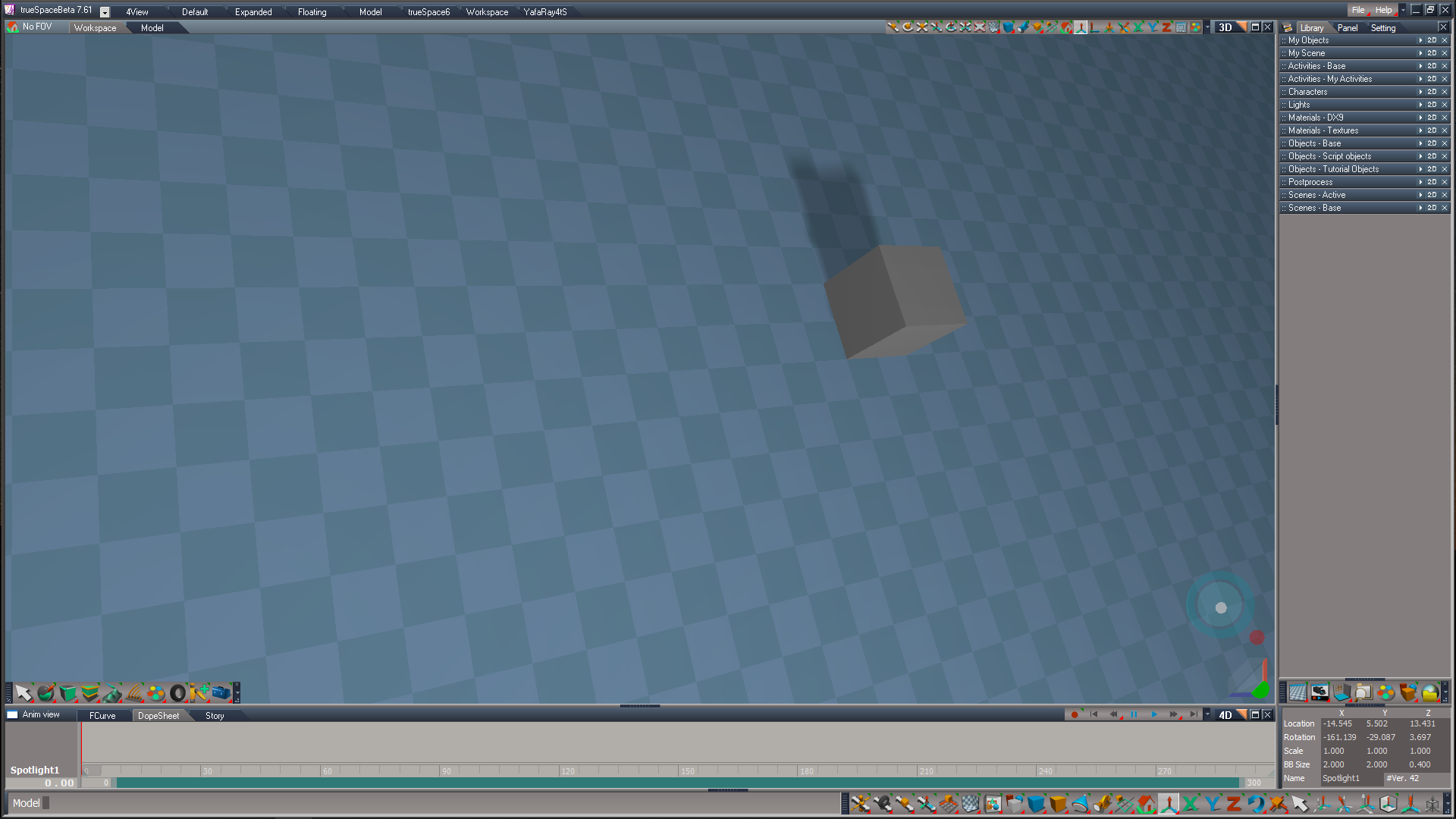
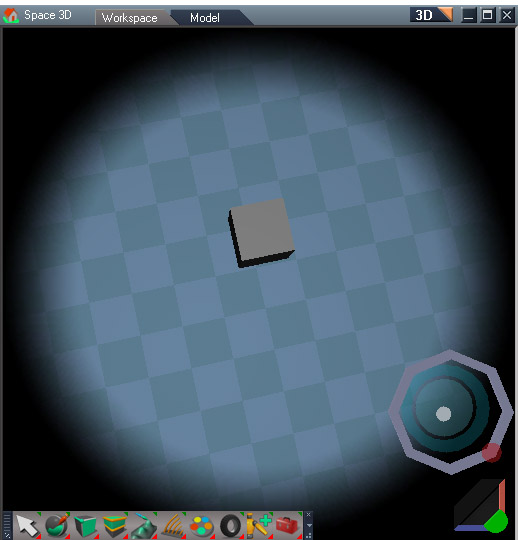
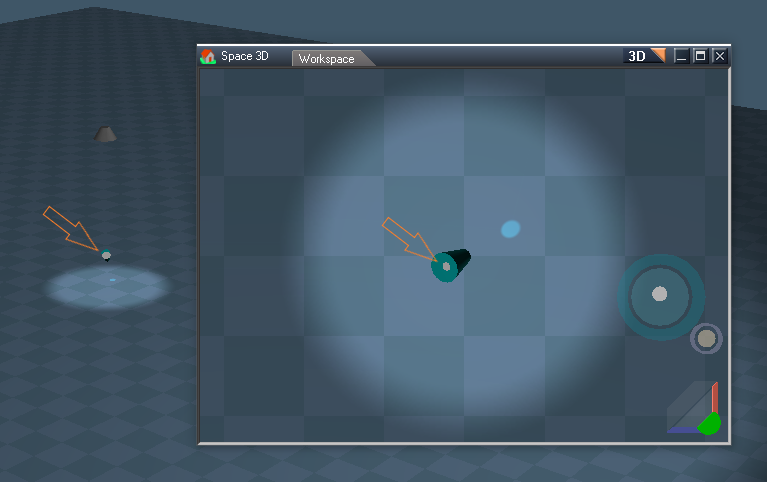
LightViewWidget1.jpg
LClick the angle ring to switch the view to a spotlight view
Ctrl + LClick to open a new 3d view for the spotlight
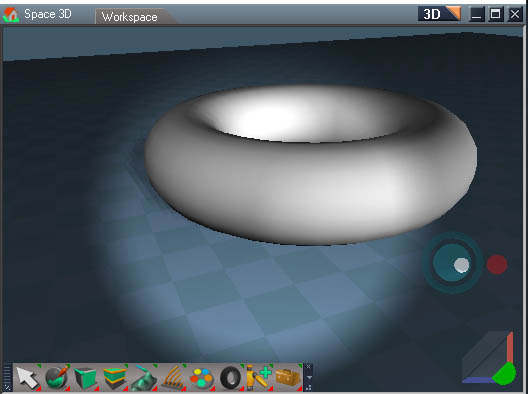

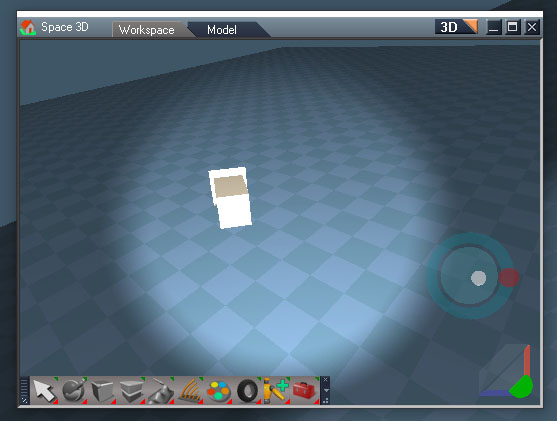
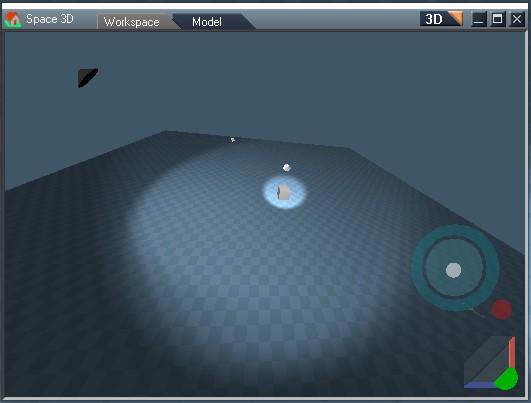
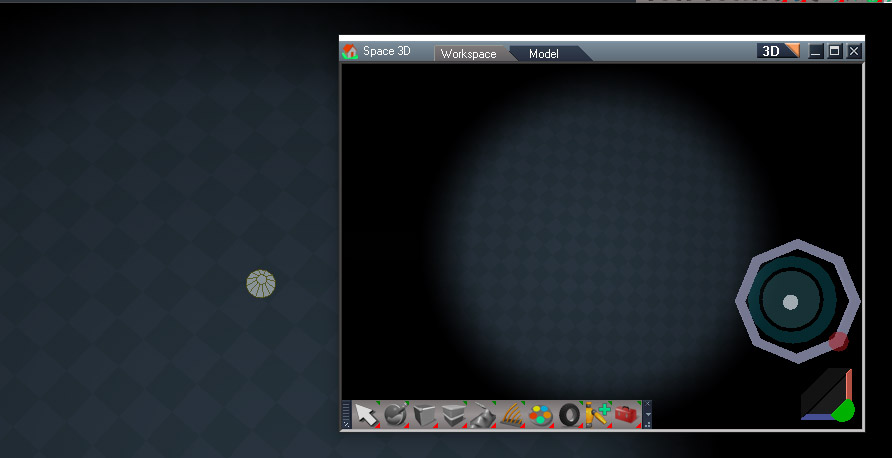
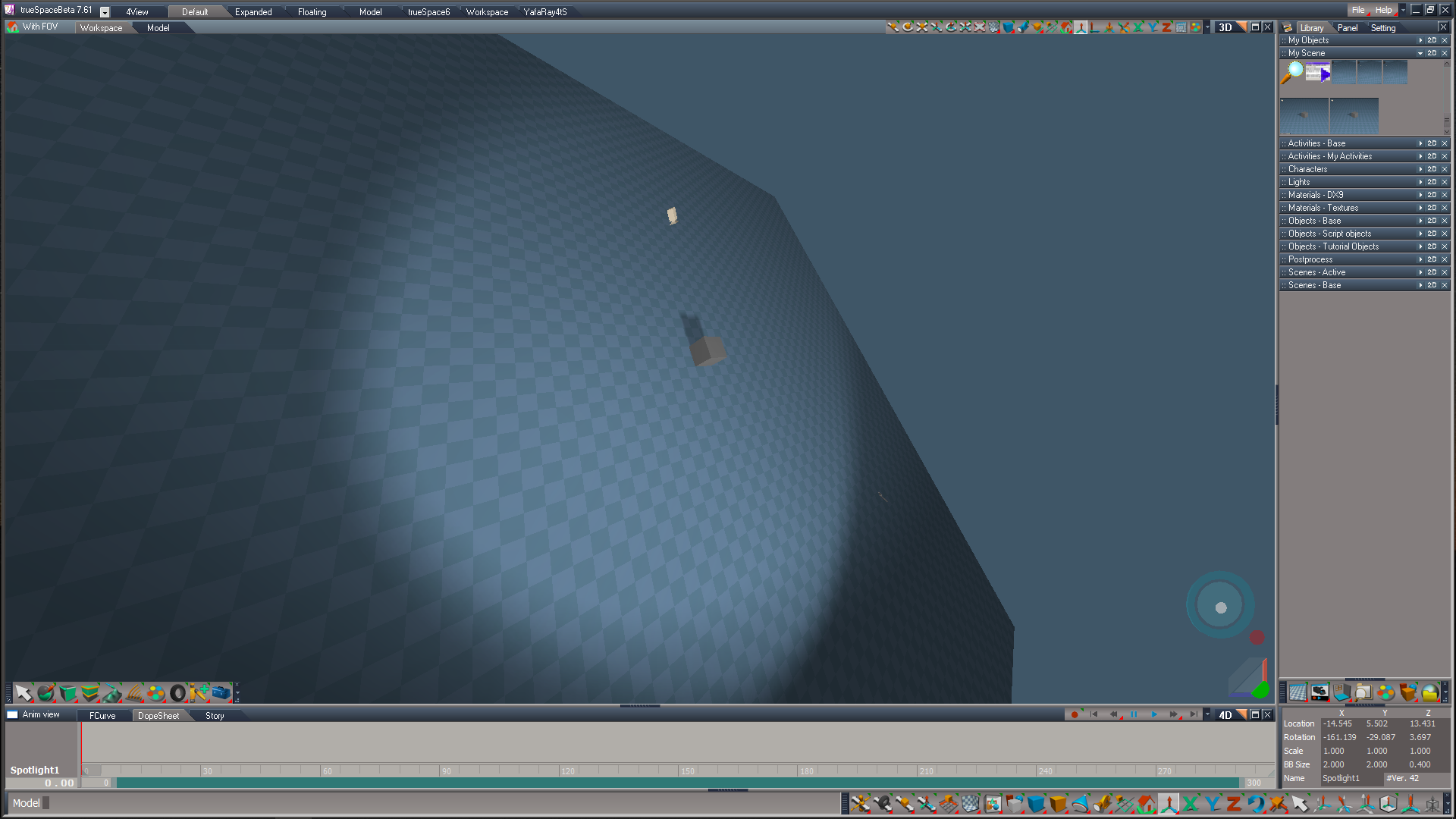
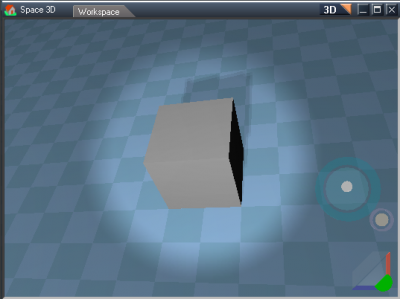
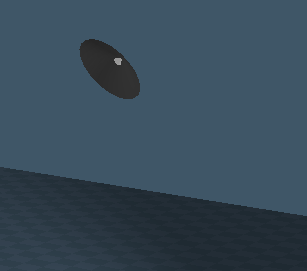
LightViewWidget2.jpg
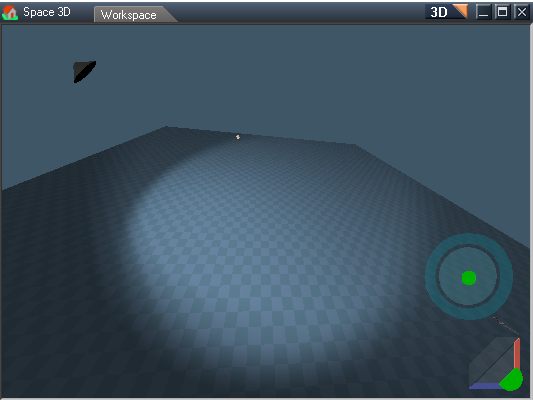
Spotlight view with spotlight view widget on the right
Red dot to switch to a perspective view and exit out of spotlight view mode
All other controls are the same for move, rotate and angle
Use the view controls to move and rotate
Only the object rotate tool works in the spotlight view, move and scale tools do not work in the spotlight view

Widget will appear in all 3d viewports when the spotlight is selected.
LClick the angle ring to switch the view to a spotlight view

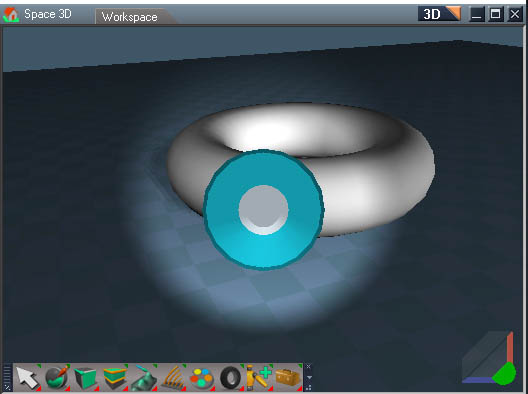
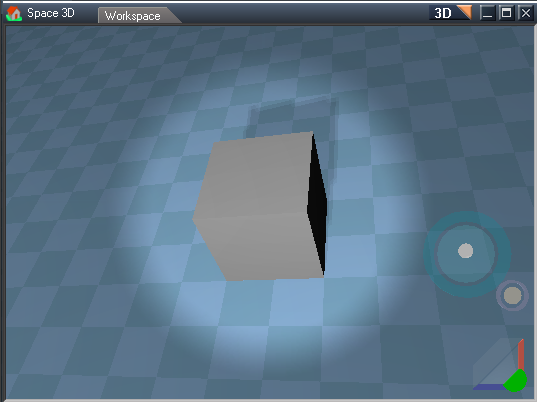
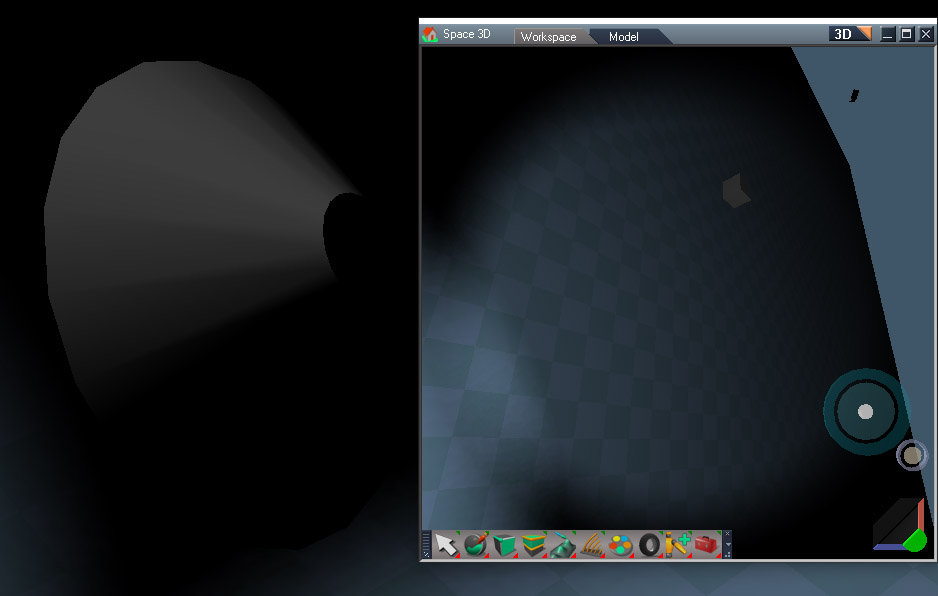
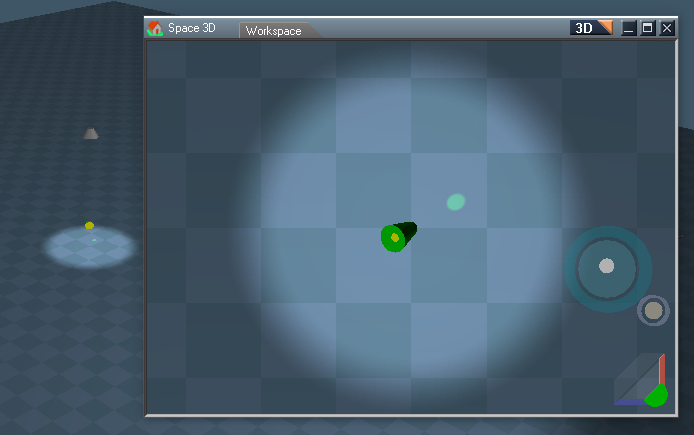
LightViewWidget3.jpg
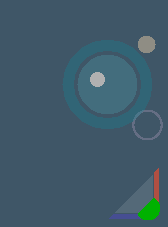
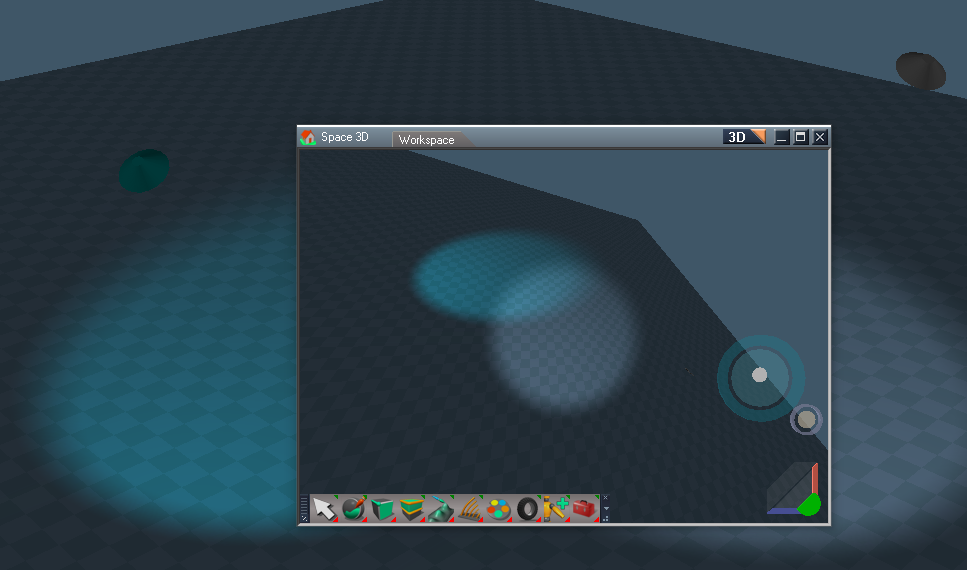
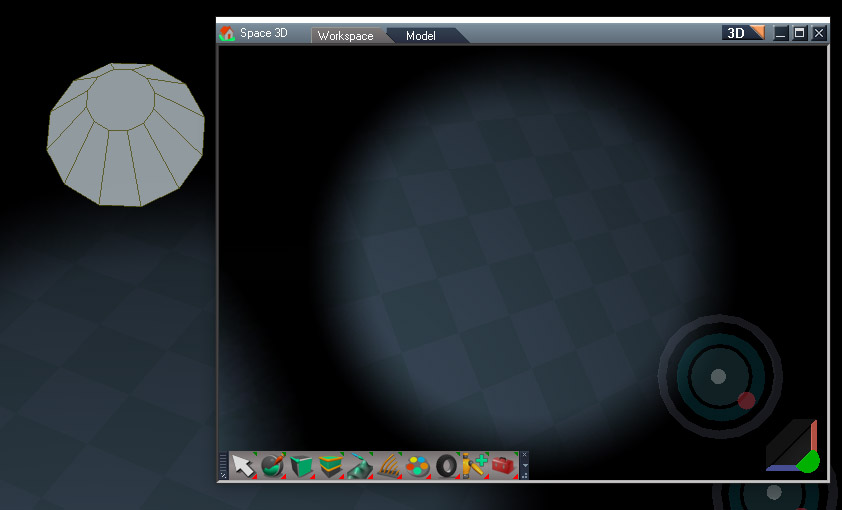
LightViewWidget4.jpg
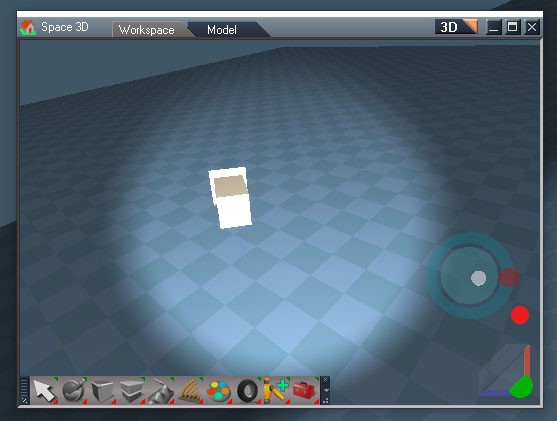
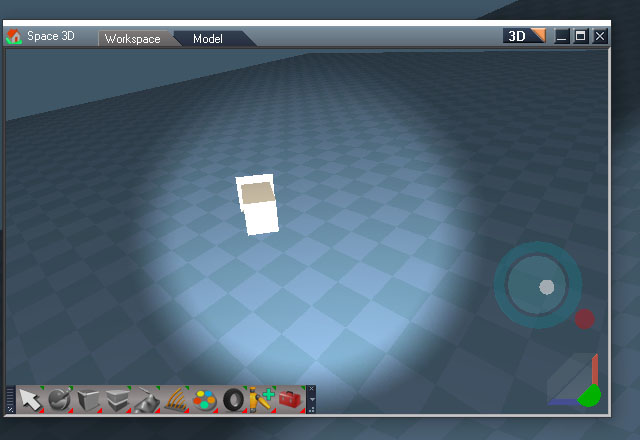
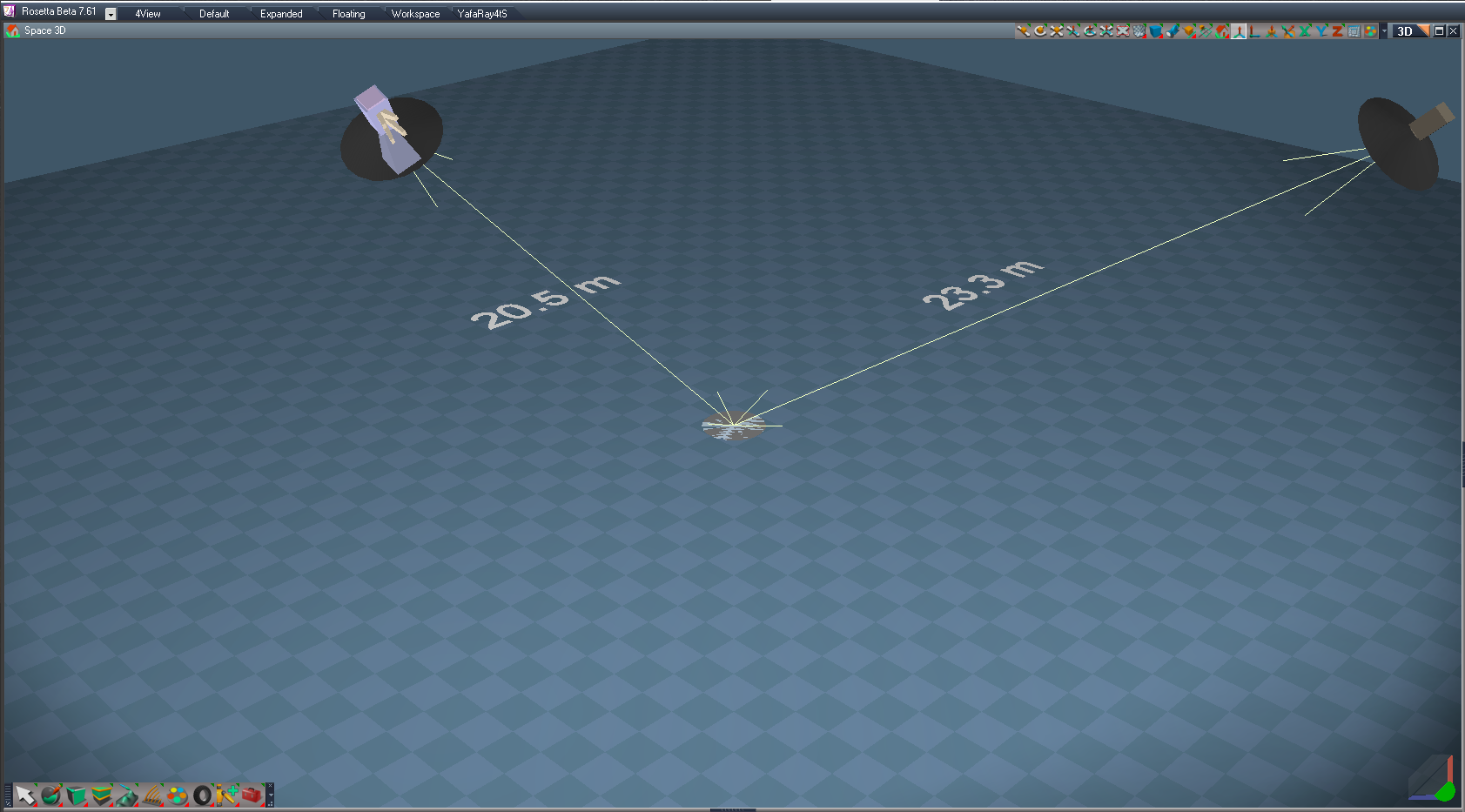
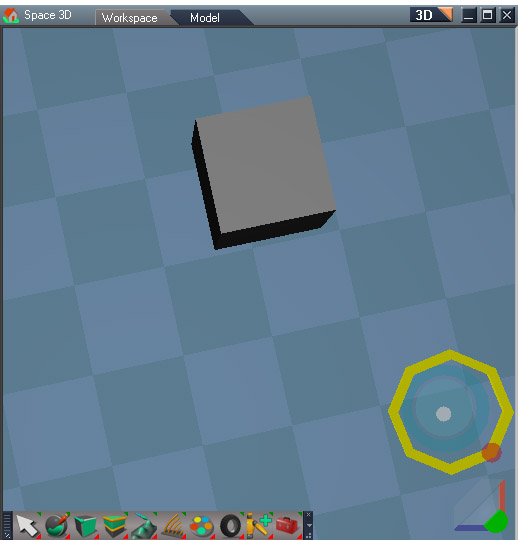
When exit out of spotlight view there is a dialog with the option to make the perspective view match the spotlight. The default for the question is "No" for the default tS behavior. Images above show what happens when you select yes and then wheel mouse back a bit.

Other changes:

Both the spotlight and camera have had their synchronization and window frame nodes removed. They are loaded as needed so the scene stays as light as possible. The spotlight has also had it's camera node removed and only loaded when using a spotlight view.
Clinton Reese

http://clintons3d.com
User avatar
clintonman
Captain
Posts: 5659
Joined: 21 May 2009, 21:08
Type the number ten into the box: 0
Location: California

Re: Light View Widget and Camera for UU

Post by clintonman »

The Unofficial Update v9 is required.

Load "CamLightExtras" into /Widgets/WidgetScripts/

Replace the "Spot light widget" inside /Widgets/Select/
Add "Spot light view widget" to /Widgets/Select/

Camera and Spot have been modified to use the CamLightExtras scripts and the new and updated spotlight widgets.

One know issue, when you Ctrl + LClick to open a new 3d view for the spotlight it sometimes converts the current view to a spotlight view. Reason unknown at this time - it's random.
Attachments
Camera8316.RsObj
(56.73 KiB) Downloaded 129 times
Spot1644.RsObj
(139.76 KiB) Downloaded 133 times
Spot light widget.RsObj
(439.37 KiB) Downloaded 94 times
Spot light view widget.RsObj
(227.48 KiB) Downloaded 113 times
CamLightExtras.RsObj
(52.58 KiB) Downloaded 119 times
Clinton Reese

http://clintons3d.com
User avatar
clintonman
Captain
Posts: 5659
Joined: 21 May 2009, 21:08
Type the number ten into the box: 0
Location: California

Re: Light View Widget and Camera for UU

Post by clintonman »

Update:

Removed the exit view dialog, "Set the perspective view to match the light viewpoint?"
New RClick on red close light view control to keep the current view point
LClick same as before, revert view point and don't ask

Added missing "/Camera" path so only the single camera node is copied instead of the camera compound object

Edit: fixed error, thanks.
Attachments
Spot light view widgeteeca.RsObj
(229.81 KiB) Downloaded 108 times
CamLightExtras3437.RsObj
(52.99 KiB) Downloaded 131 times
Clinton Reese

http://clintons3d.com
User avatar
clintonman
Captain
Posts: 5659
Joined: 21 May 2009, 21:08
Type the number ten into the box: 0
Location: California

Re: Light View Widget and Camera for UU

Post by clintonman »

Changes:
LightViewWidgetInNormalView.jpg
LightViewWidgetInNormalView.jpg (34.64 KiB) Viewed 2960 times
Image shows the spotlight view widget when it is not in a spotlight view. This is not visible from inside of a spotlight view.

Spotlight view widget:

Scene representation in non-light view is now cone shaped.
Exit spotlight view and keep position - offset back from the light position when RClick the red close control, no need to mouse scroll to clear up the view

Spot:

Spotlight View panel button(code written by trueBlue, but not approved by trueBlue):
LMB - switch spotlight widget to view widget mode
LClick the widget angle control to activate the widget in the desired 3d view

RMB - open a light view in a new 3d window with the widget already active

Status message added to the LMB panel button, "LClick the Spotlight View widget Angle control to activate it."
Attachments
Spot light view widget47c0.RsObj
(232.44 KiB) Downloaded 121 times
Spot69b9.RsObj
(142.07 KiB) Downloaded 89 times
Clinton Reese

http://clintons3d.com
Saul
Senior Chief Petty Officer
Posts: 308
Joined: 22 May 2009, 16:50

Re: Light View Widget and Camera for UU

Post by Saul »

'Load "CamLightExtras" into /Widgets/WidgetScripts/
Replace the "Spot light widget" inside /Widgets/Select/
Add "Spot light view widget" to /Widgets/Select/'

Install 'Camera Deluxe Installer' from Objects - Script Objects
Load clintonMans - 05-03-23 - Spot
LClick the Spot widget angle control
Switch view back to Perspective view
Spot widget is now Deluxe Camera Widget
User avatar
clintonman
Captain
Posts: 5659
Joined: 21 May 2009, 21:08
Type the number ten into the box: 0
Location: California

Re: Light View Widget and Camera for UU

Post by clintonman »

Saul wrote: 05 Apr 2023, 14:15 'Load "CamLightExtras" into /Widgets/WidgetScripts/
Replace the "Spot light widget" inside /Widgets/Select/
Add "Spot light view widget" to /Widgets/Select/'

Install 'Camera Deluxe Installer' from Objects - Script Objects
Load clintonMans - 05-03-23 - Spot
LClick the Spot widget angle control
Switch view back to Perspective view
Spot widget is now Deluxe Camera Widget
Looks like it takes over.
Thanks, I'll increase the activation weight of the spotlight view to prevent it.
Clinton Reese

http://clintons3d.com
User avatar
trueBlue
Captain
Posts: 5548
Joined: 06 Jul 2009, 22:50
Type the number ten into the box: 10

Re: Light View Widget and Camera for UU

Post by trueBlue »

Awesome update Clinton! :bananathumb:

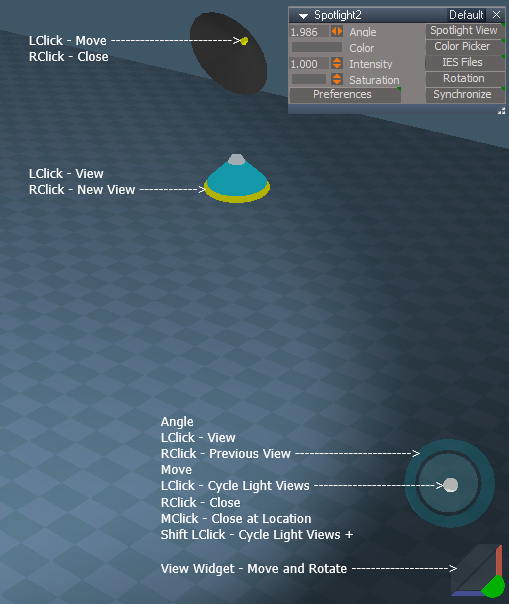
I have added a Cycle Lights script to your View widget control.
Changed the LClick gesture to this Cycle Lights script.
Changed the RClick gesture to Close the widget.
Added MClick gesture to what I am calling a Zoom to Light.
ViewControl.png
.
The Cycle Lights script cycles all of the present Spot and Projector lights in the scene, adds the Camera, and switches to the light's View.

Please try it out and let me know if you approve.
Removed due to update
User avatar
clintonman
Captain
Posts: 5659
Joined: 21 May 2009, 21:08
Type the number ten into the box: 0
Location: California

Re: Light View Widget and Camera for UU

Post by clintonman »

trueBlue wrote: 05 Apr 2023, 15:50 Awesome update Clinton! :bananathumb:

I have added a Cycle Lights script to your View widget control.
Changed the LClick gesture to this Cycle Lights script.
Changed the RClick gesture to Close the widget.
Added MClick gesture to what I am calling a Zoom to Light.
ViewControl.png
.
The Cycle Lights script cycles all of the present Spot and Projector lights in the scene, adds the Camera, and switches to the light's View.

Please try it out and let me know if you approve.
Looks good. Glad to see you stopped hating on your own code.

When I read "Zoom to Light" I thought it was going to zoom the light view to another light. Maybe Zoom to Light should be Close to Light or Exit to Light, something like that.

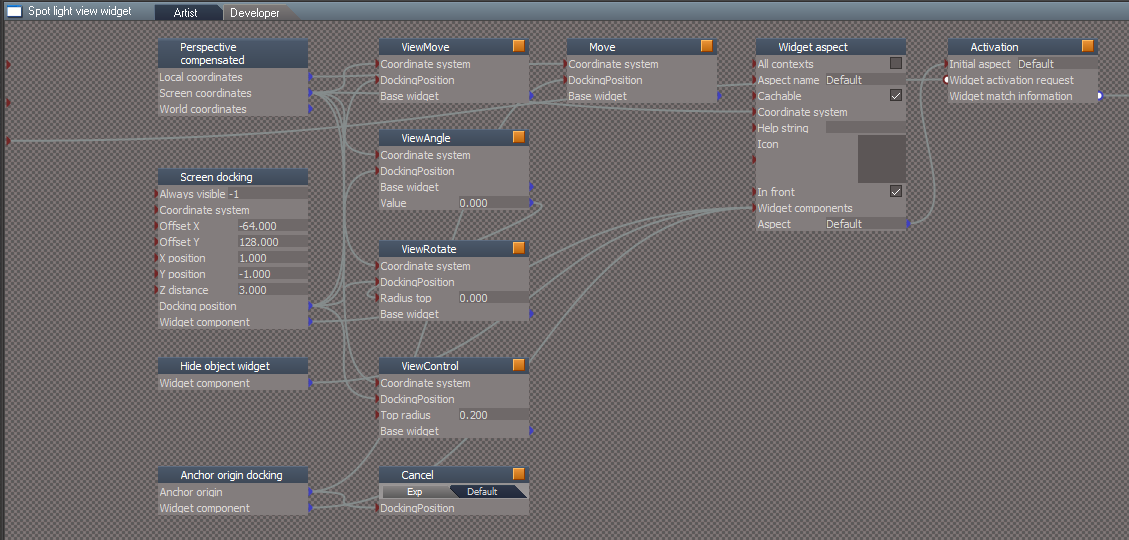
/Widgets/Select/Spot light view widget/Activation/Automatic activation node
I set the Widget weight bias to 3.1 to override the "Camera Deluxe" from the "Objects - Script objects" library
Clinton Reese

http://clintons3d.com
User avatar
trueBlue
Captain
Posts: 5548
Joined: 06 Jul 2009, 22:50
Type the number ten into the box: 10

Re: Light View Widget and Camera for UU

Post by trueBlue »

clintonman wrote: 05 Apr 2023, 16:27
trueBlue wrote: 05 Apr 2023, 15:50 Awesome update Clinton! :bananathumb:

I have added a Cycle Lights script to your View widget control.
Changed the LClick gesture to this Cycle Lights script.
Changed the RClick gesture to Close the widget.
Added MClick gesture to what I am calling a Zoom to Light.
ViewControl.png
.
The Cycle Lights script cycles all of the present Spot and Projector lights in the scene, adds the Camera, and switches to the light's View.

Please try it out and let me know if you approve.
Looks good. Glad to see you stopped hating on your own code.

When I read "Zoom to Light" I thought it was going to zoom the light view to another light. Maybe Zoom to Light should be Close to Light or Exit to Light, something like that.

/Widgets/Select/Spot light view widget/Activation/Automatic activation node
I set the Widget weight bias to 3.1 to override the "Camera Deluxe" from the "Objects - Script objects" library
Yeah, was not sure what to call it, I think you changed that from the previous version?
I think RClick Close is more similar to trueSpace's theme and other scripts/widgets.
Is 3.1 enough, did you test it?
User avatar
clintonman
Captain
Posts: 5659
Joined: 21 May 2009, 21:08
Type the number ten into the box: 0
Location: California

Re: Light View Widget and Camera for UU

Post by clintonman »

trueBlue wrote: 05 Apr 2023, 16:53
clintonman wrote: 05 Apr 2023, 16:27
trueBlue wrote: 05 Apr 2023, 15:50 Awesome update Clinton! :bananathumb:

I have added a Cycle Lights script to your View widget control.
Changed the LClick gesture to this Cycle Lights script.
Changed the RClick gesture to Close the widget.
Added MClick gesture to what I am calling a Zoom to Light.
ViewControl.png
.
The Cycle Lights script cycles all of the present Spot and Projector lights in the scene, adds the Camera, and switches to the light's View.

Please try it out and let me know if you approve.
Looks good. Glad to see you stopped hating on your own code.

When I read "Zoom to Light" I thought it was going to zoom the light view to another light. Maybe Zoom to Light should be Close to Light or Exit to Light, something like that.

/Widgets/Select/Spot light view widget/Activation/Automatic activation node
I set the Widget weight bias to 3.1 to override the "Camera Deluxe" from the "Objects - Script objects" library
Yeah, was not sure what to call it, I think you changed that from the previous version?
I think RClick Close is more similar to trueSpace's theme and other scripts/widgets.
Is 3.1 enough, did you test it?
Yes, I tested it and yes 3.1 is enough.
Clinton Reese

http://clintons3d.com
User avatar
trueBlue
Captain
Posts: 5548
Joined: 06 Jul 2009, 22:50
Type the number ten into the box: 10

Re: Light View Widget and Camera for UU

Post by trueBlue »

Thanks!
It looks like the SpotPanelFrame & ProjectorPanelFrame are no longer needed in CamLightExtras
What do you think?
User avatar
clintonman
Captain
Posts: 5659
Joined: 21 May 2009, 21:08
Type the number ten into the box: 0
Location: California

Re: Light View Widget and Camera for UU

Post by clintonman »

trueBlue wrote: 05 Apr 2023, 17:16 Thanks!
It looks like the SpotPanelFrame & ProjectorPanelFrame are no longer needed in CamLightExtras
What do you think?
Yep, if the whole point of the panels is to open the light view they're not needed anymore. I left them in because the panel button code you wrote was "up in the air".
Clinton Reese

http://clintons3d.com
User avatar
trueBlue
Captain
Posts: 5548
Joined: 06 Jul 2009, 22:50
Type the number ten into the box: 10

Re: Light View Widget and Camera for UU

Post by trueBlue »

Okay, I have removed them.
One last thing...
Spotlight's Angle max @ 3.000 seems unrealistic.
Spot View widget SIZE.png
.
Is it possible to make your Light widget's size static?
User avatar
clintonman
Captain
Posts: 5659
Joined: 21 May 2009, 21:08
Type the number ten into the box: 0
Location: California

Re: Light View Widget and Camera for UU

Post by clintonman »

trueBlue wrote: 05 Apr 2023, 17:57 Okay, I have removed them.
One last thing...
Spotlight's Angle max @ 3.000 seems unrealistic.
Spot View widget SIZE.png
.
Is it possible to make your Light widget's size static?

Yes, disconnecting the Tube "Bottom outer radius" and "Top outer radius" makes it static

Widgets/Select/Spot light view widget/ViewAngle/Tube

disconnecting the Cylinder "Top radius" makes it static

Widgets/Select/Spot light view widget/ViewRotate/Cylinder

Then just put in some values that look good for both of them

I alos increased the brightness of the rotate and angle.
How's this?
LightViewUniqueStaticWidget01.jpg
Clinton Reese

http://clintons3d.com
User avatar
trueBlue
Captain
Posts: 5548
Joined: 06 Jul 2009, 22:50
Type the number ten into the box: 10

Re: Light View Widget and Camera for UU

Post by trueBlue »

That looks good except maybe move the Red dot to the Right and Down?
User avatar
clintonman
Captain
Posts: 5659
Joined: 21 May 2009, 21:08
Type the number ten into the box: 0
Location: California

Re: Light View Widget and Camera for UU

Post by clintonman »

trueBlue wrote: 05 Apr 2023, 18:29 That looks good except maybe move the Red dot to the Right and Down?
LightViewUniqueStaticWidget02.jpg

Inside(green) or outside(orange) the angle control?
Clinton Reese

http://clintons3d.com
User avatar
trueBlue
Captain
Posts: 5548
Joined: 06 Jul 2009, 22:50
Type the number ten into the box: 10

Re: Light View Widget and Camera for UU

Post by trueBlue »

Something like this?
Dot.jpg
User avatar
clintonman
Captain
Posts: 5659
Joined: 21 May 2009, 21:08
Type the number ten into the box: 0
Location: California

Re: Light View Widget and Camera for UU

Post by clintonman »

LightViewUniqueStaticWidget03.jpg


changed Euler tx=-0.8 and ty=-0.65
/Widgets/Select/Spot light view widget/ViewControl/Euler
Clinton Reese

http://clintons3d.com
User avatar
trueBlue
Captain
Posts: 5548
Joined: 06 Jul 2009, 22:50
Type the number ten into the box: 10

Re: Light View Widget and Camera for UU

Post by trueBlue »

Not having much luck after disconnecting the attributes.
Where are you entering the values?

I also added a Cancel
Shift LClick - Close Widget
Cancel.png
User avatar
clintonman
Captain
Posts: 5659
Joined: 21 May 2009, 21:08
Type the number ten into the box: 0
Location: California

Re: Light View Widget and Camera for UU

Post by clintonman »

trueBlue wrote: 05 Apr 2023, 18:50 Not having much luck after disconnecting the attributes.
Where are you entering the values?

I also added a Cancel
Shift LClick - Close Widget
Cancel.png
I give the full path of where you need to go in the earlier posts
So when I say "Widgets/Select/Spot light view widget/ViewAngle/Tube", you have to go to the Tube and disconnect and enter the values.

Attached is what I did
Attachments
Spot light view widget26d7.RsObj
(232.33 KiB) Downloaded 81 times
Clinton Reese

http://clintons3d.com
User avatar
trueBlue
Captain
Posts: 5548
Joined: 06 Jul 2009, 22:50
Type the number ten into the box: 10

Re: Light View Widget and Camera for UU

Post by trueBlue »

Much better!
I fixed the ViewMove shape, it was off center.
I removed all of the gesture items and disconnected the Distance attribute from the Highliter solid node in the Move node, which I renamed to LightObject.
The only thing I see is, the Dot moves when you shrink the 3D View vertically.
Not a big deal.
Dot.png
Attachments
Spot light view widgetc83f.RsObj
(230.37 KiB) Downloaded 87 times
Saul
Senior Chief Petty Officer
Posts: 308
Joined: 22 May 2009, 16:50

Re: Light View Widget and Camera for UU

Post by Saul »

'Red dot to switch to a perspective view and exit out of spotlight view mode'
I don't understand the red dot. Handy to be able to able to return to the Spot view but the 2 perspective views are so distorted. Surely just 1 default perspective view is more convenient?
Attachments
Screenshot 2023-04-06 020942.jpg
Screenshot 2023-04-06 020910.jpg
Screenshot 2023-04-06 020636.jpg
User avatar
clintonman
Captain
Posts: 5659
Joined: 21 May 2009, 21:08
Type the number ten into the box: 0
Location: California

Re: Light View Widget and Camera for UU

Post by clintonman »

trueBlue wrote: 05 Apr 2023, 18:50 Not having much luck after disconnecting the attributes.
Where are you entering the values?

I also added a Cancel
Shift LClick - Close Widget
Cancel.png
How is this different from RClick on the red dot?
Clinton Reese

http://clintons3d.com
User avatar
trueBlue
Captain
Posts: 5548
Joined: 06 Jul 2009, 22:50
Type the number ten into the box: 10

Re: Light View Widget and Camera for UU

Post by trueBlue »

clintonman wrote: 06 Apr 2023, 01:13
trueBlue wrote: 05 Apr 2023, 18:50 Not having much luck after disconnecting the attributes.
Where are you entering the values?

I also added a Cancel
Shift LClick - Close Widget
Cancel.png
How is this different from RClick on the red dot?
Does not remove the attached Camera
Saul
Senior Chief Petty Officer
Posts: 308
Joined: 22 May 2009, 16:50

Re: Light View Widget and Camera for UU

Post by Saul »

'How is this different from RClick on the red dot? '

Ahhh, so what's purpose of the alternative views with Lclick on red dot?
Edit: Attached camera :) So can the attached camera views - Lclick on red dot - be made more like the Rclick view?
Last edited by Saul on 06 Apr 2023, 01:21, edited 1 time in total.
User avatar
clintonman
Captain
Posts: 5659
Joined: 21 May 2009, 21:08
Type the number ten into the box: 0
Location: California

Re: Light View Widget and Camera for UU

Post by clintonman »

trueBlue wrote: 06 Apr 2023, 01:14
clintonman wrote: 06 Apr 2023, 01:13
trueBlue wrote: 05 Apr 2023, 18:50 Not having much luck after disconnecting the attributes.
Where are you entering the values?

I also added a Cancel
Shift LClick - Close Widget
Cancel.png
How is this different from RClick on the red dot?
Does not remove the attached Camera
Why? that seems inconvenient.
Clinton Reese

http://clintons3d.com
User avatar
clintonman
Captain
Posts: 5659
Joined: 21 May 2009, 21:08
Type the number ten into the box: 0
Location: California

Re: Light View Widget and Camera for UU

Post by clintonman »

Saul wrote: 06 Apr 2023, 01:16 'How is this different from RClick on the red dot? '

Ahhh, so what's purpose of the alternative views with Lclick on red dot?
Edit: Attached camera :) So can the attached camera views - Lclick on red dot - be made more like the Rclick view?
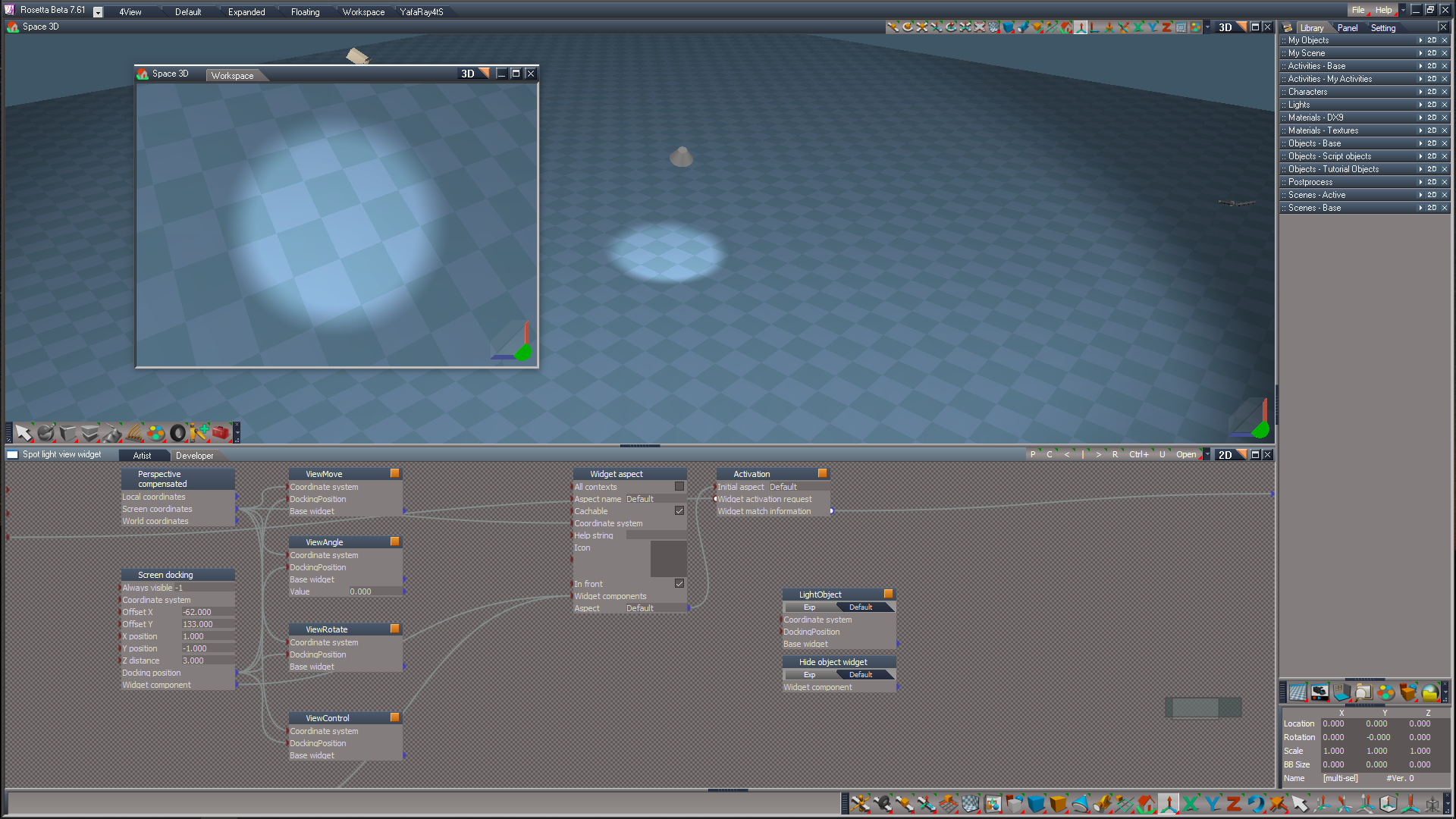
LClick will switch the view between the spotlights in the scene. The fov will match the light so some will look distorted.
RClick on red dot will change the spotlight back to normal and exit the light view. So it's similar to being in camera view and then pressing the perspective view button.
MClick on red changes the spotlight back to normal, exits the light view and keeps the position close to the light.
Clinton Reese

http://clintons3d.com
Saul
Senior Chief Petty Officer
Posts: 308
Joined: 22 May 2009, 16:50

Re: Light View Widget and Camera for UU

Post by Saul »

OK, i hadn't realised that all spots were now view widget enabled. I had been loading your Spot object and considering it unique, me daft!
Thanks.
User avatar
clintonman
Captain
Posts: 5659
Joined: 21 May 2009, 21:08
Type the number ten into the box: 0
Location: California

Re: Light View Widget and Camera for UU

Post by clintonman »

Saul wrote: 06 Apr 2023, 01:34 OK, i hadn't realised that all spots were now view widget enabled. I had been loading your Spot object and considering it unique, me daft!
Thanks.
Actually, it is unique. It has the button that starts the process, the "Scene View" button. The older spots don't have that button.
Clinton Reese

http://clintons3d.com
Saul
Senior Chief Petty Officer
Posts: 308
Joined: 22 May 2009, 16:50

Re: Light View Widget and Camera for UU

Post by Saul »

'the "Scene View" button'
By this you mean the 'Spotlight View' button?
Attachments
Screenshot 2023-04-06 024211.jpg
Screenshot 2023-04-06 024211.jpg (1.59 KiB) Viewed 2962 times
User avatar
clintonman
Captain
Posts: 5659
Joined: 21 May 2009, 21:08
Type the number ten into the box: 0
Location: California

Re: Light View Widget and Camera for UU

Post by clintonman »

Saul wrote: 06 Apr 2023, 01:46 'the "Scene View" button'
By this you mean the 'Spotlight View' button?
Oops, yes, that's what I mean.
Clinton Reese

http://clintons3d.com
User avatar
trueBlue
Captain
Posts: 5548
Joined: 06 Jul 2009, 22:50
Type the number ten into the box: 10

Re: Light View Widget and Camera for UU

Post by trueBlue »

Yippy, I fixed a couple of things! :bananatyping:
Do not hookup the Camera's FOV to the light's Angle.
Remove these two selected nodes.
Screenshot (82).png
User avatar
trueBlue
Captain
Posts: 5548
Joined: 06 Jul 2009, 22:50
Type the number ten into the box: 10

Re: Light View Widget and Camera for UU

Post by trueBlue »

Got the Camera FOV tool to work with Spot and Projector light's Angle
Add the selected items to Widget/Tools/View tools/Camera fov/
Camera FOV tool.png
.
Can do the same with the Widget/Tools/Scale selection/Scale/
Edit: Works but moves a little bit, so no go.
User avatar
trueBlue
Captain
Posts: 5548
Joined: 06 Jul 2009, 22:50
Type the number ten into the box: 10

Re: Light View Widget and Camera for UU

Post by trueBlue »

@Clinton
Please try this updated Widgets

Removed the Hide Object and LightObject

I added a Previous View - MClick gesture to the ViewAngle:

Code: Select all

var cmd = '';cmd += 'UUCFS = Node.AccessFnSet("Scripts/UUCommands/UUCameraFunctionSet");UUCFS.EyeCam();';RsApp.RunScriptBuffer(cmd)
Fixed the ViewMove RDrag - Axis Swap values changed.

Do not connect Camera FOV to Angle - Much better view from light!!! - ViewFromObject script


Fix for the Camera FOV tool now works with the Light widget
User avatar
clintonman
Captain
Posts: 5659
Joined: 21 May 2009, 21:08
Type the number ten into the box: 0
Location: California

Re: Light View Widget and Camera for UU

Post by clintonman »

trueBlue wrote: 07 Apr 2023, 03:08 ...
Removed the Hide Object and LightObject
...
What does this do and how to test it?


trueBlue wrote: 07 Apr 2023, 03:08 ...
Fixed the ViewMove RDrag - Axis Swap values changed.
...
moving in and out seems to be much more difficult or slower or something
moves very slowly, have to move mouse forward and back instead of left and right

trueBlue wrote: 07 Apr 2023, 03:08 ...
Do not connect Camera FOV to Angle - Much better view from light!!! - ViewFromObject script
...
removing all fov goes to far, now only light cone works, no control over actual view fov, not seeing what the light sees except on smaller angles
should start at same fov as the light or greater. looks like a constant unchanging fov, needs separate view zoom controls


trueBlue wrote: 07 Apr 2023, 03:08 ...
Fix for the Camera FOV tool now works with the Light widget
Same issue as Do not connect Camera FOV to Angle
Conceptually, a true fix would allow changes to both camera fov and angle with one control and have another control to adjust the light angle independent of the fov like you already have setup.


Footnote nothing to do with the changes: it should be noted that when using autokey that you don't get keys when using the view tools or the view widget like in modelspace. It involves 2 separate widgets to make it work, not usre if it's possible or worth the work require. More research is needed.
Clinton Reese

http://clintons3d.com
User avatar
clintonman
Captain
Posts: 5659
Joined: 21 May 2009, 21:08
Type the number ten into the box: 0
Location: California

Re: Light View Widget and Camera for UU

Post by clintonman »

LightViewWidgetCamSeparate01.jpg
LightViewWidgetCamSeparate01.jpg (23.96 KiB) Viewed 2926 times

Got a working prototype for separate angle and fov controls. Ugly now but it works.
I'm thinking the final form will be another concentric ring for the camera just outside the angle ring control.

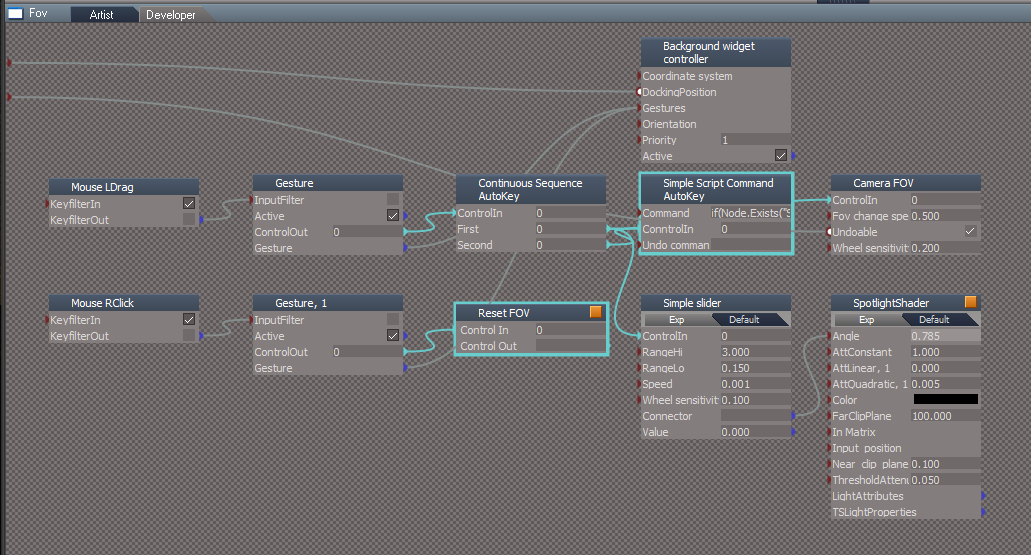
This works by exporting the light camera FOV instead of connecting it to the light FOV. Then adding a camera fov widget control to the spot light view widget.

Think I found a bug too. Earlier version could move the light around in other views by dragging it, but now can't move it.
Clinton Reese

http://clintons3d.com
User avatar
clintonman
Captain
Posts: 5659
Joined: 21 May 2009, 21:08
Type the number ten into the box: 0
Location: California

Re: Light View Widget and Camera for UU

Post by clintonman »

LightViewWidgetCamSeparate02.jpg

changes based off of the last uu release

On spotlight will now export the camera fov instead of connecting it to the spotlight angle
Added a fov widget to the Spotlight view widget - octagonal shape around the angle control
Fixed the missing move control, can now move and select if needed - small cone in the image above on the left
Removed the hide object and LightObject - there's nothing to hide I guess
Starts out with the view fov and the spot angle matching.

replace /Widgets/Select/Spot light view widget
replace /Widgets/WidgetScripts/CamLightExtras
Attachments
Spot light view widget202.RsObj
(251.64 KiB) Downloaded 143 times
CamLightExtras203.RsObj
(50.89 KiB) Downloaded 136 times
Clinton Reese

http://clintons3d.com
User avatar
trueBlue
Captain
Posts: 5548
Joined: 06 Jul 2009, 22:50
Type the number ten into the box: 10

Re: Light View Widget and Camera for UU

Post by trueBlue »

Started trueSpace this morning and the noticed the changes I made to the Widgets were not working as it was yesterday.
Not good, so scrapped those ideas!

Can you explain the new FOV, advantages and its use?
I do understand it is independent of the light's Angle but not sure why it is needed.

I do think this new FOV widget makes the whole widget huge.
How about something like this?
FOV and View Control together and are for the Camera
Light View widget.png
.
Have not previously looked at this widget in Ortho views.
The View Control moves in Perspective and Ortho views.
In ortho view the View Move, FOV, and the View Control move but not the View Angle and View Rotate
Ortho views.png
Ortho views.png (2.06 KiB) Viewed 2916 times
Looking at the View Widget, it looks like they made an Ortho and a separate Perspective widget.
They also locked all the shapes down with a ExpandInMatrix
User avatar
trueBlue
Captain
Posts: 5548
Joined: 06 Jul 2009, 22:50
Type the number ten into the box: 10

Re: Light View Widget and Camera for UU

Post by trueBlue »

clintonman wrote: 07 Apr 2023, 04:05 Footnote nothing to do with the changes: it should be noted that when using autokey that you don't get keys when using the view tools or the view widget like in modelspace. It involves 2 separate widgets to make it work, not usre if it's possible or worth the work require. More research is needed.
In UU9 the Camera tools widgets do have Auto Keyframing
The View Widget does not, because selecting the Eye Camera does not work in the Animation Editor
Because it uses a Euler Transform.
But you can use a Camera.
You just need to enable FOV in the Keying panel, to Auto Keyframe using the Camera FOV tool widget
Camera Move and Rotate also work.
User avatar
clintonman
Captain
Posts: 5659
Joined: 21 May 2009, 21:08
Type the number ten into the box: 0
Location: California

Re: Light View Widget and Camera for UU

Post by clintonman »

trueBlue wrote: 07 Apr 2023, 18:10 Started trueSpace this morning and the noticed the changes I made to the Widgets were not working as it was yesterday.
Not good, so scrapped those ideas!

Can you explain the new FOV, advantages and its use?
I do understand it is independent of the light's Angle but not sure why it is needed.
...
I guess it's just a convenience thing now. Your last set of widgets lead me to believe that you did not want a light view that matched the angle of the light.

trueBlue wrote: 07 Apr 2023, 18:10 ...
How about something like this?
FOV and View Control together and are for the Camera
...
I don't know what that sentence means, but in the image it's odd that the fov control is around the closing control.
Clinton Reese

http://clintons3d.com
User avatar
trueBlue
Captain
Posts: 5548
Joined: 06 Jul 2009, 22:50
Type the number ten into the box: 10

Re: Light View Widget and Camera for UU

Post by trueBlue »

I will be honest; I am not sure if this is correct.
This picture is Spotlight1:
Angel = 2.000
Camera = 0.785 'Default'
Camera FOV is not connected to Spotlight1's Angle.
Without FOV.png
.
This second picture is Spotlight1:
Angel = 2.000
Camera = 2.000
Camera FOV is connected to Spotlight1's Angle.
With FOV.png
.
To me, the first picture looks correct, but again I am not sure.
The second picture looks distorted!
Looking at the inner components of the Spotlights makes me believe that there is a difference between the Cameras and Spotlight's Views
Spotlight1 is 20.5m from World 000.png
Scene attached:
Attachments
Camera1 and Spotlight!.RsScn
(659.56 KiB) Downloaded 129 times
User avatar
clintonman
Captain
Posts: 5659
Joined: 21 May 2009, 21:08
Type the number ten into the box: 0
Location: California

Re: Light View Widget and Camera for UU

Post by clintonman »

LightViewZoomedIn.jpg
LightViewMatchAngle.jpg

You're confirming what I said before. You don't want the view FOV and the light Angle to match. The first is zoomed in like your preference from above, the second is how it starts out. You don't like the wide distorted view when the angle is large. There is no such thing as a wide and undistorted view. If it's wide it will be distorted. You prefer to zoom in to avoid the wide angle distortion even if it doesn't match the angle of the light cone.

This is the reason 2 controls are needed. One for FOV and one for Angle. When I look through the light I want to see what the light sees. You want to see in the direction of the light in an undistorted view. Can't have a wide, full angle view without distortion.

Don't see any difference in camera and light. Entered light view with narrow angle, medium and large angles and it looks like it's matching to me.
Clinton Reese

http://clintons3d.com
User avatar
clintonman
Captain
Posts: 5659
Joined: 21 May 2009, 21:08
Type the number ten into the box: 0
Location: California

Re: Light View Widget and Camera for UU

Post by clintonman »

Forgot to mention, you can't measure the light and camera positions with the dimension tool. You would be measuring the visual representation, the geometry, of the cam and light, not from the actual mathematical centers.
Clinton Reese

http://clintons3d.com
User avatar
trueBlue
Captain
Posts: 5548
Joined: 06 Jul 2009, 22:50
Type the number ten into the box: 10

Re: Light View Widget and Camera for UU

Post by trueBlue »

Okay, I go with what you know.
Actually, I think I confirmed what you said in Model.

Your new View Light widget...

FOV and View Control are for the Camera.
FOV is for the Camera.

View Control is also for the Camera.
LClick - Cycles the Camera views.
RClick - Removes the Camera.

For me, it makes sense that they are separate from the Light Controls.
Light View widget.png
Light View widget.png (99.08 KiB) Viewed 2809 times
.
Attachments
Spot light view widgetcb1e.RsObj
(237.79 KiB) Downloaded 114 times
User avatar
clintonman
Captain
Posts: 5659
Joined: 21 May 2009, 21:08
Type the number ten into the box: 0
Location: California

Re: Light View Widget and Camera for UU

Post by clintonman »

trueBlue wrote: 07 Apr 2023, 23:26 Okay, I go with what you know.
Actually, I think I confirmed what you said in Model.

Your new View Light widget...

FOV and View Control are for the Camera.
FOV is for the Camera.

View Control is also for the Camera.
LClick - Cycles the Camera views.
RClick - Removes the Camera.

Form me, it makes sense that they are separate from the Light Controls.
Light View widget.png
.
"Form me, it makes sense that they are separate from the Light Controls."
Question who are they
Clinton Reese

http://clintons3d.com
User avatar
trueBlue
Captain
Posts: 5548
Joined: 06 Jul 2009, 22:50
Type the number ten into the box: 10

Re: Light View Widget and Camera for UU

Post by trueBlue »

clintonman wrote: 08 Apr 2023, 00:08
trueBlue wrote: 07 Apr 2023, 23:26 Okay, I go with what you know.
Actually, I think I confirmed what you said in Model.

Your new View Light widget...

FOV and View Control are for the Camera.
FOV is for the Camera.

View Control is also for the Camera.
LClick - Cycles the Camera views.
RClick - Removes the Camera.

Form me, it makes sense that they are separate from the Light Controls.
Light View widget.png
.
"Form me, it makes sense that they are separate from the Light Controls."
Question who are they
Geeeezus, help me!
Corrected the typo
User avatar
clintonman
Captain
Posts: 5659
Joined: 21 May 2009, 21:08
Type the number ten into the box: 0
Location: California

Re: Light View Widget and Camera for UU

Post by clintonman »

Another question what is "View Control"

Also cycle isn't working, tried LClick on everything and got nothing.

Edit:
OK looked inside the nodes and see that you call ViewControl the part of the widget that controls the light angle. That is a very confusing name.
Once again can't move the light from other views by dragging on it.

Edit: Ok finally able to figure out what's what. Wasn't expecting the close control to suddenly have all the extra functionality.
Clinton Reese

http://clintons3d.com
User avatar
trueBlue
Captain
Posts: 5548
Joined: 06 Jul 2009, 22:50
Type the number ten into the box: 10

Re: Light View Widget and Camera for UU

Post by trueBlue »

clintonman wrote: 08 Apr 2023, 00:15 Another question what is "View Control"

Also cycle isn't working, tried LClick on everything and got nothing.
ViewControl
ViewControl.png
ViewControl.png (26.99 KiB) Viewed 2805 times
.
LClick the ViewControl
Maybe you need to disconnect connect a Gesture to get it work.
User avatar
trueBlue
Captain
Posts: 5548
Joined: 06 Jul 2009, 22:50
Type the number ten into the box: 10

Re: Light View Widget and Camera for UU

Post by trueBlue »

Once again can't move the light from other views by dragging on it.
Can you give me an example?
Maybe the light does not have a Camera
Works here
User avatar
clintonman
Captain
Posts: 5659
Joined: 21 May 2009, 21:08
Type the number ten into the box: 0
Location: California

Re: Light View Widget and Camera for UU

Post by clintonman »

LightViewNotMove.jpg
Light view on the right
Light in scene on the left. used to be able to drag this and move the light around.
Clinton Reese

http://clintons3d.com
User avatar
trueBlue
Captain
Posts: 5548
Joined: 06 Jul 2009, 22:50
Type the number ten into the box: 10

Re: Light View Widget and Camera for UU

Post by trueBlue »

Oh, I see, you had a Move node.
SceneLight.png
.
Upper left light
User avatar
trueBlue
Captain
Posts: 5548
Joined: 06 Jul 2009, 22:50
Type the number ten into the box: 10

Re: Light View Widget and Camera for UU

Post by trueBlue »

It can be added back in, but you can still do the same thing using the Object Move tool widget.
Object Move.png
Object Move.png (7.39 KiB) Viewed 2590 times
.
Additional Move object.png
User avatar
trueBlue
Captain
Posts: 5548
Joined: 06 Jul 2009, 22:50
Type the number ten into the box: 10

Re: Light View Widget and Camera for UU

Post by trueBlue »

What the static Move object lacks is Color and Angle.
Static Object lacks the Light's Color.png
User avatar
trueBlue
Captain
Posts: 5548
Joined: 06 Jul 2009, 22:50
Type the number ten into the box: 10

Re: Light View Widget and Camera for UU

Post by trueBlue »

How is this?
In this example, I used a very small Angle 0.150
MoveObject widget.png
.
Another example, Angle 2.000
MoveObject widget2.png
MoveObject widget2.png (12.39 KiB) Viewed 2598 times
User avatar
trueBlue
Captain
Posts: 5548
Joined: 06 Jul 2009, 22:50
Type the number ten into the box: 10

Re: Light View Widget and Camera for UU

Post by trueBlue »

Another example with a Green color and changed to a Yellow Highlight.
MoveObject widget.png
User avatar
clintonman
Captain
Posts: 5659
Joined: 21 May 2009, 21:08
Type the number ten into the box: 0
Location: California

Re: Light View Widget and Camera for UU

Post by clintonman »

LightView4Clinton.jpg

This is the LightViewWidget 4 Clinton, which means it was custom made for myself. I don't expect any of these changes to be used in the UU. See the UU fix for cycling lights at the bottom of this post.

Changes:
Moved light cycle function to the ViewMove control
Removed Cancel
Changed "Reset Angle" to "Angle to FOV", match light angle to fov
Changed "Reset FOV" to "FOV to Angle", match fov to the light angle
Increased transparency for all surfaces
Move FOV control concentric with the angle control
Moved close control so not touching the new FOV control, made it red again
Reestablished the Move control, sized to the Spotlight mesh, connected the angle value and reintroduced the object hider, can now move by dragging
Fixed cycle lights code - was adding cameras to all the lights, also moved into the function set
Repositioned whole widget

Light Cycle code still needs some work, it only works with non-grouped spot lights.


For the UU you will want to add the fix for the Cycle Lights. The previous cycle lights was adding a camera to all the scene spotlights.
The changes are in 2 places:

/Widgets/WidgetScripts/CamLightExtras/ViewFrom Function Set
contains the fix for the Cycle Lights so replace your CamLightExtras

Copy
/Widgets/Select/Spot light view widget/ViewMove/Cycle SpotLight
replacing
/Widgets/Select/Spot light view widget/ViewControl/Cycle Lights

so that the new code is used when cycling the lights
Attachments
Spot light view widget311.RsObj
(260.35 KiB) Downloaded 152 times
CamLightExtras302.RsObj
(54.73 KiB) Downloaded 142 times
Clinton Reese

http://clintons3d.com
User avatar
trueBlue
Captain
Posts: 5548
Joined: 06 Jul 2009, 22:50
Type the number ten into the box: 10

Re: Light View Widget and Camera for UU

Post by trueBlue »

What do you think about adding a FOV attribute to the Spot and Projector lights?
Of course, your code would have to be modified to check if it exists or not.
Removed
User avatar
trueBlue
Captain
Posts: 5548
Joined: 06 Jul 2009, 22:50
Type the number ten into the box: 10

Re: Light View Widget and Camera for UU

Post by trueBlue »

I think I am going to add this very simple version to the UU9
New Lightwieght version.png
.
Removed the Red Dot and CameraFOV controls.
Added the 4 Gestures from the Red Dot to the View Move
.
UU9 Light View widget.png
+ Adds a camera to all Spot & Projector lights in the current scene


CamLightExtras
Removed the seperate Camera FOV code.
Connects the Camera FOV to light's Angle.
Removed due to update
User avatar
clintonman
Captain
Posts: 5659
Joined: 21 May 2009, 21:08
Type the number ten into the box: 0
Location: California

Re: Light View Widget and Camera for UU

Post by clintonman »

trueBlue wrote: 09 Apr 2023, 19:48 ...
+ Adds a camera to all Spot & Projector lights in the current scene
...
My test shows it adds the camera one by one as you cycle the lights without removing the previous camera. It's not adding it to all the lights in the scene with one click.

Everything works as described except noted above and the normal spotlight doesn't have LClick,RClick open light view.
Clinton Reese

http://clintons3d.com
User avatar
trueBlue
Captain
Posts: 5548
Joined: 06 Jul 2009, 22:50
Type the number ten into the box: 10

Re: Light View Widget and Camera for UU

Post by trueBlue »

clintonman wrote: 09 Apr 2023, 23:58
trueBlue wrote: 09 Apr 2023, 19:48 ...
+ Adds a camera to all Spot & Projector lights in the current scene
...
My test shows it adds the camera one by one as you cycle the lights without removing the previous camera. It's not adding it to all the lights in the scene with one click.

Everything works as described except noted above and the normal spotlight doesn't have LClick,RClick open light view.
It does not add a Camera to all of the Spot and of Projector lights in the scene with one click.
You have to Shift LClick cycle through each light.
It does not duplicate the Camera, there can only be one!
Camera is not duplicated.png
.
The new Spotlight widget with the LClick and RClick gestures has not been released yet.
User avatar
trueBlue
Captain
Posts: 5548
Joined: 06 Jul 2009, 22:50
Type the number ten into the box: 10

Re: Light View Widget and Camera for UU

Post by trueBlue »

@Clinton
Here is an example using Shift LClick - Cycle Light Views + that adds a Camera to more than one light.
You are able to view 3 Spotlights at the same time.
QuadViewing 3 Spotlights.png
.
It is easy removing all of the Cameras by using your LClick- Cycle Light Views and then RClick on the last one
User avatar
clintonman
Captain
Posts: 5659
Joined: 21 May 2009, 21:08
Type the number ten into the box: 0
Location: California

Re: Light View Widget and Camera for UU

Post by clintonman »

LightViewObjectSubObjectHighlighting.jpg
Testing and modifying the UU.
Just noticed that object/subobject highlighting will show in the light view when the angle is large.

The attached CamLightExtras modifies the latest UU release so that it can find lights inside of groups and changes the cycle so if the active spotlight happens to be the first spotlight in the scene you don't have to press twice to cycle past it the first time.
Attachments
CamLightExtras402.RsObj
(55.21 KiB) Downloaded 104 times
Clinton Reese

http://clintons3d.com
User avatar
trueBlue
Captain
Posts: 5548
Joined: 06 Jul 2009, 22:50
Type the number ten into the box: 10

Re: Light View Widget and Camera for UU

Post by trueBlue »

clintonman wrote: 11 Apr 2023, 06:08 LightViewObjectSubObjectHighlighting.jpg

Testing and modifying the UU.
Just noticed that object/subobject highlighting will show in the light view when the angle is large.

The attached CamLightExtras modifies the latest UU release so that it can find lights inside of groups and changes the cycle so if the active spotlight happens to be the first spotlight in the scene you don't have to press twice to cycle past it the first time.
Yay, grouped lights! :bananathumb:

Added a solution for the Object/Subobject Highlighting that shows in the light view when the Angle is large.
LightMove
Increased the Size
Add:
Ctrl LClick - Connects the included Hide object widget
Shift move mouse - Disconnects the included Hide object widget
Note: Need to make this into a toggle with one gesture
It is possible to make this work in the Background
User avatar
trueBlue
Captain
Posts: 5548
Joined: 06 Jul 2009, 22:50
Type the number ten into the box: 10

Re: Light View Widget and Camera for UU

Post by trueBlue »

Ended up making this into a Background widget with one gesture.
LightMove
Increased the Size

Add:
Hide
Toggle
Ctrl LClick - In a 3D Window, Connects | Disconnects the included Hide object widget
User avatar
clintonman
Captain
Posts: 5659
Joined: 21 May 2009, 21:08
Type the number ten into the box: 0
Location: California

Re: Light View Widget and Camera for UU

Post by clintonman »

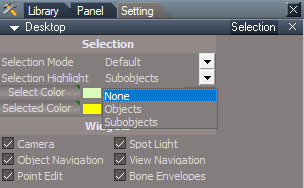
SelectionHighlightNone.jpg
SelectionHighlightNone.jpg (36.9 KiB) Viewed 3690 times

I don't see it as a problem to be fixed. Selection highlighting can be set to "None".
Clinton Reese

http://clintons3d.com
User avatar
clintonman
Captain
Posts: 5659
Joined: 21 May 2009, 21:08
Type the number ten into the box: 0
Location: California

Re: Light View Widget and Camera for UU

Post by clintonman »

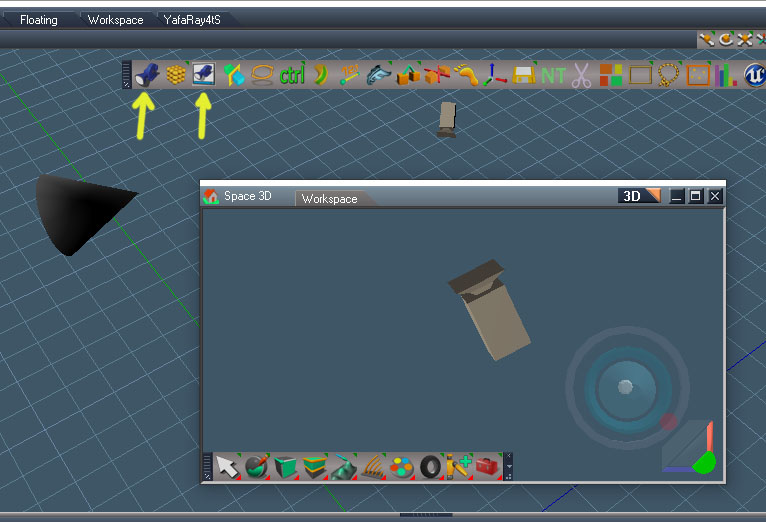
ObjectView01.jpg

Final experiments for object view started.
Image shows an Object view. The view is from the cone on the left facing in the direction of the camera.
2 toolbar buttons for setting up the view, current view or new view.
The generic widget shown is used for infinite, sky and directional lights and 3d objects. For the directional light the outer ring controls the view angle and the inner ring controls the size of the light beam.
Clinton Reese

http://clintons3d.com
User avatar
trueBlue
Captain
Posts: 5548
Joined: 06 Jul 2009, 22:50
Type the number ten into the box: 10

Re: Light View Widget and Camera for UU

Post by trueBlue »

clintonman wrote: 13 Apr 2023, 04:21 ObjectView01.jpg


Final experiments for object view started.
Image shows an Object view. The view is from the cone on the left facing in the direction of the camera.
2 toolbar buttons for setting up the view, current view or new view.
The generic widget shown is used for infinite, sky and directional lights and 3d objects. For the directional light the outer ring controls the view angle and the inner ring controls the size of the light beam.
Nice! :bananathumb:
Looks like you have created a Model's View Object for Workspace with additional controls! :worship:
User avatar
clintonman
Captain
Posts: 5659
Joined: 21 May 2009, 21:08
Type the number ten into the box: 0
Location: California

Re: Light View Widget and Camera for UU

Post by clintonman »

Requested change for the uu cycle controls. Not really sure it does what you want. You can try and see.

Replace the ViewFrom Function Set and change the command in the widget:

"/Widgets/Select/Spot light view widget/ViewMove/Cycle Light Views/Cycle Lights Plus"

new command:

cmd='Node.AccessFnSet("/Widgets/WidgetScripts/CamLightExtras/ViewFrom Function Set").CycleSpotLightsPlus();';RsApp.RunScriptBuffer(cmd);
Attachments
ViewFrom Function Set.RsObj
(15.94 KiB) Downloaded 139 times
Clinton Reese

http://clintons3d.com

Return to “Workspace Side”