How to use V-Ray on tS76 STD ?
-
Emmanuel
- Chief Warrant Officer
- Posts: 670
- Joined: 14 Jun 2009, 06:47
How to use V-Ray on tS76 STD ?
I've made a fresh new install of tS7.61 Standalone version (no unofficial update was applied yet), and installed VRay 1.54.
VRay works : I can render a picture. But it seems I can't enter VRay's material editor.
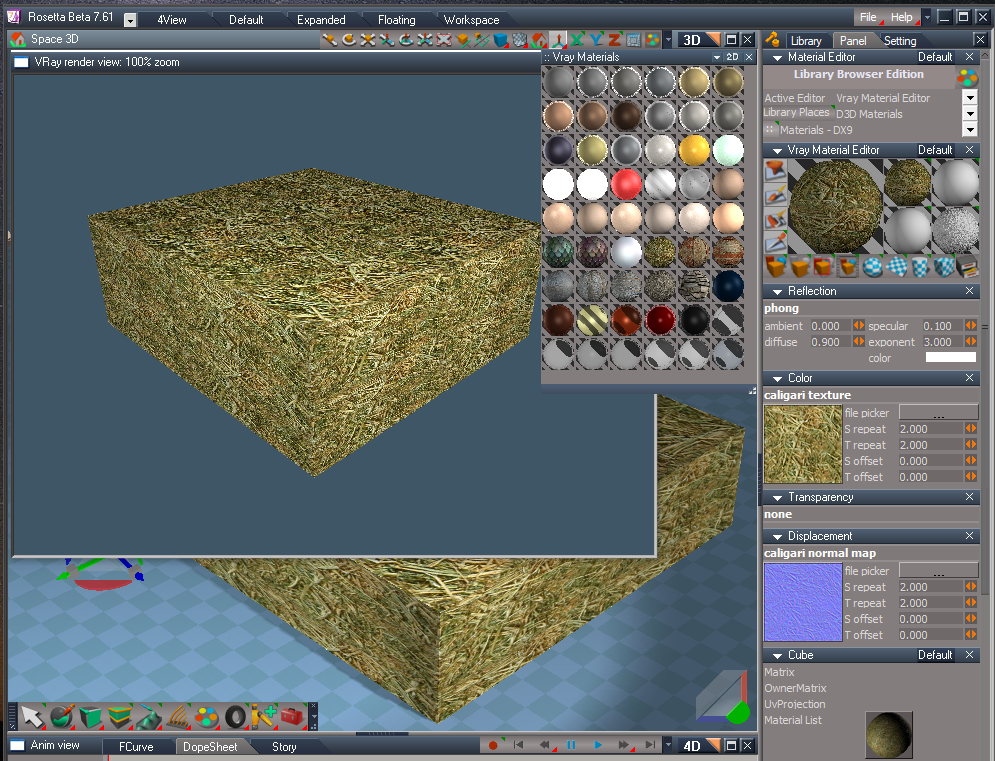
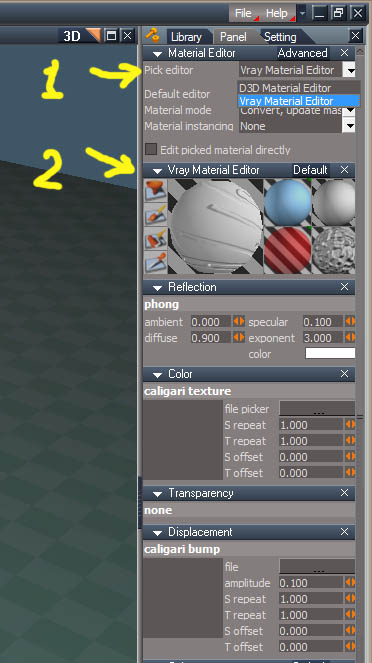
You may know that Workspace has 2 Material Editors : one is for D3D and one is for VRay. Their panels are different. In tS7.6 and 7.61 you can switch between the two modes in the Material Editor options panel. See below a screen capture from tS7.6
But in tS7.61 Standalone, I get a crash if I try to select VRay...
TrueSpace also crashes if I try to inspect the material of an object painted with a VRay shader.
If I appy the Unofficial update 3, same problem.
Did anyone tried this ?
Is there a workaround to make VRay's material editor to work in tS Standalone version ?
VRay works : I can render a picture. But it seems I can't enter VRay's material editor.
You may know that Workspace has 2 Material Editors : one is for D3D and one is for VRay. Their panels are different. In tS7.6 and 7.61 you can switch between the two modes in the Material Editor options panel. See below a screen capture from tS7.6
But in tS7.61 Standalone, I get a crash if I try to select VRay...
TrueSpace also crashes if I try to inspect the material of an object painted with a VRay shader.
If I appy the Unofficial update 3, same problem.
Did anyone tried this ?
Is there a workaround to make VRay's material editor to work in tS Standalone version ?
-
trueBlue
- Captain
- Posts: 5548
- Joined: 06 Jul 2009, 22:50
- Type the number ten into the box: 10
Re: How to use V-Ray on tS76 STD ?
Its been awhile but have noticed issues with Vray when installing it. As I remember there was difficulties with the Combo Control updating and possibly duplicate Vray nodes. IE Vray and Vray, 1 and or duplicate Vray Material Editor nodes?
Search in the Link Editor for Vray and delete duplicate nodes.
Reset the Default Context and see if that helps.
Instructions for the unofficial update are as follows:
Vray users: Install/Load Vray in the Package Manager and REBOOT trueSpace.
Select the "Update Library Places" button in the D3D Material Editor. Reselect the Library Place and a Library item.
Here is a video for the Live Vray Material Editor version showing the process of updating the Library Places near the end of the video:
download/file.php?id=9110"
Search in the Link Editor for Vray and delete duplicate nodes.
Reset the Default Context and see if that helps.
Instructions for the unofficial update are as follows:
Vray users: Install/Load Vray in the Package Manager and REBOOT trueSpace.
Select the "Update Library Places" button in the D3D Material Editor. Reselect the Library Place and a Library item.
Here is a video for the Live Vray Material Editor version showing the process of updating the Library Places near the end of the video:
download/file.php?id=9110"
-
stan
- Master Chief Petty Officer
- Posts: 584
- Joined: 21 May 2009, 17:20
Re: How to use V-Ray on tS76 STD ?
I just tried to install the standard and v-ray. I got the same crash. It seems to be working for a render, but not loading the editor.
-
stan
- Master Chief Petty Officer
- Posts: 584
- Joined: 21 May 2009, 17:20
Re: How to use V-Ray on tS76 STD ?
Ok..to make it work you must copy LwME.dll from 7.61b into your std directory. Then edit your init.js with this line:RsApp.ImportPackage('LwME.dll');
I noticed that the shaders had the red around them showing they didn't work.
I uploaded the files in 7zip.
edit: If it has any problem it's because I forgot to mention moving the LwME folder in scripts too.
I noticed that the shaders had the red around them showing they didn't work.
I uploaded the files in 7zip.
edit: If it has any problem it's because I forgot to mention moving the LwME folder in scripts too.
-
Emmanuel
- Chief Warrant Officer
- Posts: 670
- Joined: 14 Jun 2009, 06:47
Re: How to use V-Ray on tS76 STD ?
Thank you Stan 
It works : no more crash !
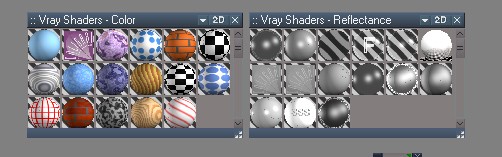
We must add the VRay materials in the library also : copy/paste from tS7.61 to tS7.61 STD's 'Rs Maine Libraries' all these folders :
Vray Materials
Vray Shaders - Color
Vray Shaders - Displacement
Vray Shaders - Reflectance
Vray Shaders - Transparency
I still get an error message when tS starts though. It says :
Error loading LW shader variables definition -
As you noticed, it seems there is some remaining of LightWorks in the code
Also, in the rendering options (in PhotoRender panel), we still have Virtualight.tsr and Lightworks.tsr in the Render Engine selector.
tS SDT has a great potential to become a fully functionnal software if we could sort out these little issues...
It works : no more crash !
We must add the VRay materials in the library also : copy/paste from tS7.61 to tS7.61 STD's 'Rs Maine Libraries' all these folders :
Vray Materials
Vray Shaders - Color
Vray Shaders - Displacement
Vray Shaders - Reflectance
Vray Shaders - Transparency
I still get an error message when tS starts though. It says :
Error loading LW shader variables definition -
As you noticed, it seems there is some remaining of LightWorks in the code
Also, in the rendering options (in PhotoRender panel), we still have Virtualight.tsr and Lightworks.tsr in the Render Engine selector.
tS SDT has a great potential to become a fully functionnal software if we could sort out these little issues...
-
stan
- Master Chief Petty Officer
- Posts: 584
- Joined: 21 May 2009, 17:20
Re: How to use V-Ray on tS76 STD ?
yes I forgot to mention that too.. the folders get created but not in the library.
If it has any problem it's because I forgot to mention moving the LwME folder in scripts too
-
trueBlue
- Captain
- Posts: 5548
- Joined: 06 Jul 2009, 22:50
- Type the number ten into the box: 10
Re: How to use V-Ray on tS76 STD ?
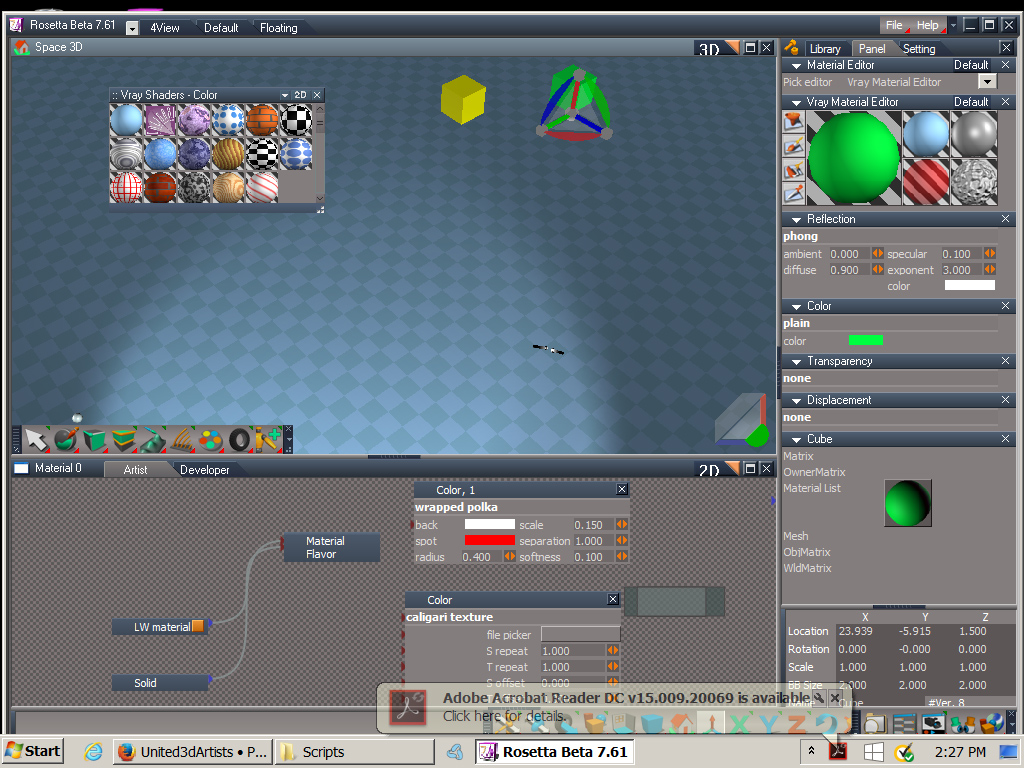
I got Vray including the Vray Material Editor working in Rosetta if anybody is interested.
The only shaders that are not working are the procedural materials.
Still working on how to reset the shaders without throwing an error but I have a work around if I can not figure out what's missing.
The only shaders that are not working are the procedural materials.
Still working on how to reset the shaders without throwing an error but I have a work around if I can not figure out what's missing.
-
stan
- Master Chief Petty Officer
- Posts: 584
- Joined: 21 May 2009, 17:20
Re: How to use V-Ray on tS76 STD ?
I guess you are saying you got it working in your unofficial update. It already worked, I suppose the procedural materials where coded in the exe or the link to them is broken, not sure. There is no error using the original material editor when resetting materials as it works fine on my win 7 machine..
-
trueBlue
- Captain
- Posts: 5548
- Joined: 06 Jul 2009, 22:50
- Type the number ten into the box: 10
Re: How to use V-Ray on tS76 STD ?
Curious? When you switch from the Vray Material Editor to the D3D Material Editor and back to the Vray Material Editor, does Vray still render as expected? For me on Win10, I have to reload the Color and Phong shaders to get it to work correctly again. The original Vray Material Editor does not have code to reset the individual Vray Shaders.stan wrote: 11 May 2018, 12:07 There is no error using the original material editor when resetting materials as it works fine on my win 7 machine..
-
stan
- Master Chief Petty Officer
- Posts: 584
- Joined: 21 May 2009, 17:20
Re: How to use V-Ray on tS76 STD ?
if you look in the preobjects I have two vray_me nodes, one with old next to it. Made in 6/10/2008. I don't think I did that as I only got my win 7 machine a couple years ago. . One has reset, one the old one doesn't. but maybe I did bring it from my old machine.. don't recall. you can just change out the clickable bitmap for bitmap button control. I remember creating one for Steinie years ago..
I did find that using materials from the library it changed my material setup from being connected to a LWmaterial node to being connected to a material editor node.. I was able to get the LWmaterial node back by deleting it in the active material node. Don't know if it causes any problems.
So far can't help on the procedural issue..it's a mystery as to where the issue lies.
I did find that using materials from the library it changed my material setup from being connected to a LWmaterial node to being connected to a material editor node.. I was able to get the LWmaterial node back by deleting it in the active material node. Don't know if it causes any problems.
So far can't help on the procedural issue..it's a mystery as to where the issue lies.
-
trueBlue
- Captain
- Posts: 5548
- Joined: 06 Jul 2009, 22:50
- Type the number ten into the box: 10
Re: How to use V-Ray on tS76 STD ?
Is the code for your Vray Material Editor to reset color using this command?
Vray.ResetMaterialEditorShader('Color');
This works in tS761 but causes an error in tS761Std. Well in Win10 anyway. Not sure in other operating systems.
Would be nice if you could confirm this!
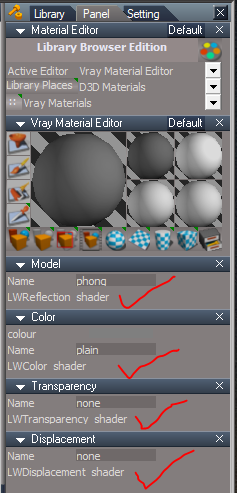
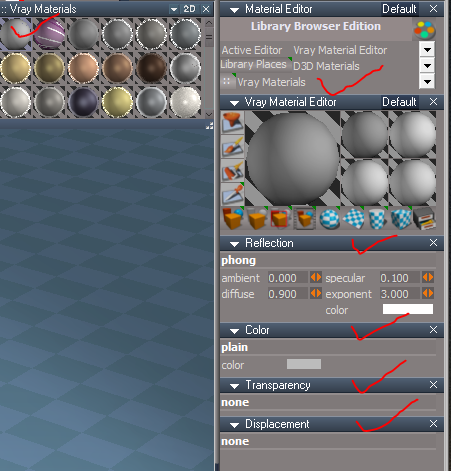
Here is what I have observed when you switch material editors and or reset the default context. and here it is after I apply material I created that has all four shaders set
Vray.ResetMaterialEditorShader('Color');
This works in tS761 but causes an error in tS761Std. Well in Win10 anyway. Not sure in other operating systems.
Would be nice if you could confirm this!
Here is what I have observed when you switch material editors and or reset the default context. and here it is after I apply material I created that has all four shaders set
-
stan
- Master Chief Petty Officer
- Posts: 584
- Joined: 21 May 2009, 17:20
Re: How to use V-Ray on tS76 STD ?
this is the code which works in win 7 64bit:
Vray.ResetMaterialEditorShader('Color');
I don't know anything about win 10 but maybe it prefers you use "
Vray.ResetMaterialEditorShader("Color");
I suppose then none of these will work on 10
Vray.ResetMaterialEditorShader('Reflectance');
Vray.ResetMaterialEditorShader('Transparency');
Vray.ResetMaterialEditorShader('Displacement');
these are all copied directly from the working node.
Vray.ResetMaterialEditorShader('Color');
I don't know anything about win 10 but maybe it prefers you use "
Vray.ResetMaterialEditorShader("Color");
I suppose then none of these will work on 10
Vray.ResetMaterialEditorShader('Reflectance');
Vray.ResetMaterialEditorShader('Transparency');
Vray.ResetMaterialEditorShader('Displacement');
these are all copied directly from the working node.
-
trueBlue
- Captain
- Posts: 5548
- Joined: 06 Jul 2009, 22:50
- Type the number ten into the box: 10
Re: How to use V-Ray on tS76 STD ?
Thanks stan,
Very odd that it works in Win7 and not Win10 for tS761Std.
Works in tS761 with Win10. Crazy!
I'm I missing something?
LwME.dll to C:\trueSpace761Std\
Vray.rsobj to C:\trueSpace761Std\Scripts\preobjects\
LwME folder to C:\trueSpace761Std\Scripts\
Vray Materials to C:\trueSpace761Std\Rs Main Libraries\
Textures folder to C:\trueSpace761Std\
Add -> RsApp.ImportPackage('LwME.dll'); to init.js
Very odd that it works in Win7 and not Win10 for tS761Std.
Works in tS761 with Win10. Crazy!
I'm I missing something?
LwME.dll to C:\trueSpace761Std\
Vray.rsobj to C:\trueSpace761Std\Scripts\preobjects\
LwME folder to C:\trueSpace761Std\Scripts\
Vray Materials to C:\trueSpace761Std\Rs Main Libraries\
Textures folder to C:\trueSpace761Std\
Add -> RsApp.ImportPackage('LwME.dll'); to init.js
-
stan
- Master Chief Petty Officer
- Posts: 584
- Joined: 21 May 2009, 17:20
Re: How to use V-Ray on tS76 STD ?
well, you put vray materials in the Rs Main Libraries but did you put the Vray Shaders - Color
- Displacement
- Reflectance
-Transparency
in also.? or did you just not list them with material?
That's the only thing I see.
- Displacement
- Reflectance
-Transparency
in also.? or did you just not list them with material?
That's the only thing I see.
-
trueBlue
- Captain
- Posts: 5548
- Joined: 06 Jul 2009, 22:50
- Type the number ten into the box: 10
Re: How to use V-Ray on tS76 STD ?
Yes Vray Shaders too.
Thanks for your help!
Found a way to survive a Reset Default Context, by saving the MaterialEditor with the ActiveMaterial set.
Also found a solution to Reseting Shaders by catching the error.
And to reset the shaders if the above does not work by including a Vray Material for Color and Texture.
Thanks for your help!
Found a way to survive a Reset Default Context, by saving the MaterialEditor with the ActiveMaterial set.
Also found a solution to Reseting Shaders by catching the error.
Code: Select all
try
{
{
Vray.ResetMaterialEditorShader('Color');
}
}
catch (e)
{
}-
trueBlue
- Captain
- Posts: 5548
- Joined: 06 Jul 2009, 22:50
- Type the number ten into the box: 10
Re: How to use V-Ray on tS76 STD ?
Just noticed a bug in the Vray material editor and found a solution
When switching Material Editors the Vray Material Editor applies a Black material Add the following to each of the material slot's - Right click command or Load/Inspect a Vray Material
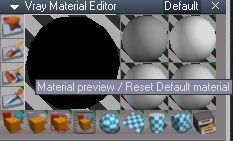
Vray for trueSpace 7.61 Standalone
Update uploaded 8/11/2020
viewt ... 259#p52259
When switching Material Editors the Vray Material Editor applies a Black material Add the following to each of the material slot's - Right click command or Load/Inspect a Vray Material
Code: Select all
//Material Preview
//Default.RsLWm included in the tS7.61B8StdVray Update - Required
D3DView.DropObject(System.GetMainDir() + '\\RS Main Libraries\\Vray Materials\\Default.RsLWm', '/Project/Windows Manager Space/Frame Window/Border Docking Place/Frame Window, 1/Split Docking Place/Frame Window, 1/Split Docking Place/Frame Window, 1/Split Docking Place/Frame Window, 2/Background', 0.000000, 0.000000, 0.000000);
//Color
D3DView.DropObject(System.GetMainDir() + '\\RS Main Libraries\\Vray Shaders - Color\\Plain Color.RsCSh', '/Project/Windows Manager Space/Frame Window/Border Docking Place/Frame Window, 1/Split Docking Place/Frame Window, 1/Split Docking Place/Frame Window, 1/Split Docking Place/Frame Window, 2/Background', 0.000000, 0.000000, 0.000000);
//Reflectance
//Reflection.RsCSh included in the tS7.61B8StdVray Update - Required
D3DView.DropObject(System.GetMainDir() + '\\RS Main Libraries\\Vray Shaders - Reflectance\\Reflection.RsCSh', '/Project/Windows Manager Space/Frame Window/Border Docking Place/Frame Window, 1/Split Docking Place/Frame Window, 1/Split Docking Place/Frame Window, 1/Split Docking Place/Frame Window, 2/Background', 0.000000, 0.000000, 0.000000);
//Transparency
D3DView.DropObject(System.GetMainDir() + '\\RS Main Libraries\\Vray Shaders - Transparency\\None Transparency.RsCSh', '/Project/Windows Manager Space/Frame Window/Border Docking Place/Frame Window, 1/Split Docking Place/Frame Window, 1/Split Docking Place/Frame Window, 1/Split Docking Place/Frame Window, 2/Background', 0.000000, 0.000000, 0.000000);
//Displacement
D3DView.DropObject(System.GetMainDir() + '\\RS Main Libraries\\Vray Shaders - Displacement\\None Displacement.RsCSh', '/Project/Windows Manager Space/Frame Window/Border Docking Place/Frame Window, 1/Split Docking Place/Frame Window, 1/Split Docking Place/Frame Window, 1/Split Docking Place/Frame Window, 2/Background', 0.000000, 0.000000, 0.000000);
//Refresh Material Editor
MeshModifiers.OpenMaterialEditor();
Update uploaded 8/11/2020
viewt ... 259#p52259
-
trueBlue
- Captain
- Posts: 5548
- Joined: 06 Jul 2009, 22:50
- Type the number ten into the box: 10
Re: How to use V-Ray on tS76 STD ?
I found the following information in a VRay.pdf
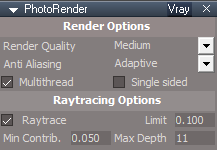
So, I exposed the Vray supported attributes The Background aspect is not shownRendering Options
Rendering Quality:
• Wireframe: Not supported under V-Ray.
• Hidden Line: Not supported under V-Ray
• Medium: This renders with textures taken directly from the Workspace, which gives fast
rendering with medium quality. Note that the Workspace textures can be down sampled
resulting in loss of details on textured surfaces.
• High: This renders with full size textures and gives the best possible quality, although there is
potentially longer start-up and rendering times as a result of the larger memory requirements
from the larger textures. Note that there is no difference between Medium or High settings in
scenes which have use no textures.
Render Method: This has no effect on rendering with V-Ray. It is suggested that this is left set to
RayCast to ensure equivalent results should you switch to another render engine.
Anti-Aliasing:
• Draft: Very fast rendering with the width and height of the image reduced in half. Suitable for
fast previews.
• None: No anti-aliasing. Fast, but jagged edges will appear in the image.
• 2X: Super-sampling with 2x2 kernel. Every pixel is computed as an average of 4 sample
points.
• 3X: Super-sampling with 3x3 kernel. Every pixel is computed as an average of 9 sample
points.
• 4X: Super-sampling with 2x2 kernel. Every pixel is computed as an average of 16 sample
points.
• Adaptive: Very high quality analytical anti-aliasing for superior image quality.
Adaptive is the suggested optimal anti-aliasing setting. Note that adding anti-aliasing will result in
longer render times, with 4X anti-aliasing being slowest of all. Adaptive should give better results that
2x anti-aliasing, and with faster render times. 3X and 4X anti-aliasing may give better results than
Adaptive (although Adaptive can often match those in quality), but with longer render times.
Triangulate: This has no effect on rendering with V-Ray.
Multithread: Enable or disable support for multiple processors or processors with HyperThreading
technology.
SingleSide: Enable or disable support for single-sided rendering. When single sided rendering is
selected (the box is checked) then normals are not corrected to face the illumination direction, which
results in slightly faster rendering but may reveal artifacts caused by back-facing surfaces. Double-sided rendering (when the box is unchecked) adjusts the normals to be always facing the illumination
direction, which removes the chance of artefacts in the render, but at the expense of a slightly longer
render time.
Raytracing Options:
• Enabled: Turn or off reflection and refraction in the scene.
• Max Depth: The level of recursion for tracing rays. A higher value will result in slower but
more accurate rendering of reflective and (especially) refractive surfaces.
• Min. Contrib: This parameter is for limiting the amount of reflections in the scene and is
directly related to the “reflection” value of a material. When that value is lower than the Min.
Contrib. setting, no reflections will be calculated for that object
• Limit: This value controls how much a ray has to contribute to the scene to be included in the
final rendering calculations. Increasing this value can reduce rendering time at the expense of
accuracy.
Background
• Color: A single color is used as the background. The color itself can be set by right clicking on
the icon in the Rendering Options Toolbar.
• Image: An image is used as the background (stretched to fit the screen). The image to use as
the background can be set by right clicking on the icon under the Rendering Options Toolbar.
• Clouds: This is not supported under V-Ray. Only the Background color from the Clouds
settings would be used, so the Color background option should be used instead.
• Graduated: This is not supported under V-Ray. Only the Top color from the Graduated
settings would be used, so the Color background option should be used instead.