Looks like a whole bunch of people have jumped on the Messiah deal lately. I did too. Unfortunately it doesn't have modeling. Been looking at Blender as an all in one also. My main interest is animation as a final product.
Can any of you who have any experience with both recent versions tell me which of the two creates better quality rigs/animations, and which creates better 'rendered' animations?
Messiah or Blender for animation?
-
Dragneye

- Lieutenant
- Posts: 906
- Joined: 02 Sep 2009, 22:09
Messiah or Blender for animation?
-
richlevy

- Senior Chief Petty Officer
- Posts: 162
- Joined: 17 Aug 2009, 20:08
Re: Messiah or Blender for animation?
I only really use messiah, so take this for all it may be worth to you.
messiah has an autorig that gives a pretty good animating rig to use, some say as good as most commercial rigs. I have no way to verify this. Autorig works with some of the BVH library's out there, on setuptab, 3DFrog just left a script that is dedicated to converting the Truebones BVH motions to be compatible with AutoRig.
As for rendering, please take a look over at setuptab and look at some of the featured projects, those are just examples of what the internal renderer is capable of... YMMV
This is probably not what you were looking for, but it does get you 1/2 way there
HTH
Rich
messiah has an autorig that gives a pretty good animating rig to use, some say as good as most commercial rigs. I have no way to verify this. Autorig works with some of the BVH library's out there, on setuptab, 3DFrog just left a script that is dedicated to converting the Truebones BVH motions to be compatible with AutoRig.
As for rendering, please take a look over at setuptab and look at some of the featured projects, those are just examples of what the internal renderer is capable of... YMMV
This is probably not what you were looking for, but it does get you 1/2 way there
HTH
Rich
My Flickr site, here you can see some of the photography I do:
http://www.flickr.com/photos/rich-l/" onclick="window.open(this.href);return false;
http://www.flickr.com/photos/rich-l/" onclick="window.open(this.href);return false;
-
Benji
- Senior Chief Petty Officer
- Posts: 280
- Joined: 22 May 2009, 01:23
Re: Messiah or Blender for animation?
Yes, I agree that it's autorig for the win here. The renderer is also sweet, too. The down side I guess is the lack of a modeler, as you mentioned, and you have to be very careful with the kinds of meshes you import. Messiah doesn't like n-gons.Looks like a whole bunch of people have jumped on the Messiah deal lately. I did too. Unfortunately it doesn't have modeling. Been looking at Blender as an all in one also. My main interest is animation as a final product.
Can any of you who have any experience with both recent versions tell me which of the two creates better quality rigs/animations, and which creates better 'rendered' animations?
I guess with Blender you're getting a large community, and if you buy the respective animations they've produced you get access to all of the animation materials they made for them including rigs and models afaik.
Basically, they're both good options for character animation, however my preference is definitely on the messiah side. I'm essentially addicted to the nodal material editor, and the lighting and rendering setup - they're everything I wished for in truespace, and more.
-
Tiles

- Master Chief Petty Officer
- Posts: 401
- Joined: 27 May 2009, 08:34
Re: Messiah or Blender for animation?
Blender is also not capable to work with N-GonsMessiah doesn't like n-gons
Free Gamegraphics, Freeware Games http://reinerstilesets.de
-
Dragneye
- Lieutenant
- Posts: 906
- Joined: 02 Sep 2009, 22:09
Re: Messiah or Blender for animation?
Thanx guys.
Yes, all these insights, large or specific, are important. The ngon issue was a question too, so thanx. Maybe a more 'pre-question' should have been, how stable these are for animating?
Yes, all these insights, large or specific, are important. The ngon issue was a question too, so thanx. Maybe a more 'pre-question' should have been, how stable these are for animating?
-
jamesmc
- Captain
- Posts: 1776
- Joined: 08 Jul 2009, 15:35
Re: Messiah or Blender for animation?
I really don't know either program.
I did notice that Blender has a node system for compositing animations. The guy that made it was some kind of blender guru. Way beyond my understanding.
I did notice that Blender has a node system for compositing animations. The guy that made it was some kind of blender guru. Way beyond my understanding.
Walk by faith, not by sight.
-
Benji
- Senior Chief Petty Officer
- Posts: 280
- Joined: 22 May 2009, 01:23
Re: Messiah or Blender for animation?
From what I've read they're as stable as any other software. All apps have their issues, though. Messiah is rare in that it was made from the ground up for character animation, and so it has many workflow enhancers dedicated to making the job easier.
-
richlevy
- Senior Chief Petty Officer
- Posts: 162
- Joined: 17 Aug 2009, 20:08
Re: Messiah or Blender for animation?
The downside to messiah is the ngon tri thing, if you are in the practice of creating clean meshs, you will have no problems. Messiah still works with either tris or ngons, but it may cause rendering issues, and you can not use messiahs version of subd on your scenes... that may or may not be a problem for you. All programs take some getting used to, messiah is no different, there are some quirky things that do not really make sense, but after you figure them out they do not detract from its usefulness.
Autorig is good, the renderer appears to be top notch... slim pickings for particles and dynamics, you can do them, but they are a tad bit limited if you are familiar with other highend packages.
They are talking about a new FBX import in the patch, so that will help with moving geometry and animations around. Compositing in messiah is possible, but very limited, better to use other packages like AE, or Vegas.
Point Animation is top notch also, this allows you to use a soft select type of feature for moving geometry in your scene, an additive type of animation feature that you can use to fix the cloth effects, or create wrinkles in clothes, skin or whatever while the character is being animated...
Compose is cool also, similiar to the same feature in TS WS side, you can add clips to the time line and than blend between them, that is pretty cool.
There are plenty of little quirks, you can see lots of threads added since DTS was started, hopefully the patch squashes them...
HTH
Rich
Autorig is good, the renderer appears to be top notch... slim pickings for particles and dynamics, you can do them, but they are a tad bit limited if you are familiar with other highend packages.
They are talking about a new FBX import in the patch, so that will help with moving geometry and animations around. Compositing in messiah is possible, but very limited, better to use other packages like AE, or Vegas.
Point Animation is top notch also, this allows you to use a soft select type of feature for moving geometry in your scene, an additive type of animation feature that you can use to fix the cloth effects, or create wrinkles in clothes, skin or whatever while the character is being animated...
Compose is cool also, similiar to the same feature in TS WS side, you can add clips to the time line and than blend between them, that is pretty cool.
There are plenty of little quirks, you can see lots of threads added since DTS was started, hopefully the patch squashes them...
HTH
Rich
My Flickr site, here you can see some of the photography I do:
http://www.flickr.com/photos/rich-l/" onclick="window.open(this.href);return false;
http://www.flickr.com/photos/rich-l/" onclick="window.open(this.href);return false;
-
3dfrog

- Senior Chief Petty Officer
- Posts: 175
- Joined: 21 May 2009, 21:09
Re: Messiah or Blender for animation?
I haven't used blender for any animation so can't comment there. Although I have seen some great stuff come out of it. If you are looking for a program you can do it all in I guess that's the way to go. But really it isn't much bother to add the step from a blender model to messiah, it is merely a obj export and import. So if you find blender animation difficult to learn or use you always have that option. Like the others said the big plus is autorig here, which is dead simple to setup, and works amazing. I use it all the time, it is the best rig I ever used. The materials and renders are very easy to set up for good results too. Anyways, I would not discount messiah so fast, its a very powerful animation app. I spent a long time trying to find the "all in one" app too so I know where you are coming from. But I found over the years apps all have strengths and weaknesses and its better to find a easy flowing pipeline for the best apps for the job. But if you can get blender to do it all for ya more power to ya. I know many have done so with that app, unfortunately I just can not wrap my head around blender, I wish I could, it would save me a bundle Good luck.
Good luck.-
Benji
- Senior Chief Petty Officer
- Posts: 280
- Joined: 22 May 2009, 01:23
Re: Messiah or Blender for animation?
I think if you can omit anything from an "all-in-one" app it's probably modeling. Sooooo many modeling options out there, and most apps play nice with .obj, to one extent or another.
----
----
-
Dragneye
- Lieutenant
- Posts: 906
- Joined: 02 Sep 2009, 22:09
Re: Messiah or Blender for animation?
Yes, finding modelers is the easy part. I tend to use TS as the basic modeler, then transfer to zbrush. Have tried Silo and Hexagon, etc. There was talk a few years ago that 'specialization' is the future for software but I think 'all in one' is the... most efficient for someone's learning curve. (I can argue against that point so, it's just how I feel).
I had heard that in Messiah, no modeler ok, but if ya start there, you have to finish there.
And then there's the dreaded Blender learning curve. But their particle system is pretty good.
(for the record, I still think TS's interface is the best, and 6.6 was the best we had for modeling. 7.6 has Very important additions for modeling though)
Also, I like the idea that Messiah is made from ground up as a animation program. That's why I asked the second question; 'which one can render the prettier anim?' I saw Sintel and the previous ones, and they all have that 'cartoony/animated' look. Can one get realism in Messiah's animation renderer?
As far as ngons and stray/extra verts, thanx for the heads up guys. Big issue. I've heard/seen they have something to address that in Silo and Hexagon, haven't found any remedy in TS for that.
I had heard that in Messiah, no modeler ok, but if ya start there, you have to finish there.
And then there's the dreaded Blender learning curve. But their particle system is pretty good.
(for the record, I still think TS's interface is the best, and 6.6 was the best we had for modeling. 7.6 has Very important additions for modeling though)
Also, I like the idea that Messiah is made from ground up as a animation program. That's why I asked the second question; 'which one can render the prettier anim?' I saw Sintel and the previous ones, and they all have that 'cartoony/animated' look. Can one get realism in Messiah's animation renderer?
As far as ngons and stray/extra verts, thanx for the heads up guys. Big issue. I've heard/seen they have something to address that in Silo and Hexagon, haven't found any remedy in TS for that.
-
richlevy
- Senior Chief Petty Officer
- Posts: 162
- Joined: 17 Aug 2009, 20:08
Re: Messiah or Blender for animation?
http://setuptab.com/index.php/topic,2321.0.html"
The capabilities are there, I am not much of a rendering guy, so my efforts have been nothing like this. Other examples from the top of the homepage indicate the renderer is quite capable... if you have the program, and are up to the task, the best way to find out is to test yourself, if you run into problems, start a thread over there and see if you can achieve the level you want. I think the rendering engine is up to task of realistic rendering, I am not so sure that messiah is up to full scene realism rendering though (issues with loading multiple large poly and 100's of items scenes).
Though, I am only testing in very crude methods in order to figure out what I can and can not do. I have yet to load a full scene, with many buildings, complex textures, normal and bump mapping, dirt grime, dust, grass, hair, fur... and than animation...
YMMV
Rich
The capabilities are there, I am not much of a rendering guy, so my efforts have been nothing like this. Other examples from the top of the homepage indicate the renderer is quite capable... if you have the program, and are up to the task, the best way to find out is to test yourself, if you run into problems, start a thread over there and see if you can achieve the level you want. I think the rendering engine is up to task of realistic rendering, I am not so sure that messiah is up to full scene realism rendering though (issues with loading multiple large poly and 100's of items scenes).
Though, I am only testing in very crude methods in order to figure out what I can and can not do. I have yet to load a full scene, with many buildings, complex textures, normal and bump mapping, dirt grime, dust, grass, hair, fur... and than animation...
YMMV
Rich
My Flickr site, here you can see some of the photography I do:
http://www.flickr.com/photos/rich-l/" onclick="window.open(this.href);return false;
http://www.flickr.com/photos/rich-l/" onclick="window.open(this.href);return false;
-
Dragneye
- Lieutenant
- Posts: 906
- Joined: 02 Sep 2009, 22:09
Re: Messiah or Blender for animation?
Keep us posted on your progress Rich.
-
richlevy
- Senior Chief Petty Officer
- Posts: 162
- Joined: 17 Aug 2009, 20:08
Re: Messiah or Blender for animation?
NP Dragneye, it might take me some time to get all of the pieces though Life only allows me so much playtime hehehe.
Rich
Life only allows me so much playtime hehehe.Rich
My Flickr site, here you can see some of the photography I do:
http://www.flickr.com/photos/rich-l/" onclick="window.open(this.href);return false;
http://www.flickr.com/photos/rich-l/" onclick="window.open(this.href);return false;
-
trueBlue

- Captain
- Posts: 5548
- Joined: 06 Jul 2009, 22:50
- Type the number ten into the box: 10
Re: Messiah or Blender for animation?
This is where the Workspace's Quadify tool comes in handy as well as when Exporting in OBJ format.Dragneye wrote:As far as ngons and stray/extra verts, thanx for the heads up guys. Big issue. I've heard/seen they have something to address that in Silo and Hexagon, haven't found any remedy in TS for that.
http://www.caligari.com/news/news_20090 ... _Ngon.html"
-
Dragneye
- Lieutenant
- Posts: 906
- Joined: 02 Sep 2009, 22:09
Re: Messiah or Blender for animation?
Thanx TrueBlue. Had forgotten abt Quadrify (which I see they also call stray vertices). ngons are relatively easy (on the 'headache/crash' scale) to find and repair because you can see them if one looks hard enough. The real headache are those hidden verts. For example:
In the red circle it looks like there is only one vert, but if found and pulled away, it would reveal an extra vert and two edges (gray dotted line) in the same spot.
Anything in TS that would find that?
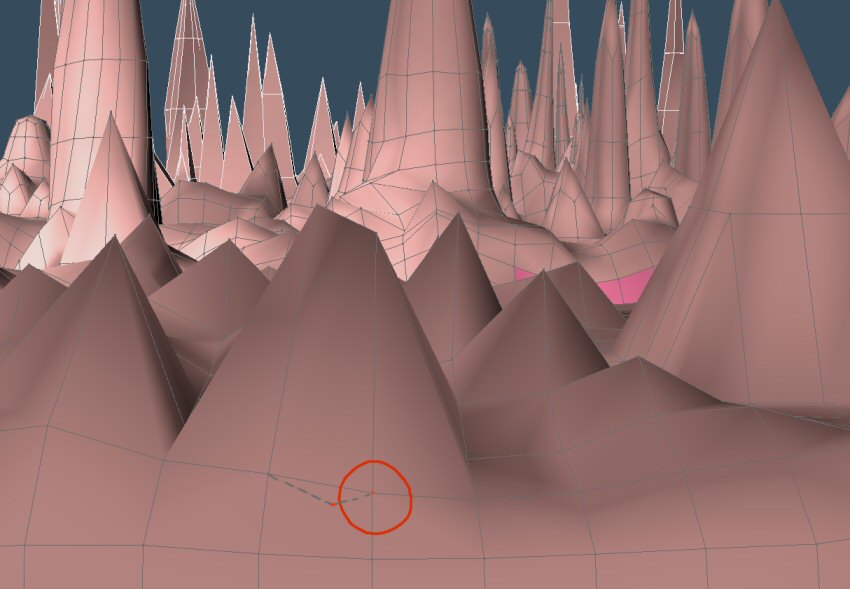
Anything in TS that would find that?
-
trueBlue
- Captain
- Posts: 5548
- Joined: 06 Jul 2009, 22:50
- Type the number ten into the box: 10
Re: Messiah or Blender for animation?
Correct me if I am wrong but I think the Quadrify tool can correct these as well. What I do is select a Face, the Select Connected tool, and then the Quadrify tool. But the better choice would be the Heal Vertices tool?
From the Manual:
The Heal Vertices tool is used to automatically check the selected elements and join together any vertices that are within a certain radius of each other. This is useful for joining vertices that are very close together, or “collapsing” faces that are very small, etc.
In effect, you rebuild an area of the mesh, and are able to do this automatically rather than having to manually select groups of vertices and weld them together. This can be useful in several examples. First, it can help clean up bad geometry, which may be helpful with an imported model. You may want to run the Heal Vertices tool on the entire mesh in situations such as this. Next, it can be helpful when you Boolean two objects together. If you have faces that exactly match in shape, it can be hard or impossible to place the faces exactly together for the Boolean union to work, and using the Heal Vertices tool can tidy up if there was a small overlap, or even better, you can ensure the faces are close together but not touching. In both cases, the matching vertices on the faces will be close enough to be joined together by the Heal operation. You may want to run the Heal Vertices tool on just the area where the objects joined, selecting the vertices with the loop or lasso tool.
Where faces do not match, Booleans can sometimes produce poor geometry at the scenes, with small triangles and other areas that almost but did not quite line up. The Heal Vertices tool will tidy up these areas, giving you cleaner geometry that is easier to work with. An example of this is shown below.
From the Manual:
The Heal Vertices tool is used to automatically check the selected elements and join together any vertices that are within a certain radius of each other. This is useful for joining vertices that are very close together, or “collapsing” faces that are very small, etc.
In effect, you rebuild an area of the mesh, and are able to do this automatically rather than having to manually select groups of vertices and weld them together. This can be useful in several examples. First, it can help clean up bad geometry, which may be helpful with an imported model. You may want to run the Heal Vertices tool on the entire mesh in situations such as this. Next, it can be helpful when you Boolean two objects together. If you have faces that exactly match in shape, it can be hard or impossible to place the faces exactly together for the Boolean union to work, and using the Heal Vertices tool can tidy up if there was a small overlap, or even better, you can ensure the faces are close together but not touching. In both cases, the matching vertices on the faces will be close enough to be joined together by the Heal operation. You may want to run the Heal Vertices tool on just the area where the objects joined, selecting the vertices with the loop or lasso tool.
Where faces do not match, Booleans can sometimes produce poor geometry at the scenes, with small triangles and other areas that almost but did not quite line up. The Heal Vertices tool will tidy up these areas, giving you cleaner geometry that is easier to work with. An example of this is shown below.
-
Benji
- Senior Chief Petty Officer
- Posts: 280
- Joined: 22 May 2009, 01:23
Re: Messiah or Blender for animation?
You could also load the model into blender and use the "remove doubles" tool. Always worked well for me. Blender doesn't like n-gons, though.
-
Finis

- Captain
- Posts: 5410
- Joined: 21 May 2009, 18:26
- Type the number ten into the box: 0
- Location: America!
Re: Messiah or Blender for animation?
Does Messiah have a tool to fix ngons and such that it doesn't like? Maybe there is a Messiah plugin for it.
I prefer dangerous freedom over peaceful servitude. -- Thomas Jefferson/Jean Jacques Rousseau
-
Tiles
- Master Chief Petty Officer
- Posts: 401
- Joined: 27 May 2009, 08:34
Re: Messiah or Blender for animation?
Remove Doubles is called Heal Vertices in trueSpace. You can setup the distance in which vertices gets welded by right clicking at the tool and have a look in the stack.the "remove doubles" tool.
Free Gamegraphics, Freeware Games http://reinerstilesets.de
-
Dragneye
- Lieutenant
- Posts: 906
- Joined: 02 Sep 2009, 22:09
Re: Messiah or Blender for animation?
Ya know, I have Never used the 'heal verts' button. Oh man.
Thanx guys. Will try it out.
Thanx guys. Will try it out.
-
Benji
- Senior Chief Petty Officer
- Posts: 280
- Joined: 22 May 2009, 01:23
Re: Messiah or Blender for animation?
Messiah has no modeling functionality whatsoever afaik, except for subdivision.Does Messiah have a tool to fix ngons and such that it doesn't like? Maybe there is a Messiah plugin for it.
The rules for models are pretty simple, however: no ngons, the models need to be imported at the right scale, and if you want to animate a model effectively it has to be all quads. If you don't want to animate something, then triangulated models seem to import without any issues.
You should also make sure your models have no holes in them if you want to use translucency (I.e. SSS). Found that out the hard way yesterday...........