I have ts7.6 set up on two different machines; XP 32 bit 1.6 ghz dual core 2GB ram bog standard graphics, Win 7 with 4Gb ram dual core 2ghz and ATi HD graphics. The XP one starts rendering in Vray almost immediately while the Win 7 machine takes an age before rendering actually starts. I also think the XP machine completes the render slightly quicker too.
Is there something I am missing here or does a better specced (and 64 bit machine) really run Vray noticeably slower than a 32bit XP?
Vray very slow in Win 7
-
splinters
- Chief Warrant Officer
- Posts: 733
- Joined: 21 May 2009, 18:55
- Type the number ten into the box: 0
Vray very slow in Win 7
-
marcel

- Captain
- Posts: 2247
- Joined: 21 May 2009, 19:52
- Type the number ten into the box: 0
- Location: paris - France
Re: Vray very slow in Win 7
you can't win speed to use a 32 bit soft on a 64 bits OS. you can't also use more than 2 giga ram with TS. the difference between 2 gh and 1.6 gh is not enought to compensate the need of power of win7. Vray and TS don't use the power of the graphic card for the render. With the same computer TS (and most of old software) are realy faster on XP than on win7. most of people think the opposite because they have often win7 with a new computer. and it is the new computer who do the difference not the OS. 
i think you lost about 25% of power with TS when you change to win 7. it is necessary to have a quad core to compensate and win speed to render. Only new generation of software benefit of win7 and sometime the power of the graphic card as cuda for nvidia and other method with ATI card.
i think you lost about 25% of power with TS when you change to win 7. it is necessary to have a quad core to compensate and win speed to render. Only new generation of software benefit of win7 and sometime the power of the graphic card as cuda for nvidia and other method with ATI card.
Design - illustration - Animation
http://www.crea-vision.fr
http://www.crea-vision.fr
-
Emmanuel

- Chief Warrant Officer
- Posts: 670
- Joined: 14 Jun 2009, 06:47
Re: Vray very slow in Win 7
I run tS on an XP Pro x64 system powered by an Asus P6T motherboard, i7 920 processor, 6Gb of DDR3 Ram, and VRay is fast.
So I don't think the x64 is slowing the things down.
Perhaps your problem comes from some Win7 memory settings ?
So I don't think the x64 is slowing the things down.
Perhaps your problem comes from some Win7 memory settings ?
-
splinters
- Chief Warrant Officer
- Posts: 733
- Joined: 21 May 2009, 18:55
- Type the number ten into the box: 0
Re: Vray very slow in Win 7
Just about everything else is faster and more responsive in win7 especially multitasking so I suspect ts7.6 is just not playing nice.
-
marcel
- Captain
- Posts: 2247
- Joined: 21 May 2009, 19:52
- Type the number ten into the box: 0
- Location: paris - France
Re: Vray very slow in Win 7
be sure TS on win7 have multithreading enabled.
Design - illustration - Animation
http://www.crea-vision.fr
http://www.crea-vision.fr
-
Finis

- Captain
- Posts: 5410
- Joined: 21 May 2009, 18:26
- Type the number ten into the box: 0
- Location: America!
Re: Vray very slow in Win 7
Maybe some Vray setting is not set the same on both computers.
I prefer dangerous freedom over peaceful servitude. -- Thomas Jefferson/Jean Jacques Rousseau
-
splinters
- Chief Warrant Officer
- Posts: 733
- Joined: 21 May 2009, 18:55
- Type the number ten into the box: 0
Re: Vray very slow in Win 7
Looks like I am gonna have to run this job on both machines unless anyone knows of a fix....I had the same problem in Vista..it often looks like ts has crashed but if you wait, the render starts. In Xp it is almost instant.
-
splinters
- Chief Warrant Officer
- Posts: 733
- Joined: 21 May 2009, 18:55
- Type the number ten into the box: 0
Re: Vray very slow in Win 7
Just an update on this. Vray still 'renders' pretty quick but it is taking an age to actually start rendering; sometimes 5-10 minutes before anything actually happens on screen. Just tried this with an empty scene and it was at least two minutes before anything happened.
Is there some setting here I am overlooking? Bridge is off by the way as I just can't move around big scenes (in modeller) when it is on.
Is there some setting here I am overlooking? Bridge is off by the way as I just can't move around big scenes (in modeller) when it is on.
-
RAYMAN

- Captain
- Posts: 2547
- Joined: 21 May 2009, 18:56
Re: Vray very slow in Win 7
Paul have you looked into the task manager ?and also how much memory is used at the beginning..... ?splinters wrote:Just an update on this. Vray still 'renders' pretty quick but it is taking an age to actually start rendering; sometimes 5-10 minutes before anything actually happens on screen. Just tried this with an empty scene and it was at least two minutes before anything happened.
Is there some setting here I am overlooking? Bridge is off by the way as I just can't move around big scenes (in modeller) when it is on.
-
splinters
- Chief Warrant Officer
- Posts: 733
- Joined: 21 May 2009, 18:55
- Type the number ten into the box: 0
Re: Vray very slow in Win 7
tS currently rendering out an empty room and CPU is at 100% (both of them!) tS7 is using 250,000K in task manager and the system is using 53% of my system ram...only explorer is running at the same time.... 
tS7 is using between 80 and 95% of system CPU while rendering to disk.
tS7 is using between 80 and 95% of system CPU while rendering to disk.
-
splinters
- Chief Warrant Officer
- Posts: 733
- Joined: 21 May 2009, 18:55
- Type the number ten into the box: 0
Re: Vray very slow in Win 7
I am confused now...tried running in compatibilty mode for XP, Vista, various service packs of each...all are the same.
I open a simple Vray scene and it renders in under 30 secs. from hitting render. I have a simple room scene....takes forever to render. Only has a few lights and objects in it. No HDRI. Is there some setting i can adjust to see if i can speed this up? Render times are getting ridiculous now.
I open a simple Vray scene and it renders in under 30 secs. from hitting render. I have a simple room scene....takes forever to render. Only has a few lights and objects in it. No HDRI. Is there some setting i can adjust to see if i can speed this up? Render times are getting ridiculous now.
-
RAYMAN
- Captain
- Posts: 2547
- Joined: 21 May 2009, 18:56
Re: Vray very slow in Win 7
Paul is the cpu at 100 % right away or after a the lag time period you mentioned ?splinters wrote:tS currently rendering out an empty room and CPU is at 100% (both of them!) tS7 is using 250,000K in task manager and the system is using 53% of my system ram...only explorer is running at the same time....
tS7 is using between 80 and 95% of system CPU while rendering to disk.
that the cpu´s are running at 100 % is normal thats what they supposed to do and if they are doing so from the moment you hit the render button would also be
the normal case( a second lag time excluded ).....
Paul try to render the cathedral scene that comes with Truespace instalation and with global illumination..... !
-
splinters
- Chief Warrant Officer
- Posts: 733
- Joined: 21 May 2009, 18:55
- Type the number ten into the box: 0
Re: Vray very slow in Win 7
Bear with me......
-
splinters
- Chief Warrant Officer
- Posts: 733
- Joined: 21 May 2009, 18:55
- Type the number ten into the box: 0
Re: Vray very slow in Win 7
WOW...didn't expect that. I hit render to screen with the cathedral scene with bridge on, GI etc. and it renders immediately...no wait at all, Whole thing is complete in under 1 minute. Exactly the same if i turn bridge off....
So, just what is in my relatively simple scenes that is causing 10-15 min renders and that awful lag?? I have attched the file if it helps.
So, just what is in my relatively simple scenes that is causing 10-15 min renders and that awful lag?? I have attched the file if it helps.
- Attachments
-
- candyroom.zip
- (72.25 KiB) Downloaded 231 times
-
RAYMAN
- Captain
- Posts: 2547
- Joined: 21 May 2009, 18:56
Re: Vray very slow in Win 7
I´ve had things like these happen to me with Vray with broken geometry in the scene....splinters wrote:Bear with me......
If you load something that we all have and know how fast it renders we can better help you find the cause...
-
splinters
- Chief Warrant Officer
- Posts: 733
- Joined: 21 May 2009, 18:55
- Type the number ten into the box: 0
Re: Vray very slow in Win 7
I stripped back the scene bit by bit and always a lag until absolutely everything had gone then...render immediately. It is just a bunch of cubes really...
-
splinters
- Chief Warrant Officer
- Posts: 733
- Joined: 21 May 2009, 18:55
- Type the number ten into the box: 0
Re: Vray very slow in Win 7
As described, cathedral scene rendered immediately....cannot see how a cube could be broken geometry though.RAYMAN wrote:I´ve had things like these happen to me with Vray with broken geometry in the scene....splinters wrote:Bear with me......
If you load something that we all have and know how fast it renders we can better help you find the cause...
-
RAYMAN
- Captain
- Posts: 2547
- Joined: 21 May 2009, 18:56
Re: Vray very slow in Win 7
I have a quadcore 4x 2400 with 3 Gig ram and vista 32 and the scene renders in 5 minutes here from workspace side at 1000 x 1500 px.
I see no problem with the geometry though...
the only thing it didnt load was a jpg file that was missing... how large is that ?
hptskyback is the name of it...
Peter
I see no problem with the geometry though...
the only thing it didnt load was a jpg file that was missing... how large is that ?
hptskyback is the name of it...
Peter
-
RAYMAN
- Captain
- Posts: 2547
- Joined: 21 May 2009, 18:56
Re: Vray very slow in Win 7
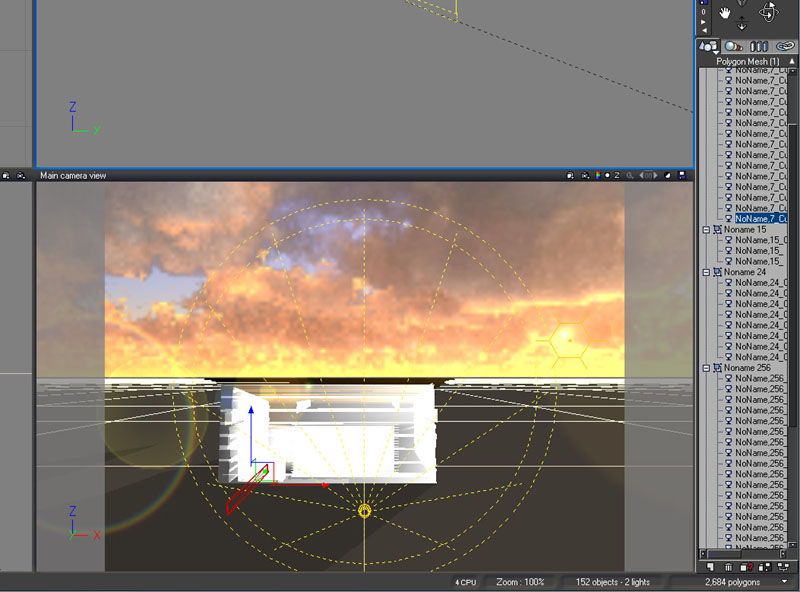
Also loaded the parts into Vue and ran a render and found out that its slow in there too !
All the parts that you have are not simple pieces but break up into material bits some of the logs even into 12 of them even though
the poly count is very low....also there must be something with the geometry because other objects if i replace the logs render fast...
Peter
All the parts that you have are not simple pieces but break up into material bits some of the logs even into 12 of them even though
the poly count is very low....also there must be something with the geometry because other objects if i replace the logs render fast...
Peter
- Attachments
-
-
Buzz

- Chief Petty Officer
- Posts: 150
- Joined: 05 Jul 2009, 12:46
- Type the number ten into the box: 0
- Location: Netherlands
Re: Vray very slow in Win 7
I had a kind of "slow render" problem a while back ago, and by coincidence I discovered that the UV mapping was not correct. After setting it right the render time was oke.
-
marcel
- Captain
- Posts: 2247
- Joined: 21 May 2009, 19:52
- Type the number ten into the box: 0
- Location: paris - France
Re: Vray very slow in Win 7
problem of slow render due to bad geometry can be strange with TS.
I have an object that i can't do the same render as other object with same texture. time to render is ok. when i try to resolve the problem of bad geometry the render is good but 10 time slower than a standard render for this kind of object. difficult to know where is a problem between obect, TS, render engine and OS. Most of the time it is better to redraw a good object than try to resolve this kind of problem.
just to remember: a bad TS object can be resolved if you save it as an .obj format then import it in a new scene. Most of time bad TS geometry dissapear after you convert the object.
I have an object that i can't do the same render as other object with same texture. time to render is ok. when i try to resolve the problem of bad geometry the render is good but 10 time slower than a standard render for this kind of object. difficult to know where is a problem between obect, TS, render engine and OS. Most of the time it is better to redraw a good object than try to resolve this kind of problem.
just to remember: a bad TS object can be resolved if you save it as an .obj format then import it in a new scene. Most of time bad TS geometry dissapear after you convert the object.
Design - illustration - Animation
http://www.crea-vision.fr
http://www.crea-vision.fr
-
Tiles

- Master Chief Petty Officer
- Posts: 401
- Joined: 27 May 2009, 08:34
Re: Vray very slow in Win 7
Scene takes eons to load here. And eons to switch between Modeler and Workspace. I don`t really wonder that it also takes eons to render then. Haven`t tested the rendering though. tS finally locked up ... Win 7 64 Bit here.
What i`ve noticed is that you have lots of hierarchical stuff in the scene. Have you tried to hit the Mesh Collapse button before switching to Workspace?
What i`ve noticed is that you have lots of hierarchical stuff in the scene. Have you tried to hit the Mesh Collapse button before switching to Workspace?
Free Gamegraphics, Freeware Games http://reinerstilesets.de
-
splinters
- Chief Warrant Officer
- Posts: 733
- Joined: 21 May 2009, 18:55
- Type the number ten into the box: 0
Re: Vray very slow in Win 7
Now you can see my problem. Most of the scenes I am rendering are chock full of complex objects; this is just the empty room! I had to leave one rendering at 1600x1200 for several hours. Client then asked for 3200x2400...GULP!!
BUT, I think i have spotted the problem (or one at least). I am using a modeller side texture; wooden floor to be precise rather than a texture map. Problem is though, I made several scenes already (this is one of around 12 rooms) I cannot just change the textures for the rest. I painted all the objects in the scene plain flat grey and it renders almost immediately.
So, is Vray struggling to convert a model side shader into Vray when it renders?
BUT, I think i have spotted the problem (or one at least). I am using a modeller side texture; wooden floor to be precise rather than a texture map. Problem is though, I made several scenes already (this is one of around 12 rooms) I cannot just change the textures for the rest. I painted all the objects in the scene plain flat grey and it renders almost immediately.
So, is Vray struggling to convert a model side shader into Vray when it renders?
-
Tiles
- Master Chief Petty Officer
- Posts: 401
- Joined: 27 May 2009, 08:34
Re: Vray very slow in Win 7
Hm, seems so. Shaders would`ve been my second bet. Have a look at the settings. Maybe there is some refraction involved? This can take forever to render ...
Free Gamegraphics, Freeware Games http://reinerstilesets.de
-
RAYMAN
- Captain
- Posts: 2547
- Joined: 21 May 2009, 18:56
Re: Vray very slow in Win 7
To be precise i would say it struggles with so many conversions becuse in your model there is not only one conversion per object but every piece.....splinters wrote:
So, is Vray struggling to convert a model side shader into Vray when it renders?
It would certainly speed up things if you made each side of your blockhouse one object and applied one uv map to each wall.....
Last edited by RAYMAN on 24 Nov 2010, 11:15, edited 1 time in total.
-
marcel
- Captain
- Posts: 2247
- Joined: 21 May 2009, 19:52
- Type the number ten into the box: 0
- Location: paris - France
Re: Vray very slow in Win 7
number of object increase the time to render more than a complex object. work on texture to optimize the time to render is an important thing. i avoid procedural texture and use jpg. some setting used can increase the time to render as reflexion combined with bump. don't use jpg bigger than you need. Use grey and smooth image for the bump not the same than those used for the map. when you use a contrasted image you can reduce the amplitude of the bump and you win time to render. don't use cast shadow with a transparency object if it is not necessary. also ray tracing in TS don't like big scene (i mean the scale and the position of the object not the complexity). if you have an object too far for the rest of the scene, it can increase the time of render. this is because of the method of calculation of the ray. there are a lot of thing to do to reduce the time to render (lightwork or vray). you learn that when you make hd animations.
Design - illustration - Animation
http://www.crea-vision.fr
http://www.crea-vision.fr
-
splinters
- Chief Warrant Officer
- Posts: 733
- Joined: 21 May 2009, 18:55
- Type the number ten into the box: 0
Re: Vray very slow in Win 7
Need to double check this on my main machine but I think we have the culprit. Seems best thing for me is to render off a few different variations of the planks in LW then repaint them as texture maps in the scene for Vray rendering.
Will let you know the results, but thanks for all your input so far.
Will let you know the results, but thanks for all your input so far.
-
RAYMAN
- Captain
- Posts: 2547
- Joined: 21 May 2009, 18:56
Re: Vray very slow in Win 7
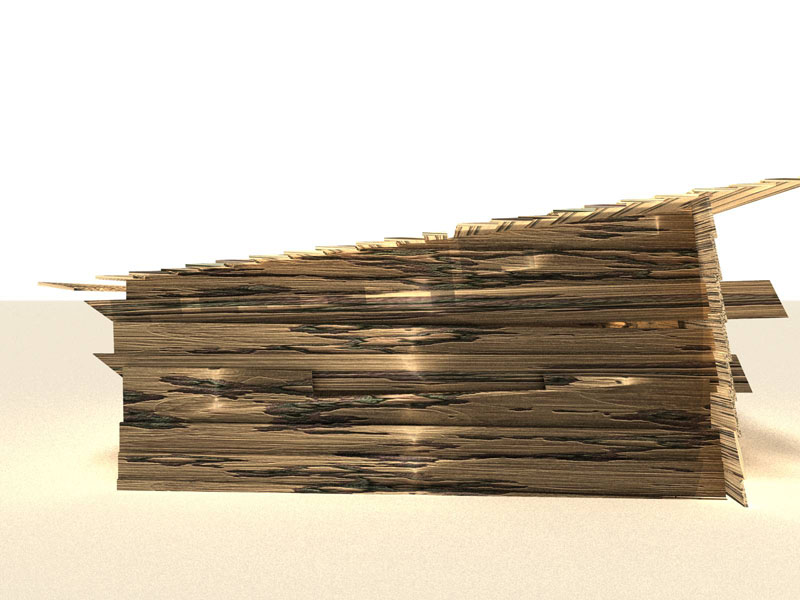
I used one big texture 1024 x 1024 size on the whole model and I collapsed the parts into 9 big parts using one texture on every big part.
It came down to 5 minutes with global illumination at 1200x1600 px.........
plus parts 15 and 304 have holes in the geometry try exporting with luuv and you will get the prompt to triangulate.....
It came down to 5 minutes with global illumination at 1200x1600 px.........
plus parts 15 and 304 have holes in the geometry try exporting with luuv and you will get the prompt to triangulate.....
- Attachments
-
Last edited by RAYMAN on 24 Nov 2010, 11:52, edited 2 times in total.
-
Tiles
- Master Chief Petty Officer
- Posts: 401
- Joined: 27 May 2009, 08:34
Re: Vray very slow in Win 7
Yikes! The Artifacts! How does that fit to HD?jpg

Free Gamegraphics, Freeware Games http://reinerstilesets.de
-
Tiles
- Master Chief Petty Officer
- Posts: 401
- Joined: 27 May 2009, 08:34
Re: Vray very slow in Win 7
Quick test. I have collapsed all your hierarchies with Mesh Collapse. No changings at the shaders, just collapse. Switch to Workspace happens nearly immediately now, compared to previous. Rendertime without GI was an eyeblink. With GI, transparent and soft shadows around two minutes or so. And this with just one core. Hmm. Why does my quadcore just render with one core? Yikes! O.o
EDIT, indeed. Lightworks renders with all four cores. VRay just with one. At least up to prepass 3. After that it renders with four. Hm.
EDIT, indeed. Lightworks renders with all four cores. VRay just with one. At least up to prepass 3. After that it renders with four. Hm.
Free Gamegraphics, Freeware Games http://reinerstilesets.de
-
Finis
- Captain
- Posts: 5410
- Joined: 21 May 2009, 18:26
- Type the number ten into the box: 0
- Location: America!
Re: Vray very slow in Win 7
You just need one of these, or a render farm of these, http://www.foxnews.com/scitech/2010/11/ ... processor/"
I prefer dangerous freedom over peaceful servitude. -- Thomas Jefferson/Jean Jacques Rousseau
-
Tiles
- Master Chief Petty Officer
- Posts: 401
- Joined: 27 May 2009, 08:34
Re: Vray very slow in Win 7
Awwww, cute. Do they sell the needed power house too? 
Free Gamegraphics, Freeware Games http://reinerstilesets.de
-
Finis
- Captain
- Posts: 5410
- Joined: 21 May 2009, 18:26
- Type the number ten into the box: 0
- Location: America!
Re: Vray very slow in Win 7
Shhh, you are revealing our secret pact: I sell the power system and you sell the cooling system (which foils my plan to sell these as electric heaters).
I prefer dangerous freedom over peaceful servitude. -- Thomas Jefferson/Jean Jacques Rousseau
-
splinters
- Chief Warrant Officer
- Posts: 733
- Joined: 21 May 2009, 18:55
- Type the number ten into the box: 0
Re: Vray very slow in Win 7
Crikey, where is mesh collapse? I haven't used it before.
-
splinters
- Chief Warrant Officer
- Posts: 733
- Joined: 21 May 2009, 18:55
- Type the number ten into the box: 0
Re: Vray very slow in Win 7
My original problem seems solved though...just paint the whole scene with the default model material and it renders immediately.
I am happy now....although I will still look at the mesh collapse tool. Ironic eh? I made it and have no idea what it looks like or where it is!!
I am happy now....although I will still look at the mesh collapse tool. Ironic eh? I made it and have no idea what it looks like or where it is!!
-
Finis
- Captain
- Posts: 5410
- Joined: 21 May 2009, 18:26
- Type the number ten into the box: 0
- Location: America!
Re: Vray very slow in Win 7
Mesh collapse is a plugin in the tsx directory with TS7.6.
I prefer dangerous freedom over peaceful servitude. -- Thomas Jefferson/Jean Jacques Rousseau
-
splinters
- Chief Warrant Officer
- Posts: 733
- Joined: 21 May 2009, 18:55
- Type the number ten into the box: 0
Re: Vray very slow in Win 7
My mistake...I thought it was an icon....
-
Finis
- Captain
- Posts: 5410
- Joined: 21 May 2009, 18:26
- Type the number ten into the box: 0
- Location: America!
Re: Vray very slow in Win 7
Glad I could help a little. Looking forward to seeing your new art.
I prefer dangerous freedom over peaceful servitude. -- Thomas Jefferson/Jean Jacques Rousseau
-
splinters
- Chief Warrant Officer
- Posts: 733
- Joined: 21 May 2009, 18:55
- Type the number ten into the box: 0
Re: Vray very slow in Win 7
Not mine matey but head on over to http://www.emagine-nation.com" and you can see what me and Zach have been up to for the last year or so...
By the way, mesh collapse made no difference to the render speed for me but it all starts immediately now I removed the procedural textures.
By the way, mesh collapse made no difference to the render speed for me but it all starts immediately now I removed the procedural textures.
-
marcel
- Captain
- Posts: 2247
- Joined: 21 May 2009, 19:52
- Type the number ten into the box: 0
- Location: paris - France
Re: Vray very slow in Win 7
That is what i said about procedural texture. I subscribed to your website. I do not remember zach. Is a member of the forum or old Caligari forum?
Design - illustration - Animation
http://www.crea-vision.fr
http://www.crea-vision.fr
-
splinters
- Chief Warrant Officer
- Posts: 733
- Joined: 21 May 2009, 18:55
- Type the number ten into the box: 0
Re: Vray very slow in Win 7
Zachary P Humway. Did some great work...still does by the looks of things. Was quite prominent in the galleries in the old forums.
-
jamesmc
- Captain
- Posts: 1776
- Joined: 08 Jul 2009, 15:35
Re: Vray very slow in Win 7
Speed depends on the render engine design.
I just did a test in Lightwave3D and compared it to times submitted in Carrara 8 Pro (both on 64 bit Win 7, 8 gb ram).
Using the same 3D model, the Lightwave3D 64 bit engine was faster by almost a minute than a souped up Xeon processor that rendered the same model in Carrara 8 Pro.
My guess is that the V-ray has some bottlenecks in reflections, lights that VRay for tSpace can't break down for 64 bit.
I just did a test in Lightwave3D and compared it to times submitted in Carrara 8 Pro (both on 64 bit Win 7, 8 gb ram).
Using the same 3D model, the Lightwave3D 64 bit engine was faster by almost a minute than a souped up Xeon processor that rendered the same model in Carrara 8 Pro.
My guess is that the V-ray has some bottlenecks in reflections, lights that VRay for tSpace can't break down for 64 bit.
Walk by faith, not by sight.