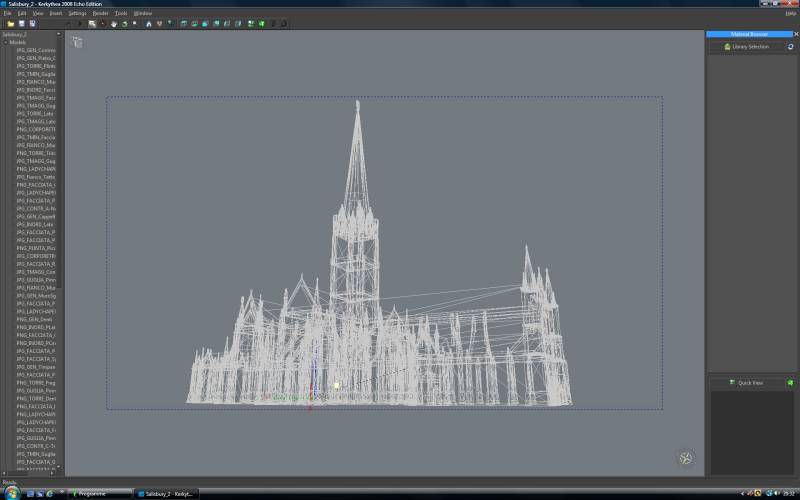
well, I've about had it. Truespace still wont render my scene seemingly no matter what I do.
The stage its in right now, it will render but when I add any new geometry, no matter what it is, it will not render. Just says: "generating shadow maps" and then the cursor goes from hour glass to regular cursor and it does nothing, no matter how long you wait.
This is NOT the first time this has happened, I've had a number of scenes do this, it's almost like it don't want to tolerate any more geometry. I have a beautiful Cathedral I've been busting butt on for a while now and I need to add in some hanging lamps and it just ain't gonna tolerate it or any other geometry added, simple OR complex. Anyone ever seen a Cathedral that has no way to light the interior? It would be unrealistsic, I need to add my lamps. Seriously getting sick of TS, but then again theres no way I can afford Lightwave or any of the others.
If Caligari hadn't sold out I'd been able to call them as I had been a registered user for years......but no! Argh!
Is there a polygon limit in Truespace? still wont render.
-
horusra

- Petty Officer First Class
- Posts: 70
- Joined: 02 Feb 2010, 13:09
- Type the number ten into the box: 0
- Location: Appleton, Wisconsin. U.S.A.
Is there a polygon limit in Truespace? still wont render.
-
Finis

- Captain
- Posts: 5410
- Joined: 21 May 2009, 18:26
- Type the number ten into the box: 0
- Location: America!
Re: Is there a polygon limit in Truespace? still wont render.
This is TS 7.6x model side or earlier version? I've had scenes with 700K polys but fairly simple textures in 7.6 model side.
Try rendering with regular shadows instead of mapped ones. If that renders at least you'll be able to make an image though not with the shadows you want.
Try changing from scanline to raycast render, or raycast to scanline, whichever you're not using.
If TS 7.6x model side then turn the bridge completely off.
If this is in TS 7.6x model side and you have an earlier version of TS, with no workspace, try rendering in the earlier version. (7.6 can write files in earlier formats.)
Large texture images could make a difference. Smaller ones might work.
If it just won't work you could export the models/scene and render in Kerkythea (free) or Blender.
Try rendering with regular shadows instead of mapped ones. If that renders at least you'll be able to make an image though not with the shadows you want.
Try changing from scanline to raycast render, or raycast to scanline, whichever you're not using.
If TS 7.6x model side then turn the bridge completely off.
If this is in TS 7.6x model side and you have an earlier version of TS, with no workspace, try rendering in the earlier version. (7.6 can write files in earlier formats.)
Large texture images could make a difference. Smaller ones might work.
If it just won't work you could export the models/scene and render in Kerkythea (free) or Blender.
I prefer dangerous freedom over peaceful servitude. -- Thomas Jefferson/Jean Jacques Rousseau
-
stan
- Master Chief Petty Officer
- Posts: 584
- Joined: 21 May 2009, 17:20
Re: Is there a polygon limit in Truespace? still wont render.
sometimes it takes a very long time to render like 20 hours before the image starts to appear on screen with some of my old scenes. Have you tried a render area it too might take a long time but less that a full scene.
ajusting raytrace limits might help, its the panel on right click of enable raytracing..if using raytracing.
have you tried the lowest possible shadow map settings?
otherwise try hiding things on layers and seeing what stops the render, and what will render.
ajusting raytrace limits might help, its the panel on right click of enable raytracing..if using raytracing.
have you tried the lowest possible shadow map settings?
otherwise try hiding things on layers and seeing what stops the render, and what will render.
-
RAYMAN

- Captain
- Posts: 2547
- Joined: 21 May 2009, 18:56
Re: Is there a polygon limit in Truespace? still wont render.
Truespace is a very nicely little app but its not made for very very big scenes...... 
That the limit to TS....
Unfortunatly a 64 bit version never made it because Caligari shut down....
Peter
That the limit to TS....
Unfortunatly a 64 bit version never made it because Caligari shut down....
Peter
-
fahembree
- Chief Petty Officer
- Posts: 108
- Joined: 22 May 2009, 02:28
Re: Is there a polygon limit in Truespace? still wont render.
Here are some other things to try.
Set rendering quality to low
Set Antialsing to draft
Set Output to render to file, and when you select render set resolution to
lowest setting of 320 x 200.
If this helps then slowly change to higher resolution, then quality, and
finally Antialsing.
Set rendering quality to low
Set Antialsing to draft
Set Output to render to file, and when you select render set resolution to
lowest setting of 320 x 200.
If this helps then slowly change to higher resolution, then quality, and
finally Antialsing.
- Attachments
-

- Settings.jpg (20.78 KiB) Viewed 3989 times
-
Emmanuel

- Chief Warrant Officer
- Posts: 670
- Joined: 14 Jun 2009, 06:47
Re: Is there a polygon limit in Truespace? still wont render.
If you have a LOT of lights with LARGE shadow maps, plus some transparent AND reflective materials, you will put the render engine on its knees.horusra wrote: it will not render. Just says: "generating shadow maps"
Being a good 3D artist is also being able to optimize a scene to get the effect you want to achieve at the minimum of time. For example, simplify models (less polygons) that are far from the camera, or at light settings reduce sharpness to keep a small map size and make the shadow map aliasing less visible. Etc...
Perhaps you could post a screenshot of your scene in polygon mode to let us see how it looks and what are the possible issues.
-
RAYMAN
- Captain
- Posts: 2547
- Joined: 21 May 2009, 18:56
Re: Is there a polygon limit in Truespace? still wont render.
Over the years I found out that Ts limit was around 400000 polygons..... plus minus depending on the settings and the lights etc.
A detailed cathedral would get over that limit easily...
In how many posrtions can you export the scene from Truespace because you can try to use the free render engine Kerkythea.....
It goes way over 400000 and it also has instancing which Ts doesnt have.....
In the render section is a detailed instruction on how to export and use Kerky with TS !
It works well with obj !
Peter
A detailed cathedral would get over that limit easily...
In how many posrtions can you export the scene from Truespace because you can try to use the free render engine Kerkythea.....
It goes way over 400000 and it also has instancing which Ts doesnt have.....
In the render section is a detailed instruction on how to export and use Kerky with TS !
It works well with obj !
Peter
- Attachments
-
-