How to keep aspect ratio in UV mapping?

compPanda
Senior Chief Petty Officer
Posts: 275
Joined: 21 May 2009, 21:15
Type the number ten into the box: 0

How to keep aspect ratio in UV mapping?

Post by compPanda »

I am sorry if I post this in the wrong forum - I want to discuss a problem with keeping perspective in the UV mapping editor of TS 7x and 6.6....

To keep it simple - I made this barn:
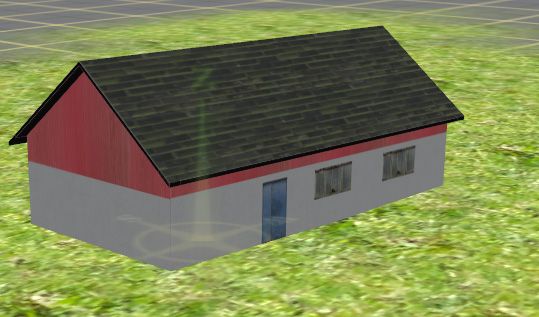
forum_bild_lada_rak.jpg
As you see, there is a door and windows on one side of it.
Each long side only consists of two faces, so I need a texture map to fit there.
This is my texture map:
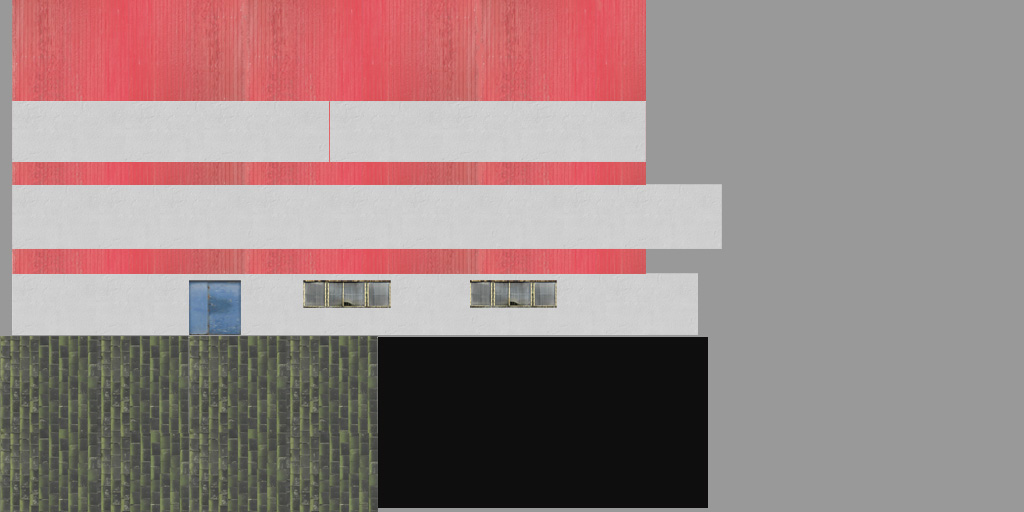
basetextur_mod2 kopiera.jpg
As you see - my windows are much wider than they become in the model. I actually had to stretch them in PSE to make them appear more correct when applied in Truespace.

This is an image of how my mapping is done:
basetextur_mod2 m ritning.jpg
When I first unwrapped, or what it is called, the sides of the building was much higher and not as long. But they was also of different height, despite being equal in size.
I started by texture the building with a 1024x512 empty texture since I wanted to use that texture size. Then I placed the walls in the UV mapping editor where I wanted them by selecting them each in turn.

What I did was to resize the short walls (the pointy ones) to the size I wanted and then made sure that the long sides had the same height as they should when compared to short sides and then I made the long sides twice as wide/long as the short sides. This should have been correct since the building has a dimension of 16x8 meters, that is the long sides should be twice as wide as the short sides. However, when I exported the texture map from TS, it had made all walls wider than they was in the UV editor - I don't understand why.

Obviously this didn't work since the windows of the texture and the door doesn't map correctly on the building in TS - they appear less wide when applied in TS than they should according to the texture map.

How should I work to keep the aspect ratio when I unwrap? What did I do wrong? I need to use as few faces as possible so I don't want to use one face for each window for instance.
User avatar
Breech Block
Master Chief Petty Officer
Posts: 482
Joined: 13 Jun 2009, 20:31

Re: How to keep aspect ratio in UV mapping?

Post by Breech Block »

The computer algorithm used to calculate a model's UV space can only work effectively if it knows in advance what shape your texture map is. Therefore, and this should be true with all 3D apps, it automatically assumes your texture map is square. Furthermore the algorithm has also been optimised to calculate UV maps that are divisible by 256. Thus texture maps should be 256 x 256 or 512 x 512 or 1024 x 1024 etc, etc.

The best way to customize a texture map to a model is to export the models UV map directly to a paint program and then use it as a template for creating your texture.

btw, you'll probably get a better response to your queries if you post them in the right place which is the TechForum.

I also note you have posted quite a few other technical questions regarding UV mapping in the General Discussion forum. Please refrain from doing this as you are doing a dis-service to your fellow community members. The whole point of posting technical queries in one central place is to a) make it easier for new members to search through the forum so they can ascertain if their query has been asked/answered previously and thus become a central source for reference. And b) to prevent more experienced users from constantly having to answer the same questions over and over again.

HTH.
User avatar
Tiles
Master Chief Petty Officer
Posts: 401
Joined: 27 May 2009, 08:34

Re: How to keep aspect ratio in UV mapping?

Post by Tiles »

tS is not really suited to UV map a model. Use Blender or a unwrap software like Ultimate Unwrap 3D to unwrap your building, by using LSCM or ABF for example. Then arrange the UV patches until you`re happy with the result. Next step is to paint the texture. And after that come back to trueSpace.
Free Gamegraphics, Freeware Games http://reinerstilesets.de
User avatar
RAYMAN
Captain
Posts: 2547
Joined: 21 May 2009, 18:56

Re: How to keep aspect ratio in UV mapping?

Post by RAYMAN »

Another little secret ! But pssst dont tell anybody !
Drop TS for making buildings alltogether !
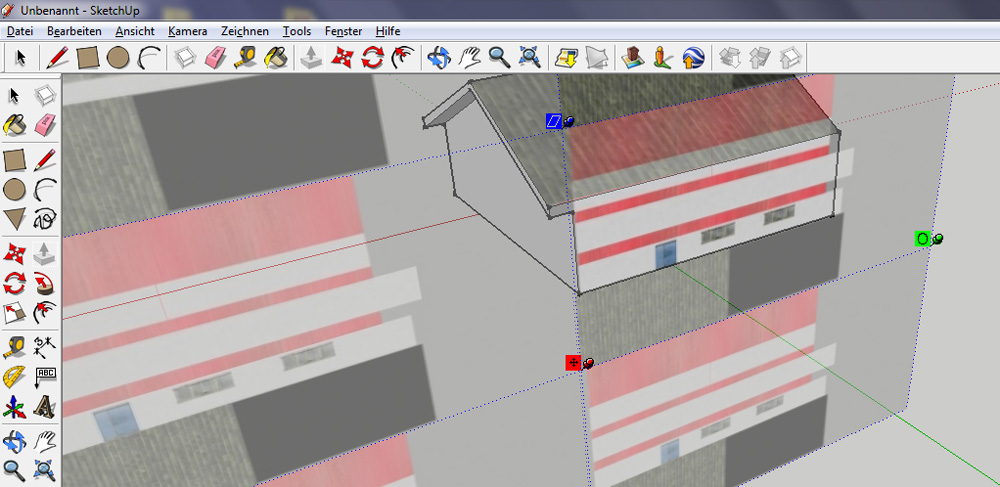
Your way far better off with using Sketchup for architecture and even
more mapping walls inside Sketchup !
Its made for that purpose !Thats what very many architects do all over the world
for fast brainstorming.....
The free version is perfect for that you only need an application like Blender or
any other that allows you to import via Collada or fbx....
The format in which Sketchup exports is nothing else then a zip file
of a collada file folder.... ;)
Peter
Attachments
screenshot.jpg
compPanda
Senior Chief Petty Officer
Posts: 275
Joined: 21 May 2009, 21:15
Type the number ten into the box: 0

Re: How to keep aspect ratio in UV mapping?

Post by compPanda »

RAYMAN wrote:Another little secret ! But pssst dont tell anybody !
Drop TS for making buildings alltogether !
Your way far better off with using Sketchup for architecture and even
more mapping walls inside Sketchup !
Its made for that purpose !Thats what very many architects do all over the world
for fast brainstorming.....
The free version is perfect for that you only need an application like Blender or
any other that allows you to import via Collada or fbx....
The format in which Sketchup exports is nothing else then a zip file
of a collada file folder.... ;)
Peter
The problem with Sketchup in this case is that it, at least if you actually make the house hollow and makes holes the windows, tends to make the house polygon heavy when you import it. At least that is what the folks at the Swedish Trainz forum told me.
So I would end up doing a lot of work in Blender removing edges. But I will try to see how it works if I don't add the Windows.

I find it a bit funny that you always also tells me that I use the wrong software, Rayman....
Is there any thing that you like to use Truespace for? Becasue your solutions are almost always "use another software"...
Last edited by compPanda on 27 Mar 2011, 13:32, edited 1 time in total.
compPanda
Senior Chief Petty Officer
Posts: 275
Joined: 21 May 2009, 21:15
Type the number ten into the box: 0

Re: How to keep aspect ratio in UV mapping?

Post by compPanda »

Breech Block wrote:
btw, you'll probably get a better response to your queries if you post them in the right place which is the TechForum.

I also note you have posted quite a few other technical questions regarding UV mapping in the General Discussion forum. Please refrain from doing this as you are doing a dis-service to your fellow community members. The whole point of posting technical queries in one central place is to a) make it easier for new members to search through the forum so they can ascertain if their query has been asked/answered previously and thus become a central source for reference. And b) to prevent more experienced users from constantly having to answer the same questions over and over again.

HTH.
I have to be honest - I didn't thought the TechForum was for modelling or UV questions at all. I thought that forum was for questions like "I can't get TS to work with directX" or "my windows locks if I install software X and Y".
That is what I usually expect to find in a TechForum - questions about problems with running software, not questions about usage of the software.

Personally I think we have WAY to many forums here. It is almost impossible to choose the right forum. Personally I never read any other forum than this General forum or the "Work in progress" forum. I might scan the Ts 6.6 forums first to see if someone else have had the same problem as me and given a solution.
User avatar
nigec
Master Chief Petty Officer
Posts: 561
Joined: 21 May 2009, 18:46

Re: How to keep aspect ratio in UV mapping?

Post by nigec »

BB did give the solution, power of 2 images 128x128 etc, use a more powerful uv mapping tool, use Blender's
UV tools, they are awesome.

You can turn off export edges in SU, it doesn't create anymore than TS would, then again it depends how you model something, there's the lazy way and the right way with Sketchup, the lazy way you draw, extrude and paint, then you end up with flipped faces, holes, back faces not textured and they go freaky in game engines, its way better to build a floor, walls, roof etc as a single items.
Sometimes you need to outsource, there's quicker and easier ways to do things and looking at better options isn't a bad thing, TS's UV tools are a bit of a pain, Blender's smart projection does all the hard work for you
User avatar
clintonman
Captain
Posts: 5659
Joined: 21 May 2009, 21:08
Type the number ten into the box: 0
Location: California

Re: How to keep aspect ratio in UV mapping?

Post by clintonman »

Here are some tutorial links for uv mapping in truespace. Maybe you can compare your process to theirs.

Texture Creation course, some uv projection topics
http://www.caligari.com/products/trueSp ... ate=Master"

Gamespace UV mapping tut
http://web.archive.org/web/200502050621 ... v_map1.asp"

Tiles's tutorial
http://reinerstileset.4players.de/TS66_ ... _Tut_E.htm"
Clinton Reese

http://clintons3d.com
User avatar
RAYMAN
Captain
Posts: 2547
Joined: 21 May 2009, 18:56

Re: How to keep aspect ratio in UV mapping?

Post by RAYMAN »

The problem with Sketchup in this case is that it, at least if you actually make the house hollow and makes holes the windows, tends to make the house polygon heavy when you import it. At least that is what the folks at the Swedish Trainz forum told me.
So I would end up doing a lot of work in Blender removing edges. But I will try to see how it works if I don't add the Windows.

I find it a bit funny that you always also tells me that I use the wrong software, Rayman....
Is there any thing that you like to use Truespace for? Becasue your solutions are almost always "use another software"...[/quote]

Sketchup like Nigec also said does not export with more polygons if you model the right way...
It actually models with the least amount of polygons.. it only triangulates and halves the quads which
many or most applications it exports to do anyhow.
Making buildings and texturing them is much easier then in any other application and that doesnt exclude
TS.
Ts has a few strong points but Uv mapping isnt the strongest.
When I say use other software then I refer to things that can be made better with different typs of software like boolean operations that are not a good thing inside polygonal editing......
also large scenes arent a strongpoint of Ts....
Its good to look around and find easier ways to do things because eventually it will be harder and harder
to use TS in the future anyhow....
Have you ever touched Sketchup ?or Uv mapped inside it.. youd probably know what i´m talking about....
Ts for that matter isnt any different to any of the other sofware around including maya or max or any other...
Peter

Return to “General Discussion”