Selection Color Problem... solution?
-
lrdsatyr8
- Petty Officer First Class
- Posts: 68
- Joined: 24 Mar 2013, 20:19
- Type the number ten into the box: 10
Selection Color Problem... solution?
Hey all... I'm so glad I found a tS community again. You just don't know how long this has been bugging the heck outta me and I can't figure out how to change the settings to get them the way they should be. Here's the problem. Ever since version 5 of tS I've been having this problem. When working on modeling mode, make yourself a few cubes in the scene of various shapes and sizes. Not using the solid render (openGL or D3D modes, just plain ol wireframe modeling). When selecting any of the cubes, the color of the cube changes. But not vary much. Makes it difficult to tell what is selected and what isn't. I've tried changing the colors in the Display Options panel but it don't work. That only affects if I have children of an object while I'm going down thru the object list. It would be nice if what's I had selected was like White and whatever wasn't was Dark Gray to give more contrast to my selection process, but no. It's like a light gray and lighter gray and makes difficult to tell what is accually selected at times. The only way I've been able to work around it is if I Render Current Object (which becomes a strain after awhile). Does anyone know how to change the main selection colors that actually work in ts6 and up?
-
spacekdet

- Captain
- Posts: 1810
- Joined: 27 May 2009, 15:00
- Type the number ten into the box: 10
- Location: On the day shift at the Utility Muffin Research Kitchen
Re: Selection Color Problem... solution?
This one is tricky, but easy once you know how.
Right click the 'Basic Layer is visible' icon.
Uncheck the 'Use as wire color'
Next, click File/ Display Options
Choose nice bright color for 'Select' parameter.
Set other modes colors as desired.
Right Clicking 'Add New Layer' you can set different colors for different layers by ensuring 'Use Layer Colors' box is checked.
Right-Click the small colored square on each Object Layer to pick color; Left click the green parallelogram to hide/show Layer.
Note that Object Layers and Material Layers are two different things.
Right click the 'Basic Layer is visible' icon.
Uncheck the 'Use as wire color'
Next, click File/ Display Options
Choose nice bright color for 'Select' parameter.
Set other modes colors as desired.
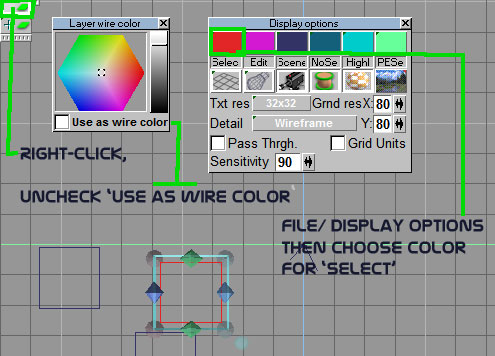
Right Clicking 'Add New Layer' you can set different colors for different layers by ensuring 'Use Layer Colors' box is checked.
Right-Click the small colored square on each Object Layer to pick color; Left click the green parallelogram to hide/show Layer.
Note that Object Layers and Material Layers are two different things.
-
lrdsatyr8
- Petty Officer First Class
- Posts: 68
- Joined: 24 Mar 2013, 20:19
- Type the number ten into the box: 10
Re: Selection Color Problem... solution?
OMG... THAT IS AWESOME!!! You don't know how long I've been dealing with this problem without knowing how to fix it! It started with version 5 and I've been dealing with it since! THANK YOU THANK YOU THANK YOU! Now I don't have to render the current object any more to make sure I have the right object selected! 


-
Draise

- Captain
- Posts: 3200
- Joined: 21 Sep 2009, 19:33
- Type the number ten into the box: 0
- Location: Bogota, Colombia
Re: Selection Color Problem... solution?


-
marcel

- Captain
- Posts: 2247
- Joined: 21 May 2009, 19:52
- Type the number ten into the box: 0
- Location: paris - France
Re: Selection Color Problem... solution?
Today i find how to close TS. I click on the cross at the corner of the Windows. I don't need now to turn off the computer to close TS ! 
Design - illustration - Animation
http://www.crea-vision.fr
http://www.crea-vision.fr
-
spacekdet
- Captain
- Posts: 1810
- Joined: 27 May 2009, 15:00
- Type the number ten into the box: 10
- Location: On the day shift at the Utility Muffin Research Kitchen
Re: Selection Color Problem... solution?
There's an icon for that...somewhere.
-
Finis

- Captain
- Posts: 5410
- Joined: 21 May 2009, 18:26
- Type the number ten into the box: 0
- Location: America!
Re: Selection Color Problem... solution?
That's a great trick Spacekdet. Thanks.
I'll bet you close Blender simply by pressing cntrl-alt-V-backspace-shift-F3-6-up arrow.
I'll bet you close Blender simply by pressing cntrl-alt-V-backspace-shift-F3-6-up arrow.
I prefer dangerous freedom over peaceful servitude. -- Thomas Jefferson/Jean Jacques Rousseau