cartoon transportation - sponge car square tires
-
Finis

- Captain
- Posts: 5410
- Joined: 21 May 2009, 18:26
- Type the number ten into the box: 0
- Location: America!
cartoon transportation - sponge car square tires
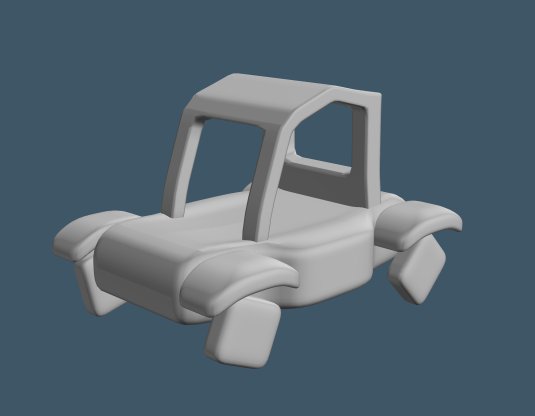
The roof needs to be more rounded. It will get bumpers and lights. The lights will be eyes and bumper a mouth.
- Attachments
-
-
I prefer dangerous freedom over peaceful servitude. -- Thomas Jefferson/Jean Jacques Rousseau
-
Finis
- Captain
- Posts: 5410
- Joined: 21 May 2009, 18:26
- Type the number ten into the box: 0
- Location: America!
Re: cartoon transportation - sponge car square tires
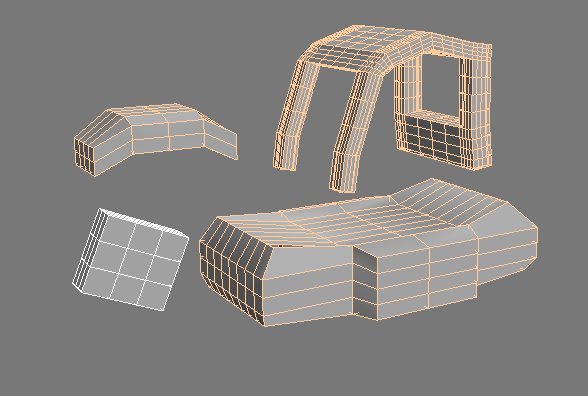
My work flow for this is:
1 Make simple shapes for SDS control meshes.
2 Use the Wriggledy plugin from Cool Powers two to make the control meshes rough.
3. Apply SDS and extract the final meshes.
4. Add details to the final meshes.
5. Do textures.
The details will be grooves to indicate doors, hood, trunk hatch.
Wiggledy plus SDS will gives this effect.
1 Make simple shapes for SDS control meshes.
2 Use the Wriggledy plugin from Cool Powers two to make the control meshes rough.
3. Apply SDS and extract the final meshes.
4. Add details to the final meshes.
5. Do textures.
The details will be grooves to indicate doors, hood, trunk hatch.
Wiggledy plus SDS will gives this effect.
- Attachments
-

I prefer dangerous freedom over peaceful servitude. -- Thomas Jefferson/Jean Jacques Rousseau
-
Finis
- Captain
- Posts: 5410
- Joined: 21 May 2009, 18:26
- Type the number ten into the box: 0
- Location: America!
Re: cartoon transportation - sponge car square tires
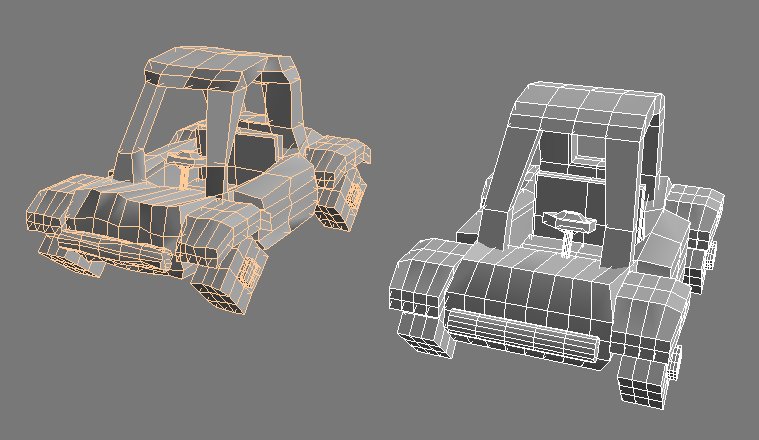
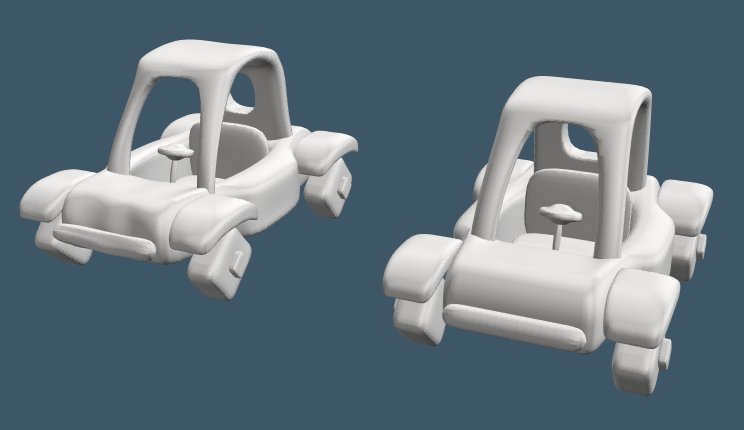
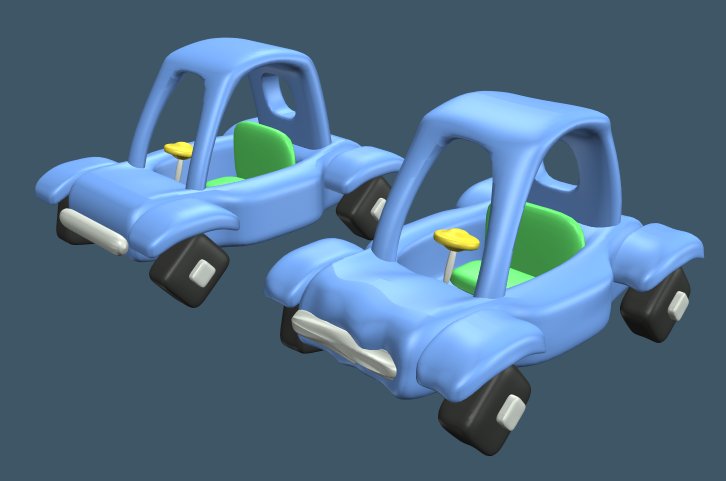
New roof. Steering wheel, hubcaps, bumpers, seat. One version is precise and the other uses the Wiggledy method to make it lumpy. I 'decided not to do a face but might add lights.
- Attachments
-
-
I prefer dangerous freedom over peaceful servitude. -- Thomas Jefferson/Jean Jacques Rousseau
-
Finis
- Captain
- Posts: 5410
- Joined: 21 May 2009, 18:26
- Type the number ten into the box: 0
- Location: America!
Re: cartoon transportation - sponge car square tires
With plastic texture. Have to experiment with the wriggledy settings. I want subtle imperfections but the plug in works more in some directions than others.
- Attachments
-
I prefer dangerous freedom over peaceful servitude. -- Thomas Jefferson/Jean Jacques Rousseau
-
seppgirty

- Master Chief Petty Officer
- Posts: 354
- Joined: 22 May 2009, 03:34
- Type the number ten into the box: 0
- Location: pittsburgh Pa.
Re: cartoon transportation - sponge car square tires
lookin good Finis. i used to own a car just like that. the square tire ride was hell on my hemroids though.
truespace 3.2, 5.2, 6.6, ani-pack, flash plugin,........ you can check out my films athttp://www.chaosbrosfilms.com
-
Steinie

- Captain
- Posts: 2958
- Joined: 21 May 2009, 17:38
- Type the number ten into the box: 10
Re: cartoon transportation - sponge car square tires
Cool concept Finis! I like that you are using the wriggledy plugin.( and the fact that it is fun to say) 
-
Finis
- Captain
- Posts: 5410
- Joined: 21 May 2009, 18:26
- Type the number ten into the box: 0
- Location: America!
Re: cartoon transportation - sponge car square tires
Thanks everyone.
Well, the fun-to-say plugin has a problem. It barely moves anything along the Z axis. The plugin has numbers for how rough it is in X, Y, and Z. That is, how much it moves vertices in each direction. In X and Y, a setting of 48 produces what you see above but the Z setting does nothing. Experiments with Z = 999 barely moved verticies. The same in TS 5. I'll try TS 3. Maybe it doesn't work right in higher versions.
I don't remember having that problem before. This is disappointing.
A work around is to rotate the axis of the object. That works but it is a lot of trouble. I might just push and pull some vertices in point edit instead or just leave the car smooth.
Does Hexagon have a function similar to wriggledy?
Well, the fun-to-say plugin has a problem. It barely moves anything along the Z axis. The plugin has numbers for how rough it is in X, Y, and Z. That is, how much it moves vertices in each direction. In X and Y, a setting of 48 produces what you see above but the Z setting does nothing. Experiments with Z = 999 barely moved verticies. The same in TS 5. I'll try TS 3. Maybe it doesn't work right in higher versions.
I don't remember having that problem before. This is disappointing.
A work around is to rotate the axis of the object. That works but it is a lot of trouble. I might just push and pull some vertices in point edit instead or just leave the car smooth.
Does Hexagon have a function similar to wriggledy?
I prefer dangerous freedom over peaceful servitude. -- Thomas Jefferson/Jean Jacques Rousseau
-
Draise

- Captain
- Posts: 3200
- Joined: 21 Sep 2009, 19:33
- Type the number ten into the box: 0
- Location: Bogota, Colombia
Re: cartoon transportation - sponge car square tires
A cool solution you can use is one of Clinton's plugins.
Fix Bad Geometry
Select random vertices in the WS and then scale them out in any value you want. I used that to make some cool random deformed things. Does the same thing as your last plugin.
Fix Bad Geometry
Select random vertices in the WS and then scale them out in any value you want. I used that to make some cool random deformed things. Does the same thing as your last plugin.
-
Finis
- Captain
- Posts: 5410
- Joined: 21 May 2009, 18:26
- Type the number ten into the box: 0
- Location: America!
Re: cartoon transportation - sponge car square tires
Thanks Draise. That's almost what I would do in point edit as an alternative method. Select a some verts and move, scale, or rotate 'em.
I prefer dangerous freedom over peaceful servitude. -- Thomas Jefferson/Jean Jacques Rousseau
-
Draise
- Captain
- Posts: 3200
- Joined: 21 Sep 2009, 19:33
- Type the number ten into the box: 0
- Location: Bogota, Colombia
Re: cartoon transportation - sponge car square tires
Exactly! Except this plugin saves you time selecting the hundreds of random vertices without you having to do it manually!
-
Finis
- Captain
- Posts: 5410
- Joined: 21 May 2009, 18:26
- Type the number ten into the box: 0
- Location: America!
Re: cartoon transportation - sponge car square tires
For this project, if I do it manually in point edit, a few vertices/polys will do but there are several objects. Maybe with a little moving around of whole sections too. For more detailed crumpling, yeah, automation is needed. Probably use wriggledy with the axis rotation work around. I think wriggledy used to work in all directions.
Random verticies! That is a good idea. I wish this plugin had random selection options.
I appreciate the efforts and accomplishments of the programmers who have made plugins etc. but workspace was never anywhere close enough to finished to be other than a demo of interesting ideas. Invest effort in learning other software instead of workspace and maybe instead of TS. After this image I'm learning Hexagon before doing another 3D project.
Random verticies! That is a good idea. I wish this plugin had random selection options.
I appreciate the efforts and accomplishments of the programmers who have made plugins etc. but workspace was never anywhere close enough to finished to be other than a demo of interesting ideas. Invest effort in learning other software instead of workspace and maybe instead of TS. After this image I'm learning Hexagon before doing another 3D project.
I prefer dangerous freedom over peaceful servitude. -- Thomas Jefferson/Jean Jacques Rousseau
-
Finis
- Captain
- Posts: 5410
- Joined: 21 May 2009, 18:26
- Type the number ten into the box: 0
- Location: America!
Re: cartoon transportation - sponge car square tires
Got some results with the ToonUp shader. It seems to like the plastic reflectance shader. This is applied to the smooth car. Strange things happened in the scene editor and elsewhere after using this. Maybe it is not compatible with TS 7.6.
- Attachments
-

I prefer dangerous freedom over peaceful servitude. -- Thomas Jefferson/Jean Jacques Rousseau
-
froo
- Captain
- Posts: 2554
- Joined: 22 May 2009, 12:13
Re: cartoon transportation - sponge car square tires
wiggledy? I never heard of that plugin Finis. Is that a workspace or Model side plugin?
Your model looks cool, and it's interesting what you can do with the wiggledy plugin.
Is there a link to it?
Your model looks cool, and it's interesting what you can do with the wiggledy plugin.
Is there a link to it?
-
Finis
- Captain
- Posts: 5410
- Joined: 21 May 2009, 18:26
- Type the number ten into the box: 0
- Location: America!
Re: cartoon transportation - sponge car square tires
Froo, it is one of my favorites. Model side. It is part of Cool Powers 2. There are other cool plugins in that too. I think I got it on a CD of goodies that came with an earlier TS version but it is free now. http://freecp.sourceforge.net/"
Wiggledy worked better on test cubes in TS 5 but no better on the car. Maybe it doesn't like the sweeps on the roof.
Cool Powers particulator plugin does strange things too. I used to use them with little trouble.
Update: I read that Cool Powers doesn't work with multiple processors. Setting TS to single processor mode didn't help wiggledy but maybe it will with particulator.
Update: The axis rotation work around does work for wiggledy in TS 7.6 model side. So, leave the Z setting at zero and wiggle in X and Y. Then rotate the object axis so Y points in the direction that used to be Z. Set Z and X to zero and Y to a value and wiggle.
I'll probably just go with the toon shader and maybe a few manual lumps.
Wiggledy worked better on test cubes in TS 5 but no better on the car. Maybe it doesn't like the sweeps on the roof.
Cool Powers particulator plugin does strange things too. I used to use them with little trouble.
Update: I read that Cool Powers doesn't work with multiple processors. Setting TS to single processor mode didn't help wiggledy but maybe it will with particulator.
Update: The axis rotation work around does work for wiggledy in TS 7.6 model side. So, leave the Z setting at zero and wiggle in X and Y. Then rotate the object axis so Y points in the direction that used to be Z. Set Z and X to zero and Y to a value and wiggle.
I'll probably just go with the toon shader and maybe a few manual lumps.
I prefer dangerous freedom over peaceful servitude. -- Thomas Jefferson/Jean Jacques Rousseau
-
Finis
- Captain
- Posts: 5410
- Joined: 21 May 2009, 18:26
- Type the number ten into the box: 0
- Location: America!
Re: cartoon transportation - sponge car square tires
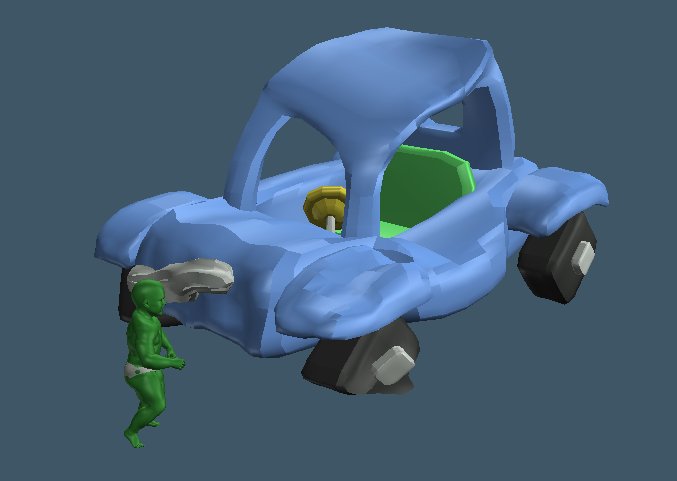
Baby Hulk smash!
How does he keep getting into my projects?
How does he keep getting into my projects?
- Attachments
-
I prefer dangerous freedom over peaceful servitude. -- Thomas Jefferson/Jean Jacques Rousseau
-
jamesmc
- Captain
- Posts: 1776
- Joined: 08 Jul 2009, 15:35
Re: cartoon transportation - sponge car square tires
I'm thinking baby Hulk may be responsible for those square tires.
just saying...
just saying...
Walk by faith, not by sight.
-
trueBlue

- Captain
- Posts: 5548
- Joined: 06 Jul 2009, 22:50
- Type the number ten into the box: 10
Re: cartoon transportation - sponge car square tires
Sponge car - Square tires
LOL...too cool!
LOL...too cool!
-
Dragneye

- Lieutenant
- Posts: 906
- Joined: 02 Sep 2009, 22:09
Re: cartoon transportation - sponge car square tires
Cute.
Baby does have to be bigger though.
Baby does have to be bigger though.
-
Finis
- Captain
- Posts: 5410
- Joined: 21 May 2009, 18:26
- Type the number ten into the box: 0
- Location: America!
Re: cartoon transportation - sponge car square tires
James, Baby Hulk has been known to chew on tires. Thanks trueBlue. Dragneye, (in baby talk) but he's a wittle tiny baby.
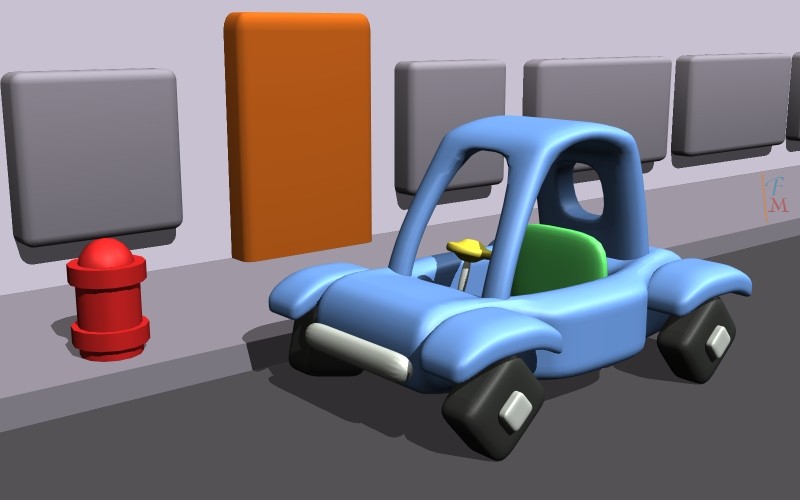
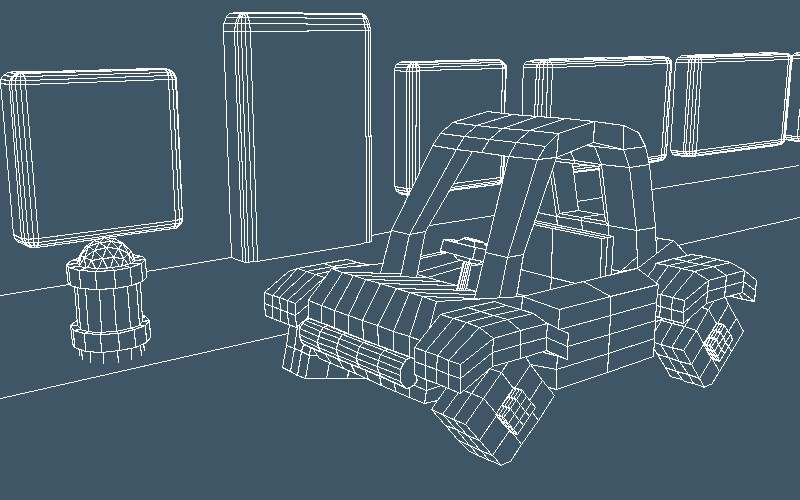
I can't get results with ToonUp shader now. The highlight area is either too large or not there. The axis changing workaround for wiggledy is too much trouble so this is probably my challenge entry. Should I make the sidewalk edge rounded or leave it sharp so everything isn't the same style?
I can't get results with ToonUp shader now. The highlight area is either too large or not there. The axis changing workaround for wiggledy is too much trouble so this is probably my challenge entry. Should I make the sidewalk edge rounded or leave it sharp so everything isn't the same style?
- Attachments
-
-
I prefer dangerous freedom over peaceful servitude. -- Thomas Jefferson/Jean Jacques Rousseau