Truespace and normal maps
-
tatts
- Seaman Recruit
- Posts: 4
- Joined: 22 May 2009, 14:19
Truespace and normal maps
How do I actually apply a normal map that was made in another program to my objects? to even get a texture on an object in workspace is run around in its own. I have figured out how to add textures and create my own library by first applying the pink Caligari texture to my objects then changing them in the material editor, and then add the new texture to my library by adding them in as an RSMAT. But in all, I can't seem to figured out how to actually apply a normal map and all these brick library things of shaders make absolutely no sense to me. atleast on the model side adding a texture is not so mind boggling but it is the workspace that i am trying to figure this out in not the model side.
-
clintonman

- Captain
- Posts: 5659
- Joined: 21 May 2009, 21:08
- Type the number ten into the box: 0
- Location: California
Re: Truespace and normal maps
tatts wrote:How do I actually apply a normal map that was made in another program to my objects? to even get a texture on an object in workspace is run around in its own. I have figured out how to add textures and create my own library by first applying the pink Caligari texture to my objects then changing them in the material editor, and then add the new texture to my library by adding them in as an RSMAT. But in all, I can't seem to figured out how to actually apply a normal map and all these brick library things of shaders make absolutely no sense to me. atleast on the model side adding a texture is not so mind boggling but it is the workspace that i am trying to figure this out in not the model side.
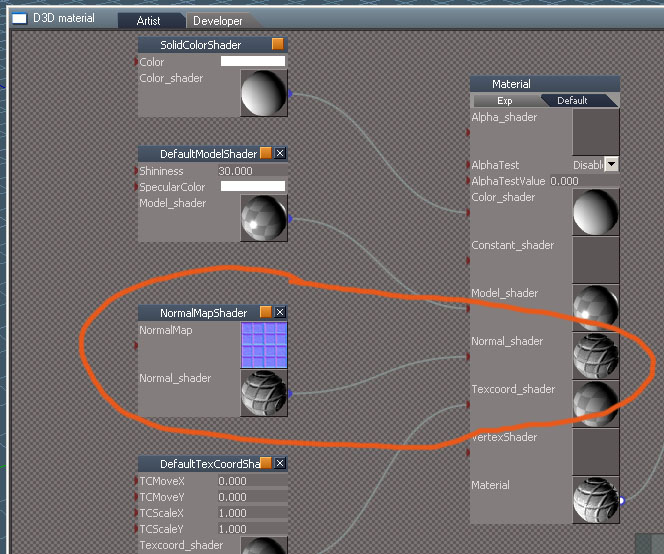
start with the blank dx material from materials - dx9
edit the material editor
open the shaders - normal shaders library
drag the normalmapshader in
hook it up to norma_shader input of the material node
ctrl-click on the normalmap image to load your image
-
tatts
- Seaman Recruit
- Posts: 4
- Joined: 22 May 2009, 14:19
Re: Truespace and normal maps
thank you, Although it was not exactly what I was looking for it did teach me something and it did point me in the right direction. It turns out what i needed was the brickesh texture bump, which allows you to add both the texture and normal map. So again all i did is apply the brickesh texture bump found under material textures and just replaced the textures, applied it to the model then saved it as a new rsmat which worked out fine 
But as far as your explanation, after adding the blank material and adding in a normal map, is it also possible to add the diffuse texture as well? I tried finding on how to do it through the editor but was not able to figure that part out. As I said the material editor is actually pretty confusing, i'm finding it easier just to pick a material with the same attributes and just change the textures but I gather that is not suppose to be the usual practice for creating materials or is it?
following your steps I was able to load the normal map but again was not able to figure out how to add the texture as well from a blank material. But in any case atleast i know now how to add the normals. again thanks for your help.........Tatts
But as far as your explanation, after adding the blank material and adding in a normal map, is it also possible to add the diffuse texture as well? I tried finding on how to do it through the editor but was not able to figure that part out. As I said the material editor is actually pretty confusing, i'm finding it easier just to pick a material with the same attributes and just change the textures but I gather that is not suppose to be the usual practice for creating materials or is it?
following your steps I was able to load the normal map but again was not able to figure out how to add the texture as well from a blank material. But in any case atleast i know now how to add the normals. again thanks for your help.........Tatts
-
Karthogen
- Master Chief Petty Officer
- Posts: 454
- Joined: 03 Jun 2009, 14:12
Re: Truespace and normal maps
I foudn the easiest way was to add the Mapped Binn shader, this had most of the bricks I needed 90% of the time. When you dig into the material in the LE you find the texture block with a color tint, the normal map, and more. once you are in the material you can follow the lines to where each Brick is linked. Then you can delete shaders and change them to get the combination you are looking for.
For example. The Binn Shader block has 2 options and is linked to the Model shader of the material, If you bring up the model shader library you now have 10 options that you can replace the Binn shader with that will give you multiple options to changing the texture. In the screen print clinton man added he is using the default model shader which has options to change the specular and shininess.
For example. The Binn Shader block has 2 options and is linked to the Model shader of the material, If you bring up the model shader library you now have 10 options that you can replace the Binn shader with that will give you multiple options to changing the texture. In the screen print clinton man added he is using the default model shader which has options to change the specular and shininess.
-
3dvisuals dude

- Chief Warrant Officer
- Posts: 643
- Joined: 03 Jun 2009, 02:53
- Type the number ten into the box: 0
Re: Truespace and normal maps
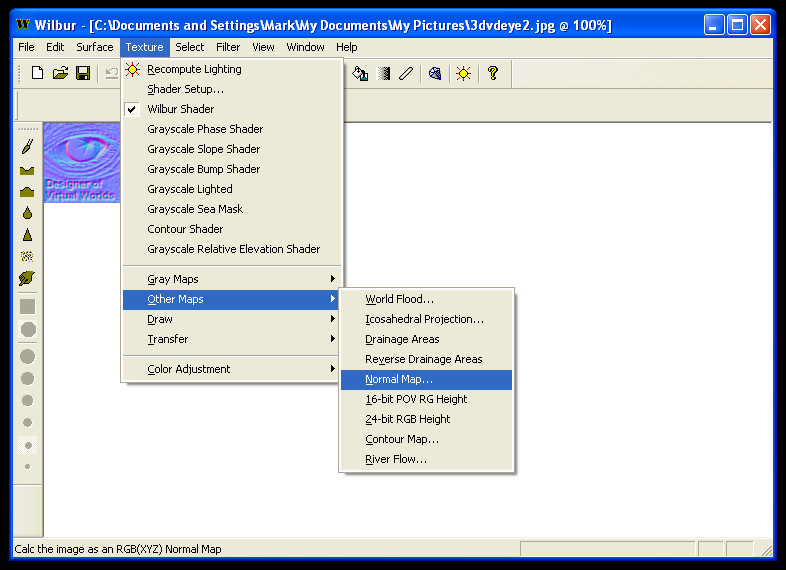
Since you are discussing normal maps, I thought I'd point out that Wilbur is a free software which creates a trueSpace compatible Normal Map out of any image with just a click. very handy trueSpace companion tool.
Also has many one-click cool image modification features you can combine with it's Normal Mapping tool.
http://forums1.caligari.com/truespace/s ... ostcount=2
Wilbur Homepage:
http://www.ridgecrest.ca.us/~jslayton/wilbur.html
Example Screenshot (using my avatar here):
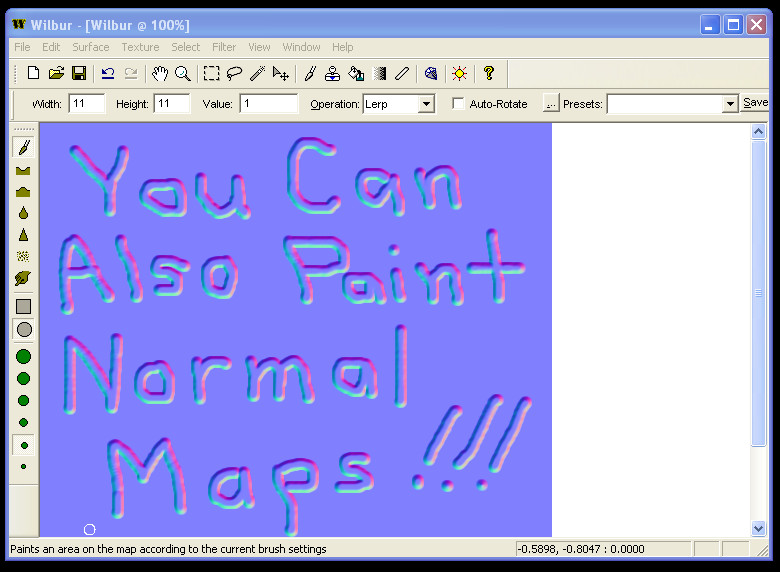
Also... you can Paint Normal Maps in Wilbur easily!
Also has many one-click cool image modification features you can combine with it's Normal Mapping tool.
http://forums1.caligari.com/truespace/s ... ostcount=2
Wilbur Homepage:
http://www.ridgecrest.ca.us/~jslayton/wilbur.html
Example Screenshot (using my avatar here):
-
clintonman
- Captain
- Posts: 5659
- Joined: 21 May 2009, 21:08
- Type the number ten into the box: 0
- Location: California
Re: Truespace and normal maps
No, that is the way you're supposed to do it. Pick a material with the attributes you need is the quickest most straightforward way to do it. I prefer to build up from the most basic material because I'm familiar with it and otherwise I would end up looking through a bunch of materials trying to find a good match or no match at all if there is none.tatts wrote:...
As I said the material editor is actually pretty confusing, i'm finding it easier just to pick a material with the same attributes and just change the textures but I gather that is not suppose to be the usual practice for creating materials or is it?
...
So quick answer is you are doing it right. To answer the other question for diffuse textures you can use the textureshader from the shaders - color shaders library .