MayaBoxWidgetDeluxe Isometric
-
stan
- Master Chief Petty Officer
- Posts: 584
- Joined: 21 May 2009, 17:20
MayaBoxWidgetDeluxe Isometric
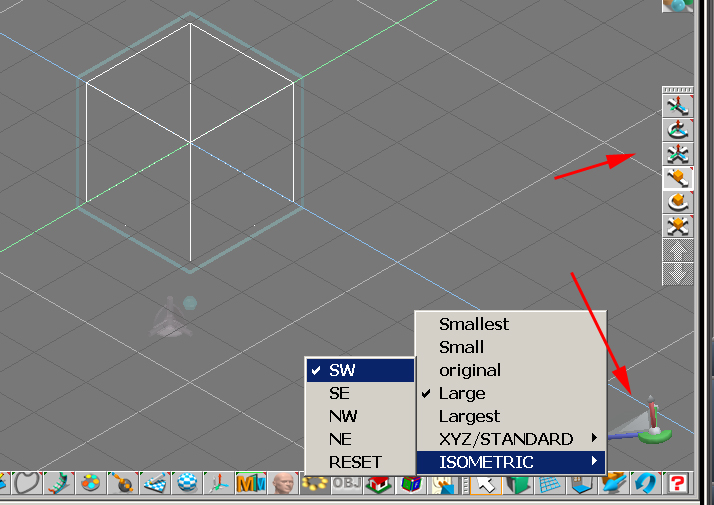
Here is an Isometric version of the box widget. There is just a new menu with isometric views and a reset. When in use the box widget is out of view and the view is controlled by the zoom icon and to pan use the scene widget XY eye move. Once reset the widget works as before. Enjoy!
-
the_ant

- Chief Petty Officer
- Posts: 155
- Joined: 02 Jun 2009, 09:26
- Type the number ten into the box: 0
- Location: Perugia - Italy
Re: MayaBoxWidgetDeluxe Isometric


-
trueBlue

- Captain
- Posts: 5548
- Joined: 06 Jul 2009, 22:50
- Type the number ten into the box: 10
Re: MayaBoxWidgetDeluxe Isometric
Took this for a spin.
Nice job on the Cube widget!
I do not know if this is your View settings or it's from creating a Camera from the Find Camera plugin.
When you view from the Camera, the Grid is super far away:
The Location is 1000.000 in the XYZ
Changing these values to around 45.000 puts the Grid in full view.
In Workspace these values are around 500.000
Nice job on the Cube widget!
I do not know if this is your View settings or it's from creating a Camera from the Find Camera plugin.
When you view from the Camera, the Grid is super far away:


- Capture2.PNG (5.51 KiB) Viewed 52 times
In Workspace these values are around 500.000
-
stan
- Master Chief Petty Officer
- Posts: 584
- Joined: 21 May 2009, 17:20
Re: MayaBoxWidgetDeluxe Isometric
-
trueBlue
- Captain
- Posts: 5548
- Joined: 06 Jul 2009, 22:50
- Type the number ten into the box: 10
Re: MayaBoxWidgetDeluxe Isometric
No problem, I was just pointing out what I was seeing.
I know your intent was not to cross the bridge, just noting their differences.
I know your intent was not to cross the bridge, just noting their differences.