Ramp texture
-
clintonman
- Captain
- Posts: 5659
- Joined: 21 May 2009, 21:08
- Type the number ten into the box: 0
- Location: California
Ramp texture
Ramp texture for truespace. Image shows result from 3dbuzz maya fundamentals project 2, the beach ball object.
Both ramps are set for no interpolation and one ramp feeds the other as a texture.
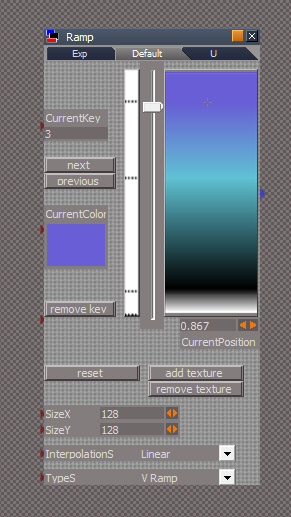
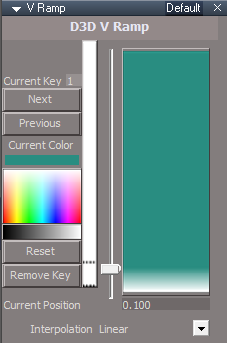
Press init to start out with 2 keys of white for key 0 at position 0 and black for key 1 at position 0.1.
The current color is selected with the previous and next buttons. They cycle through the keys in the order they are created, not their position on the ramp.
To add a new key click in the ramp then change the color with the current color input and the position with the slider. Keys can be added in any order but it's easier next and previous buttons if the keys are added bottom to top or left to right.
Interpolation of 0 means hard lines, no interpolation. 1 means linear interpolation
Type 0 creates a vertical ramp, type 1 is horizontal.
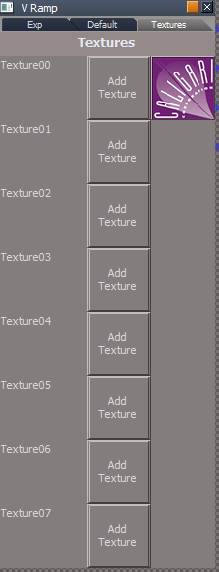
To assign an image to a key press the add texture button, the area of the key will be filled with noise. Switch to the Exp tab to assign the actual texture to be used. When the ramp type is set to 1/horizontal the image will be reversed left for right. Hmm, seems a little broken not working for the last key.
The remove a texture press the remove texture button.
There is no way to remove a key yet.
Don't use the CurrentKey number input, it only works with the previous and next buttons.
Both ramps are set for no interpolation and one ramp feeds the other as a texture.
Press init to start out with 2 keys of white for key 0 at position 0 and black for key 1 at position 0.1.
The current color is selected with the previous and next buttons. They cycle through the keys in the order they are created, not their position on the ramp.
To add a new key click in the ramp then change the color with the current color input and the position with the slider. Keys can be added in any order but it's easier next and previous buttons if the keys are added bottom to top or left to right.
Interpolation of 0 means hard lines, no interpolation. 1 means linear interpolation
Type 0 creates a vertical ramp, type 1 is horizontal.
To assign an image to a key press the add texture button, the area of the key will be filled with noise. Switch to the Exp tab to assign the actual texture to be used. When the ramp type is set to 1/horizontal the image will be reversed left for right. Hmm, seems a little broken not working for the last key.
The remove a texture press the remove texture button.
There is no way to remove a key yet.
Don't use the CurrentKey number input, it only works with the previous and next buttons.
- Attachments
-
- ball.RsObj
- (351.82 KiB) Downloaded 270 times
-
- Ramp.RsObj
- (200.52 KiB) Downloaded 269 times
-
clintonman
- Captain
- Posts: 5659
- Joined: 21 May 2009, 21:08
- Type the number ten into the box: 0
- Location: California
Re: Ramp texture
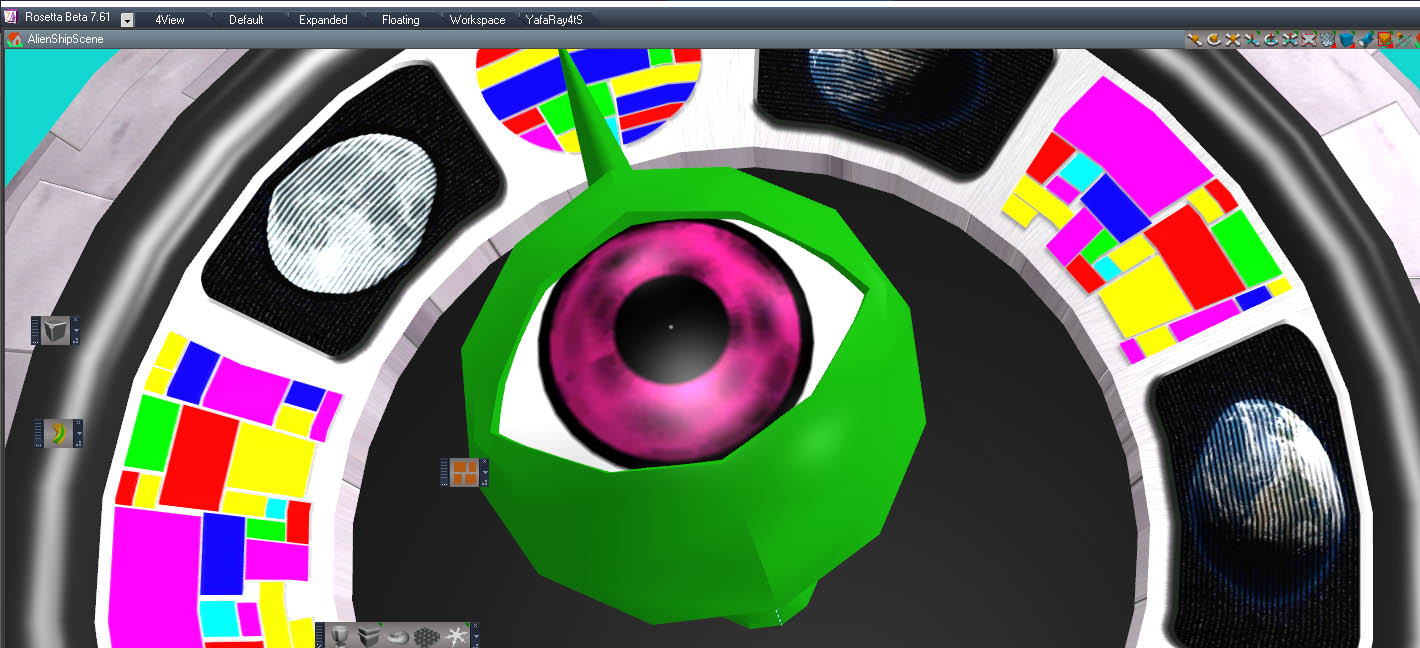
Alien eye made with ramp and voronoi texture. Same 3dbuzz project.
-
trueBlue
- Captain
- Posts: 5548
- Joined: 06 Jul 2009, 22:50
- Type the number ten into the box: 10
Re: Ramp texture
Awesome Clinton!
Are you able to do something like this?
https://www.google.com/url?sa=t&rct=j&q ... ymwKkyeEcZ
Are you able to do something like this?
https://www.google.com/url?sa=t&rct=j&q ... ymwKkyeEcZ
-
Finis
- Captain
- Posts: 5410
- Joined: 21 May 2009, 18:26
- Type the number ten into the box: 0
- Location: America!
Re: Ramp texture
Good feature for trueSpace! Color ramps are awesome. Blender people use them for an amazing variety of effects. I used a color ramp in Blender to color the ornament particles on the Christmas tree (v ... 999#p56999). Outside the environment background of stars is a noise texture sent through a color ramp.
I prefer dangerous freedom over peaceful servitude. -- Thomas Jefferson/Jean Jacques Rousseau
-
MikomDude
- Captain
- Posts: 1930
- Joined: 04 Oct 2010, 11:12
- Type the number ten into the box: 0
- Location: The Hague, Netherlands
Re: Ramp texture
Ohh, yeah ramps are super useful! Couldn't make a material in Blender without one.
-
clintonman
- Captain
- Posts: 5659
- Joined: 21 May 2009, 21:08
- Type the number ten into the box: 0
- Location: California
Re: Ramp texture
I don't think so except maybe to make a uv planar projection in the second uv channel and use it in place of the projection node he uses in the video.trueBlue wrote: 05 Feb 2020, 18:50 Awesome Clinton!
Are you able to do something like this?
https://www.google.com/url?sa=t&rct=j&q ... ymwKkyeEcZ
-
trueBlue
- Captain
- Posts: 5548
- Joined: 06 Jul 2009, 22:50
- Type the number ten into the box: 10
Re: Ramp texture
Wanting to add your Ramp material to the updates.
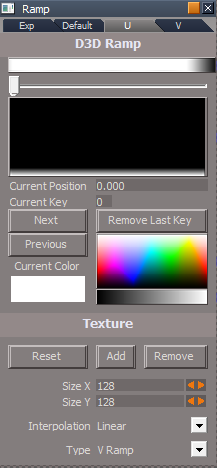
Does this UI make sense?
- Attachments
-
- D3D Ramp.RsObj
- (271.9 KiB) Downloaded 256 times
-
clintonman
- Captain
- Posts: 5659
- Joined: 21 May 2009, 21:08
- Type the number ten into the box: 0
- Location: California
Re: Ramp texture
I'll have to get back to you. For now I think Position isn't used, but I'm not sure.trueBlue wrote: 08 Feb 2020, 21:11 Wanting to add your Ramp material to the updates.
Does this UI make sense?
RampUI.PNG
Initiate should be Initialize or Reset
The Next and Previous buttons should be closer to the ramp than the Add and Remove texture buttons. Or maybe Add/Remove should be closer to the color since it replaces the color.
I plan to replace Interpolation and Type with drop down lists
Also plan to add key position indicators.
-
trueBlue
- Captain
- Posts: 5548
- Joined: 06 Jul 2009, 22:50
- Type the number ten into the box: 10
Re: Ramp texture
Okay, I'll wait until your finished.
I like the Vertical or Horizontal Combo Control idea!
Wonder though if it should be two different materials?
One for Horizontal and one for Vertical.
Looking at your Ball.RsObj, I'm guessing that it should be a Component verses a Material?
With your Ball.RsObj, I was getting an error from the data script.
Something about the newkey being undifined:
If I remember correctly, I just clicked on the ramp bitmap control.
I like the Vertical or Horizontal Combo Control idea!
Wonder though if it should be two different materials?
One for Horizontal and one for Vertical.
Looking at your Ball.RsObj, I'm guessing that it should be a Component verses a Material?
With your Ball.RsObj, I was getting an error from the data script.
Something about the newkey being undifined:
Code: Select all
var curkey = CurrentKey;
if(curkey < 9) {
curkey = "0" + curkey ;
} else {
curkey = "" + newkey;
}-
clintonman
- Captain
- Posts: 5659
- Joined: 21 May 2009, 21:08
- Type the number ten into the box: 0
- Location: California
Re: Ramp texture
That reminds me, it's also probably limited to adding less than 10 keys and there's no way to delete keys.
-
clintonman
- Captain
- Posts: 5659
- Joined: 21 May 2009, 21:08
- Type the number ten into the box: 0
- Location: California
Re: Ramp texture
Removed unused Position input
Changed Interpolation and Type from number inputs to word selection inputs.
Added a clickable key indicator - click near to select a key
Added a remove key button - it only works on the last key added
Reset/Clear the texture connection when removing a texture
InterpolationS only valid values are "Linear" and "None"
TypeS only valid values are "V Ramp" and "U Ramp"
Limited to 16 color keys
First 8 keys can be textures
Changed Interpolation and Type from number inputs to word selection inputs.
Added a clickable key indicator - click near to select a key
Added a remove key button - it only works on the last key added
Reset/Clear the texture connection when removing a texture
InterpolationS only valid values are "Linear" and "None"
TypeS only valid values are "V Ramp" and "U Ramp"
Limited to 16 color keys
First 8 keys can be textures
- Attachments
-
- Ramp53c9.RsObj
- (117.71 KiB) Downloaded 237 times
-
trueBlue
- Captain
- Posts: 5548
- Joined: 06 Jul 2009, 22:50
- Type the number ten into the box: 10
Re: Ramp texture
Nice! Now I need to figure out how to use it.
Made a U Ramp and V Ramp D3D Materials
Removed due to update
Made a U Ramp and V Ramp D3D Materials
Removed due to update
-
trueBlue
- Captain
- Posts: 5548
- Joined: 06 Jul 2009, 22:50
- Type the number ten into the box: 10
Re: Ramp texture
U Ramp
With the RampBitmap/Clickable Bitmap Control, I am getting errors!
If I change to code as follows, I do not get errors.
With the RampBitmap/Clickable Bitmap Control, I am getting errors!
If I change to code as follows, I do not get errors.
Code: Select all
Node.Value("%THIS_NAME%" + "/add new key" , "Position") = "%MOUSE_X%/" + Node.Value("%THIS_NAME%","SizeX");
color = System.CreateDO("Common Data Package/Color Data");
color.SetRed('%COLOR_R%')
color.SetGreen('%COLOR_G%')
color.SetBlue('%COLOR_B%')
Node.Value("%THIS_NAME%" + "/add new key" , "ColorIn") = color
Activity.Run("%THIS_NAME%" + "/add new key")
-
clintonman
- Captain
- Posts: 5659
- Joined: 21 May 2009, 21:08
- Type the number ten into the box: 0
- Location: California
Re: Ramp texture
That doesn't work. Error must be from something else.trueBlue wrote: 11 Feb 2020, 21:51 U Ramp
With the RampBitmap/Clickable Bitmap Control, I am getting errors!
If I change to code as follows, I do not get errors.Code: Select all
Node.Value("%THIS_NAME%" + "/add new key" , "Position") = "%MOUSE_X%/" + Node.Value("%THIS_NAME%","SizeX"); color = System.CreateDO("Common Data Package/Color Data"); color.SetRed('%COLOR_R%') color.SetGreen('%COLOR_G%') color.SetBlue('%COLOR_B%') Node.Value("%THIS_NAME%" + "/add new key" , "ColorIn") = color Activity.Run("%THIS_NAME%" + "/add new key")
-
trueBlue
- Captain
- Posts: 5548
- Joined: 06 Jul 2009, 22:50
- Type the number ten into the box: 10
Re: Ramp texture
For me it is mostly Line 335 Type mismatch when scrubbing the CurrentPosition slider.
How about a color picker?
-
clintonman
- Captain
- Posts: 5659
- Joined: 21 May 2009, 21:08
- Type the number ten into the box: 0
- Location: California
Re: Ramp texture
I can slide all day long and not get an error. Are you sure there are no other steps to reproduce the error?trueBlue wrote: 12 Feb 2020, 00:38 For me it is mostly Line 335 Type mismatch when scrubbing the CurrentPosition slider.
Line 335 Type mismatch.PNG
How about a color picker?
ColorPicker.PNG
-
trueBlue
- Captain
- Posts: 5548
- Joined: 06 Jul 2009, 22:50
- Type the number ten into the box: 10
Re: Ramp texture
Maybe if you create a ramp below the highest ramp?
If I just create a few ramps, then I can scrub all day long too!
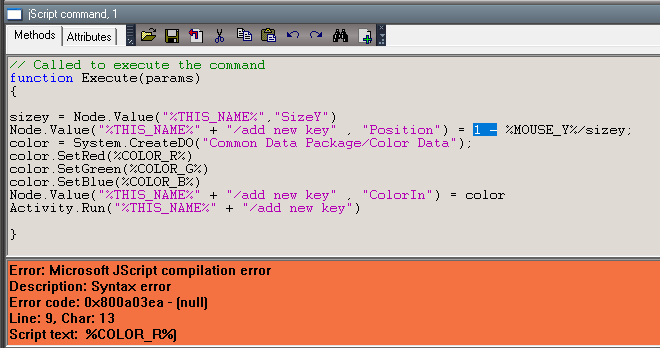
If I take your button script into a JScript and run a syntax check, you'll see why I suggested a change from the previous post.
If I just create a few ramps, then I can scrub all day long too!
If I take your button script into a JScript and run a syntax check, you'll see why I suggested a change from the previous post.
-
clintonman
- Captain
- Posts: 5659
- Joined: 21 May 2009, 21:08
- Type the number ten into the box: 0
- Location: California
Re: Ramp texture
%MOUSE%, %COLOR_R% etc. don't work inside scripts. They only work in the script section of the UI tools.trueBlue wrote: 12 Feb 2020, 01:14 Maybe if you create a ramp below the highest ramp?
If I just create a few ramps, then I can scrub all day long too!
If I take your button script into a JScript and run a syntax check, you'll see why I suggested a change from the previous post.
ButtonScript.PNG
I copied and pasted your earlier code and it didn't work. That's why I said it doesn't work.
What does it mean to create a ramp below the highest ramp? I'm guessing this is giving you errors?
-
trueBlue
- Captain
- Posts: 5548
- Joined: 06 Jul 2009, 22:50
- Type the number ten into the box: 10
Re: Ramp texture
Here is the Ramp object with error
- Attachments
-
- Ramp3d95.RsObj
- (616.07 KiB) Downloaded 250 times
-
clintonman
- Captain
- Posts: 5659
- Joined: 21 May 2009, 21:08
- Type the number ten into the box: 0
- Location: California
-
clintonman
- Captain
- Posts: 5659
- Joined: 21 May 2009, 21:08
- Type the number ten into the box: 0
- Location: California
Re: Ramp texture
Found the problem. The reason for the error was because the MapRange function was trying to divide by zero. This happens when 2 keys have the exact same position. Added a check so it bypasses the division when the start and end of the range are the same value. The function is somewhere around line 500 of the RampDataNode.
It's funny I searched the internet and everyone is giving the same function for mapping a range and no one is checking for the divide by zero error case.
Edit:
side note, if you add a color picker it should be a normal color picker, not the abstract art version of a color picker.
Code: Select all
// https://rosettacode.org/wiki/Map_range
function MapRange(val,a1,a2,b1,b2)
{
if(Math.abs(a2 - a1) < Number.MIN_VALUE) return b1;
var val2 = Math.min(val,a2);
s = Math.max(val2, a1);
return b1 + (s-a1)*(b2-b1)/(a2-a1)
}Edit:
side note, if you add a color picker it should be a normal color picker, not the abstract art version of a color picker.
-
clintonman
- Captain
- Posts: 5659
- Joined: 21 May 2009, 21:08
- Type the number ten into the box: 0
- Location: California
Re: Ramp texture
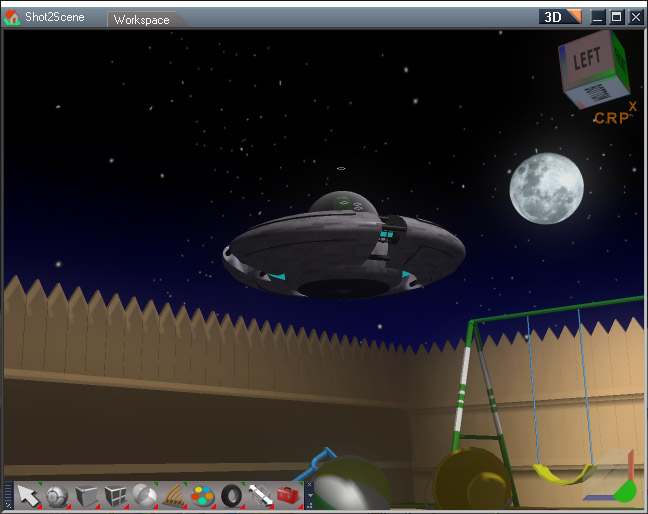
Here the ramp is used to add a blue tint to the lower part of the night sky.
The Compression in the material bitmap had to be turned off to get a smooth ramp texture. When on it gave a stair step like change of color.
-
trueBlue
- Captain
- Posts: 5548
- Joined: 06 Jul 2009, 22:50
- Type the number ten into the box: 10
Re: Ramp texture
Working great!clintonman wrote: 12 Feb 2020, 04:45 Found the problem. The reason for the error was because the MapRange function was trying to divide by zero. This happens when 2 keys have the exact same position. Added a check so it bypasses the division when the start and end of the range are the same value. The function is somewhere around line 500 of the RampDataNode.It's funny I searched the internet and everyone is giving the same function for mapping a range and no one is checking for the divide by zero error case.Code: Select all
// https://rosettacode.org/wiki/Map_range function MapRange(val,a1,a2,b1,b2) { if(Math.abs(a2 - a1) < Number.MIN_VALUE) return b1; var val2 = Math.min(val,a2); s = Math.max(val2, a1); return b1 + (s-a1)*(b2-b1)/(a2-a1) }
Edit:
side note, if you add a color picker it should be a normal color picker, not the abstract art version of a color picker.
Is there anyway you can export out the Texture slots to a Texture aspect, and add a Add/Remove button script?
Edit: I notice that you can add unlimited Textures as it is now. Remove Texture is not working when in this state..
-
trueBlue
- Captain
- Posts: 5548
- Joined: 06 Jul 2009, 22:50
- Type the number ten into the box: 10
Re: Ramp texture
Here is my attempt for a Texture UI for your V Ramp as a D3D material
D3D V Ramp material
Add
Luminosity Color Picker init script
Add
Node.ConReset(System.ThisOwner(), "Red");
Node.ConReset(System.ThisOwner(), "Green");
Node.ConReset(System.ThisOwner(), "Blue");
Node.ConReset(System.ThisOwner(), "lum");
RampDataNode
Add
params.ConValue("Current_Key") = CurrentKey;
add texture script
Comment
//Node.ExportConnector(System.ThisOwner() + "/RampDataNode", "Texture" + curkey, "", 1, 1);
remove texture script
Not in use
Texture aspect RampBitmap / Clickable Bitmap Control
Add
Activity.Run("%THIS_NAME%" + "/add texture")
Use:
First 8 Keys can be textures
LMB click in Ramp Bitmap control to add texture
Ctrl + LMB select Bitmap to change texture
RMB select Reset - Texture @ Key # to remove texture
D3D V Ramp material
Add
Luminosity Color Picker init script
Add
Node.ConReset(System.ThisOwner(), "Red");
Node.ConReset(System.ThisOwner(), "Green");
Node.ConReset(System.ThisOwner(), "Blue");
Node.ConReset(System.ThisOwner(), "lum");
RampDataNode
Add
params.ConValue("Current_Key") = CurrentKey;
add texture script
Comment
//Node.ExportConnector(System.ThisOwner() + "/RampDataNode", "Texture" + curkey, "", 1, 1);
remove texture script
Not in use
Texture aspect RampBitmap / Clickable Bitmap Control
Add
Activity.Run("%THIS_NAME%" + "/add texture")
Use:
First 8 Keys can be textures
LMB click in Ramp Bitmap control to add texture
Ctrl + LMB select Bitmap to change texture
RMB select Reset - Texture @ Key # to remove texture
- Attachments
-
- D3D V Ramp.zip
- (391.7 KiB) Downloaded 251 times
-
trueBlue
- Captain
- Posts: 5548
- Joined: 06 Jul 2009, 22:50
- Type the number ten into the box: 10
Re: Ramp texture
If you remove the 0 key, you will get several errors and you can not continue adding keys.
Adding:
to the remove key script seems to work.
Code: Select all
if(key == 0) return;-
clintonman
- Captain
- Posts: 5659
- Joined: 21 May 2009, 21:08
- Type the number ten into the box: 0
- Location: California
Re: Ramp texture
Added the ramp textures to my site. It has my original ugly texture and the ramp textures extracted from the ramp materials of the Unofficial Update.
http://clintons3d.com/plugins/truespace ... rials.html