Hi guys this is my Christmas present for all of you..
Advanced Lights - My custom set of lights for Workspace and Vray
Max Widget - Cube Max widget on Workspace
LEBrowser - Jump inside LE to find selected object
AutoBackup - Workspace Timer AutoBackup
Image Sequence - Load Image sequence into Workspace (animated textures for Workspace and Vray)
Christmas present
-
Prodigy

- Site Admin
- Posts: 957
- Joined: 21 May 2009, 14:46
- Type the number ten into the box: 0
- Location: Uruguay
-
Prodigy
- Site Admin
- Posts: 957
- Joined: 21 May 2009, 14:46
- Type the number ten into the box: 0
- Location: Uruguay
Re: Christmas present
Dx Power Shader with Sample scene.
- Attachments
-
- prodigy2.rar
- (1.18 MiB) Downloaded 256 times
๑۩۞۩๑ prodigy ๑۩۞۩๑
-
Prodigy
- Site Admin
- Posts: 957
- Joined: 21 May 2009, 14:46
- Type the number ten into the box: 0
- Location: Uruguay
Re: Christmas present
And my verminator vehicle.. it's Unfinished but you can use but not sell it.. 
- Attachments
-
- Verminator 7.6 .rar
- (5.32 MiB) Downloaded 272 times
๑۩۞۩๑ prodigy ๑۩۞۩๑
-
froo
- Captain
- Posts: 2554
- Joined: 22 May 2009, 12:13
Re: Christmas present
Coooooool thanks Prodigy! You Rock! 


-
Peter
- Senior Chief Petty Officer
- Posts: 170
- Joined: 18 Apr 2010, 15:18
- Type the number ten into the box: 0
- Location: Texas
Re: Christmas present
Thanks a huge amount!
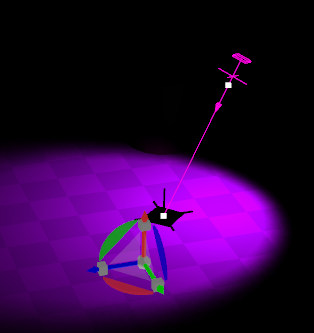
On the directional spot light (brilliant buy the way) how do you make the target cross-hair and square shadow go invisible so they don't appear in the workspace?
How do you make the purple widget disappear?
Doing the "Show Object Attributes" button in "Setting" tab makes the widget disappear instantly with out changing any of the attributes. I can't make it reappear again. "Cast Shadow" check box has no effect.
On the directional spot light (brilliant buy the way) how do you make the target cross-hair and square shadow go invisible so they don't appear in the workspace?
How do you make the purple widget disappear?
Doing the "Show Object Attributes" button in "Setting" tab makes the widget disappear instantly with out changing any of the attributes. I can't make it reappear again. "Cast Shadow" check box has no effect.
- Attachments
-
- dirSpot.jpg (14.96 KiB) Viewed 4860 times
a day without orange juice is like... a day without orange juice
-
Peter
- Senior Chief Petty Officer
- Posts: 170
- Joined: 18 Apr 2010, 15:18
- Type the number ten into the box: 0
- Location: Texas
Re: Christmas present
Very nice shader! I'll be using it. I particularly like the detail normal map slot.Prodigy wrote:Dx Power Shader with Sample scene.
a day without orange juice is like... a day without orange juice
-
Prodigy
- Site Admin
- Posts: 957
- Joined: 21 May 2009, 14:46
- Type the number ten into the box: 0
- Location: Uruguay
Re: Christmas present
i'll take a look i often use my set of lights for vray. but must be a way to fix that..
glad you like it.. some must understand these lights are custom made for my needs.. so you may find weird options, but useful for my needs.
Example disable lights dx preview are due i don't need to see DX light in workspace but render into vray.. that increase alot the performance in my pc..
glad you like it.. some must understand these lights are custom made for my needs.. so you may find weird options, but useful for my needs.
Example disable lights dx preview are due i don't need to see DX light in workspace but render into vray.. that increase alot the performance in my pc..
๑۩۞۩๑ prodigy ๑۩۞۩๑
-
Steinie

- Captain
- Posts: 2958
- Joined: 21 May 2009, 17:38
- Type the number ten into the box: 10
Re: Christmas present
Thanks Augusto! I hope you have a nice Holiday with your family.
Bob
Bob
-
Prodigy
- Site Admin
- Posts: 957
- Joined: 21 May 2009, 14:46
- Type the number ten into the box: 0
- Location: Uruguay
Re: Christmas present
Thanks bob, same for you and yours..
Hope next year we find more time to enjoy here..
Hope next year we find more time to enjoy here..
๑۩۞۩๑ prodigy ๑۩۞۩๑