Hello all
Is there a way to scale the workspace camera? I want to make it smaller so it fits within an object in my scene. Using the scale object tool changes FOV. Maybe there is a way to change the actual geometry of the camera to make a smaller camera?
If none of this works is there a way to scale up my scene by a precise ratio, say 200%? this would enable me to fit the camera within the geometry while maintaining my real world scale.
TIA
WS Camera
-
Saul
- Senior Chief Petty Officer
- Posts: 308
- Joined: 22 May 2009, 16:50
WS Camera
-
MikomDude

- Captain
- Posts: 1930
- Joined: 04 Oct 2010, 11:12
- Type the number ten into the box: 0
- Location: The Hague, Netherlands
Re: WS Camera
I'm not sure how you can scale you're entire scene in the workspace except by selecting absolutely everything and then scale that. However, in the model side that is easier, there you can just select everything by holding down Ctrl and draw a rectangle around your whole scene.
-
Steinie

- Captain
- Posts: 2958
- Joined: 21 May 2009, 17:38
- Type the number ten into the box: 10
Re: WS Camera
I think either trueBlue, Stan, Froo or Clinton could figure this one out or tell us if this is possible.
I'll attempt this later today also.
I'll attempt this later today also.
-
LeonRegis

- Captain
- Posts: 1946
- Joined: 18 Aug 2009, 17:36
- Type the number ten into the box: 0
- Location: Brazil/Earth/Orion Arm/Milky Way/4th Dimension/This Universe/Multiverse???/Singularity???
Re: WS Camera
You can select the whole scene using the LE (Link Editor), just click and drag until select everything.
Then you can scale using the Scale on WS object info (Between Rotation and BB Size). It starts with 1.000, so 2.000 is and 100% increase and so on...
About the camera I think you can't scale it down, just if someone do a plugin, but for now just the FOV is changeable.
Then you can scale using the Scale on WS object info (Between Rotation and BB Size). It starts with 1.000, so 2.000 is and 100% increase and so on...
About the camera I think you can't scale it down, just if someone do a plugin, but for now just the FOV is changeable.
Be the change you want to see in the world. - Mohandas Gandhi
-
stan
- Master Chief Petty Officer
- Posts: 584
- Joined: 21 May 2009, 17:20
Re: WS Camera
there is a camera in the library .. objects-script objects that I made and you can scale it by +- or ctl +-. its called camera deluxe installer
-
Saul
- Senior Chief Petty Officer
- Posts: 308
- Joined: 22 May 2009, 16:50
Re: WS Camera
Thanks everyone for suggestions. The select in LE and scale is possible but needs very carefull organisation of the axis of individual objects and then the encapsulated object otherwise the scale puts everything out of alignment
Stan that sounds perfect but i dont get it to work. I click on install in LE but nothing happens. There is an entry for camera deluxe installer in the scene view but i dont see it in the scene. what me do wrong?
I am running 7.61.
Stan that sounds perfect but i dont get it to work. I click on install in LE but nothing happens. There is an entry for camera deluxe installer in the scene view but i dont see it in the scene. what me do wrong?
I am running 7.61.
-
stan
- Master Chief Petty Officer
- Posts: 584
- Joined: 21 May 2009, 17:20
Re: WS Camera
It does work in 7.61..just tried..the only thing that it could be is the activation weight of the other camera, but it should be less..go to your widgets/select and remove the other cam saved to the library and it should work....
-
Saul
- Senior Chief Petty Officer
- Posts: 308
- Joined: 22 May 2009, 16:50
Re: WS Camera
OK thanks Stan, got it working.
Deleting the widgets/select/camera doesnt work BUT deleting the widgets/select/camerawidget2 does!
Now to try it in my scene, thanks again.
Deleting the widgets/select/camera doesnt work BUT deleting the widgets/select/camerawidget2 does!
Now to try it in my scene, thanks again.
-
trueBlue

- Captain
- Posts: 5548
- Joined: 06 Jul 2009, 22:50
- Type the number ten into the box: 10
Re: WS Camera
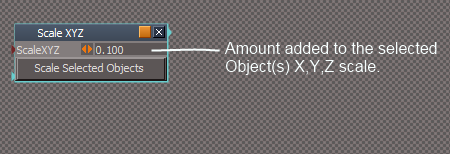
Here is a script that adds an amount (ScaleXYZ) to all of the Selected object's XYZ scale.
- Attachments
-
- Scale XYZ.zip
- (2.86 KiB) Downloaded 251 times
-
- Capture.PNG (8.94 KiB) Viewed 5697 times
-
Saul
- Senior Chief Petty Officer
- Posts: 308
- Joined: 22 May 2009, 16:50
Re: WS Camera
Thanks Trueblue, thats well cool!
Stan, is there a way to scale the transfrom widget independent of the camera, it would make it a lot easier to manipulate a tiny camera.
TIA
Stan, is there a way to scale the transfrom widget independent of the camera, it would make it a lot easier to manipulate a tiny camera.
TIA
-
stan
- Master Chief Petty Officer
- Posts: 584
- Joined: 21 May 2009, 17:20
Re: WS Camera
Saul, here is a version that has two transforms..one for cam -+ ..one for dolly CTRL +-
..
..
- Attachments
-
- Camera Deluxe installer.rar
- (41.93 KiB) Downloaded 265 times
-
Saul
- Senior Chief Petty Officer
- Posts: 308
- Joined: 22 May 2009, 16:50
Re: WS Camera
Thanks Stan, thats just how i imagined it!
xx
xx
-
Saul
- Senior Chief Petty Officer
- Posts: 308
- Joined: 22 May 2009, 16:50
Re: WS Camera
Stan, is there a way to control the transform of the Deluxe cameras independently?
At the moment scaling one Dcam in the scene scales all others in the scene identically, can they be transformed seperately?
TIA again )
At the moment scaling one Dcam in the scene scales all others in the scene identically, can they be transformed seperately?
TIA again )
-
Saul
- Senior Chief Petty Officer
- Posts: 308
- Joined: 22 May 2009, 16:50
Re: WS Camera
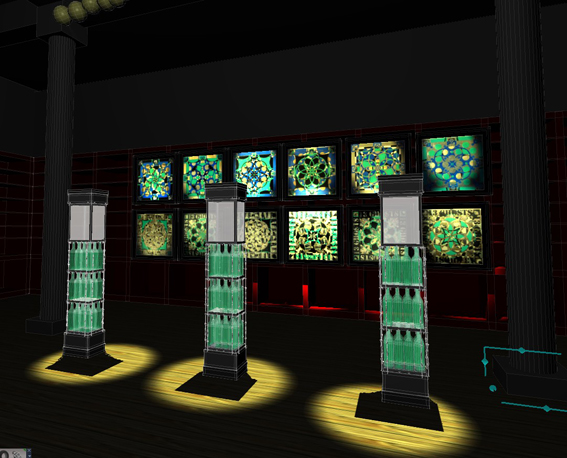
Ps Here is what i am working on, proposal for an interactive installation.
- Attachments
-
-
stan
- Master Chief Petty Officer
- Posts: 584
- Joined: 21 May 2009, 17:20
Re: WS Camera
Saul, it's the widget that gets transformed so I'd say no for the moment..I suppose it's possible to keep size info in each cam and retrieve it when selecting that cam and pass it back to the widget...
-
stan
- Master Chief Petty Officer
- Posts: 584
- Joined: 21 May 2009, 17:20
Re: WS Camera
Saul, here is the changes you wanted..you might have to go inside the widget and uncheck then recheck the selection change event if it isn't working right..(or in installer before install).
- Attachments
-
- Camera Deluxe installer1ebc.rar
- (56.99 KiB) Downloaded 247 times
-
Saul
- Senior Chief Petty Officer
- Posts: 308
- Joined: 22 May 2009, 16:50
Re: WS Camera
Very cool, thanks again Stan!
As the master once said 'the trueSpace community is alive and well'
As the master once said 'the trueSpace community is alive and well'